A negative SEO attack is a deliberate effort to damage a rival’s search visibility, using spam links, hacking, copied content or fake brand signals. Most drops that owners blame on one have another cause.
This guide shows how to confirm a negative SEO attack with dated evidence, and which types do real damage. If the cause of a drop is unknown, start with a traffic drop triage.
Quick answer: A negative SEO attack is real but rarer than owners fear, and spam links are its weakest form. Confirm one by finding a signal that predates the drop, such as a hack, spam pages or a security flag. Close the opening first, and disavow only when a manual action is at risk.
What the Evidence Says About Negative SEO in 2026
Negative SEO is real, but spam links alone rarely sink a site. Google says it can judge most links without help, and its systems devalue link spam instead of demoting sites. A hacked site, fake listings and false security reports do more damage, so those deserve the first look.
Why spam links alone rarely make a negative SEO attack succeed
Google’s disavow guidance says most sites do not need the tool, because Google can assess which links to trust.
Ahrefs’ review of negative SEO adds the mechanism. Since Penguin 4.0 in 2016, link spam is devalued rather than punished sitewide.
So spam links are the most common attack and the least effective one.
Why owners still report real damage
Practitioners who manage thousands of sites report only a handful of cases where spam links mattered. Individual owners report multi-year traffic loss. Both describe real things.
3 details explain the gap:
- Thin sites are more exposed: 200 good links give less cushion than 5,000.
- Other problems hide in the story: owners who blame links often also have indexing problems.
- Some attacks are not link attacks: hacks and fake listings leave a different trail.
Sterling Sky’s Joy Hawkins reported in September 2026 that a roofing audit found dozens of keyword-rich anchor links from direct competitors. The owner had bought none.
A single case report is not a controlled test.
The 5 Doors an Attacker Can Use
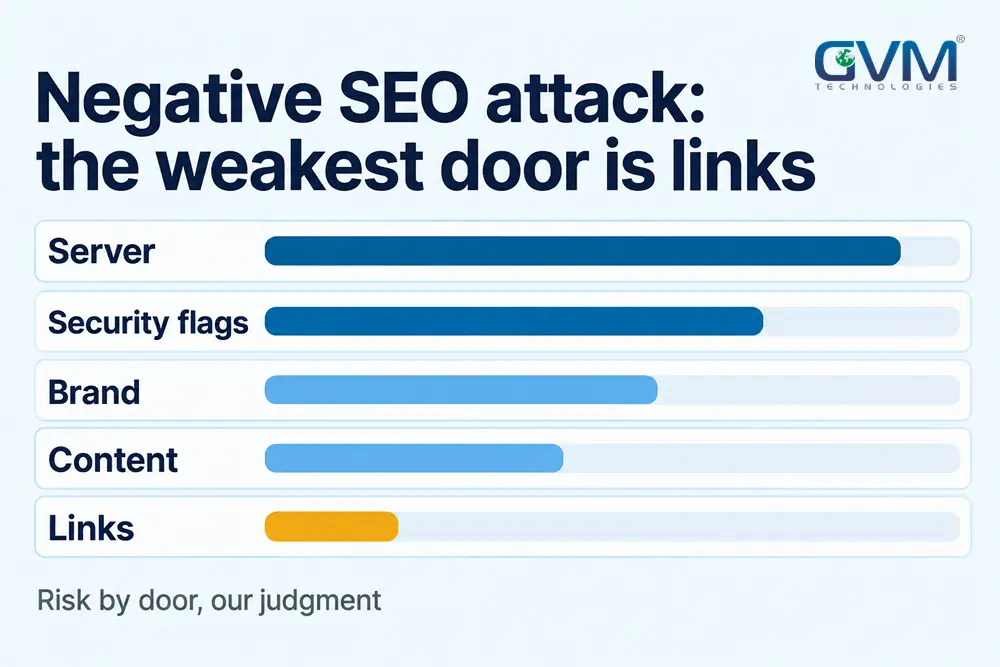
Sites have 5 doors an attacker can use: the server, security reputation, brand signals, content and links. Most are cheap to attempt. The table ranks them by reported damage and Google’s documentation, so treat the order as our judgment.
| Door | What the attacker does | How it hurts | Risk |
|---|---|---|---|
| Your server | Hacks the site, injects spam pages or redirects | Spam URLs indexed, security flags | High |
| Security reputation | Files false malware or abuse reports | Browser, ISP or firewall blocks | Medium to high |
| Your brand | Fake profiles, listings and review bombs | Hostile results for your name | Medium |
| Your content | Scrapes pages onto spam sites | Copies confuse or outrank you | Low to medium |
| Your links | Spam link blasts, fake removal requests | Noise, rare manual action | Low |
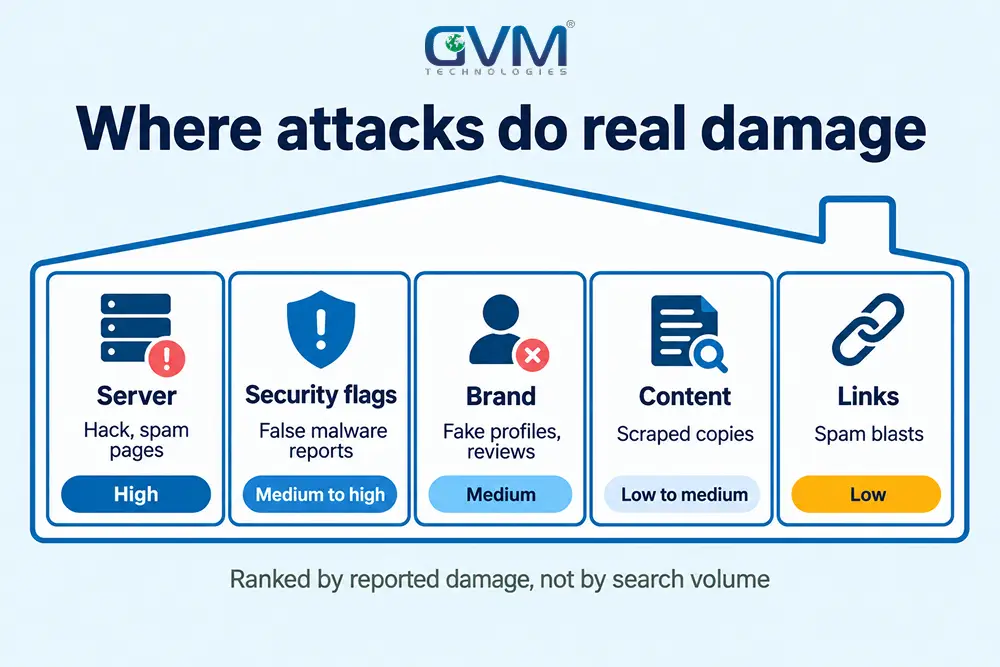
Most guides lead with links, but the risk column runs the other way.
How to Identify a Negative SEO Attack: The Timeline Test
Confirm an attack with 3 tests: the signal appears before the drop, you did not cause it, and it matches a known mechanism. A link spike with no ranking change is noise. A hack that predates the drop is evidence.
1. Rule out the usual suspects first
Most drops trace to ordinary causes, so check these first:
- Algorithm timing: compare the first drop day with core update windows.
- Broken tracking: a missing tag can fake a collapse, as in analytics that stopped counting.
- A recent move: check dates against a hosting migration.
- A third-party score: a Domain Rating drop is a vendor’s recalculation, so check clicks and impressions in Search Console instead.
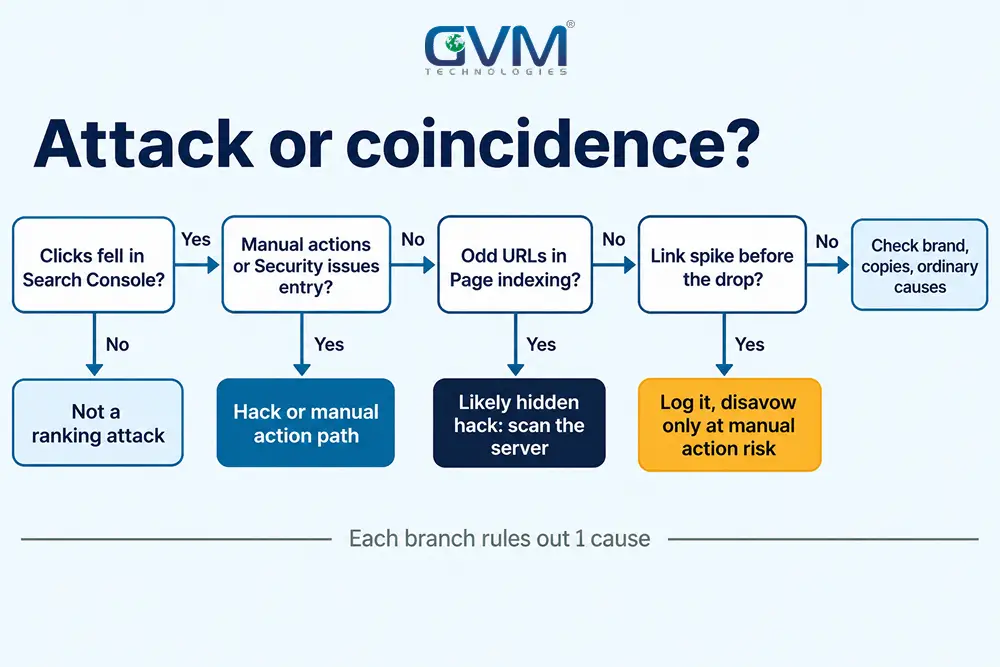
2. Follow the decision path
Open Search Console’s reports and walk down this path, using indexing statuses to read odd URLs:
Clicks fell in Search Console?
 No  -> Not a ranking attack. Check tracking and vendor score noise.
 Yes -> Entry under Manual actions or Security issues?
         Yes -> Manual action or hack path. Fix first, then request review.
         No  -> Odd URLs in Page indexing or Crawl stats?
                 Yes -> Likely hidden hack. Scan the server.
                 No  -> New linking domains spiked BEFORE the drop, 1 anchor?
                         Yes -> Log it. Disavow only if a manual action is at risk.
                         No  -> Check brand search, copies, then ordinary causes.
3. Build a dated evidence log
Write 1 line per signal: the date first seen, where you saw it, and the page group affected. Then add the date clicks fell. The order of dates does most of the work.
Take an Example:
- 11 Mar: an unfamiliar PHP file appears in the site root.
- 14 Mar: indexed URLs jump from 300 to 12,000, mostly odd paths.
- 20 Mar: clicks fall 40%.
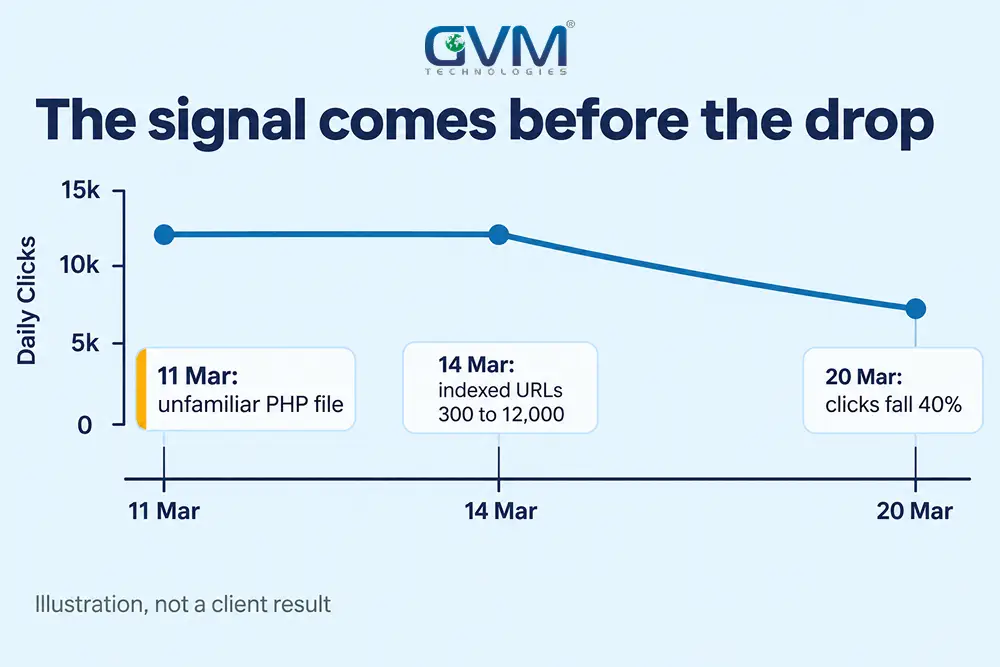
The file predates the drop, so a hack is the lead cause and links are not. A single bad signal rarely sinks a site, while a pattern across several can.
What to Do for Each Door
Fix the door that was opened before anything else, and keep the order. Close a hack first, then clean spam URLs, then handle flags, copies and links. Link cleanup while a backdoor stays open wastes effort, because the spam keeps coming back.
1. Hacked site: close it at the server
A clean Security issues report does not prove the hole is shut, because it can lag behind the real state of the server. Work in this order:
- Scan: ask the host for a server-level malware scan, not only a plugin scan.
- Close: reset every password and key, remove unknown admin users, delete unfamiliar files.
- Restore: compare against a clean backup, and patch the plugin or theme that let the attacker in.
- Clean URLs: return 410 or 404 for spam URLs, drop them from the sitemap, and use 301s only where a real replacement exists, per 404 and 410 handling.
- Verify: watch Security issues and crawl stats while the indexed spam fades.
Indexed spam URLs fade over months, not days. Google defines hacked content as a spam violation, so cleanup also protects rankings.
GVM Technologies runs security testing as part of its QA work, which finds the entry point before the cleanup starts.
2. Security flags on a clean site after an attack
A site can be flagged as malicious after false reports to security vendors, or after a real hack leaves a planted file. Check for the planted file first.
- Re-scan: look for files you did not upload, including PHP files in the root.
- Request re-review: ask each vendor that lists you to reassess. Owners report that a human check clears the flag.
- Contact networks directly: VPN, firewall and ISP lists update separately.
Browser warnings have other causes, covered in not secure and deceptive flags.
3. Scraped content as negative SEO
Many owners fear that a copy will replace the original. Google picks 1 version of near-identical pages, so a stronger site can win with your text.
To check, search a distinctive sentence in quotes, then act in this order:
- Ask: contact the site owner and its host.
- Report: file a copyright removal request with Google for pages you own.
- Reduce: switch the RSS feed to summaries so bots copy less.
4. Fake profiles and review bombs as negative SEO
Practitioners call fake profiles, bad citations and copied listings “entity poisoning”. We found no Google statement on the term, so treat it as a monitoring habit, not a documented penalty.
Sterling Sky’s report also describes a fake listing for its own agency that Google removed, then reinstated twice.
- Search your brand name: check page 1 and the map pack weekly.
- Report fakes: use the platform’s removal form, with screenshots.
- Ask AI answers about your brand: copied pages can shape them, though no source measures how much.
5. Extortion messages and fake removal requests
Some attackers blast spam links, then offer to remove them for a fee, often through a messaging app. Others email a demand to stop an attack. Do not pay or reply.
Fake link removal requests also circulate, so confirm the sender before removing any link. Report the spam through Google’s spam report form, and contact the police if threats are explicit.
Disavow: A Narrow Tool, Not a Weekly Habit
Google says to disavow only when you have a considerable number of spammy links and they caused, or likely will cause, a manual action. Removal comes first. A new file takes a few weeks to apply, and disavowed links still show in reports.
When to disavow and when to skip
| Situation | Action |
|---|---|
| Manual action for unnatural links | Remove what you can, disavow the rest, request review |
| Link spike, no ranking or manual action change | Log it and skip the file |
| Vendor toxicity score or Domain Rating drop | Check Search Console first, then skip |
| Links you or an old vendor built | Disavow, since those are yours to clean |
| Dozens of domains with 1 exact anchor to a ranking page | Document the pattern, then disavow whole domains |
In a recent GVM client case, we found more than 300 spam links. Most came from only 15 to 20 domains. Each domain had its own design, but its pages repeated 1 layout with different content and URLs.
That repetition is the footprint of a network. Group the links by source domain, then disavow whole domains.
Many owners disavow for months, see no change and call the tool broken, because the links did not matter. The penalty recovery plan covers the manual action route.
How to build a safe disavow file
Google’s rules are specific. Follow them exactly, because a wrong file can discount good links:
- Export: download linking sites from the Links report, then delete any you want to keep.
- Format: save a UTF-8 .txt file with 1 entry per line, using
domain:example.comfor networks so new pages stay covered. - Limits: use
#for notes, and stay under 100,000 lines and 2MB. - Upload: a new file replaces the old one, so keep a master copy.
Domain properties are not supported, so use a URL-prefix property.
Protect Your Website Before Anyone Tries
Protection is mostly ordinary security plus monitoring. Lock every account that can change the site, patch software, add a firewall, keep tested backups, and check 4 signals weekly. These steps also stop opportunistic hackers.
1. Lock the layers outside your website code
A weak registrar password hands over the site without any hacking. Secure each layer with a unique password and 2-factor sign-in:
- Domain registrar: the account that controls DNS.
- Hosting account and control panel: the keys to files and databases.
- Email sending service: a route for phishing in your name.
- File transfer: use SFTP, and switch off plain FTP.
Keep plugins licensed, since pirated copies often carry malware. Test updates on a staging copy, as in broken updates, and run the pre-launch security checklist on new builds.
2. Add a firewall, backups and change alerts
- Firewall or CDN with bot rules: block abusive crawlers and rate-limit login pages.
- Daily off-site backups: test a restore, since an untested backup is a guess.
- Activity log alerts: get an email on admin logins and file changes.
- Uptime and server load alerts: heavy crawling can slow a site to a halt, as in site downtime checks.
GVM’s DevOps and cloud hosting service includes real-time monitoring and backup and disaster recovery.
3. The weekly 15-minute watch routine
| Check | Where | Red flag |
|---|---|---|
| Alerts and reports | Search Console | Any Manual actions or Security issues entry |
| New linking domains | Any backlink tool alert | A spike with 1 repeated anchor |
| Indexed URL count | Page indexing report | Thousands of new unexpected URLs |
| Brand results and reviews | Google search, map pack | Fake profiles or a sudden review burst |
Mistakes That Waste Weeks After a Suspected Attack
The costliest mistakes are acting on the wrong signal and fighting back against a rival you cannot prove. Each wastes weeks, and some add a new problem on top of the old one, such as a policy violation of your own. Avoid these 2.
- Treating bot traffic as a ranking attack: Google’s Martin Splitt said in 2024 that sending traffic from questionable sources does not taint a site.
- Buying spam links in return: that breaks Google’s link spam rules and can backfire.
A technical SEO audit separates attack damage from ordinary problems.
GVM’s project rescue service handles code audits, repairs and post-recovery support for compromised builds.
FAQs
1. Can spam backlinks hurt my site?
Rarely. Google says it can assess which links to trust in most cases. A large pattern that risks a manual action is the exception, so check Search Console first.
2. How long does recovery take?
It depends on the door. A disavow file takes a few weeks to apply, per Google. Indexed hack spam fades over months, and no official timer exists.
3. Is negative SEO illegal?
Hacking a site and demanding payment are crimes in many places. Spam link buying is a policy violation, not necessarily a crime. Ask a lawyer before any cease and desist.
4. Does a Domain Rating drop mean I was attacked?
No. Domain Rating is a third-party estimate that moves when the vendor recalculates. Check clicks, impressions and indexed pages in Search Console first.
5. What if someone demands payment to stop an attack?
Do not pay or reply. Save the message, report it, and run the weekly checks above.
Conclusion: Prove It, Close the Door, Then Watch
A negative SEO attack is real but narrower than the fear around it. Dated evidence separates an attack from a coincidence, and the server is the first door to check.
Today’s checklist:
- Open the Manual actions and Security issues reports.
- List the dates of every odd signal, then add the date clicks fell.
- Scan the server for files you did not upload.
- Lock the registrar, host and email accounts with 2-factor sign-in.
Then set the weekly routine, and revisit disavow only if a manual action appears.
Talk to GVM Technologies about a suspected negative SEO attack
A missed hack or a wrong fix can cost months of traffic, and the spam keeps returning until the entry point is closed. GVM’s team can trace the cause and secure the site. The work covers:
- Security testing to find the vulnerability an attacker used
- Monitoring and backups so changes trigger alerts and restores work
- Project rescue for compromised builds that need repair
- SEO audits that separate attack damage from ordinary ranking problems
GVM’s trucking insurance case study reached page 1 for 3 target phrases in roughly 3 to 4 months.