Your website was fine an hour ago. Now it won’t load, a customer just emailed, and you have no idea where to start.
The instinct is to start changing things. That is what turns a ten-minute fix into a lost afternoon.
“Why is my website down?” has a small number of answers, and they sit in a predictable order. Work from the outside in, one layer at a time, and within about ten minutes you know what broke and who fixes it.
Quick answer: First confirm the site is down for everyone, not just you. Then read the exact error, ask what changed in the last 24 to 48 hours, and walk the stack from the outside in: domain, DNS, SSL, host, server, CMS or app, database, third-party services. The first layer that fails is your answer.
Key Takeaways
- “Down for everyone” and “down for me” are different problems with different fixes. Confirm which one you have before touching anything.
- The exact error code is the most useful clue. A 500 is your code; a 502 or 503 is your server or host; an SSL warning is your certificate; a site-wide 404 is usually DNS or a broken deploy.
- “What changed?” finds the cause faster than any tool. Most outages follow a deploy, an update, a billing lapse, or a DNS edit.
- A backup that lives on the same server as the site is not a rollback plan.
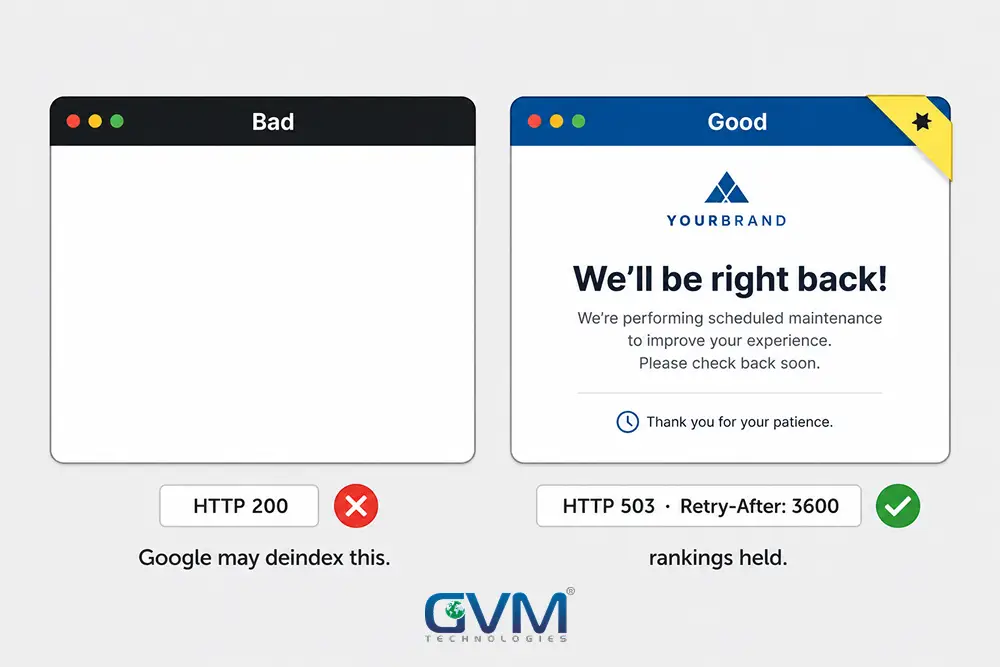
- Serving downtime as an HTTP 503 with a
Retry-Afterheader protects your rankings. A blank page or a normal “we’re down” page does not.
First, Is Your Website Down for Everyone, or Just You?
A large share of “my site is down” panics are local: your browser cache, your network, your DNS resolver, or a VPN. The site is fine for everyone else. Confirm the outage is real before you diagnose anything.
1. The 60-second confirmation test
Run these in order and stop at the first clear signal.
- Open the site on your phone using mobile data, not Wi-Fi. Different network, different DNS, different route.
- Open it in a private window, then a second browser. Rules out extensions and stale files.
- Run the domain through an external checker (search “is [yourdomain] down”). It loads your site from outside your network.
- Check your host’s and CDN’s status pages, plus Downdetector for your host’s name.
Loads on mobile data but not desktop, the problem is yours. An external checker also fails, the outage is real.
2. The “It’s Just Me” matrix
| Where it works vs. fails | Most likely cause |
|---|---|
| Fails in one browser, loads in incognito | Browser cache or a rogue extension |
| Fails on one device, loads on your phone | Local DNS cache, a VPN, or a broken network stack |
| Fails on Wi-Fi, loads on mobile data | Your router, ISP, or the DNS it hands out |
| Fails for you and your whole city, loads elsewhere | ISP or backbone routing, not your server |
| Fails everywhere, external checker agrees | A real outage. Start the checklist. |
| Loads for you, fails for some visitors | DNS still propagating, or one CDN region is down |
3. Fixes when it really is just you
- Flush your DNS cache:
ipconfig /flushdns(Windows),sudo dscacheutil -flushcache(macOS). - Switch your device or router to Cloudflare
1.1.1.1or Google8.8.8.8. - Restart your router; give it a full 30 seconds off.
- Disable IPv6 on the adapter as a test. A broken IPv6 route is a common cause of “fast internet, one dead site” on a single machine.
- On Wi-Fi with an Ethernet cable also plugged in, unplug one. Two live connections can route traffic down a dead path.
Many owners burn an hour here because the tools disagree: a checker says “up,” but the site still times out for you and everyone in your area.
That points at your ISP or an internet backbone carrier. In 2026, regional fiber cuts on major carriers made sites unreachable for whole metro areas while the servers never went down.
The 4 Questions That Answer “Why Is My Website Down”
1. Is it down for everyone, some people, or just you?
“Everyone” points at your server, DNS, domain, or SSL. “Some people” points at DNS propagation, a CDN region, or geo-routing. “Just you” is local.
2. What is the exact error or symptom?
“It’s broken” is not a diagnosis. Before changing anything, record: a specific HTTP code (500, 502, 503, 403); a security warning (NET::ERR_CERT_DATE_INVALID); a DNS_PROBE_FINISHED_NXDOMAIN; a white screen or an unexpected redirect; a host suspension or “domain expired” page.
Screenshot it. A common mistake across support communities is skipping this, then rebooting, which clears the symptom and erases the log line that named the cause.
3. What changed in the last 24 to 48 hours?
Most outages have a recent trigger: a plugin or dependency update, a code deploy, a page-builder edit, a DNS change, an expired card on the hosting account, a traffic spike, or host-side maintenance.
If someone edited the site right before it broke, roll that back first and diagnose second.
Real example: On 8 June 2021, one configuration bug at the CDN Fastly took down Reddit, the Guardian, GOV.UK, the New York Times and Amazon for about an hour. None of them had a server problem.
4. Which layer is failing?
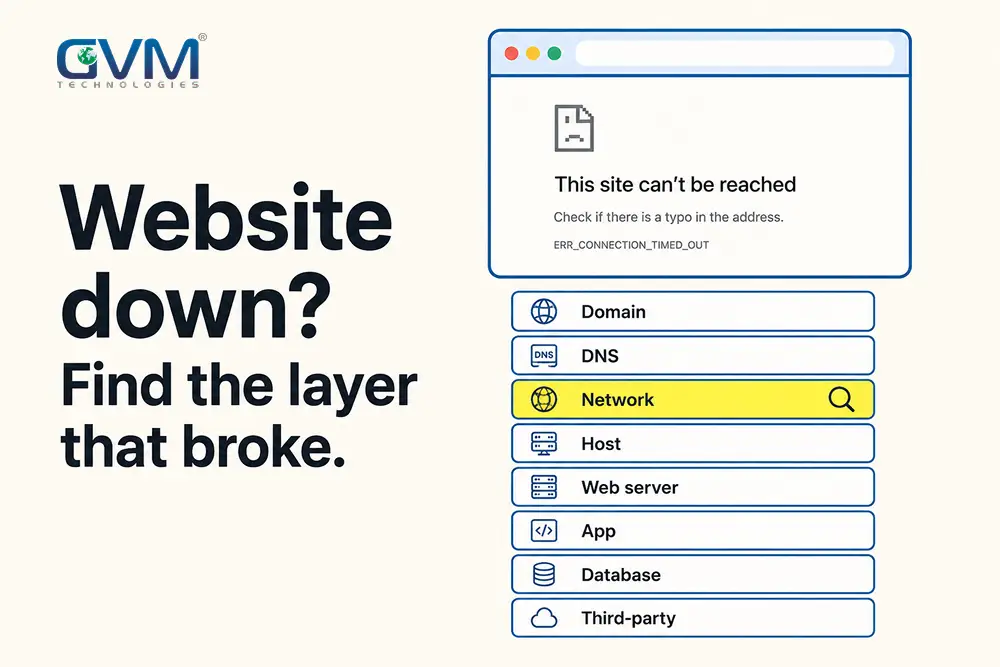
A website is a stack of services, each depending on the one below. Walk it from the outside in; the first broken layer is your answer.
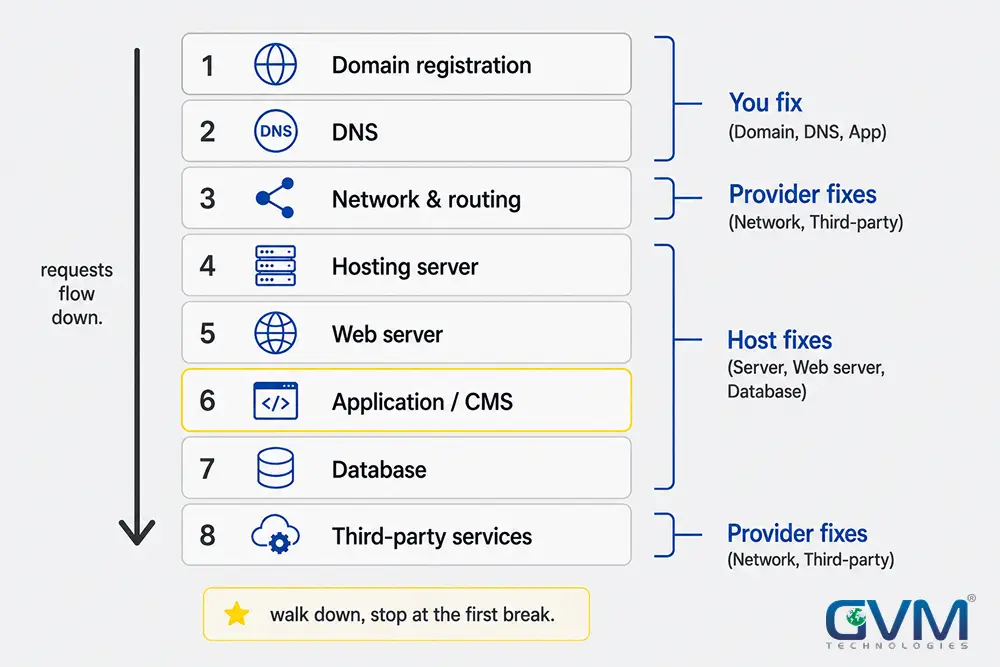
| Layer | Fails as | Who fixes it |
|---|---|---|
| Domain registration | “Domain expired” page, NXDOMAIN |
You, at your registrar |
| DNS | “Can’t find server,” works for some visitors only | You / your DNS host |
| Network and routing | Timeouts for a whole region | ISP / backbone carrier |
| Hosting server | 502, 503, connection refused | Your host |
| Web server (Nginx/Apache) | 502, 503, default landing page | You / your host |
| Application / CMS | 500, white screen | You / your developer |
| Database | “Error establishing a database connection” | You / your host |
| Third-party (CDN, payment, auth) | Partial breakage, checkout fails | The provider |
What 403, 404, 500, 502, 503 and SSL Warnings Mean
The status code tells you which layer failed and who owns the fix.
| You see | It usually means | First move | Who fixes it |
|---|---|---|---|
| Site-wide 404 | DNS points nowhere, or a deploy wiped the web root | Check DNS and your latest deploy | You / developer |
| 403 Forbidden (site-wide) | Permissions, an .htaccess rule, or a security block |
Check .htaccess and recent firewall or permission changes |
You / host |
| 500 Internal Server Error | Your app or a plugin crashed | Read error logs; disable the last update | You / developer |
| 502 Bad Gateway | The proxy got no valid response from your app server | Restart the app service; confirm it is running | You / host |
| 503 Service Unavailable | Server overloaded, or in maintenance mode | Check traffic and resource graphs | You / host |
| 508 / “Resource limit reached” | Shared hosting plan limits exceeded | Find the runaway process, or upgrade | You / host |
| “Not secure” / cert warnings | SSL certificate expired or misconfigured | Renew it; check the auto-renew job | You / host |
| “Connection timed out” | Server down, a firewall, or routing | Ping the server IP; check host status | You / host / ISP |
| “Error establishing a database connection” | Database down, out of connections, or bad credentials | Restart the DB; check disk and credentials | You / host |
The Website-Down Troubleshooting Checklist
Walk these eight checks in order. Stop at the first that fails. Each takes one to three minutes.
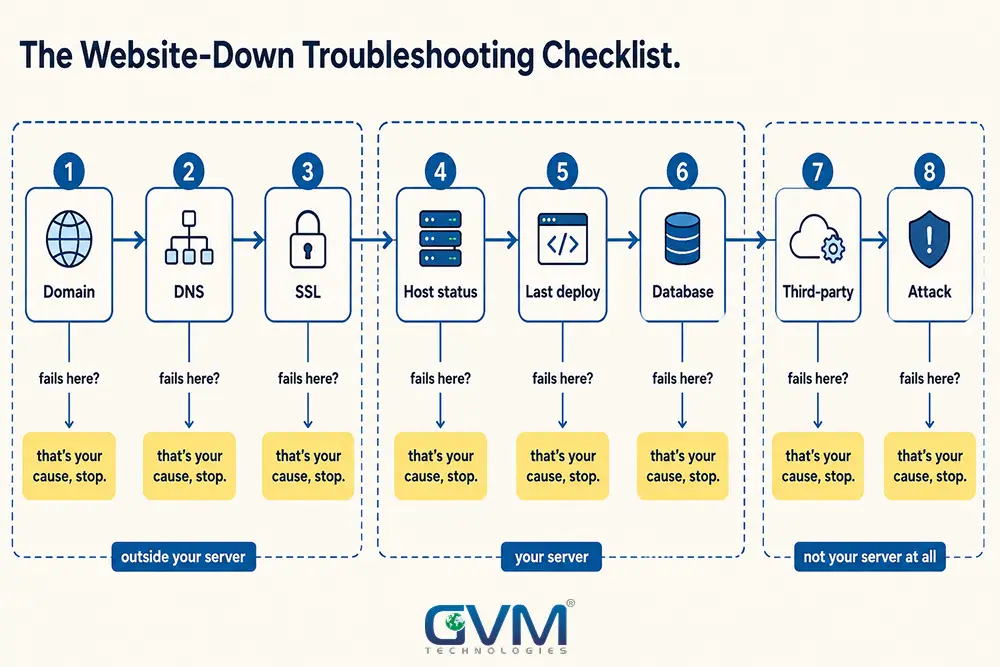
1. Domain still registered and pointed correctly?
Log into your registrar. Confirm the domain is active (not expired or in redemption), auto-renew is on, the card is valid, and the nameservers match your DNS host.
An expired domain is a common total outage and is invisible from your server: the machine is fine, the name no longer resolves.
Expired .com-style domains sit in a ~30-day grace period, then a costlier redemption window, before deletion.
2. DNS resolving, and edited recently?
Run nslookup yourdomain.com or dig yourdomain.com. Does it return the right IP? Check your DNS host for recent edits; a changed A record or nameserver is a frequent culprit.
Changed DNS in the last 48 hours means propagation is still in progress, which produces the “works for some, not others” pattern and clears on its own.
3. SSL certificate valid?
Read the certificate details or run an SSL checker. A certificate that expired today, with no other change, means an auto-renewal job stopped quietly weeks ago.
Let’s Encrypt certificates last 90 days and renew about 30 days early; if yours expired, the renewal has been failing silently.
4. Host status page, then the server itself
Read your host’s status page and social account. A provider-wide incident means “wait and monitor,” not “keep changing settings.” If the host is green, ping the server IP and SSH in.
A server that pings but won’t serve pages points at the web server or the app, not the machine. On shared hosting, check for a resource-limit or suspension notice.
5. Roll back the last deploy, plugin, or theme
If the site 500s or white-screens right after an update, that update is the suspect.
On WordPress: rename the plugins folder over SFTP to disable all at once, then re-enable one by one; switch to a default theme to test the theme. On a custom app, redeploy the last known-good build.
This is the failure a staging environment and QA process is meant to catch first.
6. Check the database
“Error establishing a database connection” means the app can’t reach its database: the service is down, out of connections, the disk is full, or credentials changed.
Restart the service, check disk space, and confirm the config credentials.
A traffic spike or a bad query can exhaust the connection pool without anyone touching it; slow degradation before a full outage is often a server response and load problem.
7. Rule out a third-party dependency
Your site can be down while your server is healthy because something it depends on is not: your CDN, your DNS provider, a payment gateway, an auth provider, or an external script the page can’t render without.
Check the status page of every service in your critical path.
8. Rule out an attack or a hack
A traffic flood shows as 503s and a spike in your graph with no matching campaign.
A defacement, an unexpected redirect, casino or pharma spam pages, or a suspension for outbound spam is a compromise, not an outage.
If the symptoms look like a hack, switch to what to do if your website gets hacked.
When the Site Is Down Only Sometimes
Intermittent outages are almost always resource contention, a flapping service, or a network problem, and you can’t diagnose them by clicking around.
- Set up external uptime monitoring now, so the next drop leaves timestamps and response codes.
- When it drops, check CPU, memory, and disk I/O graphs for that exact window. A server that goes unstable and recovers is usually being crushed by a backup job, a cron task, a crawler, or a memory leak.
- Watch the logs for a service restarting in a loop (PHP-FPM, the database, the app).
- “SSH goes laggy and the site drops together, but the apps never crash” is the box running out of headroom, or packet loss on the path.
- A Cloudflare 521 that clears before you can screenshot it often means your origin firewall or a rate-limiter is intermittently blocking the CDN’s IP ranges. Allowlist them.
What to Do While the Site Is Down
Fix the site and limit the damage in parallel.
- Serve the right status code: Taking the site down on purpose, return HTTP 503 with
Retry-After, not a blank page and not a normal 200. Google holds rankings on a 503; it can derank a 200 “we’re down” page or a soft 404. A technical SEO check after a long outage confirms nothing structural was left behind. - Capture evidence before you reboot: Save the error, the status code, the start time, and log lines. A restart clears the symptom and destroys the record of the cause, which is how sites go down again the next day.
- Communicate: “We’re aware the site is down and working on it, updates here,” posted where customers look, costs two minutes and prevents a support pile-up.
Who to Contact, and in What Order
| Symptom | Contact first | Have ready |
|---|---|---|
Domain expired / NXDOMAIN |
Your domain registrar | Account login, domain name |
| DNS not resolving after a change | Your DNS host | Screenshot of current records |
| 5xx errors, server unreachable, host status red | Your hosting provider | Error code, start time, screenshots |
| Site broke right after a deploy | Your developer or dev agency | What changed and when |
| Checkout fails, rest of site works | The third-party provider | The failing request and its error |
| Regional timeouts, host says they’re fine | Your ISP, then your host again | Traceroute output, affected locations |
Before you open a ticket, gather the error code, exact start time, screenshots, and what changed. “The site is down, fix it” sits in a queue. “502 since 14:10, right after your maintenance window” gets escalated.
What Downtime Costs, and the Cheap Insurance
For most businesses the real cost is lost sales and lost trust, compounding by the minute.
The Uptime Institute’s outage analysis has repeatedly found more than half of significant outages cost over $100,000, with roughly one in five exceeding $1 million.
The insurance costs a fraction of one bad outage:
- External uptime monitoring with alerts (often free for a single site).
- Off-server, versioned backups you have tested restoring.
- A staging environment, so updates are tested before production.
- Managed cloud hosting where someone watches the graphs, so you are not the monitoring system.
Common Mistakes That Turn a 10-Minute Fix Into a 10-Hour One
- Changing things before confirming the outage is real. Half the panic is a local cache or DNS issue.
- Rebooting before reading the error. The site comes back, then falls over again that night for the same unfound reason.
- Deleting files by hand. Broken plus more-broken is worse than broken. Roll back.
- Trusting a status page over reality. If your monitoring and your customers say it’s down, it’s down. Status pages lag.
- Backups on the same server as the site. When the server dies, the backup dies with it. See GVM’s pre-launch security checklist.
- No one who owns uptime. Without one named person and an alert, you learn the site is down from a customer. A dedicated resource is faster than building the process from zero.
FAQs
1. How do I know if my website is down for everyone or just me?
Open it on your phone using mobile data, then run the domain through an external down-checker. If it loads on mobile data or the checker says it’s up, the problem is your network, browser, or DNS. If the checker also can’t reach it, the outage is real.
2. My internet works but one website won’t load. Why?
Almost always a local DNS or cache problem, or a broken IPv6 route on that device. Flush your DNS cache, switch to Cloudflare (1.1.1.1) or Google (8.8.8.8), try incognito, and as a test disable IPv6 on your network adapter.
3. What does a 500 error mean?
Your website’s code or a plugin crashed while building the page. Check your error logs and disable whatever was updated or deployed most recently. It is an application-layer problem, not usually the host.
4. My website says “Not Secure.” Is it down?
Not technically, but browsers will warn or block visitors, which has the same effect. The SSL certificate has expired or is misconfigured. Renew it, and find out why the auto-renewal stopped.
5. How long does DNS take to propagate?
Usually 1 to 4 hours, sometimes up to 24 to 48. During that window the site loads for some visitors and not others, which is expected after a DNS change, not a fault.
6. Should I reboot the server if my website is down?
Not first. Capture the error message, status code, and logs before you reboot. A restart often clears the symptom and erases the only evidence of the cause.
7. How much does it cost to fix a website that’s down?
If you find the cause yourself, it costs your time. A developer or host doing an urgent fix typically runs $75 to $200 per hour. The larger cost is the lost sales and trust during the outage.
8. Why does my website keep going down and coming back?
Intermittent outages are usually resource exhaustion, a service restarting in a loop, or packet loss. Set up monitoring for exact timestamps, then check CPU, memory, and disk graphs for those windows and read the service logs.
Conclusion
An outage feels chaotic, but the diagnosis rarely is. Confirm it’s real, read the exact error, ask what changed, then walk the stack from the domain inward and stop at the first layer that fails.
Most outages come down to a short list: an expired domain or certificate, a bad update, a DNS edit, a host incident, or a dependency you didn’t know you had. Each has an obvious owner once you know which layer broke.
The sites that recover in minutes aren’t the ones with no problems. They’re the ones with monitoring that caught it, a backup that restores, and one person who knows where to look.
Keep Your Website Online With GVM Technologies
If your site is down now and the cause isn’t obvious, or if it keeps going down and nobody can say why, that is work for a team that does this every week.
GVM Technologies has built, hosted, and recovered custom software since 2012, from offices in Miami and Surat, under ISO 27001, 20000-1, and 9001 certified processes.
Our DevOps and cloud hosting team sets up monitoring, off-site backups, and staging pipelines so an outage is a ten-minute rollback.
When a site is already broken and the original developer is gone, project rescue picks it up.
Talk to GVM Technologies about your website and get it back online, then get a setup where the next incident is a non-event.