A 404 error is the status code a server returns when no page exists at the requested address. The link between 404 errors and SEO is weaker than most audit tools suggest.
Most 404s do no harm, while a few leak links and traffic. Our guide to Search Console indexing statuses decodes the report, while this guide sorts which 404 errors and SEO issues deserve work.
Quick answer: 404 errors and SEO problems arise only when your own links, backlinks or past visitors point at a dead page. A 404 alone does not lower site rankings. Sort each URL by its source, redirect the few that carry value, repair your links and leave the rest.
Key takeaways
- No site-wide penalty: Google’s help page says 404s do not harm a site’s indexing or ranking.
- Cost sits in 3 places: 404 errors and SEO losses trace to your own links, backlinks to deleted pages and lapsed visitors.
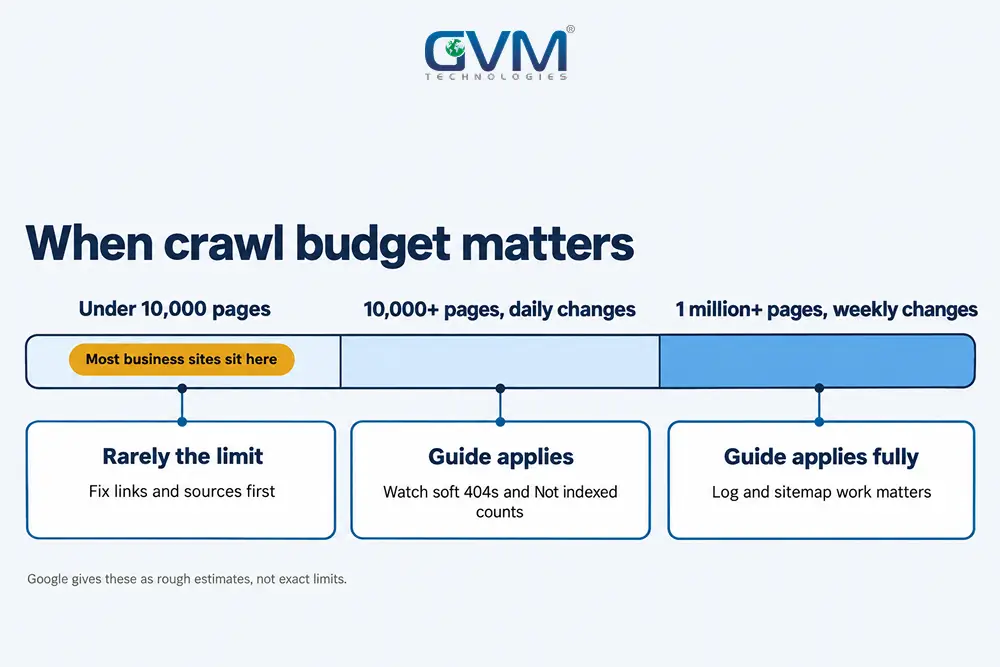
- Crawl budget is a large-site topic: Google’s guide targets sites above 10,000 pages with daily changes.
- Source decides the fix: the 4-Source Triage sorts each URL into edit, redirect, restore or leave.
- Homepage redirects backfire: Google warns that mass redirects to a single unrelated page may read as soft 404s.
What 404 errors are and how 404 errors and SEO connect
A 404 error means the server found no page at the requested address. Google drops such URLs from its index and crawls them less often over time.
A 404 is normal web behavior, not a quality score for your whole site.
404, 410 and soft 404 responses compared
| Response | What the server says | What Google does | Fix |
|---|---|---|---|
| 404 Not Found | No page at this address | Drops it and recrawls less often | Redirect only if a close match exists |
| 410 Gone | Removed on purpose | Treats it like a 404 | Pick it to mark an intentional removal |
| Soft 404 | 200 OK with error text or an empty page | Keeps crawling and flags it | Return a real 404 or restore content |
| Redirect to homepage | 301 to an unrelated page | May read it as a soft 404 | Redirect to a close match or leave it |
Google treats 404 and 410 alike, so only the soft 404 causes trouble on its own. A manual action or spam hit is a different problem, handled in recovering from a Google penalty.
What Google documents about 404 errors and SEO
- Ranking: Google’s 404 help page says 404s do not harm indexing or ranking.
- Crawling: the status code documentation says 4xx content is ignored.
- Quality: John Mueller called 404s and 410s “not a negative quality signal,” as Search Engine Roundtable reported in January 2026.
Why audits overstate 404 errors and SEO risk
This confusion usually happens because crawlers list every dead URL without knowing its source or value. A report with 300 rows reads like 300 faults, yet most rows are old URLs that nothing links to.
Many owners also receive an agency list of 900 dead URLs and wonder whether to bulk redirect or ignore it.
Where 404 errors and SEO damage really comes from
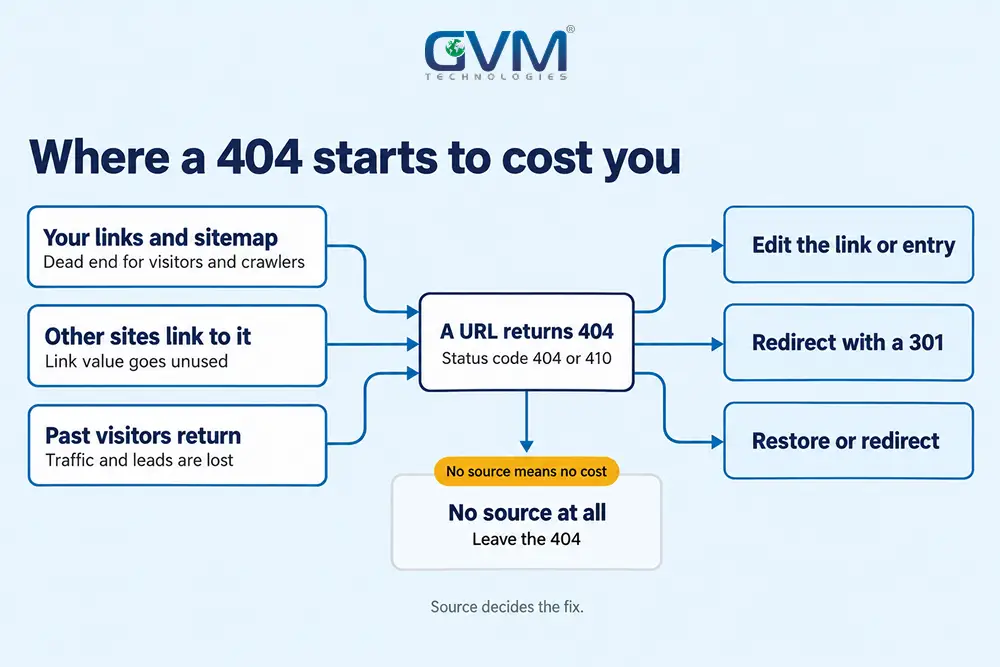
Damage in 404 errors and SEO work comes from 3 places: your own links and sitemap entries, backlinks to deleted pages, and visitors who used to arrive.
Each has an owner and a fix. The raw count of 404s in a report is not a cost by itself.
1. Internal links and sitemap entries that point to dead URLs
Broken links SEO checks start here, because your own links are the only cause you control fully. Google says a submitted URL that returns an error is worth fixing.
- Navigation: old menu items, footer links and buttons.
- Content: blog posts that link to retired pages.
- Sitemap: XML entries for URLs you deleted.
- Media: image and PDF links that moved folders.
GVM starts technical SEO audits with a crawl that finds all 4 in 1 pass.
2. Backlinks to deleted pages lose their value
When a page with outside links returns a 404, those links stop passing value to you. Google states that permanent redirects do not cause a loss in PageRank, so a 301 to a close match recovers it.
A typo in someone else’s link is not your fault and needs no action.
3. Traffic from pages that still earned visits
A page that ranked, or that visitors reached through bookmarks and email, loses that traffic the day it returns a 404. Pull a year of sessions from your analytics reports before deleting a page.
A step-shaped fall right after a redesign often points here, as our sudden traffic drop diagnosis explains.
4. When crawl budget enters 404 errors and SEO decisions
Google’s crawl budget guide targets sites with 1 million+ pages that change weekly, or 10,000+ pages that change daily. It calls these figures rough estimates.
Below that size, 404 URLs rarely limit crawling, because the guide calls a 404 a strong signal not to crawl a URL again. Soft 404s differ, since Google keeps crawling them.
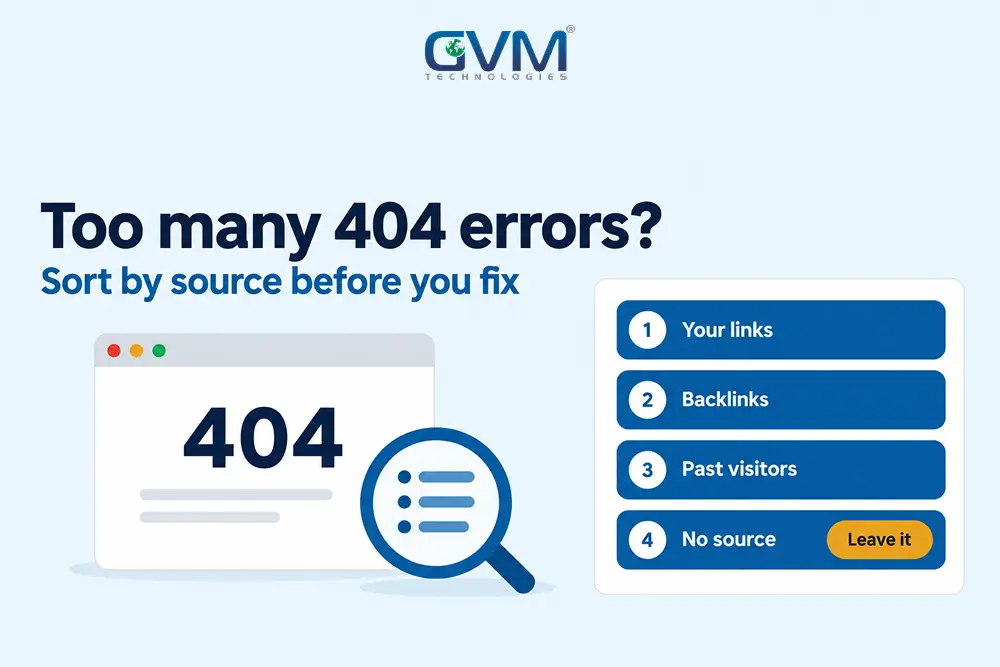
The 4-Source Triage for 404 errors and SEO
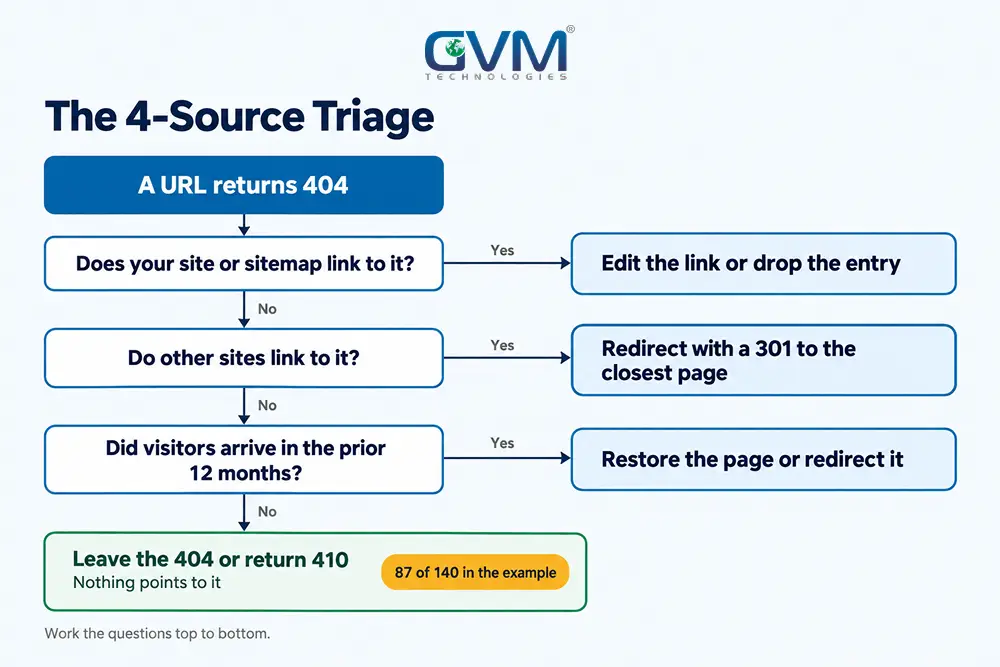
In 404 errors and SEO cleanups, the 4-Source Triage asks where each dead URL’s demand comes from: your pages, your sitemap, other sites or past visitors.
The source that exists decides the fix. A URL with no source can stay a 404 at no cost.
Pull the 404 errors and SEO evidence from 4 places
- Search Console: open the Page indexing report and export the “Not found (404)” rows.
- A crawler: run a free crawl of up to 500 URLs and list internal links that return 404.
- Your backlinks: use the Search Console Links report to see which dead URLs have outside links.
- Analytics: filter 12 months of landing pages for URLs that now return a 404.
GVM Technologies audits cover crawlability, URLs and internal linking, which is the work behind steps 1 and 2.
If every URL returns a 404, stop. A site-wide failure points to DNS or a failed deploy, so use the website down checklist first.
Sort each URL with the 4-Source Triage
| Source | How to spot it | Fix | Order |
|---|---|---|---|
| 1. Your pages or sitemap link to it | A crawl shows an inlink or a sitemap entry | Edit the link, drop the entry | First |
| 2. Other sites link to it | The Links report lists referring domains | 301 to the closest live page | Second |
| 3. Visitors still arrive | Clicks or sessions across the prior 12 months | Restore the page or 301 it | Second |
| 4. Nothing points to it | No links, no traffic | Leave the 404 or return 410 | Skip |
We set that order ourselves, and Google publishes no such figure. Source 1 comes first because it costs little and removes the only cause you control fully.
A worked example: 140 dead URLs after a redesign
The figures below are illustrative, for a 600-page service site. Host moves create similar piles, as our hosting migration SEO guide shows.
- 38 URLs: linked from old blog posts, so edit the links with no redirect.
- 9 URLs: carry outside links, so each gets a 301 to the closest page.
- 6 URLs: had clicks in 12 months, so restore 2 and redirect 4.
- 87 URLs: have no source, so they stay as 404s.
The work shrinks from 140 rows to 53 actions, and 87 rows need nothing.
How to fix 404 errors and SEO leaks: redirect, restore, edit or leave
For 404 errors and SEO leaks, redirect when a close match exists, restore when the page should still exist, edit the link when you own it, and leave the 404 when nothing points to it.
Log 1 action per URL so the report makes sense later.
1. When a 301 redirect is the right fix
- Close match: a live page covers the same topic or product.
- Value to keep: the URL has relevant backlinks or past traffic.
- Single hop: point the old URL straight at the final page, not through a chain.
Google’s redirect documentation treats 301 and 308 as permanent signals. Its site move guidance says to keep redirects for at least 1 year.
GVM’s website development process plans sitemaps and wireframes before launch, which is where a redirect map belongs.
A lapsed domain with old backlinks follows the same rule, as our expired domain recovery steps show.
2. When to leave a 404 or return a 410
Leave it when no close match exists and nothing links to the URL. Return 410 only to record that removal was deliberate, since Google treats it like a 404.
Typo URLs from other sites, spam links and plugin feed URLs fit here.
3. Why redirecting every 404 to the homepage backfires
Google’s guidance warns against sending many old URLs to a single unrelated page such as the homepage, because it may be treated as a soft 404. Visitors land on a page that ignores their request.
Some WordPress SEO plugins include a switch for this, so check that yours is off.
4. How to fix a soft 404
- Open URL Inspection and view the rendered page Google sees.
- Return a real 404 or 410 if the page is gone.
- Add a 301 to the new address if the page moved.
- Write real content if the page should exist.
5. What a useful custom 404 page needs
- A real 404 status: a 200 with “not found” text becomes a soft 404.
- A plain message: say the page is missing and offer a next step.
- Search and links: add a search box and 4 to 6 top pages.
A clear error page also keeps visitors oriented, which good UX design treats as basic.
How long fixes for 404 errors and SEO take to show up
Fixes for 404 errors and SEO leaks show in stages: up to 2 weeks for a Search Console validation and about a month for stale rows to clear.
Gains appear only where a dead URL had links or visits. Unlinked 404s show no change, and that is correct.
Search Console timelines for 404 errors
- Validate fix: Google says validation typically takes up to about 2 weeks, and sometimes longer.
- Report clearing: Google’s help page says deleted URLs with no replacement drop from the report after about a month.
- Redirects: keep them for at least 1 year, per Google’s site move guidance.
What to track after the fix
Track clicks to each redirect target for 4 to 8 weeks, which is our editorial window and not a Google figure.
If clicks look wrong, confirm the data first with this GA4 tracking checklist.
Claims and mistakes about 404 errors and SEO that waste time
Most wasted effort in 404 errors and SEO work comes from 5 repeated claims and 5 repeated mistakes. Test each against Google’s documentation before it eats an hour of your week.
The table covers the claims, and the list covers the mistakes.
5 claims about 404 errors and SEO that reports repeat
| Claim | What the documentation says | How to treat it |
|---|---|---|
| 404s penalize the whole site | Google says 404s do not harm indexing or ranking | Ignore the count, fix sources |
| 404s waste crawl budget | The guide targets 10,000+ and 1 million+ page sites | Count your pages before worrying |
| A 410 removes pages faster | Google treats 410 like 404 | Use either |
| A bounce from a 404 page lowers rankings | No Google page we reviewed lists it | Fix the cause for visitors |
| A clean report means no 404s | Deleted pages should return 404 | Aim for no broken internal links |
A few practitioners on very large sites report gains after pruning dead URLs. Those cleanups usually bundle other fixes, so the 404 count alone is not proven as the cause.
5 mistakes that turn harmless 404s into real problems
- Blocking 404 URLs in robots.txt: Google then cannot see the status code.
- Validating intended 404s: nothing is broken, so the check changes nothing.
- Redirecting to a loose match: the redirect may read as a soft 404.
- Deleting before checking: skipping the 12-month traffic and link check.
- Chaining redirects: each extra hop adds delay and risks a redirect error.
Theme and plugin updates can also strand URLs overnight, which our WordPress update troubleshooting covers. GVM’s QA team validates a build before launch, so those changes surface early.
FAQs
1. Do 404 errors hurt SEO?
Not directly. Google says 404s do not harm indexing or ranking, so the losses come from links, backlinks and visitors that point at a dead URL.
2. How many 404 errors is too many?
Google publishes no limit, so treat any internal link or sitemap entry that returns a 404 as too many. Some enterprise teams cap crawl-found 404s at 2% to 5% of URLs, which is a team rule. Put the same question to an agency, then compare its answers with these vetting questions for an SEO agency.
3. Should I redirect all 404 errors to the homepage?
No. Google warns that mass redirects to an unrelated page may be treated as soft 404s. Redirect only where a close match exists.
4. How does a soft 404 differ from a regular 404?
A 404 returns the correct status code for a missing page. A soft 404 returns 200 OK while showing an error or empty page, so Google keeps crawling it.
5. Is a 410 better than a 404?
No. Google treats the 2 alike, so choose 410 only to mark a deliberate removal.
6. Do broken links to other websites hurt SEO?
Google documents no ranking effect for outbound dead links. Broken links SEO guides often mix this case with inbound 404s, yet visitors still hit a dead end, so fix or remove both.
Conclusion: sort 404 errors and SEO problems by source before you fix them
Handling 404 errors and SEO well means treating a 404 as a status, not a verdict on your site. The 4-Source Triage turns a long report into a short list of fixes.
Your checklist for today:
- Export the “Not found (404)” rows from the Page indexing report
- Crawl for internal links and sitemap entries that return a 404
- Match dead URLs against backlinks and 12 months of traffic
- Redirect 1 to 1, leave the rest and log each decision
Run the crawl again after every redesign, migration or plugin change, since that is when new dead URLs appear.
Talk to GVM Technologies about 404 errors and SEO losses
Each month a deleted page with backlinks stays dead, its link value sits unused while competitors collect it. These 4 GVM services apply:
- Search engine optimization: audits that check crawlability, URL structure and internal links
- Website development: sitemap and wireframe planning, launch testing and ongoing maintenance
- Quality assurance and security testing: manual and automated checks that validate a build before launch
- Project rescue solutions: a code audit, repairs and support after recovery for a failing build
In 90 days, GVM’s SEO work lifted organic impressions by 200% for an online flower seller, as our GlobalRose case study records.