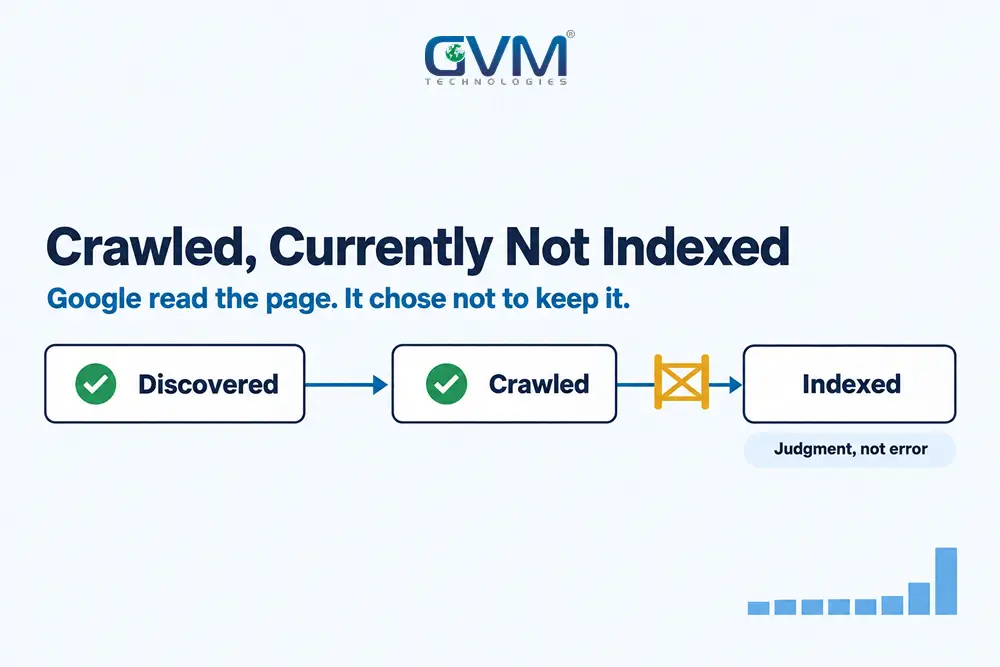
“Crawled – currently not indexed” is a Google Search Console status for pages Googlebot fetched and then chose not to store. Until that changes, the page cannot rank or appear in Google’s AI answers.
A climbing crawled currently not indexed count rarely has 1 cause. This guide reads the chart, sorts the URLs and fixes what matters, beyond our overview of every Search Console indexing status.
Quick answer: Crawled currently not indexed means Google fetched the page, hit no technical block, and still decided not to index it for now. It is a judgment, not an error or a penalty. Fix it by leaving out URLs that should not rank, merging overlapping pages, and sending real signals to the unique ones.
Key takeaways
- Crawled currently not indexed rules out robots.txt blocks, noindex tags and server errors, which all have their own labels.
- Google treats this bucket as a catch-all: duplicates, site-level doubt, weak signals and thin rendering all land here.
- A sudden step up in the chart points to a site change. A slow climb points to quality or authority.
- Requesting indexing or Validate fix on unchanged crawled currently not indexed pages changes nothing.
- A page must be indexed before it can appear as a link in AI Overviews or AI Mode.
What crawled currently not indexed means in plain terms
The crawled currently not indexed status means Googlebot reached the page, read it, and the indexing system declined to store it. The word “currently” matters: Google’s Page indexing report help says the page may be indexed later and needs no resubmission.
It is not a manual action or penalty either.
What the status rules out, and what it does not
Because the crawl succeeded, these causes are already off the table:
- Robots.txt blocks: a blocked page reports as “Blocked by robots.txt”, not as crawled.
- Noindex tags: these show under “Excluded by ‘noindex’ tag”.
- Server and 404 errors: these get their own 5xx, 404 or soft 404 rows.
These technical causes can still hide inside the status:
- Rendering gaps: Google may have read a thinner version than the one your browser shows.
- Canonical confusion: a near-duplicate can land here instead of in a canonical row.
A common mistake is auditing robots.txt for days. The real question is why Google passed.
Why indexing now decides AI search visibility too
Google says a page must be indexed and eligible for a snippet to appear as a link in AI Overviews or AI Mode. A crawled but not indexed page is invisible in both.
Schema and answer engine optimization (AEO) cannot help an unstored page, so GVM starts every AI search optimization project with an indexing check.
Why pages end up crawled currently not indexed: 4 causes
Google’s Gary Illyes has said Google would like to split this bucket into finer reasons, but its internal data makes that hard (Search Engine Journal). In practice, 4 causes fill most crawled currently not indexed reports, and each needs a different fix.
1. A stronger version of the page already exists
Google groups similar pages and keeps 1 as the canonical. Your page can lose to a sibling on your own site, or to another site answering the same question with stronger signals.
- Location pages that differ only by city name
- Product variants, such as a 4-port and an 8-port router on separate pages
- 2 posts written for the same query with near-identical title tags
Template pages with a few words swapped are the usual culprit; see template vs custom-coded websites.
2. Google is not convinced about the site overall
John Mueller has said that when Google doubts a site’s quality, it crawls less and indexes less (Search Engine Roundtable). The tell is the status covering most of the site.
Fixing 1 page at a time will not move a site-level verdict. Prune or merge weak sections and make the best pages clearly better.
3. The page has no signals beyond the sitemap
A page reachable only from the sitemap or a footer gives Google little reason to keep it. Such pages often index within days of 1 contextual link from a page people visit.
4. Googlebot saw a thinner page than you do
Content loaded by JavaScript after a click, text hidden in tabs, a consent wall or a bot challenge can leave Google with a near-empty page. The live test in URL Inspection shows what Google kept.
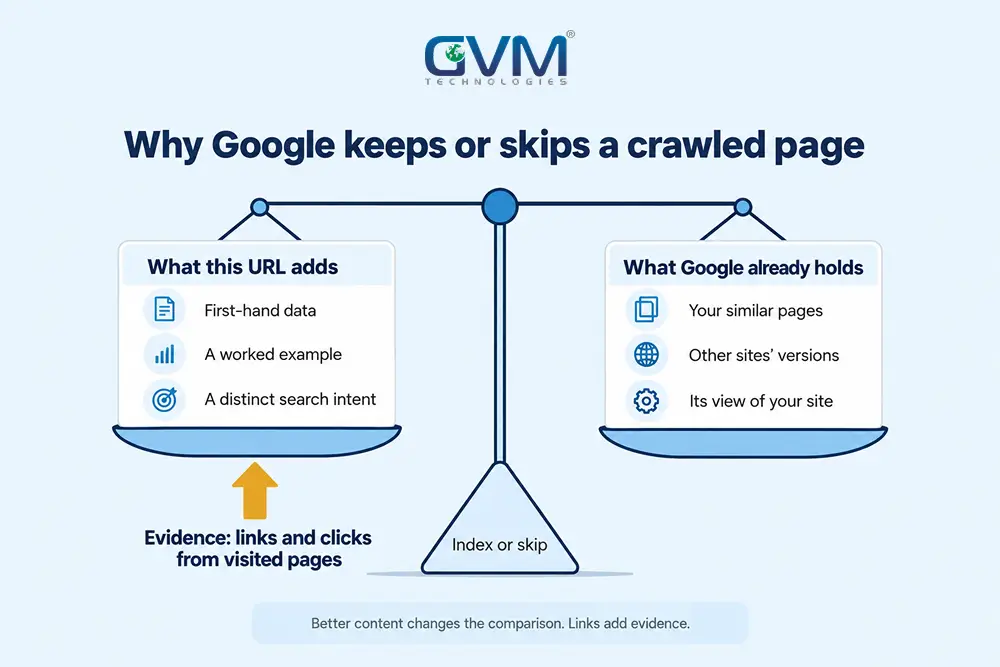
In practice: Quality and authority are 2 sides of 1 decision. Google weighs what a URL adds against what it holds. Content changes that comparison; links add evidence.
How to read the Page indexing chart before touching a page
The shape of the crawled currently not indexed chart tells you more than any single URL. A step up on 1 date usually means the site changed: a new URL pattern, template, plugin or platform migration. A slow climb points to quality or authority. Each shape needs a different first move.
| Chart shape | What it usually means | Check first |
|---|---|---|
| Flat, then a step up overnight | New URLs appeared: parameters, attachments, a migration or template | Group new URLs by folder and pattern |
| Slow, steady climb | Pages publish faster than Google trusts them | Compare indexed and unindexed posts by links |
| URLs moving in and out | Borderline pages near Google’s threshold | Strengthen or merge the weakest group |
| Indexed pages dropping into this bucket | Site-level reassessment, often near a core update | Site-wide quality, not single pages |
Take a typical report: about 100 URLs for a month, a jump to roughly 300 in 1 day, then a plateau near 345. Validation still says “Started” 2 months on.
That shape rarely means 200 pages got worse overnight; about 200 unwanted URLs appeared.
When GVM audits a chart like this, the culprit is usually a moved site, a plugin update creating attachment pages, or leaking filter URLs.
The Ignore, Merge, Earn sort for every URL in the report
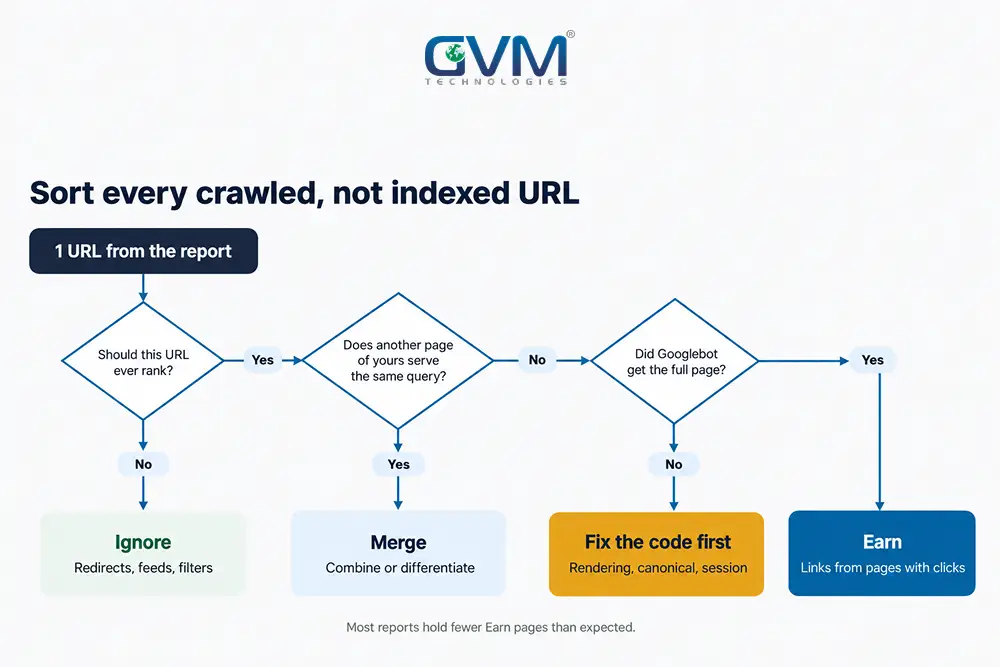
Every crawled currently not indexed URL goes into 1 of 3 groups. Ignore the ones that should not rank, merge the ones competing with your own pages, and earn indexing for the unique ones. Most reports hold far fewer “Earn” pages than owners expect, which shrinks the real workload.
1. Ignore: URLs that belong out of the index
Google itself says non-indexed URLs can be fine. These usually belong in the crawled currently not indexed bucket:
- Old URLs that now 301 redirect after a slug or structure change
- Image and attachment URLs, such as files under /wp-content/uploads/
- RSS feeds, tag archives and deep paginated archive pages
- Filter, sort and tracking parameters, such as ?sort= or ?color=
- Dated news or event pages nobody searches for anymore
If a redirected URL still has traffic or backlinks, treat it like a 404 error that still gets visits.
Warning: If product URLs show a “session expired” page as the Google-selected canonical, a session check is bouncing Googlebot. Fix the code; do not ignore it.
2. Merge: pages that compete with your own pages
Merge cases share 1 search intent, 1 template with a few changed words, or near-identical titles. Keyword research mapped to intent shows which pages chase the same query.
- Combine: fold the weaker page into the stronger URL and 301 redirect it.
- Differentiate: give each page something the others lack, such as local data, pricing or a worked example.
3. Earn: unique pages that need evidence
These pages are useful but have not earned a place yet. They need links from pages that get clicks, a clear match to a real query, and time.
The report’s export caps at 1,000 example URLs. Filter by sitemap, or use the URL Inspection API, which allows 2,000 checks per day per property.
How to fix crawled currently not indexed pages, in order
Work in this order: confirm the page is truly missing, check what Googlebot received, fix the page against its nearest rival, then send signals from pages that already get clicks. Request indexing once, at the end. Skipping the first 2 steps is how owners rewrite pages Google did not see properly.
1. Confirm the page is really missing from Google
The report lags, because Google updates counts only as it recrawls. A fixed page can show as crawled currently not indexed for weeks.
- Run URL Inspection and read “URL is on Google” or “URL is not on Google”.
- Open Performance, then Pages: a URL with impressions is indexed.
- Treat site: searches as a hint only, because they return incomplete results.
2. Check what Googlebot actually received
Run a live test in URL Inspection, open the tested HTML and check:
- The main text sits in the HTML, not loaded after a click or scroll.
- The Google-selected canonical matches the canonical you declared.
- No consent wall, “checking your browser” page or login redirect appears.
If the main content only arrives through client-side JavaScript, server-side rendering fixes it. GVM builds Next.js sites with server-side rendering so the fetched HTML holds the full page.
3. Fix the page against its nearest indexed rival
Find the page Google prefers: your own similar URL or the top result for the main query. Add what it lacks, such as first-hand data, a worked example or a clearer answer.
Adding words is not the fix: Google’s guide to how Search works says indexing is not promised and duplicates share 1 canonical.
4. Send signals from pages that already earn clicks
- Add 2 to 3 contextual links from related pages with impressions, using descriptive anchors.
- Link from a hub or category page so the URL sits within 3 clicks of the homepage.
- Update the sitemap’s lastmod date only when the page truly changed.
- Request indexing once, then leave it alone.
A technical SEO audit finds orphan pages that no internal link reaches.
Fixes that waste time, and 1 that carries risk
Repeated indexing requests, Validate fix on unchanged pages, slug swaps and paid indexers all try to force a decision Google already made on crawled currently not indexed URLs. Some seem to work only because they coincide with a real change, such as a new link.
| Tactic | What it actually does | Worth it when |
|---|---|---|
| Request indexing again | Queues a recrawl; does not change the verdict | Once, after a real change |
| Validate fix | Asks Google to recheck every URL in the group | A site-wide cause was found and fixed |
| Changing the slug | Creates a new URL with no history, plus a redirect | Rarely, such as a URL stuck with a wrong canonical |
| Paid indexing services | Often push pages through the Indexing API | Not worth the risk |
Why “Validation started” can sit for months
Google says validation typically takes up to about 2 weeks but can take much longer. “Started” stays while any URL in the group still qualifies.
On a judgment status, most URLs keep their verdict, so validation rarely finishes. Google spots real fixes during normal crawls anyway.
Why the slug-change trick and paid indexers mislead
A new slug gets a fresh evaluation, and owners usually add internal links at the same time. The links did the work; the old URL’s history is lost.
Paid indexers are riskier. Google limits the Indexing API to job posting and livestream pages and warns that abuse can cost API access.
How long recovery takes, and when it is a developer problem
After a real fix, Google usually recrawls within days to weeks, and the report updates after that. New or low-authority sites often wait 1 to 3 months. If crawled currently not indexed counts do not move after 2 recrawls of the fixed URLs, the cause probably sits in the code.
If traffic falls as pages drop out, run our sudden traffic drop checks first.
Realistic timelines after a genuine fix
These are planning ranges from our own projects, except where noted:
- Single page with new internal links: often 1 to 4 weeks.
- Validation of a site-wide group: about 2 weeks, sometimes far longer (Google’s figure).
- Site-level quality reassessment: usually several months.
- New site with few links: 1 to 3 months is common.
Signs the cause sits in the code, not the content
- Main content or links injected by JavaScript after the page loads
- A firewall or bot-protection rule serving Googlebot a challenge page
- Templates generating thousands of parameter or attachment URLs
- Session or login checks that send crawlers to 1 shared page
Here GVM’s SEO specialists and developers share 1 ticket, because copy changes cannot fix a template that keeps producing unwanted URLs.
FAQ
1. Is crawled currently not indexed bad for SEO?
Not when it covers low-value URLs. It matters when important pages sit there, because they cannot rank or appear in AI Overviews.
2. How long can a page stay crawled but not indexed?
Indefinitely if nothing changes. Without better content or a new signal, many pages stay for months.
3. Should I click Validate fix for this status?
Only after fixing a site-wide cause, such as a template or a parameter leak. On unchanged pages it does little.
4. Why did an indexed page move to crawled currently not indexed?
Google re-evaluated it. A newer competing page, a sibling on your site, a template change or lower trust in the site can trigger it.
5. Do I need backlinks to get pages indexed?
Not necessarily. Internal links from pages that get clicks often work alone. External links help most on new sites with little authority.
6. Will Bing or ChatGPT still find a page Google won’t index?
Possibly, as other engines run their own crawls. Google’s AI Overviews only link to indexed pages, which is why GEO work starts with indexing.
Conclusion: fix the pages that deserve a place
Crawled currently not indexed is Google’s verdict that a URL adds too little, for now. Read the chart, sort the URLs, and spend effort only on pages that should rank. Start today:
- Note the date the count jumped and list what shipped that week.
- Sort every URL into Ignore, Merge or Earn.
- Add 2 to 3 links to each Earn page from pages with impressions.
- Request indexing once per fixed page, then wait for 2 recrawls.
As AI answers draw on the same index, the pages Google keeps are increasingly the only ones it cites.
Talk to GVM Technologies about pages Google won’t index
Every week a key page sits in this bucket, it earns no clicks, AI citations or leads. Our team handles it from diagnosis to fix:
- Technical SEO and indexing fixes: crawlability, indexing, structured data and internal links, reviewed URL group by URL group.
- Content marketing: content that gives Earn pages something the indexed competition lacks.
- Website development: rebuilding templates that render thin or spawn duplicate URLs.
- DevOps and cloud hosting: fast, monitored hosting so Googlebot reaches the real page.
In our GlobalRose SEO campaign, the audit found weak internal linking holding back crawling and indexing, and organic impressions rose 200% within 90 days.