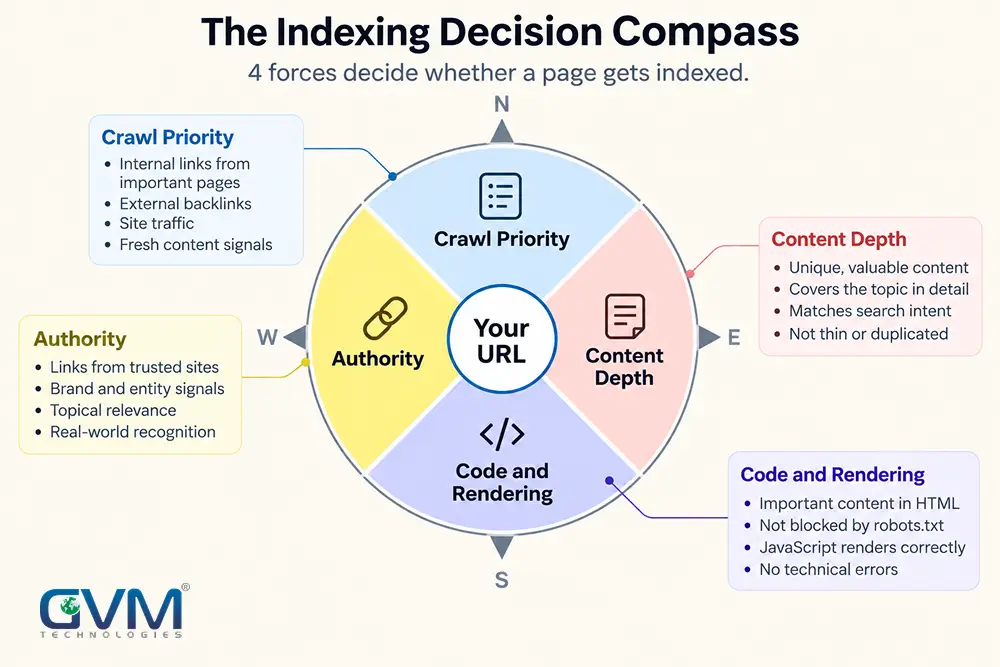
Google Search Console pages not indexed is rarely 1 problem. It is usually 3 or 4: a crawl-priority issue, a content or duplication issue, a canonical mismatch, and a technical block Googlebot cannot see past. A technical SEO audit that only checks meta tags will miss at least 1 of those.
This guide sorts every Page Indexing status, adds the technical causes most checklists skip, and closes with a 3-signal framework for diagnosing which fix to run first.
Quick answer: Google Search Console pages not indexed almost always falls under 1 of a few labels: “Discovered,” “Crawled – currently not indexed,” or “Google chose a different canonical.” Each traces to a different root cause: crawl priority, content quality, duplication, or a technical block. Fixing the wrong one wastes weeks.
Key Takeaways
- “Discovered – currently not indexed” means Google found the URL but has not fetched it. Crawl priority, not a quality verdict.
- “Crawled – currently not indexed” means Google fetched the page and chose not to keep it. Usually a content or duplication issue.
- Google’s John Mueller names 2 root causes for stuck pages: server capacity and overall site quality, not per-page word count.
- “Google chose a different canonical” is not a penalty. It means 2 URLs read as 1 document, and Google picked the other.
- Benchmark: 5 to 15% of crawled pages sitting “not indexed” is normal. Past 20 to 30%, something site-wide is wrong.
- Clicking “Request Indexing” on an unchanged page does nothing. It only re-checks signals that have not moved.
- Most Google Search Console pages not indexed cases trace back to 1 of only 4 root causes: crawl priority, content quality, a canonical mismatch, or a code-level block.
What Google Search Console Pages Not Indexed Actually Means
A page clears 5 stages before it can rank, and the Page Indexing report shows exactly where each URL stalled.
The 5 stages a page must clear before it can rank
- Discovery. Google learns the URL exists (sitemap, link, or manual submission).
- Crawl. Googlebot requests the page.
- Render. Google executes the JavaScript and builds the page.
- Index eligibility. Google decides whether the rendered page earns a place in the index.
- Ranking. Only indexed pages compete for a position.
Most statuses fail at stage 3 or 4, not stage 1. Re-submitting a sitemap only touches stage 1.
Every reason Search Console excludes a page
Most guides spread this across a dozen or more sections. Here it is in 1 table.
| Status | What it means | Typical fix |
|---|---|---|
| Discovered – not indexed | Known, not yet crawled | Add internal links, build demand |
| Crawled – not indexed | Fetched, rejected | Fix depth, duplication, or intent |
| Different canonical | Google picked another URL | Align canonical signals |
| Duplicate, canonical not selected | Your tag conflicts with Google’s pick | Fix the rel=canonical target |
| Excluded by “noindex” | A tag or header blocks it | Remove, if unintentional |
| Blocked by robots.txt | Cannot fetch at all | Edit the Disallow rule |
| 401 / 403 | Login or firewall blocks Googlebot | Open access or check bot rules |
| 404 / soft 404 | Gone, or looks empty | Redirect, remove, or fix content |
| Page with redirect | Forwards elsewhere | Confirm the target is correct |
| Server error (5xx) | No response during crawl | Fix hosting capacity |
Discovered vs. Crawled: the 2 Statuses Everyone Mixes Up
“Discovered” means Google has not opened the page. “Crawled” means it opened the page and passed. Confirm which 1 a page has before touching a word of copy.
1. Discovered: found, not fetched
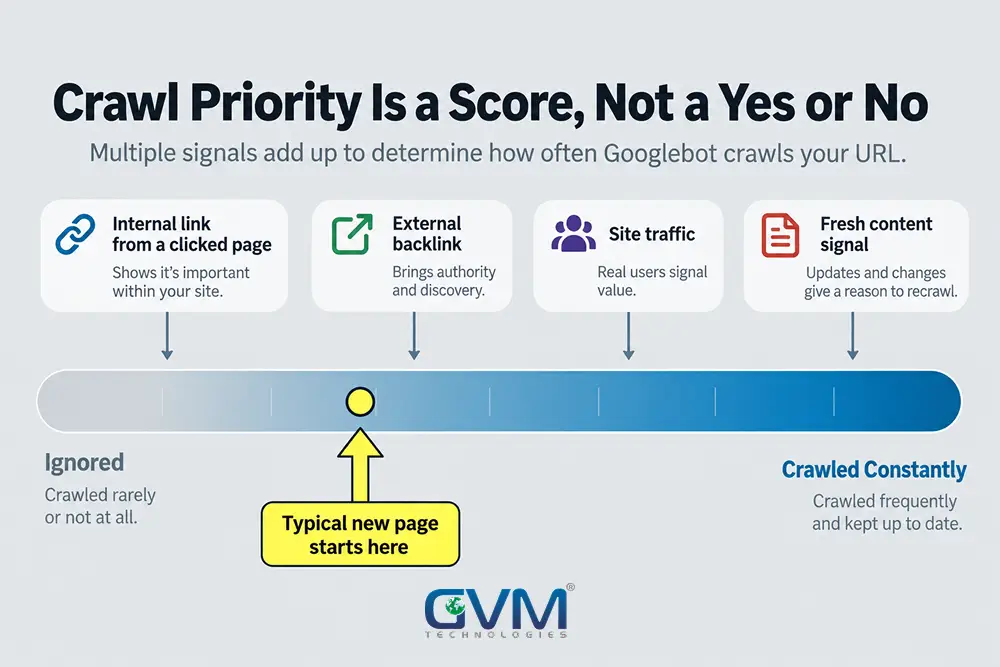
Google is weighing whether the page looks worth the trip, not judging its content yet. 4 causes recur:
- Weak internal linking, often 1 to 3 links from low-traffic pages. Link it from an indexed, high-traffic page with real anchor text.
- Sitemap noise: redirects, errors, or thousands of low-value URLs. Keep sitemaps to canonical, 200-status URLs only.
- Low site-wide crawl demand. Work on generating real traffic to the strongest pages first; frequency follows.
- A URL pattern that reads as low-value: deeply nested, parameter-heavy, or near-duplicate.
2. Crawled: fetched, rejected
This covers thin content, content that duplicates another page, an intent mismatch, or a structured data error.
Communities argue whether this is a content or authority problem. It is rarely only 1. A deep page with zero internal support struggles for a second look; a well-linked page with nothing new next to an indexed page gets rejected anyway. Fix the weaker signal, not the one that’s easier to blame.
Keyword research before writing prevents most of this by showing what a page must say that competing, indexed pages do not.
3. The fix most guides skip: resetting crawl priority
A page can sit in “Discovered” for months because Google’s crawl-priority read on that exact URL never resets on its own.
Once other fixes are in place, try this: make a small, real slug change, keep the content, update every internal link pointing to it, and request indexing on the new URL. A new URL forces a fresh crawl decision instead of revisiting one Google already deprioritized. Skip this on a page with almost no internal links; fix the linking first, or the new URL stalls too.
4. Fixing each status: what moves the needle
| Fix | Discovered | Crawled |
|---|---|---|
| Internal link from an indexed, high-traffic page | Yes | Yes |
| Rewrite for genuine depth | Limited | Yes |
| Consolidate near-duplicates | Limited | Yes |
| Earn 1 or 2 real backlinks | Yes | Yes |
| Repeat “Request Indexing” | Rarely | Rarely |
What Google Itself Says Is Going On
Most advice here is a practitioner’s guess. John Mueller has addressed “Discovered – currently not indexed” directly, and named only 2 causes.
Server capacity
Google avoids overloading a struggling server, so a slow host gets crawled more cautiously, leaving more URLs waiting in “Discovered.” That is Google’s own confirmation that hosting quality is an indexing factor, not only a user-experience one.
Overall site quality
As reported by Search Engine Journal, Mueller said: “In most cases though, it’s more about overall website quality… unless you focus on improving the actual quality, it’s easy to just spend a lot of time reducing pages.”
That rules out the common instinct to delete a few weak pages and hope the rest recovers. Mueller is describing a site-wide signal a handful of deletions rarely moves.
Google Chose a Different Canonical: the Most Misread Status
This is not a duplicate-content penalty. Google decided 2 URLs represent the same document and picked the one it trusts more. The other URL still exists; it just is not the one shown.
Why it isn’t a penalty
The web is full of legitimate duplication (syndication, printer-friendly pages, parameters). This system just picks 1 representative URL. Common triggers:
- www vs. non-www, or http vs. https, never fully redirected to 1 version.
- Trailing-slash vs. no-trailing-slash variants of the same URL.
- Color or size parameters, common on Shopify and other e-commerce platforms with large catalogs.
- Syndicated content published elsewhere first.
- Template pages sharing 90%+ identical copy, like city-by-city local service pages.
How to find and fix a collision
- Open URL Inspection and compare “Google-selected canonical” against your intended URL.
- Confirm every version 301-redirects to 1 URL.
- Add a correct, self-referencing
rel="canonical"tag. - Give near-identical pages real, unique specifics, per Google’s own guidance on consolidating duplicate URLs.
- Request indexing only once every signal agrees.
When It’s Not Content, It’s Your Code
Most guides stop at content advice because most are written by teams that only do content and links. Plenty of “not indexed” pages fail in the codebase, the server, or a past migration.
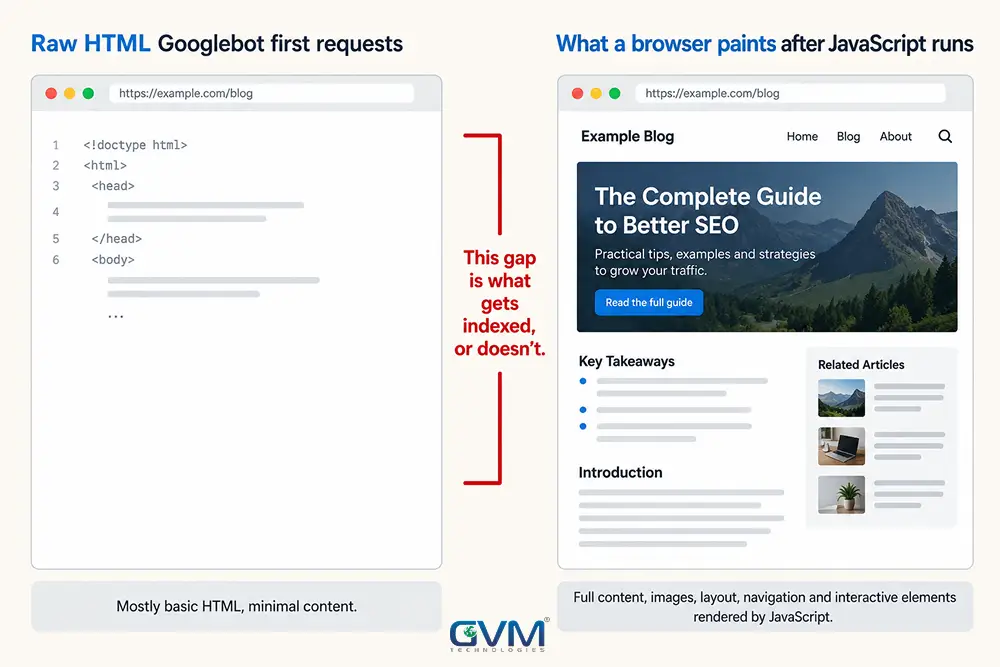
1. What Googlebot requests vs. what a browser paints
Google crawls raw HTML first, then queues rendering as a separate step that can lag. If real content only appears after JavaScript runs, and something interrupts that (a blocked script, a rendering timeout, client-only routing), Google can index something close to an empty shell.
GVM has seen this on pages that wrap individual words in their own elements for animation, ballooning the page’s structure until it reads as low-value, even though it looks fine to a visitor. Google’s JavaScript SEO guidance covers checking what Googlebot actually sees; the same weight usually shows up in a Core Web Vitals report first.
2. Server response time and crawl budget
Google’s crawl budget guidance says this mainly matters for sites with many thousands of URLs. But response time matters at any size: a slow server tells Googlebot to pull back.
GVM checks this on every audit: overlay Crawl Stats average response time against crawl requests. Past 1,000 milliseconds, request volume tends to flatten while the unindexed queue keeps growing. The same slow responses hurt website speed and conversion rate, since a visitor abandons before Googlebot does.
3. Leftovers from a migration
The fastest wins on this list, because the content is usually fine:
- A staging noindex tag that shipped to production by mistake.
- A plugin default that quietly noindexes a custom post type.
- A robots.txt Disallow rule inherited from a redesign.
- A redirect chain of 3 or more hops.
- A new sitemap generated but never submitted.
These are also the exact signs a site needs modernization, not another content pass.
The 3-Signal Indexing Check
Every Google Search Console pages not indexed case comes down to 1 of 3 weak signals. Score each honestly: content, code, authority. The weakest 1 is almost always blocking indexing.
1. Content: does this page deserve to exist twice?
Compare it against the top 3 ranking results and your own site. Says nothing they don’t already say? Content is the weak signal. Google’s people-first content guidance is a fair bar.
2. Code: can Googlebot retrieve and read it?
Run “Test Live URL” and check the rendered HTML. Thinner than the visitor view? Code is the weak signal.
3. Authority: has any page here earned a click?
Check the Performance report, the same one used for digital marketing analytics. A recurring pattern in practitioner testing: 4 or 5 genuine backlinks can flip a stuck page to indexed within about a week, after 2 months of going nowhere on internal signals alone. Authority is a measurable lever, not a vague concept.
| Signal | Weak sign | Strong sign |
|---|---|---|
| Content | Says nothing the top 3 don’t already | Covers a real gap they miss |
| Code | Rendered HTML thinner than visitor view | Rendered HTML matches the visitor view |
| Authority | Zero clicked internal or external links | 1+ link from a page that gets real clicks |
How Long It Takes and When to Escalate
1. Realistic timelines
| Status | Time to re-evaluate after a real fix |
|---|---|
| Discovered | 1 to 3 weeks after real internal links |
| Crawled | 2 to 6 weeks after a content fix |
| Canonical mismatch | 1 to 4 weeks after signals agree |
| Technical block | Days, once removed |
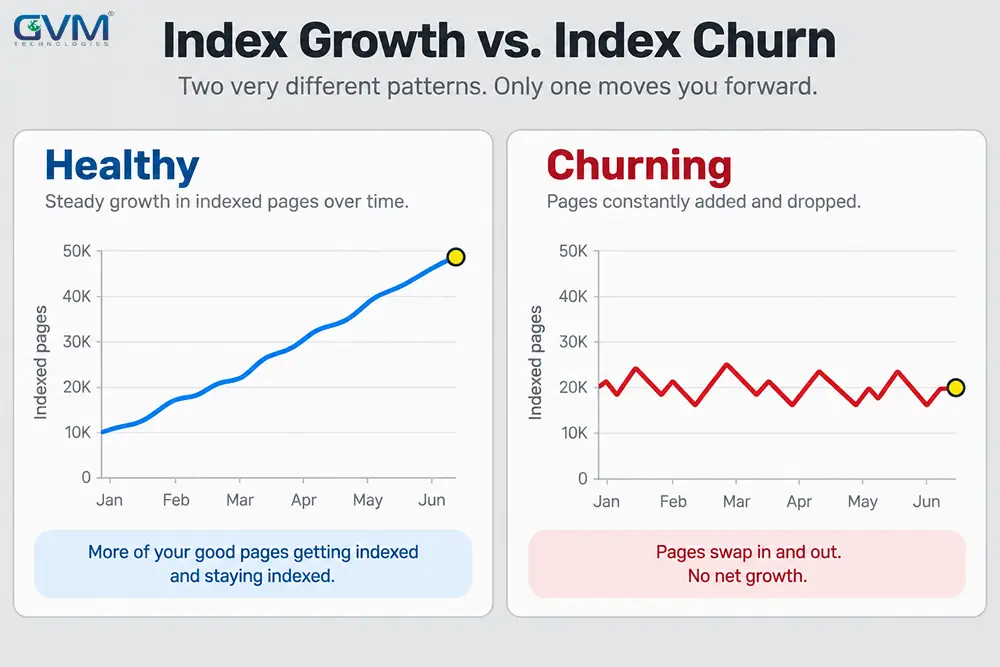
A new site with little authority sits at the slow end regardless of how clean the fix is. Benchmark: 5 to 15% of crawled pages “not indexed” is normal; past 20 to 30%, run the 3-signal check above.
2. When “Request Indexing” helps, and when it wastes a click
Search Console limits daily manual requests, so save it for pages with a real, verifiable change. Clicking “Validate Fix” repeatedly on an unchanged URL does not work; Google re-checks the same signals and returns the same result.
Faster gut check: paste the exact URL into a live Google search. The Page Indexing report can lag by hours or more, so a live search sometimes shows a page already indexed.
3. When it’s a developer problem, not an SEO checklist
Rendering, response time, redirects, and migration cleanup are development work. GVM’s website development and DevOps and cloud hosting teams handle that layer; GVM’s search engine optimization and Generative Engine Optimization services handle content and authority, under 1 roof.
That combination diagnosed and fixed indexing coverage before rankings recovered in GVM’s trucking-insurance SEO and AIO engagement and the GlobalRose e-commerce campaign. An unindexed page cannot appear in an AI Overview either, worth remembering the next time GEO comes up.
Rendering also differs enough between platforms, from WordPress to a heavier JavaScript framework, that a fix proven on 1 rarely transfers cleanly.
FAQ
1. What does “Crawled – currently not indexed” mean?
Google fetched the page and decided not to add it, usually for thin, duplicate, or low-value content, not a technical block.
2. What is the difference between “Discovered” and “Crawled”?
“Discovered” means not fetched yet, a crawl-priority problem. “Crawled” means read and rejected, a quality or duplication problem.
3. How long does re-indexing take after a fix?
Technical blocks can clear in days. Content and authority fixes typically take 1 to 6 weeks, longer on a low-authority site.
4. Does “Request Indexing” actually help?
Only after a real, verifiable change. On an unchanged page it just re-checks the same signals.
5. Can I trust the Page Indexing report’s numbers?
Treat it as a snapshot, not a live feed; it can lag by hours or more. Use “Test Live URL” or a direct search for a current read.
6. Why do indexed pages sometimes drop out again?
A competing page now covers the topic better, or the page’s supporting signals faded. Google re-evaluates continuously, not once.
Conclusion
A Google Search Console pages not indexed report is a diagnostic tool, not a verdict. “Discovered,” “Crawled,” a canonical mismatch, and a technical block each need a different fix, and the 3-Signal Indexing Check (content, code, authority) is what stops you from fixing the wrong one.
Get a Real Diagnosis Instead of Another Checklist
Every month a page sits unindexed, it earns 0 organic traffic and 0 leads while a competitor’s page keeps compounding. A GVM engagement covers:
- A full index-coverage audit across every status, not just the obvious ones.
- A rendered-HTML check from GVM’s development team.
- A server response time and Crawl Stats review.
- A content and canonical consolidation plan.
Talk to GVM Technologies about your indexing problem