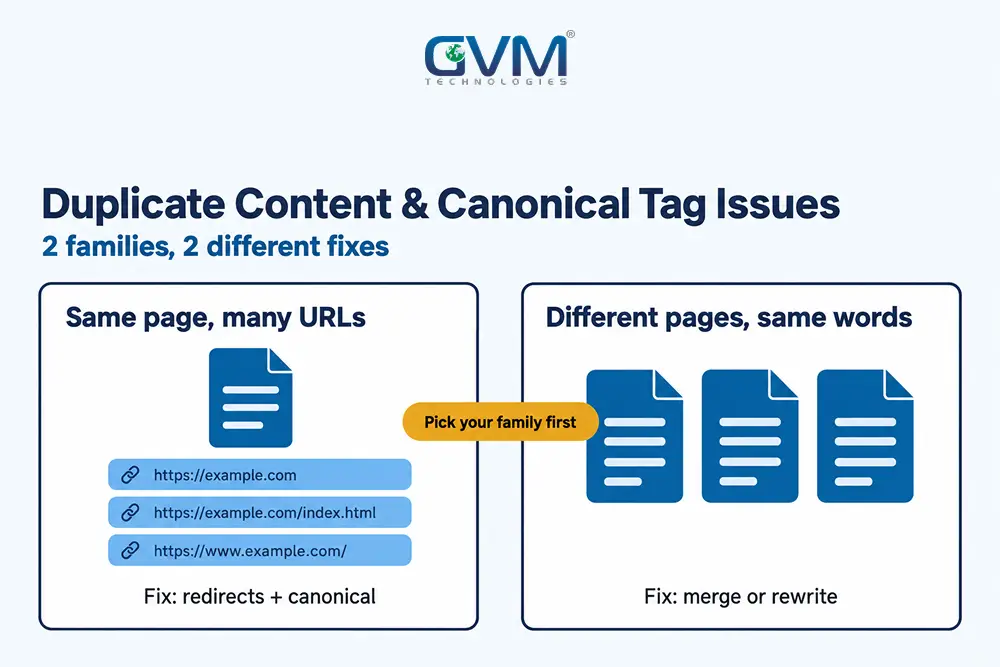
Duplicate content is the same content at more than 1 URL. Canonical tag issues appear when your signals disagree on the real one, so choose 1 preferred URL and align every signal.
Most owners fix the tag and stop, which is why canonical tag issues keep coming back. This guide separates the 2 kinds of duplicates and extends our overview of Search Console indexing statuses.
Quick answer: Most canonical tag issues come from signals that disagree. Choose 1 preferred URL, redirect copies nobody needs, keep a self-referencing canonical on it, and link only to that URL. A canonical is a strong signal, not a command, so Google can still pick another.
Start here: match your duplicate content symptom to the fix
Duplicate problems come in 2 families: technical duplicates are 1 page at many URLs and need redirects or canonicals.
Content duplicates are different pages with the same words, so merge or rewrite them. Pick your row before touching any tag.
| What you see | Family | Usual fix |
|---|---|---|
| /page and /page/ both load | Technical | 301 redirect to 1 version, then align the canonical |
| Thousands of ?sort= or ?date= URLs in Search Console | Technical | Stop linking to them, then block or canonicalize |
| Google indexes the URL you canonicalized away | Technical | Make links, sitemap and redirects match the tag |
| 50 product pages share 1 description | Content | Rewrite what truly differs, or merge |
| City pages differ only by the city name | Content | Merge, or add real local facts |
| The same article sits on 2 sites | Content | Name the original and ask the partner to noindex |
What duplicate content really costs, and what it does not
Duplicate content rarely causes a penalty. Google groups the copies and shows 1 of them, so the damage is lost control: the wrong URL ranks, link signals split, and crawling is spent on copies instead of your newest, most useful pages.
No penalty, but 3 real costs
Google’s John Mueller has said duplicate content is not a negative ranking factor. Scraped spam copies are a separate matter and can draw a manual action.
Unmanaged duplicate content issues still cost you:
- Wrong URL shown: Google may pick a parameter or staging URL as the result people see.
- Split signals: links and engagement spread across copies instead of building 1 page.
- Wasted crawl time: Googlebot fetches copies before it learns to skip them.
Pages that look alike but are not duplicates
Many owners worry when pages are merely related. Google judges duplicates by content similarity, so 3 common cases are fine:
- Translations: Google says localized versions count as duplicates only when the main content stays untranslated.
- Distinct products: a helmet in 50 designs is 50 real products if shoppers search by design.
- Location pages with real local facts: staff, prices and service areas set them apart.
Canonical tag issues: what the tag can and cannot do
A canonical tag names the URL you prefer among near-identical pages. Google’s own guide calls it a strong signal, yet Google may still choose another URL. It merges true duplicates but does not remove pages from the index or join unrelated ones.
In HTML, it is 1 line in the page head: <link rel="canonical" href="https://example.com/page/" />.
1. Why canonical tag issues start with a wrong assumption
This confusion usually happens because the tag looks like an order. A canonical does not say “index this, hide that.”
Google compares the content first. Pages with different words rarely form a duplicate cluster, so the tag does nothing for them.
To keep a page out of search, use noindex, a tag that keeps a page out of results, instead. GVM’s technical SEO audit shows which pages carry which tags.
2. The signal ladder in Google’s own documentation
Google’s guide to consolidating duplicate URLs ranks 3 methods:
- Redirects: a strong signal that the target should become canonical.
- rel=”canonical” annotations: a strong signal, set in HTML or an HTTP header, not both.
- Sitemap inclusion: a weak signal.
The same guide says to link internally to the canonical and keep a self-referencing canonical on the preferred page.
Blocking in robots.txt, the file that tells crawlers where not to go, is no substitute, since blocked URLs can still be indexed.
3. The 4-Vote Check: count who votes for which URL
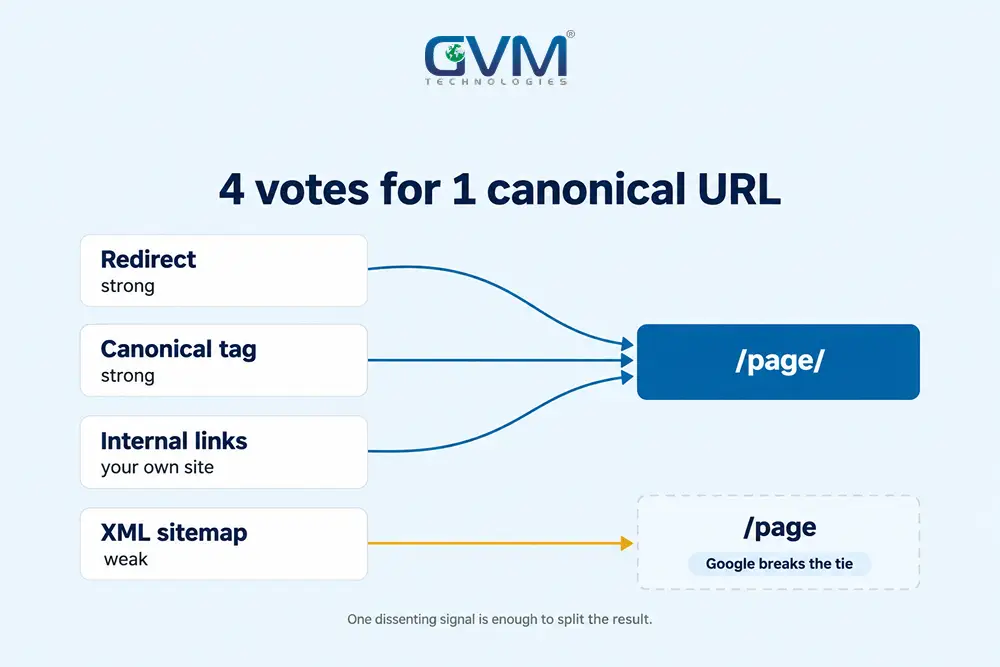
Every URL gets 4 votes on which version is canonical. A crawl lists where each vote points.
| Vote | What it tells Google | How it breaks |
|---|---|---|
| Redirect | The old URL is gone | A chain, or a target that differs from the tag |
| Canonical tag | This is the preferred copy | Points to a redirect, a 404 or a blocked URL |
| Internal links | Where your own site sends people | Menus and posts link to the other version |
| XML sitemap | Which URLs you want indexed | Lists duplicates, redirects or parameter URLs |
If all 4 agree, canonical tag issues mostly disappear. If 2 disagree, Google breaks the tie, and the result may not favour your choice.
A redirect that lands on a dead page is just another 404 error that affects SEO.
4. A worked case: canonical tag issues from a trailing slash
A common case: menus link to /page, but the canonical points to /page/, and neither redirects. Google follows the tag because it outweighs a link. Both URLs stay reachable, so signals keep leaking.
Google’s slash guidance treats the 2 as separate URLs and says to pick 1 and redirect the other. If a vendor cannot change the tag, redirect the top traffic pages first.
Fixing technical canonical tag issues: 1 page, many URLs
Technical duplicates come from your platform, not your writers. Fix them at the source: redirect protocol, host and slash variants, stop links to parameter URLs, and output 1 clean canonical per page. Each of the 4 patterns below needs a different tool.
1. Protocol, host and slash variants
http vs https, www vs non-www, and slash vs no slash can each create a full copy of your site.
- Pick 1 version and 301 redirect (a permanent redirect) all others to it in a single hop.
- Check that site moves and migrations left no old hostnames answering.
2. Parameters, filters and booking dates
Google’s faceted navigation guide lists robots.txt first when filter URLs have no search value. A canonical only reduces their crawling gradually, so canonical tag issues linger on filtered pages.
Google retired the URL Parameters tool in April 2022, so advice to use it is outdated.
On a booking site, a few thousand pages can spawn hundreds of thousands of URLs through date and guest filters. Redirecting each does not scale, so restructure the filter links crawlers can follow.
3. Product variants and collection paths
Platforms often serve 1 product at several paths, such as /collections/shoes/item and /item. Shopify themes normally canonicalize the collection path to the clean URL; check your theme source.
Use this rule for variants:
- Same product with a selector (size, colour): 1 page, variants inside it.
- Separate designs people search by name: separate pages, each with its own title, images and copy.
Pointing 50 genuinely different pages at 1 canonical tends to be ignored. Our Shopify vs custom e-commerce comparison covers when the platform is the limit.
4. CMS settings, pagination and file types
WordPress plugins such as Yoast and Rank Math output a canonical and offer a per-page override.
Updates can create canonical tag issues without warning, as one update that broke a site showed. View the page source afterwards.
Two cases need care:
- Pagination: Google says not to use page 1 as the canonical for later pages. Each page keeps its own; rel=prev/next is retired.
- PDFs and other files: send the canonical in an HTTP Link header, which Google supports for web search.
Template builds repeat a flaw on every page; see template vs custom-coded websites.
Fixing content duplicates: different pages, same words
Content duplicates need an editorial decision, not a tag. Merge pages that answer the same query, rewrite pages that deserve their own rankings, and use noindex only where a page must exist for visitors but should not rank in search results.
1. Near-identical templates: city, service and product pages
Pages that differ only by a swapped word get grouped, and most are dropped. Canonical tag issues here are a symptom of overlapping content.
Map each page to its query using GVM’s guide to keyword research tied to intent.
- Merge: fold the weaker page into the stronger URL with a 301.
- Differentiate: add facts only that page can hold, such as local data, pricing or a worked example.
2. Syndicated and copied content
Many people believe a canonical tag marks the original source. For syndication, Google’s canonical troubleshooting guide does not recommend it.
Syndicated pages often differ, so the better fix is for partners to block indexing of your copy.
If a scraper outranks you, ask its host to remove the page or file a DMCA request, a copyright takedown notice.
If your site was compromised, check for injected canonical links to spam, using our hacked site recovery steps.
3. Translated and regional versions
Translations get hreflang, tags that link each language version to the others, not a canonical to another language.
Each version needs a self-referencing canonical plus reciprocal hreflang links, or Google ignores the annotations.
Google’s localized versions guide says alternates can live on different domains. Hreflang picks the right version for a visitor; it does not force indexing.
A new domain with pages stuck at “discovered” has a crawl problem; see our crawled currently not indexed guide.
Choosing between 301, canonical, noindex and robots.txt
Canonical tag issues often come from using the wrong tool. A 301 removes the old URL, a canonical keeps the copy live, noindex keeps a page out of search, and robots.txt only saves crawling. Match the tool to the question first.
Ask these 4 questions in order:
- Does anyone need this URL? If no, 301 redirect it to the preferred page.
- Do visitors still use it, such as a sorted view? Keep it live and add a canonical to the preferred URL.
- Should it stay out of search with no preferred match? Add noindex.
- Is crawl volume the problem? Disallow the pattern in robots.txt.
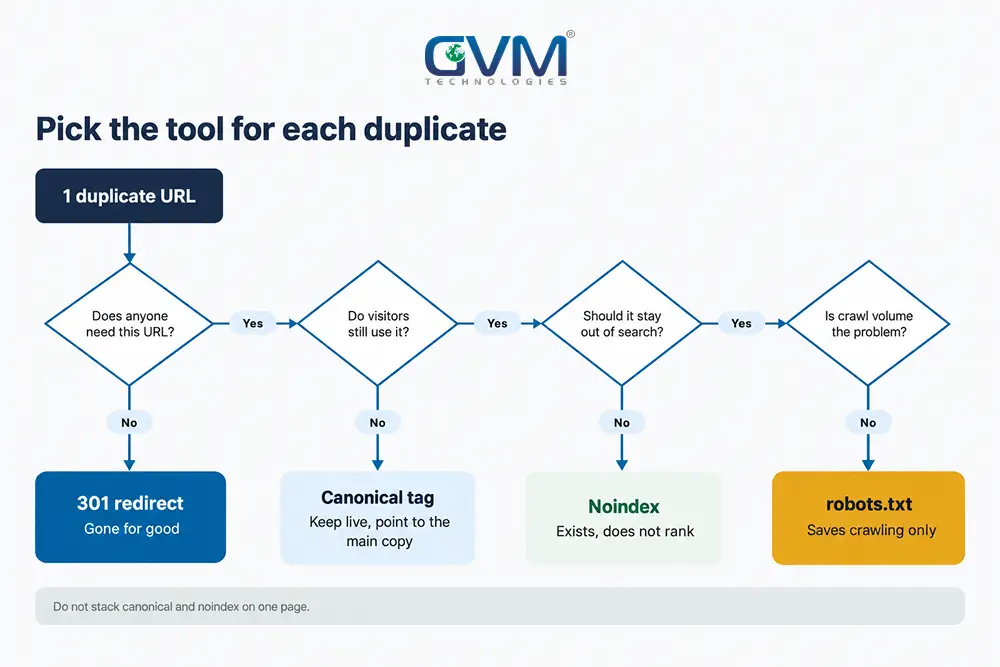
Warning: Do not combine canonical with noindex. Google says noindex blocks a page from search, so the signals conflict, and a page blocked in robots.txt cannot show its canonical.
Canonical tag issues in Search Console: a 6-step diagnosis
Fixing canonical tag issues starts with proof in Search Console, not guesses. Compare the declared and selected URLs, read the raw response, then run the 4-Vote Check. Changing the tag and waiting is the slowest route, because Google needs fresh evidence to change its mind.
- Inspect the URL. URL Inspection shows the Google-selected canonical next to yours.
- Read the status label. The 3 below need different responses.
- Check headers. Google advises the HTML tag or the HTTP header, not both, because mixed signals can name different URLs.
- View rendered HTML. Google accepts the tag only inside the head, prefers absolute URLs and says not to let JavaScript change it.
- Test the target. It must return 200, be indexable and not redirect.
- Compare the content. If the pages differ, Google may treat them as separate.
When a canonical depends on client-side scripts, GVM builds Next.js sites with server-side rendering so the source holds the tag.
The Page indexing report separates the 3 labels:
| Search Console label | What Google means | Your move |
|---|---|---|
| Alternate page with proper canonical tag | Google agrees with you | None |
| Duplicate without user-selected canonical | You gave no tag, so Google picked | Mark the canonical if you disagree |
| Duplicate, Google chose different canonical than user | Your tag lost | Compare both pages and the 4 votes |
Timelines, and a 30-minute check for canonical tag issues
After a real fix, Google can keep pages in a duplicate cluster for up to 2 weeks, according to its troubleshooting guide. Large sites take longer because Googlebot must recrawl thousands of URLs, so a slow count on a huge site is normal.
If traffic dropped as duplicates cleared, run the sudden traffic drop checks before reversing anything.
These planning ranges come from our own projects, not Google:
- A few pages with aligned signals: 2 to 6 weeks.
- A template or parameter fix on a mid-size site: 1 to 3 months.
- Hundreds of thousands of parameter URLs: several months, falling in steps.
Then verify:
- Crawl the site and list pages whose canonical differs from their own URL.
- Filter Search Console by the 3 duplicate labels and sample 10 URLs each.
- Compare sitemap URLs with canonical URLs; they should match.
- Confirm only 1 hostname and protocol answers with a 200.
Whether you hire GVM or another agency, ask these questions about technical SEO scope first.
Canonical tag issues FAQ: 6 quick answers
1. Do duplicate content issues hurt SEO?
Not through a penalty in most cases. It hurts through split signals, wasted crawling and the wrong URL ranking.
2. What are the most common canonical tag issues?
A target that redirects or 404s, conflicting canonical signals on 1 page, a tag injected by JavaScript, and links or sitemaps that favour another URL.
3. Canonical or 301 redirect: which is better?
Use a 301 when the duplicate has no reason to exist. Use a canonical when people still use it, like a sorted list or print view.
4. Why does Google index the URL I canonicalized away?
Usually because links, redirects or the sitemap still favour it, or the 2 pages differ too much to count as duplicates.
5. How long until Google respects a fixed canonical?
Up to 2 weeks after content changes, per Google. Large sites take longer, so measure over 1 to 3 months.
6. Are translated pages duplicate content?
No. Google treats translations as duplicates only when the main content stays untranslated. Use hreflang between them.
Conclusion: fix canonical tag issues by making every signal agree
Duplicate content issues are a signal-conflict problem. Choose 1 URL and make redirects, canonicals, links and sitemaps agree. Start today:
- Run the 4-Vote Check on your 5 most important URLs.
- Redirect copies nobody needs and remove them from the sitemap.
- Fix the template that creates the extra URLs.
AI answers draw on the same index, so GVM’s generative engine optimization work starts with clean canonicals.
Talk to GVM Technologies about duplicate URLs and canonical tag issues
Every week canonical tag issues let Google rank the wrong URL, links and impressions drain from the page you want found. Our team covers diagnosis to fix:
- Technical SEO and indexing fixes: crawlability, indexing and canonical review, URL group by URL group.
- Website development: templates that output 1 clean URL and canonical per page.
- DevOps and cloud hosting: monitored hosting and release pipelines that keep rules in place.
- Digital marketing: content that gives merged pages something the competition lacks.
In our GlobalRose SEO campaign, the audit found weak internal linking holding back crawling and indexing, and organic impressions rose 200% within 90 days.