A template site runs on a layout coded for many buyers, while a custom coded website runs on code written for 1 business. Check the platform, the theme and what you can export to tell which you own.
This guide shows how to tell if a website is a template or a custom coded website in 8 checks, and where each check misleads. It also sits beside our guide to low-code vs custom development.
Quick answer: To tell if a website is a template, check 3 layers: platform strings in the source, the theme folder and style header, and code ownership. A hosted builder, marketplace theme or plugin-built layout means template, while a theme named after the business suggests a custom coded website.
Key takeaways
- A site is a template, a customised template or a custom coded website, and most live sites sit in the middle.
- The platform names the engine, while the theme folder names the author. Read both before judging.
- WordPress does not mean template, and “no CMS detected” does not mean custom code.
- Score 8 checks to get a confidence level, because no single sign proves the answer.
- Template sites suit many businesses. However, paying custom prices for template work is the real problem.
Template vs custom coded website: what each label means
A template website reuses design and code built for many sites, and the owner swaps colours, logos and content. A custom coded website, however, runs on code written for 1 business. Most live sites fall between the 2, so ask how much code was written for you.
1. The 4-level spectrum of website builds
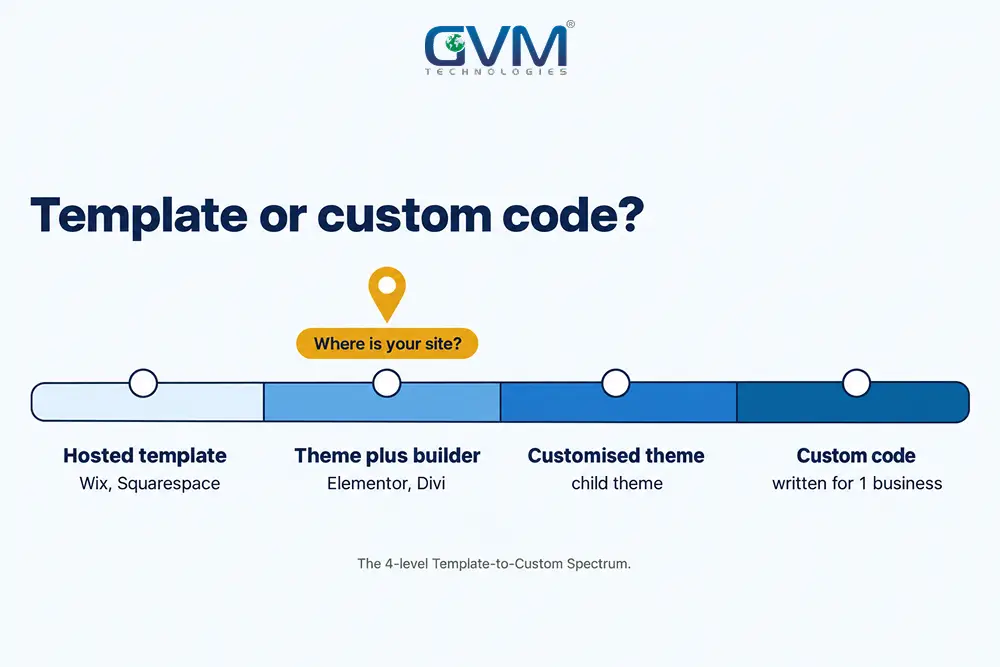
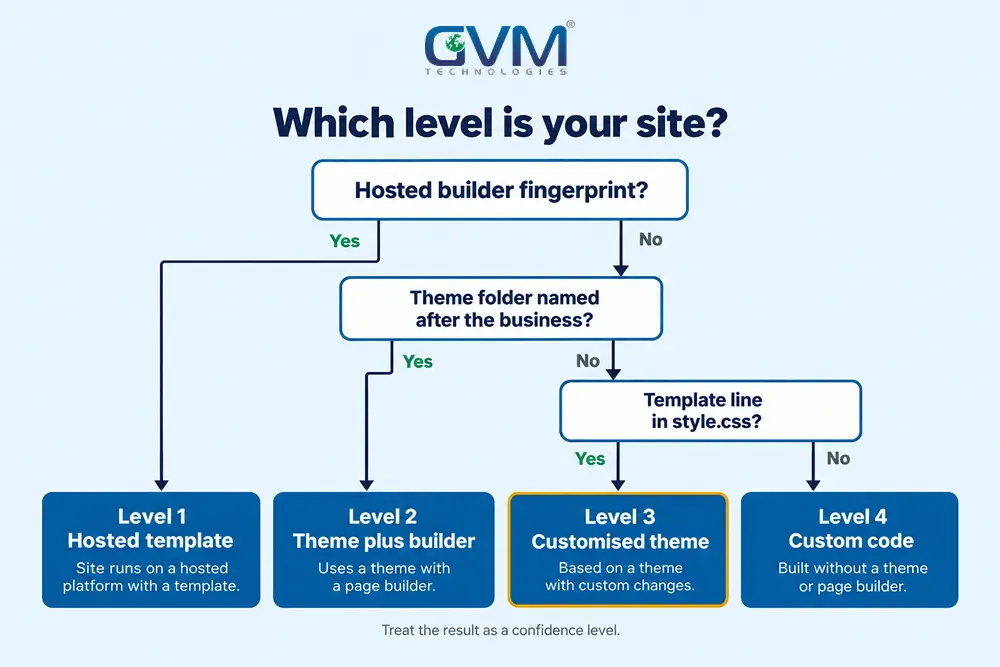
So think of builds as a spectrum, not a switch. This Template-to-Custom Spectrum shows who wrote the code at each level.
| Level | What it is | Typical platforms | Code written for you |
|---|---|---|---|
| 1. Hosted template | Pre-built design on a builder’s servers | Wix, Squarespace, Framer | None |
| 2. Theme plus page builder | Purchased theme, layouts built with plugins | WordPress with Elementor or Divi | Very little |
| 3. Customised theme | Child theme or edited theme with added features | WordPress child theme, custom Shopify sections | Some |
| 4. Custom code | Theme or app written from scratch | Custom WordPress theme, Next.js app | Most or all |
Levels 2 and 3 cause the confusion, because agencies sell both as “custom”.
GVM Technologies builds on both sides of this line, with custom web development plus open-source platforms such as WordPress, Shopify and WooCommerce.
2. Why “custom” means different things on a quote
Many website owners struggle because “custom design” and “custom code” sound identical on a quote. However, they describe different work.
- Custom design: original visuals, often placed on a purchased theme.
- Customised template: edited theme files plus added features.
- Custom coded website: a theme or app written from scratch for 1 business.
So a good quote says which of the 3 you are buying.
Custom coded website or template: the 3-layer evidence test
Check 3 layers in order. The platform layer names the engine, the theme layer names who wrote the design code, and the ownership layer shows what you can take with you. Each takes about 5 minutes, and the verdict comes from all 3 together.
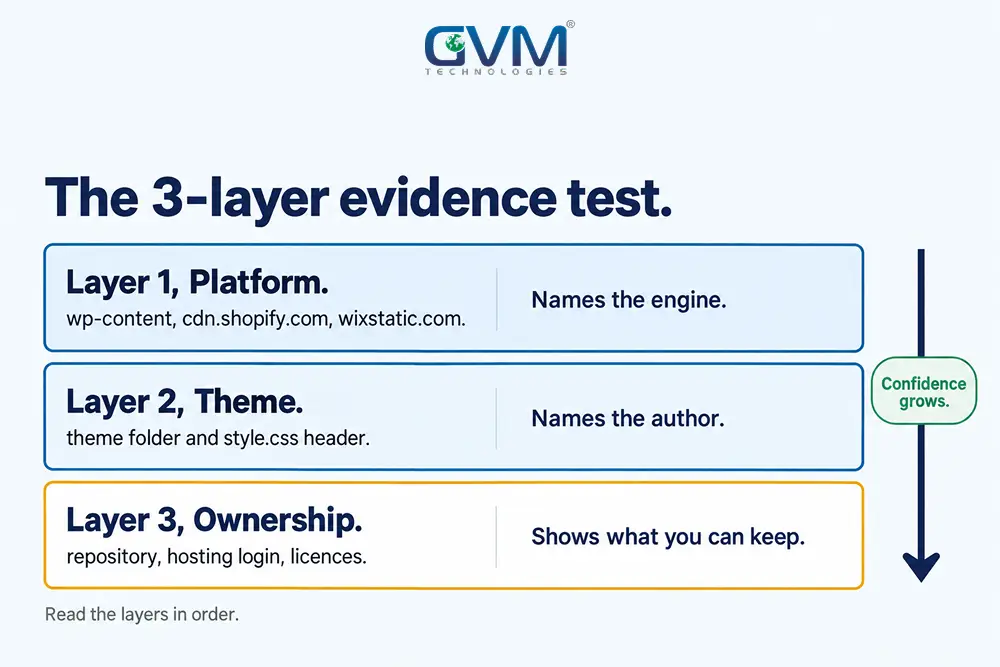
1. Layer 1: read the platform fingerprint
Open the site, press Ctrl+U to view the source, then search for the strings below. We confirmed each string on live sites on 2026-10-06.
- Wix:
wixstatic.comfiles and a generator tag reading “Wix.com Website Builder”. - Squarespace:
static1.squarespace.comfiles and aStatic.SQUARESPACE_CONTEXTscript. - Webflow:
data-wf-siteanddata-wf-pageattributes pluswebsite-files.comassets. - Framer:
framerusercontent.comfiles and a generator tag naming Framer. - Shopify:
cdn.shopify.comfiles and aShopify.themescript object. - WordPress:
/wp-content/themes/and/wp-content/plugins/in file paths. - Next.js:
/_next/static/in file paths.
Also, tools such as Wappalyzer and BuiltWith read the same signals from headers, cookies and scripts. A hosted-builder hit settles the code question, because the builder’s platform renders your pages.
2. Layer 2: read the theme fingerprint
On WordPress, look at the file paths in the source. The folder after /wp-content/themes/ is the theme name.
A name like astra or hello-elementor is a public theme. However, a folder named after the business, such as gvm-technologies on our own homepage, points to a theme written for 1 site.
Next, open /wp-content/themes/<folder>/style.css. WordPress requires only a Theme Name in that header, so the Author and Theme URI lines show who wrote the theme.
A Template line marks a child theme built on a parent.
On Shopify stores (see Shopify vs custom e-commerce), search the source for Shopify.theme. A numeric theme_store_id means a Theme Store theme, while null means an uploaded or custom theme.
On allbirds.com the object read "theme_store_id":null with the schema name allbirds-theme on 2026-10-06, so that fits a brand-specific build.
3. Layer 3: ask what you own and can export
Code you cannot take with you is rented, whatever the design looks like. So ask 4 questions in writing.
- Repository: can you receive the source code? A hosted builder cannot give it.
- Accounts: do you hold the admin login and the hosting account?
- Licences: do the quote or invoices list theme or plugin fees?
- Handover: could a new developer take over within 7 days?
Our guide to who owns the IP when you hire an agency covers the contract wording.
Signs you can spot without reading code
Visual and behavioural signs raise or lower suspicion, but they cannot prove the answer. Look for repeated layouts, features you did not request, a confusing admin area, and slow pages loaded with plugins. Then confirm each hint with the source checks above.
- Look-alike layouts: a headline or hero photo that matches a theme marketplace demo in Google Images or TinEye.
- Builder credits: “theme by” footer lines, the
authormeta tag, or a humans.txt file. - Unrequested modules: sliders, popups or shop sections that cannot be switched off.
- A crowded admin: dozens of options for features the site does not use.
- Repeat layouts: the same structure on unrelated clients of 1 agency.
- Heavy pages: many plugin stylesheets and scripts in the source.
- Weak mobile behaviour: menus that need sideways swiping, or blocks that overlap at 375px width.
Google measures Core Web Vitals per page, not per builder, so a template can pass and a custom coded website can fail. Our Core Web Vitals guide explains how to test.
When the evidence lies: how fingerprints mislead
A fingerprint shows the tools used, not the quality or originality of the work. Renamed themes, headless setups and AI-built exports can all hide the answer. So treat each result as evidence with a confidence level, and look for 3 or more signals that agree.
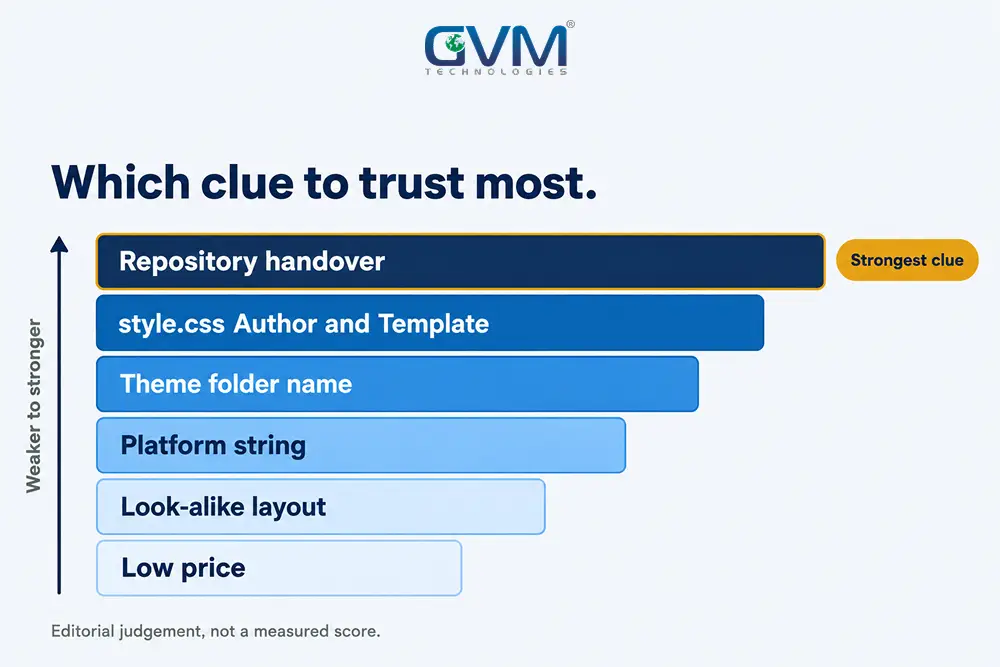
1. A renamed theme looks custom
For example, an agency can copy a purchased theme into a folder named after the client.
The style.css Author line and the file structure still show the original, so compare the markup with the marketplace demo before you trust the folder name.
2. WordPress and “no CMS” are weak signals
W3Techs lists WordPress on 40.1% of websites and 31.5% with no tracked CMS on 2026-10-06. A hand-written theme and a purchased theme both report WordPress.
The no-CMS group mixes static pages, framework apps and hidden setups, so it does not prove a custom coded website.
3. AI-built and headless sites hide or fake the trail
Public detection guides list generator tags and default subdomains for builders like Lovable, Bolt and v0. However, exported code carries none of them, and headless front ends show only /_next/ paths.
A common mistake is treating a missing mark as proof of hand-written code. Review is the real difference, as our vibe coding vs hiring a developer guide explains.
GVM’s project rescue team starts with a code audit that goes past fingerprints.
Custom coded website confidence score: 8 checks in 10 minutes
Give 1 point for each custom signal below. A total of 0 to 2 means template, 3 to 5 means customised template, and 6 to 8 means a custom coded website. Use the score as a confidence level, because each check can be faked or misread.
- The platform is not a hosted builder.
- The theme folder carries the business or agency name.
- Author and Theme URI in style.css name the site’s builder, not a marketplace.
- No Template line in style.css points to a public parent theme.
- Page-builder prefixes such as
elementor-oret_pb_are missing from the markup. - Layout and photos match no marketplace demo.
- Theme or plugin licences for the design are absent from the quote.
- You hold the repository, or the contract gives you the right to receive it.
A score of 3 to 5 is a normal result for a customised theme, not a sign of bad work.
Template or custom code: which option fits your business
Choose a template when speed and budget matter more than unique features, and choose a custom coded website when the site must do something a theme cannot. Neither choice decides rankings, because Google measures page experience and content. The mistake is paying custom prices for template work.
| Factor | Template | Custom code |
|---|---|---|
| Typical cost (2026 agency guides) | Under about $3,000 | From about $5,000, past $20,000 for complex builds |
| Launch time | 1 to 4 weeks | 6 to 12+ weeks |
| Unique features | Limited by the theme | Built to your spec |
| Page weight | Extra scripts from unused theme features | Only what each page needs |
| Ownership | Licence plus platform terms | You, if the contract says so |
Also, our website development costs guide breaks down what drives these ranges.
- A template fits: a brochure site, an idea test, a small team that edits daily, a tight budget.
- A custom coded website fits: bookings, member areas, integrations, regulated data, traffic that outgrows plugins.
GVM’s SEO team handles technical SEO on both kinds of site.
What to do after you have your score
If the score says template and you paid for custom, collect evidence before you raise it: source paths, theme header, quote lines and contract wording. If the score says custom, still ask for repository and hosting access. Either way, send the builder a written question next.
1. If you paid for custom and received a template
- Save screenshots of the source paths and the style.css header.
- Compare them with the scope wording in your quote.
- Ask the builder in writing which theme was licensed, and in whose name.
- Check the contract against these software contract red flags.
2. If you are buying a site or hiring a builder
Run the 8 checks on the portfolio sites first. Then ask each candidate 5 questions:
- Stack: which theme or framework does each portfolio site use?
- Authorship: which parts were hand-written for that client?
- Ownership: who holds the repository and hosting account?
- Licences: which paid themes or plugins sit inside the quote?
- History: can you see the commit history?
GVM’s public portfolio shows both approaches, from Lekkri on WordPress and Google Cloud to enterprise .NET work.
Frequently asked questions
1. How do I tell if a website is a template from the page source?
Search the page source for builder strings, then read the theme folder and style.css header. A hosted builder or a public marketplace theme means a template.
2. Can I tell from outside if a website is custom coded?
Only with a confidence level, because source checks, theme headers and a look-alike search give strong hints while a renamed theme or headless setup can hide the answer.
3. Is a WordPress site a template?
Not necessarily. WordPress is an engine. A theme written for 1 business is a custom coded website, while a purchased theme with plugins is a template.
4. How do I find out who built a website?
Read the footer credit, the author meta tag, a humans.txt file and the Author line in the theme header. Many sites carry none, so ask the owner.
5. Can I tell if a website was built with AI?
Sometimes. Builders leave marks such as generator tags or default subdomains, but exported code carries none, so a missing mark proves nothing.
6. Does a template hurt SEO?
Not by itself. However, slow pages from heavy plugins hurt, and a technical SEO audit shows which plugins cause them. A light template can outrank a bloated custom build.
Conclusion: read the evidence, then ask for the code
You now know how to tell if a website is a template by reading 3 layers: platform, theme and ownership. No single sign settles the question, so score the evidence, then ask the builder for the code in writing before you spend on a redesign.
Today, do these 4 things:
- View the source and note the platform strings.
- Read the theme folder and style.css header.
- Score the 8 checks to get your confidence level.
- Email your builder the 4 ownership questions.
Next, decide whether the result fits your goals, because a clean template can serve a small business better than a rushed custom coded website.
Talk to GVM Technologies about moving from a template to a custom coded website
A site that cannot grow with your business leaves you paying for workarounds, plugin fixes and rebuilds. GVM Technologies can help you:
- Plan a custom website development build that you own outright.
- Check a build with quality assurance and security testing.
- Set up DevOps and cloud hosting with monitoring and backups.
- Add capacity through dedicated developers.
We have delivered this work since 2013, including the Crash Champions platform across 600+ locations.