Schema markup errors are Search Console messages saying the structured data on a page is unreadable, incomplete or invalid. A red number looks urgent, yet many of them only flag optional fields.
This guide to schema markup errors (Google says structured data errors) shows what needs a fix. Fix errors first, then warnings only for rich results you want. Wider checks: technical SEO auditing.
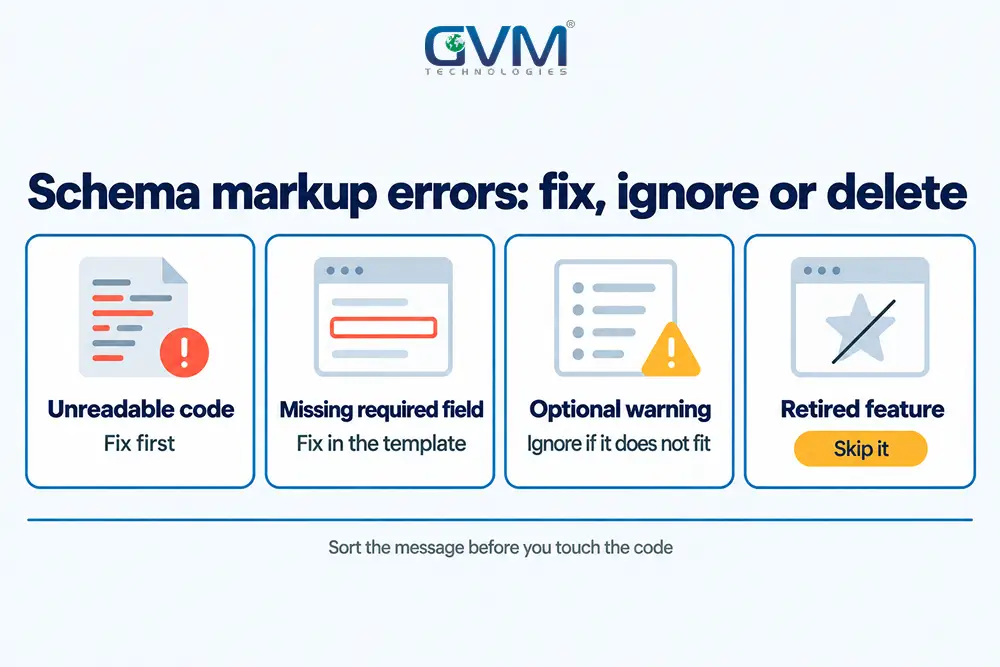
Quick answer: Schema markup errors fall into 4 groups: unreadable code, missing required fields, optional warnings and retired features. Fix the first 2 where the rich result matters, skip warnings that do not fit, and ignore retired features. Then click Validate fix and allow about 2 weeks.
What schema markup errors mean: the 4 message types in Search Console
Search Console sorts schema markup errors into 4 kinds: unparsable code, required-field errors, recommended-field warnings and reports for retired features. Only the first 2 can cost you a rich result, while the last 2 rarely deserve developer time or budget.
A rich result is the enhanced listing, such as star ratings or a product price, that valid structured data can earn.
| Message you see | What Google is saying | Risk to the rich result | Your move |
|---|---|---|---|
| Unparsable structured data | Syntax broke, so the type is unknown | High | Repair the syntax, then Validate fix |
| Missing field “name” | A required property is empty or missing | High for that feature | Add real data in the template |
| Missing field “url” (optional) | A recommended property is absent | Low | Add it only if the data is real and visible |
| FAQ rich result report | Google no longer shows the feature | None | Stop fixing it |
1. Where structured data errors and warnings split
Google’s own guidance says to include all required properties, while recommended ones improve the result. So structured data errors are gaps in must-haves, and warnings are gaps in nice-to-haves.
Indexing problems live in separate reports, covered in our guide to pages not indexed.
Since March 2022 messages also name the parent object, as in “Missing field ‘name’ (in ‘author’)”. That shows which nested item is thin.
2. Why unparsable schema markup errors get their own report
Google’s unparsable structured data report holds only critical errors, because the syntax broke before Google could identify the type. A type report such as Product cannot list it.
Result: a page can vanish from your Product report while it sits in the unparsable list.
3. How nested items collect their own messages
Structured data errors can attach to a nested item judged as its own type. An Event inside a live blog’s “about” property can be flagged for event fields such as location.
The bracketed parent, such as “author”, names the block to edit.
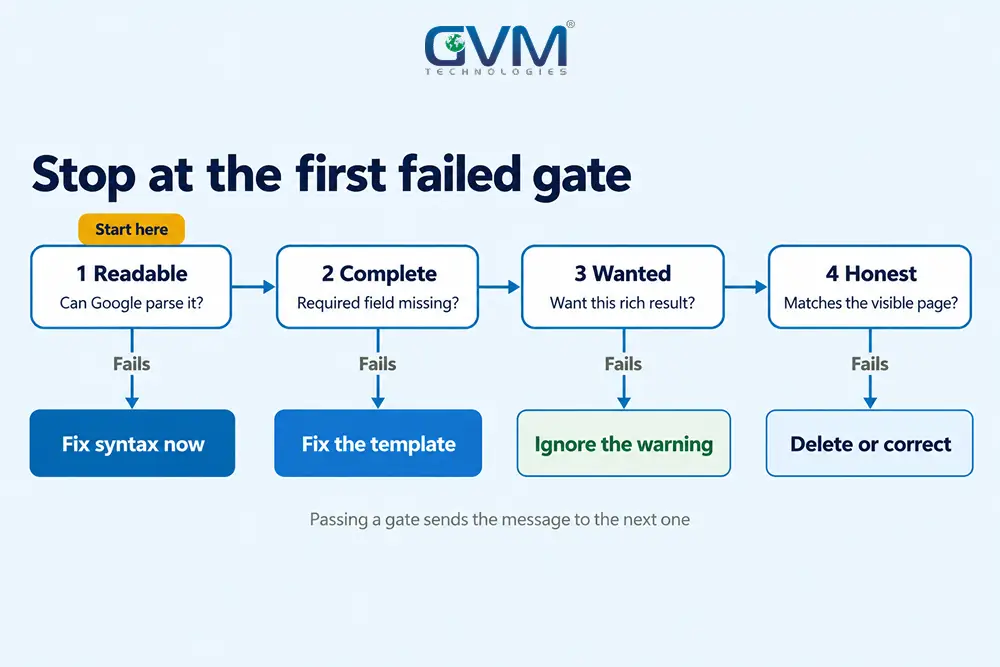
A 4-gate triage for schema markup errors: fix, template-fix, ignore or delete
Send every structured data error through the same 4 checks, in this order: can Google read it, is a required field missing, do you want that rich result, and does the markup match the visible page. Your next move comes from the first gate it fails.
- Readable: if the JSON is broken, nothing else counts. Fix syntax first.
- Complete: a missing required field for a feature you use is a real error.
- Wanted: if you do not want that result, a warning is only a suggestion.
- Honest: the markup must match what visitors can see on the page.
Each failed gate ends in one of 4 outcomes:
- Fix now: gate 1 or 2 fails on a page that earns traffic or sales.
- Fix in the template: a message repeats across many URLs.
- Ignore: a warning asks for data your page does not have.
- Delete: the markup describes a retired feature or hidden content.
GVM’s SEO service covers crawlability and structured data. Any agency you hire should explain these gates, and how to vet an SEO agency test that.
Why most warnings fail gate 3 on generated schema markup errors
Auto-generated markup often fills a template built for online shops. A car dealer’s listing page then collects warnings about shipping details and a return policy, because the generator assumed a checkout.
Pick the closest accurate type, even if no rich result fits.
Why invented values fail gate 4 and add new schema markup errors
Filling a warning with made-up data swaps a yellow flag for a policy problem. Google’s structured data guidelines bar markup for content readers cannot see.
When Google applies a manual action for markup, the page loses rich result eligibility, so a fake shipping policy is a poor trade for a quiet report.
Fixing unparsable structured data: the 5 breakages behind most schema markup errors
Unparsable structured data typically traces to a tiny syntax slip in the code. A stray character voids the whole block, taking every field inside it down too.
Repair these breakages first, since a broken block can hide every other field on that page.
1. The 5 syntax slips behind schema markup errors
- Comma trouble: a missing comma between fields, or a trailing comma after the last one.
- Unclosed brace or bracket: a block that opens with { or [ and does not close.
- Curly quotes: quotes pasted from a word processor are not valid JSON quotes.
- Unescaped quotes: a title such as 12″ Pan ends the string early.
- Merged blocks: 2 objects pasted back to back without an array or a graph.
The first block below carries 3 of them. The second is the repaired version.
{
  "@context": "https://schema.org",
  "@type": "Organization",
  "name": "Acme Pans",
  "url": "https://example.com/"
  "logo": “https://example.com/logo.png”,
}
{
  "@context": "https://schema.org",
  "@type": "Organization",
  "name": "Acme Pans",
  "url": "https://example.com/",
  "logo": "https://example.com/logo.png"
}
2. Finding the broken line fast
Paste the page into the Rich Results Test. When the line stays hidden, Google’s advice is to start from an empty object and add content back piece by piece.
3. Why one template slip becomes hundreds of structured data errors
Google notes that one error repeated across many pages usually points to a template. A theme edit or plugin update can change markup on every page overnight; see what breaks after WordPress updates.
GVM’s QA service covers manual, automated and cross-platform testing, a sensible place to add a markup check before a template goes live.
When Search Console and a validator disagree about schema markup errors
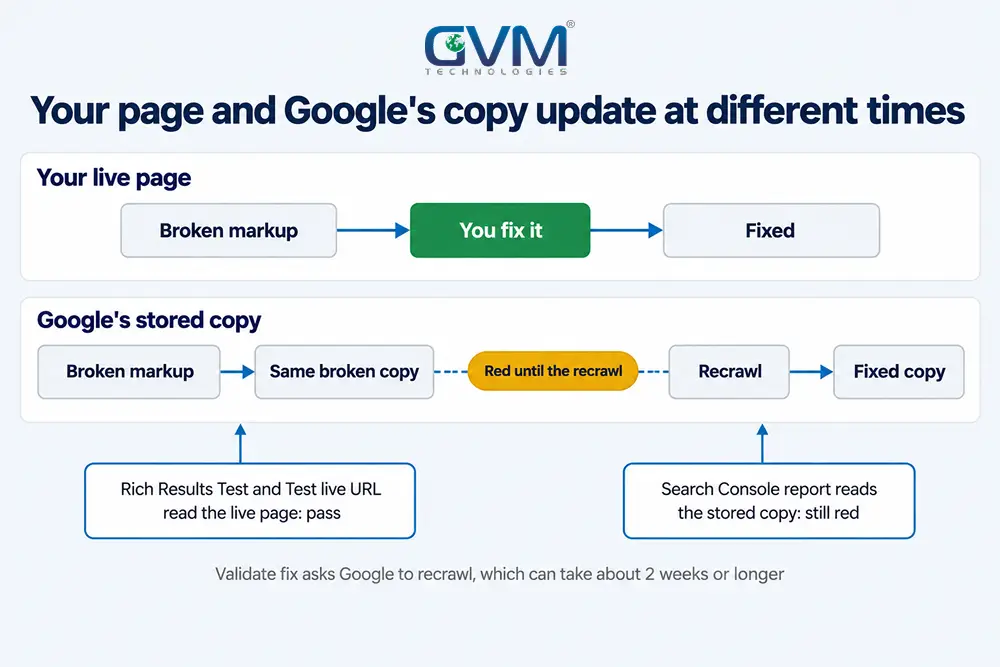
A validator reads the page you give it today, while Search Console reports the copy Google crawled earlier. They disagree for 3 reasons: the crawl is stale, Googlebot received different HTML, or the tools apply different rules. Start with the stored copy, via URL Inspection.
A cache or server move can change the HTML Googlebot receives, so see hosting migration SEO if errors began after one.
| What you see | Likely cause | First check | Who usually fixes it |
|---|---|---|---|
| Validator passes, report still red | The report shows the last crawl | Indexed copy versus Test live URL | Nobody; wait for a recrawl |
| Errors on some URLs only | Googlebot got different HTML | View crawled page and search for ld+json | Developer or host |
| Two blocks of one type | Theme and plugin both print markup | View source and count the blocks | Developer |
| Schema Markup Validator clean, Rich Results Test warns | The 2 tools use different rules | Run the same URL through both | Whoever owns the markup |
1. Indexed copy versus the live test
Google’s URL Inspection help page says indexed results come from the most recently indexed version, not the live page. Test live URL fetches the page in real time.
View crawled page shows the HTML Google received. Search it for the ld+json block.
2. Three tools, three questions about schema markup errors
- Schema Markup Validator: is this valid schema.org code, whatever the search feature?
- Rich Results Test: can Google build a rich result from it today?
- URL Inspection: what did Google store and see?
Some forum threads describe structured data errors that survive clean validators. No confirmed bug explains them, so test the crawled HTML before blaming Google.
3. Who prints the markup: theme, plugin, app or script
Duplicate blocks appear when sources print markup without coordinating, and each adds structured data errors.
- WordPress: a theme and an SEO plugin can print the same type twice.
- Shopify: theme markup and a review app can describe 1 product twice, a trade-off in choosing Shopify or a custom store.
- Webflow and generators: presets assume a standard online shop.
- Tag Manager: a JSON-LD tag adds a block the source code does not show, a trap in our Google Tag Manager mistakes guide.
- Custom builds: hand-written templates drift as pages get edited, a risk in custom code versus a template.
Let 1 source own each type. Where entities link, use 1 graph with @id references so each entity appears once.
If nobody on your team can say which source prints your markup, GVM’s website development team can trace it. Our builds cover custom code, WordPress and online stores.
Schema markup errors that stopped mattering: FAQ and other retired rich results
Google stopped showing FAQ rich results on May 7, 2026, and its FAQ page says the feature is gone. Practice problem markup was removed in January 2026.
Structured data errors tied to a retired feature cost nothing in search, so remove them from the fix list.
What Google retired in 2026
- FAQ rich results: stopped appearing on May 7, 2026, and the documentation was removed on June 15, 2026.
- Practice problem: removed in January 2026, per Google’s FAQ page.
What to do with leftover FAQ markup
Visible questions still help readers; the JSON-LD behind them is optional now.
We found no Google statement that leftover FAQ markup harms a page. Spend the hours on types Google still shows, such as Product, Article or Review snippet.
What schema markup errors do to rankings, rich results and AI answers
Schema markup errors can cost a page its rich result, yet Google says even a manual action for markup leaves ranking untouched. Google adds that its AI answer features need no special schema. A traffic drop after an error usually has another cause.
1. Rich result eligibility is not ranking
A page with structured data errors can stay indexed and keep its position. It loses the enhanced listing, not the blue link.
Chart clicks for affected URLs against similar pages without errors. A cleanup near a core update can look like the cause; read our guides on a sudden traffic drop and core update recovery.
2. AI Overviews, AI Mode and answer engines
Google’s AI features page says no special schema.org markup is needed to appear. It lists matching structured data to visible text as a basic that still pays off.
We treat valid Organization and Article markup as helpful context for machines, not a citation switch, since no platform documents it as one.
For visibility inside AI search tools, GVM offers generative engine optimization work, with structured data in scope.
3. Ratings copied from other sites break the rules
Google’s review snippet guidelines say not to aggregate ratings from other websites. A rating copied from an app store into AggregateRating is a common trap.
Competitors doing it is not proof it is safe, and a breach can bring a manual action, as in Google penalty recovery. Gather ratings from real customers through your own pages, or leave rating markup out.
Validate fix: when Google rechecks your schema markup errors
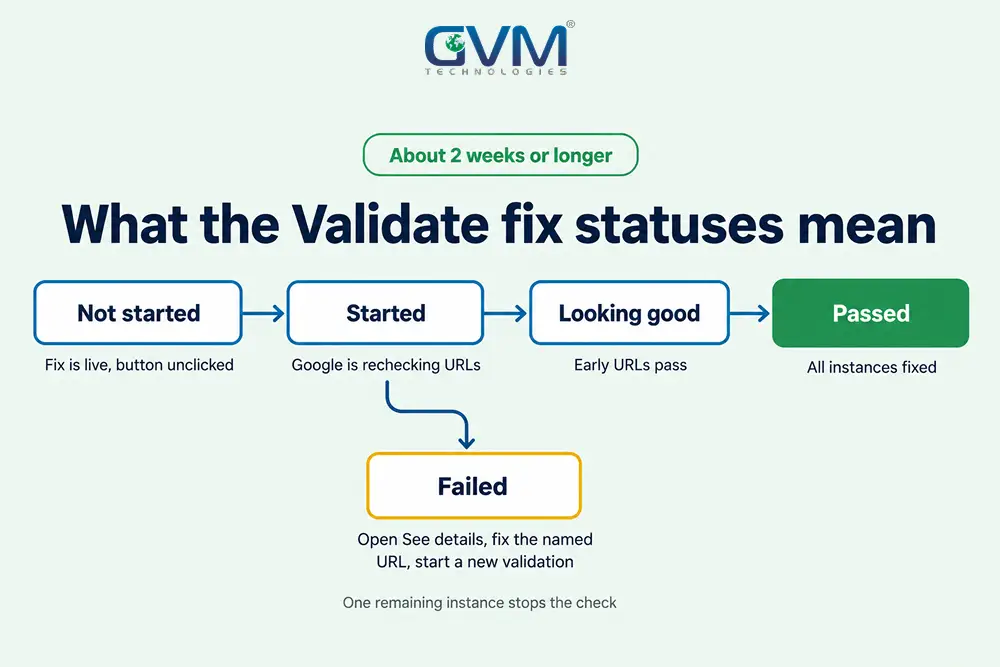
Validate fix queues every URL with structured data errors for another look. Google says validation can take about 2 weeks or longer and sends an email when it ends. It stops if a single instance remains, so repair the whole template before you click.
The 6-step routine for schema markup errors
- Fix every instance at its source, not just the sample URL.
- Test 1 fixed URL in the Rich Results Test.
- Check that fixed URL with Test live URL in URL Inspection.
- Click Validate fix once, then wait.
- If it fails, open See details, fix the named URL and start a new validation.
- Recheck the report later, since fixing 1 problem can expose another.
Why validation fails or stalls
- One instance left: validation stops while any instance remains.
- A 200-row view: with very many issues, the report shows only the first 200.
- Pages that vanish: a removed or noindexed page counts as fixed, which can hide a bigger problem such as 404 errors.
- Slow clean-up: an issue stays listed until 90 days after its last instance disappears.
FAQs
1. Do schema markup errors hurt my rankings?
Not directly. Per Google, even a manual action for markup only removes rich result eligibility. A drop after an error usually has another cause, so confirm GA4 is tracking first.
2. Can I ignore schema markup warnings?
Yes, when the field does not fit the page. Fix a warning only if the data is true, visible and tied to a rich result you want.
3. Why do the Rich Results Test and Search Console give different answers?
Search Console shows the copy Google crawled earlier, while the test fetches the page now. Put the indexed copy next to the Test live URL result.
4. How long should I wait after Validate fix?
About 2 weeks or longer, per Google, with an email when the check ends.
5. Do I need schema markup to appear in AI Overviews?
No. Google says no special schema.org markup is required for its AI features.
6. Should I delete FAQ schema now?
You can, but it is not urgent. FAQ rich results no longer appear, so structured data errors on that markup cost nothing in search.
Conclusion: triage first, then fix once at the source
Schema markup errors are a sorting job before they are a coding job. Spend your hours on unreadable code and missing required fields, and fix structured data errors once, in the template.
Today, do these:
- Open the unparsable report and fix syntax first.
- Run every other structured data error through the 4 gates.
- Count the ld+json blocks on 1 page and find who prints each.
- Click Validate fix once, after the whole template is repaired.
Recheck the reports after each release, so a theme update cannot quietly bring the errors back.
Talk to GVM Technologies about schema markup errors
One broken template can turn hundreds of URLs into structured data errors, and each week it stays live is a week without the rich result. GVM Technologies handles the code, the testing and the search work:
- Search engine optimization: crawlability and structured data sit inside its technical SEO scope.
- Website development: builds on custom code, WordPress or e-commerce, plus support.
- Quality assurance testing: manual, automated and cross-platform testing.
- Generative engine optimization: visibility in AI search such as ChatGPT and Google’s AI results.
GVM has run SEO campaigns for US brands, including the GlobalRose e-commerce SEO campaign.