Webflow is a hosted website builder that bundles design tools, a CMS (content management system) and hosting in 1 subscription. WordPress is free, open-source software that you install on a host you choose. So the choice is renting a managed platform or owning a flexible system.
This Webflow vs WordPress guide gives the verdict first: Webflow suits small teams running design-led marketing sites, and WordPress suits content-heavy, store-based or custom-feature sites. For other options, see how to choose a CMS, which also covers headless builds.
Quick answer: Choose Webflow when 1 to 3 marketers run a design-led site and want no plugin upkeep. Choose WordPress when you publish often, sell products, need custom features or want freedom to change hosts. Neither ranks better by default, so settle Webflow vs WordPress on editing, features and exit, not SEO.
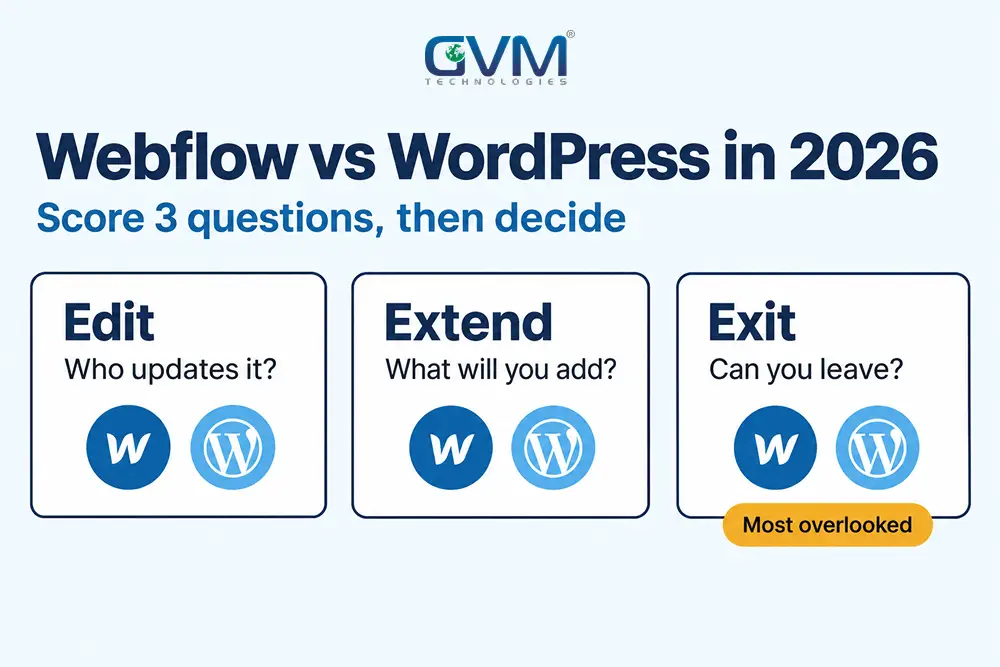
Settle Webflow vs WordPress with the Edit, Extend, Exit test
Most Webflow vs WordPress comparisons list features. A faster method scores 3 questions: who edits the site, what you will add in the next 2 years, and how hard it is to leave. The platform that wins 2 of 3 is usually the right one.
| Question | Webflow fits when | WordPress fits when |
|---|---|---|
| Edit: who updates it? | 1 to 3 marketers change pages monthly, with no developer on call | Several writers publish weekly, with roles and approval steps |
| Extend: what comes next? | Marketing pages, forms, a blog, light CMS data | A store, memberships, bookings, directories or custom plugins |
| Exit: can you leave? | You accept 1 vendor for hosting and a rebuild if you move | You want any host, your own files and a database you control |
| Budget shape | A flat monthly plan and little upkeep labor | Free software, but hosting, licences and upkeep are yours |
3 typical fits show the test at work:
- 12-page consultancy, 1 marketer: Webflow, because layout safety and no upkeep matter most.
- Resource site, 4 writers, 300 posts: WordPress, for roles, plugins and cheap scale.
- Local firm with bookings and payments: WordPress with proven plugins, or a booking SaaS beside either site.
Many owners hear a biased verdict because each adviser knows 1 platform well. Ask whether yours has built and maintained both, and learn how to tell a template from custom code if you inherited the site.
What you are really choosing: a rented platform or owned software
Webflow is software as a service (SaaS): Webflow hosts your site, and the design canvas, CMS and hosting arrive as 1 subscription. WordPress is software you own under an open-source licence, so the host, theme and plugins are your choices.
1. How Webflow works
You design visually, publish to Webflow’s hosting and edit content in its editor. Platform updates happen on Webflow’s side.
It sits between no-code and hand-coded work, as our low-code vs custom development guide explains. The trade is that your site lives inside 1 vendor’s system.
2. How WordPress works
WordPress runs on a server with PHP and a database. Themes control design, plugins add features and a host runs it all.
W3Techs puts WordPress on 38.5% of all websites in November 2026, against 0.8% for Webflow. GVM builds custom WordPress themes and plugins instead of stacking page builders.
3. The WordPress.com mix-up
This confusion usually happens because 2 products share 1 name. WordPress.org is the free software, while WordPress.com is a hosted service with paid plans. Compare Webflow with the one you mean.
Edit: who runs the site day to day on Webflow vs WordPress
In Webflow vs WordPress, upkeep is the first split. Webflow removes server and plugin work, so small teams edit with less risk of breaking layouts. WordPress gives larger editorial teams roles and workflows, but someone must keep it patched and tested.
1. What editing looks like on Webflow
- Layout safety: editors change text and CMS items without touching page structure.
- Fewer moving parts: hosting, SSL (the padlock certificate) and forms sit inside the plan.
- Seat costs: Workspaces are billed apart from Site plans, so price your team size first.
2. What WordPress upkeep involves
- Updates: core, theme and plugin releases, tested before they go live.
- Server care: PHP versions and host compatibility.
- Backups: daily copies, plus 1 restore test per quarter.
- Security: malware scans and login protection.
- Speed tuning: caching, image sizes and database cleanup.
Our guide on what to do when a WordPress update breaks your site shows how fast a skipped test becomes downtime.
3. Security in Webflow vs WordPress: what a managed platform removes
Patchstack’s 2026 report traces 91% of new WordPress vulnerabilities in 2025 to plugins, 9% to themes and only 6 to core. A lean plugin list therefore matters more than the WordPress version.
Managed hosting removes server patching on Webflow, not risk from custom code and integrations. If a site is already compromised, follow our hacked website recovery steps.
Before launch, run the pre-launch security checklist. GVM’s DevOps and cloud hosting team covers monitoring, backups and disaster recovery.
Extend: where Webflow and WordPress run out of room
Webflow vs WordPress differs most in growth room. Webflow handles marketing pages, blogs and structured CMS content well, then strains on memberships, complex data and large online stores. WordPress extends furthest through plugins and custom code, but each extension adds upkeep.
Plan for what you will add in 24 months, not at launch.
1. Webflow limits to check before you commit
- CMS size: Premium includes 20,000 CMS items and 40 collections (details in the cost section).
- Back-end logic: memberships, event check-in and advanced forms usually need Zapier, Make or custom code.
- Stores: a catalog of thousands of products and variants strains Webflow, so many teams pair it with Shopify.
- API pace: Webflow’s API docs list 60 requests a minute on Basic, 120 on CMS-tier plans and 1 publish a minute.
2. WordPress limits to check
- Plugin stacking: each plugin adds code, licence cost and 1 more point of failure.
- Builder weight: heavy page builders slow both the editor and the front end.
- Host dependence: speed and stability depend on the host, caching and PHP setup.
- Licence creep: theme, forms, SEO and backup licences renew every year.
For stores, GVM’s WooCommerce developers handle payment gateway integration and plugin updates.
3. When neither Webflow nor WordPress fits
Large catalogs often belong on Shopify, and our Shopify vs custom ecommerce guide shows when. Developer-led teams may prefer a headless CMS with Astro or Next.js.
AI-coded sites cost little to host, yet each becomes a bespoke project to maintain. Read vibe coding vs hiring a developer before you choose that route.
Exit: what you take with you in Webflow vs WordPress
Webflow vs WordPress differs most at exit. WordPress files and databases move to any host, while Webflow’s code export copies pages, styles and scripts but not CMS content, forms, ecommerce data or localized pages. Test your exit before you build.
| What you own | WordPress | Webflow |
|---|---|---|
| Page design | Theme and builder files move with you | Exports as HTML, CSS and JavaScript |
| CMS posts and data | Database export plus media files | Not in code export; collections export as CSV |
| Forms | Plugin data on your own host | Stop working on an exported site |
| Ecommerce data | WooCommerce database | Not in code export |
| Hosting choice | Any host | Static pages only; CMS needs rebuilding |
The code export catch many owners miss
Per Webflow’s help center, code export is a Workspace feature, not a Site plan feature. CMS, user accounts, ecommerce content and localized pages stay behind.
That article was updated about 1 year ago, so confirm today’s rules with Webflow.
A 5-step exit test before you sign
- Ask which plan allows code export.
- Export every CMS collection to CSV and open the file.
- Record all URLs and redirects in a sheet.
- Keep your own copy of images and documents.
- Register the domain and DNS in your own name.
Contracts matter too, so read who owns the IP when you hire an agency.
Cost: Webflow vs WordPress pricing after May 2026
Webflow’s May 2026 update merged the CMS and Business plans into Premium at $25 a month on yearly billing, or $39 monthly. WordPress software costs nothing, but hosting, licences and upkeep do. Compare 3-year totals, not sticker prices, in any Webflow vs WordPress budget.
1. Webflow plans after the update
- Starter: free, with a webflow.io domain, 2 static pages and 50 form submissions.
- Basic: $15 a month yearly or $25 monthly, with 300 static pages and no CMS.
- Premium: $25 yearly or $39 monthly, with 20,000 CMS items and bandwidth tiers from 50GB.
- Team: $2,500 a month on an annual contract, adding Localize, AEO agents and publishing workflows.
- Repricing dates: most existing sites change at renewal from June 29, 2026, Freelancer or Agency sites from November 16, 2026.
Both dates have passed, so renewals now reprice. Webflow’s announcement also cuts Business bandwidth from 100GB to 50GB. Older guides still quote the retired plans.
2. Where WordPress costs hide
- Hosting: managed hosting costs more than the cheapest shared plans.
- Licences: premium themes, builders, forms and SEO tools.
- Upkeep hours: updates, testing and backups.
- Recovery: the day a plugin update breaks checkout.
Once these are added, budgets often land closer to Webflow’s price than owners expect. Agencies feel this in retainers: WordPress sells upkeep, while Webflow shifts the work toward content and conversion.
Our website development costs guide breaks down the build side.
3. A 3-year view of Webflow vs WordPress costs
| Option | Billing | Per year | Over 3 years |
|---|---|---|---|
| Webflow Basic | Yearly | $180 | $540 |
| Webflow Premium | Yearly | $300 | $900 |
| Webflow Premium | Monthly | $468 | $1,404 |
| WordPress.org | Your own choices | Hosting + licences + upkeep | Collect 3 quotes |
Webflow figures are list prices in November 2026, before taxes, bandwidth add-ons and extra seats.
Webflow vs WordPress SEO: the platform is not the ranking factor
Google’s John Mueller has said WordPress is not inherently better for SEO, and Google does not rank by platform. Rankings come from content, links, crawlability and page experience. What differs is how much technical work each platform does for you.
1. What Google says about platforms
Search Engine Journal reported Mueller’s view that WordPress is one of many ways to build a site that ranks. Google has also said it does not prioritize crawling, indexing or ranking by platform.
2. Speed in Webflow vs WordPress: what the data shows
In HTTP Archive data for November 2025, 46.28% of WordPress sites passed Core Web Vitals, last among 6 platforms. Duda led with 84.87%, per Search Engine Journal.
The report did not list Webflow, so no public figure compares the 2. That average includes cheap hosting and heavy themes, so a lean build can pass. Learn what to fix in Core Web Vitals explained.
3. Where day-to-day SEO work differs
- Redirects: Webflow manages 301s in settings and suggests staying near 1,000, while WordPress can apply rules at server level.
- CMS URLs: Webflow puts collection items in a folder such as /blog/. Community answers say you can rename it, not drop it.
- Schema and bulk edits: WordPress SEO plugins automate both, while Webflow often needs custom code or scripts.
- Scale: the WordPress REST API can update thousands of posts, while Webflow’s rate limits slow the same job.
GVM’s SEO team audits templates, schema and crawlability on either platform. Start with our technical SEO audit guide.
Moving between Webflow and WordPress without losing rankings
A Webflow vs WordPress move is an SEO event, so rankings depend on the redirect map, not the new design. Map every old URL to a new one before launch and check for 404s afterward. WordPress to Webflow often changes blog URLs.
- Export all URLs, titles and traffic to 1 sheet.
- Match new URL patterns to old ones, and plan a 301 per post where they differ.
- Rebuild forms, because plugins such as Gravity Forms do not carry over.
- Rebuild builder layouts, since Elementor and Divi content rarely converts cleanly.
- Launch with redirects live, then submit the sitemap in Search Console.
- Watch 404s and indexing for 2 to 4 weeks.
A common mistake we see is leaving the redirect map to launch week. Have your SEO owner write it, then read our hosting migration SEO guide and 404 errors and SEO.
Webflow vs WordPress FAQ: 6 quick answers
1. Is Webflow better than WordPress for SEO?
No platform wins by default. Webflow gives a clean technical baseline with less work, and WordPress gives deeper control and plugins. Content and links decide rankings on both.
2. Is Webflow cheaper than WordPress?
Webflow Premium costs $900 over 3 years on yearly billing. In Webflow vs WordPress, a WordPress build can cost less or more, depending on hosting, licences and upkeep.
3. Can I move a Webflow site to WordPress?
Yes, but you rebuild the design. Webflow’s code export leaves out CMS content, so export collections to CSV and import them.
4. Which is easier for beginners?
WordPress installs quickly, but upkeep takes care. Webflow editing is calmer, yet its visual canvas needs layout concepts like flexbox. Neither is simple.
5. Does the platform change AI search visibility?
Not by itself. AI answer engines rely on crawlable pages, clear structure, schema and brand mentions on both. GVM’s generative engine optimization work starts there.
6. Will AI site builders replace both?
They replace first drafts, not ownership. Someone must still edit, secure and update the site, so a CMS stays useful. See our review of AI tools for web development.
Conclusion: Webflow vs WordPress comes down to who can run it in year 3
Webflow vs WordPress is a decision about editing, extending and exiting, not about who ranks better. Score the 3 questions honestly and price 3 years. Then use this checklist:
- Name who will edit the site and how often.
- List the features you expect to add within 24 months.
- Confirm what you can export, and test it.
- Price 3 years of hosting, licences and upkeep.
- Write the redirect map before any move.
Platforms change prices and limits fast, so recheck these Webflow vs WordPress figures before you sign.
Talk to GVM Technologies about choosing and building your website platform
A wrong platform shows up in year 2 as stalled updates, surprise renewals and a rebuild you did not budget. Our team covers the full path:
- WordPress development: custom themes and plugins on a lean, maintainable stack.
- Website development: structured builds with SEO-ready templates.
- Search engine optimization: technical audits, crawlability and structured data.
- DevOps and cloud hosting: monitoring, backups and recovery planning.
See how we built a WordPress site for Alvix Insurance Group.