A content management system (CMS) is the software your team uses to publish web pages without code. A wrong pick rarely fails at launch. It fails in year 2, when updates stall.
This guide explains how to choose a CMS by matching it to editors, channels and budget. If you inherited a site, first learn how to tell a template from custom code, then run the 4-question test below.
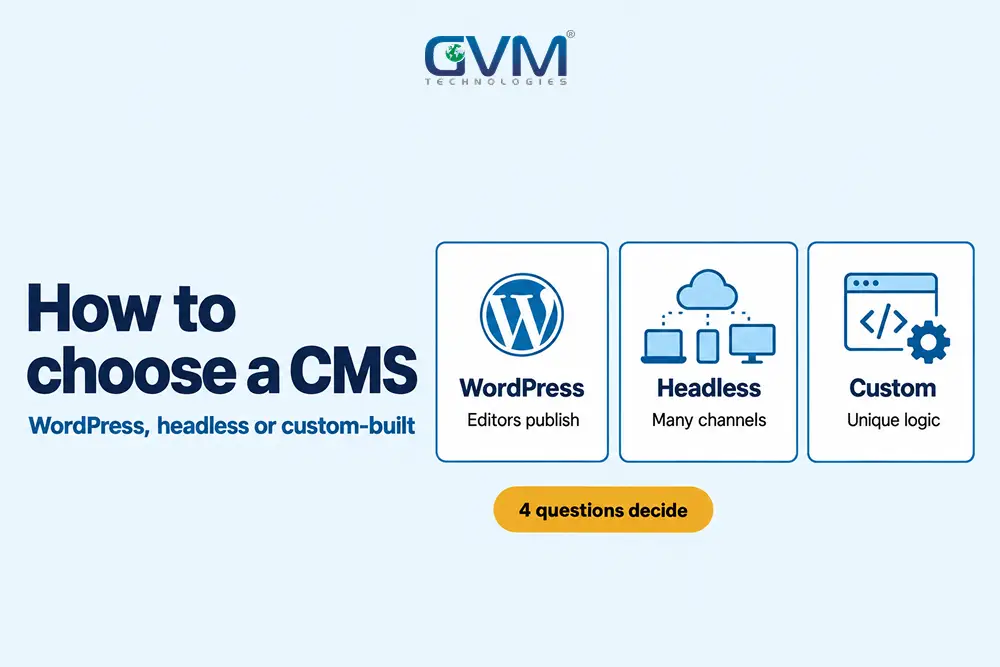
Quick answer: How to choose a CMS: pick WordPress when non-technical staff publish often on 1 website. Pick a headless CMS when the same content feeds a site plus apps and you have developers. Pick a custom-built CMS only when the site is software with rules no platform models.
Key takeaways
- No CMS ranks better by default: Google has said its systems judge the finished page, not the software behind it.
- WordPress still leads: W3Techs puts it on 40% of all websites and 58.5% of sites with a known CMS.
- Plugins carry the risk: Patchstack traced 91% of 2025’s new WordPress flaws to plugins.
- Headless is not faster by default: speed comes from rendering, caching and lean pages.
- Year 3 settles how to choose a CMS: pick the one your team can still patch after the builders leave.
WordPress, headless and custom-built CMS options explained
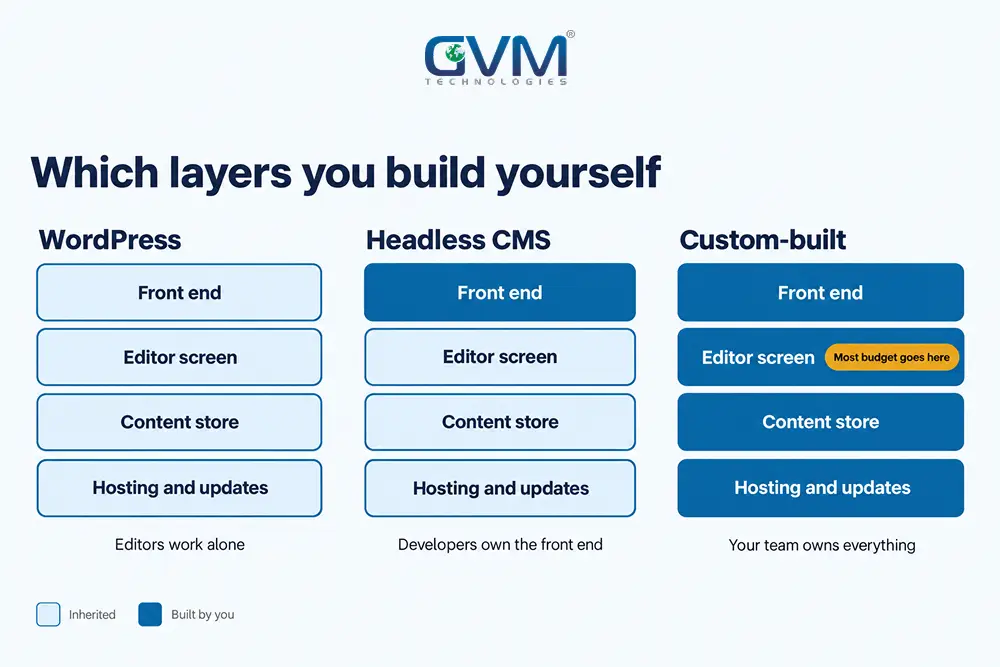
All 3 options store content and publish it, so how to choose a CMS depends on the differences. They differ in where pages render, who edits layouts and who maintains code. WordPress bundles everything, headless splits content from design, and custom-built means your team writes the whole system.
1. What WordPress does as a coupled CMS
WordPress is a coupled (traditional) CMS: dashboard, database and theme live in 1 system. An editor clicks Publish, and WordPress renders the page.
Its strength is the ecosystem. A well-built site uses custom WordPress themes and plugins, not a heavy page builder.
2. What a headless CMS changes
A headless CMS stores content and sends it through an API (a data connection) to a separate front end. Sanity, Contentful, Strapi and Payload are common examples.
Developers build that front end in Next.js or Astro, so 1 content source can feed a website, an app and a portal.
WordPress can work this way too, through its REST API. That setup is called headless WordPress.
3. What a custom-built CMS really means
A custom-built CMS is an admin panel, database and publishing flow written for your business alone. Nothing is inherited, so nothing comes free.
Custom and headless are not opposites, since a custom CMS can be headless. Many “custom” sites are really WordPress with a bespoke theme.
This confusion happens because agencies say “custom” for design, not software.
| Factor | WordPress | Headless CMS | Custom-built CMS |
|---|---|---|---|
| Who changes layouts | Editors, within blocks | Developers, mostly | Developers |
| Typical launch | 3 to 8 weeks | 6 to 12 weeks | 3 to 6 months |
| Content channels | 1 website, mainly | Web, apps, portals | Whatever you build |
| SEO tooling | Mature plugins | Coded into the front end | Coded by your team |
| Main ongoing risk | Plugin updates | 2 systems to maintain | Knowledge leaves with builders |
Our guide on low-code versus custom development covers the build-or-buy call behind how to choose a CMS.
How to choose a CMS with the 4-Question Fit Test
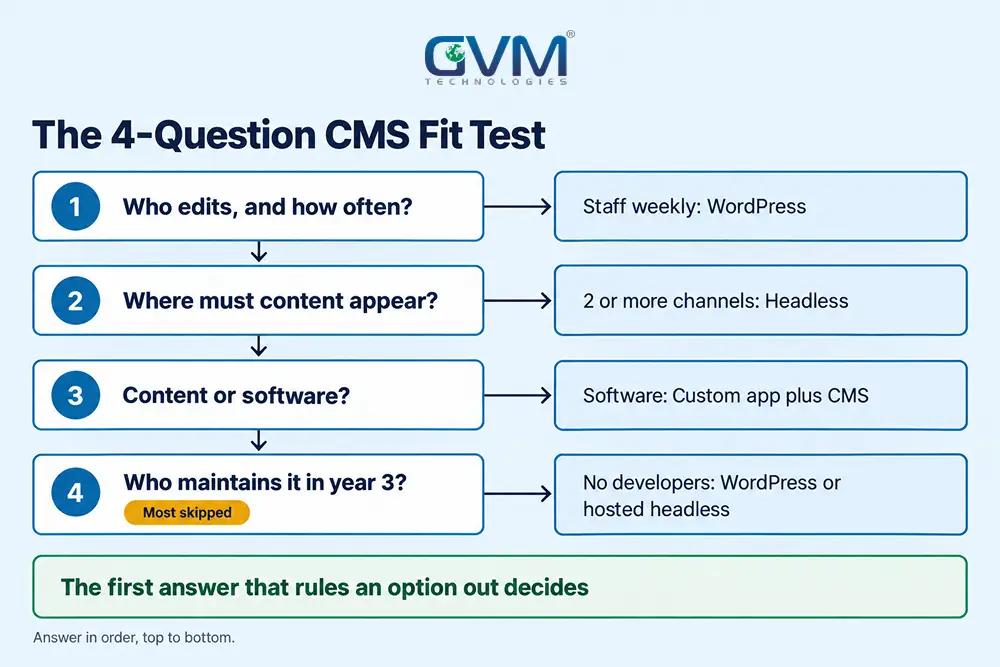
Most CMS debates compare features. A better way to decide how to choose a CMS is to answer 4 questions about your people and content, in order. The first answer that rules out an option usually settles the whole decision.
1. Who edits the site, and how often?
If marketers publish weekly, how to choose a CMS starts with the editing screen, not the tech stack. WordPress and headless tools with visual editors suit them.
Yet many small business sites are edited only by their agency, so speed and upkeep matter more.
2. Where does the content need to appear?
Count the channels. One website alone rarely justifies headless. A website plus an app, partner portal or in-store screens does, because 1 source avoids copying text into 3 systems.
3. Is the site content or software?
A brochure, blog or service site is content. Booking engines, marketplaces and SaaS dashboards are software. Software needs an application, often with a CMS beside it for marketing pages.
4. Who maintains it in year 3?
The most skipped step in how to choose a CMS is asking who patches it later. No in-house developers points to WordPress on managed hosting or a hosted headless service.
Comparing agency and freelancer costs helps you price that support honestly.
| Your answers | Lean toward |
|---|---|
| Non-technical editors, 1 website, content, no developers | WordPress with a light custom theme |
| Developer team, 2 or more channels, content | Headless CMS |
| Editors know WordPress, developers want React | Headless WordPress |
| Developer-only edits, small static site | Astro or 11ty static site |
| Unique business rules, the site is the product | Custom app plus a CMS for marketing pages |
Here is how to choose a CMS in an illustrative case. A 4-person accounting firm whose office manager posts monthly gets WordPress. A startup with an app and 3 developers lands on headless.
When WordPress is the right CMS, and the plugin trap
WordPress fits content and lead-generation sites edited by non-technical staff on a modest budget. It launches fastest and has the deepest pool of plugins and developers. Its weak point is plugin sprawl, which causes most of the slowness and security issues blamed on WordPress itself.
Sites where WordPress wins
- Service and local business sites: pages, a blog, forms and reviews, all editable by staff.
- Content-heavy blogs: categories, authors and SEO plugins work without custom code.
- Small stores: WooCommerce handles catalogs in the hundreds.
Why a slow WordPress site is usually a plugin problem
A common mistake in WordPress communities is planning a headless rebuild because a site with 1,300 posts feels slow. Post count is rarely the cause, since pages load only a few posts at a time.
Plugins, by contrast, run on every request. Patchstack’s State of WordPress Security in 2026 counted 11,334 new flaws in 2025, 91% in plugins. Also, 46% had no fix by public disclosure.
In practice: when weighing how to choose a CMS for a rebuild, audit plugins first. Remove unused ones and check caching. GVM runs this step before any rebuild quote.
If updates keep breaking layouts, see what to do when a WordPress update breaks your site. If you see spam pages, follow the hacked website recovery steps first.
When a headless CMS earns its extra cost
Headless pays off when 1 content source must feed several front ends, or when developers need full control of rendering. It costs more because you run 2 systems: the CMS and a front end your team maintains. For a single brochure site, that overhead rarely pays back.
Signals that justify headless architecture
- Several channels: the same products or articles appear on a site, an app and a portal.
- A developer team in place: someone owns the front end, deployments and previews.
- Structured content: reusable fields, such as specs or locations, matter more than free-form pages.
Warning: plugins stop helping once WordPress goes headless. Forms, SEO plugins and page builders output nothing on a separate front end, so each gets rebuilt in code.
The headless CMS vs WordPress debate also hides an editor cost. Marketing teams often miss live previews and drag-and-drop layouts, and some push to move back.
So how to choose a CMS includes testing the editor with your real team.
Headless WordPress as the middle path
Headless WordPress keeps the familiar dashboard and swaps the theme for a modern front end. GVM builds such front ends with Next.js server-side rendering and static generation, which keeps pages crawlable.
The trade-off is double maintenance: WordPress core, plugins and a JavaScript app. Each new custom field changes both codebases.
When a custom-built CMS makes sense, and the year-3 question
A custom-built CMS makes sense when the system is a product surface rather than a website, such as multi-brand workflows or data that drives business logic. It costs the most, because you also rebuild features every CMS already ships, and you own every bug.
What custom CMS builds quietly pay for
Most of the budget goes on basics editors expect on day 1, not on unique features:
- A rich text editor with links, tables and embeds
- A media library with image resizing and alt text fields
- Drafts, revisions, scheduled publishing and previews
- User roles, password resets and audit logs
- Redirects, sitemaps and metadata fields
Before approving one, revisit how to choose a CMS: would an open source CMS extended with your rules cover it? A content model problem stays a content model problem on new software.
AI coding tools and the custom CMS question
AI coding assistants let a developer ship a hand-coded site in days. That lowers build cost, not ownership cost. Someone still reviews code, patches dependencies and supports editors.
Our take on vibe coding versus hiring a developer covers that line. If the only person who understands your CMS leaves, recovery is slow, as our project rescue guide shows.
How to choose a CMS on 3-year cost, not launch price
For a 20 to 50 page business site, WordPress usually costs least to build and run, and headless costs about 3 to 4 times more. Custom-built costs most. So how to choose a CMS on budget means comparing 3-year totals, because hosting, licences and developer hours keep billing after launch.
| Cost line (planning ranges, USD) | WordPress | Headless CMS | Custom-built CMS |
|---|---|---|---|
| Build | 3,000 to 15,000 | 12,000 to 40,000 | 25,000 to 80,000+ |
| Yearly running (hosting, licences, updates) | 600 to 4,000 | 2,000 to 8,000 | 5,000 to 20,000+ |
| 3-year total | 4,800 to 27,000 | 18,000 to 64,000 | 40,000 to 140,000+ |
These are our scoping ranges for shortlisting how to choose a CMS, not quotes. Our breakdown of website development costs itemizes design, hosting and maintenance lines.
2 costs most buyers miss:
- Migration: moving content, redirects and forms often adds 15% to 30% to a replatform.
- Licence tiers: hosted headless tools often price by seats, locales or API calls.
How to choose a CMS that protects SEO and AI search
Your CMS does not earn rankings, but it controls what search engines and AI crawlers receive. Complete HTML, clean URLs, metadata and schema give every page a fair start. Content hidden behind JavaScript, or a careless migration, can erase years of rankings.
1. What Google says about CMS choice and rankings
Google’s John Mueller has said no CMS carries a ranking advantage, as Search Engine Journal reported. Hand-coded pages can rank as well as WordPress pages.
What differs is effort. On WordPress, plugins handle titles, sitemaps and schema. On headless and custom builds, developers code each one, so run a technical SEO audit before launch.
2. Rendering, AI crawlers and AI Overviews
Google renders JavaScript, yet its JavaScript SEO guide still calls server-side or pre-rendering “a great idea”.
Vercel’s AI crawler study found GPTBot, ClaudeBot and PerplexityBot fetch scripts without running them.
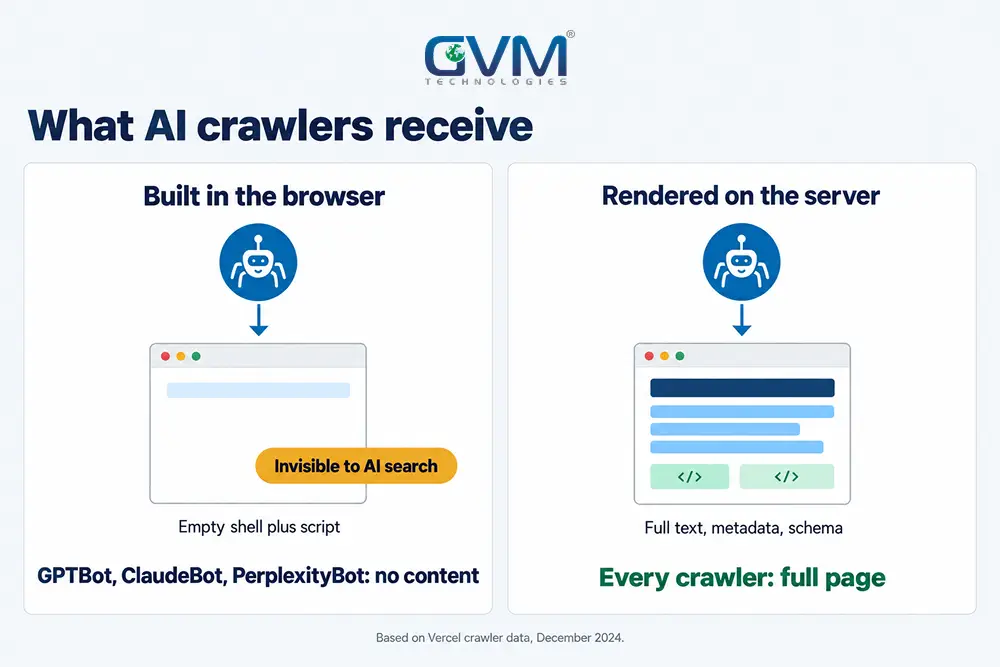
So a headless site that builds content in the browser can look empty to ChatGPT search. Part of how to choose a CMS is checking what each platform outputs:
- Full article text in the first HTML response
- An editable title, meta description and canonical URL per page
- Article, FAQ and Organization schema as JSON-LD
- An XML sitemap that updates on publish
- Short answer passages under clear headings that AI systems can quote
GVM’s Generative Engine Optimization service builds on these basics to earn citations in AI Overviews, ChatGPT and Perplexity.
3. Migration mistakes that cost rankings
Migration is the part of how to choose a CMS teams underplan, since URLs, templates and links all change. Avoid these 4 mistakes:
- Launching without a 1-to-1 redirect map for every old URL
- Dropping metadata, alt text or schema the old plugin added
- Leaving staging indexable, or blocking the live site
- Redirecting deleted pages to the homepage instead of a close match
Our hosting migration SEO checklist covers launch-day checks. Then read which 404 errors actually hurt SEO before redirecting old URLs.
FAQs
1. How to choose a CMS for a small business?
Start with WordPress on managed hosting and a light custom theme. Staff can edit it and running costs stay low. Move to headless or custom only when a specific need demands it.
2. Is a headless CMS better for SEO than WordPress?
On SEO, the headless CMS vs WordPress question has no default winner. Headless wins only if it renders HTML on the server and rebuilds the metadata, sitemaps and schema plugins handle.
3. Is WordPress still worth using in 2026?
Yes, for content and lead-generation sites. Its risks come mainly from plugins and missed updates. A lean plugin list, managed hosting and monthly updates handle most of that.
4. How much does a custom CMS cost?
Budget roughly 25,000 to 80,000 USD to build a business CMS and 5,000 to 20,000 USD a year to maintain it. Much of that buys editor features off-the-shelf tools include.
5. Can I switch from WordPress to headless later?
Yes. Your content stays in WordPress and becomes an API source, so the move can be gradual. Fix plugins and hosting first, since that often solves the speed issue.
6. Should an online store use WordPress, headless or custom?
Small catalogs run well on WooCommerce, while hosted platforms suit teams wanting less upkeep. Our Shopify versus custom e-commerce guide compares store trade-offs.
Conclusion: how to choose a CMS your team can run in year 3
Deciding how to choose a CMS comes down to people more than features. Match the platform to who edits, where content goes and who maintains it, and the right option is usually clear.
Your checklist for today:
- Write down who edits the site and how often
- Count the channels your content must reach in 2 years
- Audit plugins and hosting before pricing a rebuild
- Compare 3-year costs, not launch quotes
Front ends will keep changing, so the lasting answer to how to choose a CMS is content that outlives any design.
Talk to GVM Technologies about how to choose a CMS
A wrong platform usually surfaces as a second rebuild within 3 years, paid for twice. These 4 GVM services cover the choice, the build and the upkeep:
- Website development: WordPress, WooCommerce and Next.js builds with sitemaps and launch testing
- Search engine optimization: technical and on-page SEO so a new platform keeps its rankings
- DevOps and cloud hosting: CI/CD, monitoring and backups for headless and custom stacks
- Project rescue solutions: code audits and repairs when a past CMS build stalls
For a trucking insurer, GVM chose WordPress for easy content management and built a custom-theme site with quote forms and a blog.