
A website slow on mobile loads fast on a laptop but drags on a phone. Owners see the gap in PageSpeed Insights, while visitors simply leave.
This guide finds the cause in 3 gates, starting with the Core Web Vitals behind the score.
Quick answer: If 1 site is slow on your phone and others load fine, the site is the cause. Owners should then compare lab and real-user data and find the longest LCP phase. That phase names the fix: server, late image, heavy file or blocking code.
Key takeaways
- Only 1 site slow on your phone? The site is the cause. All sites slow? Check the phone, browser or network.
- A website slow on mobile is partly by design: Lighthouse throttles phones to Slow 4G and a 4x slower CPU.
- A “No Data” label means the mobile page speed score is lab-only, so test a real phone too.
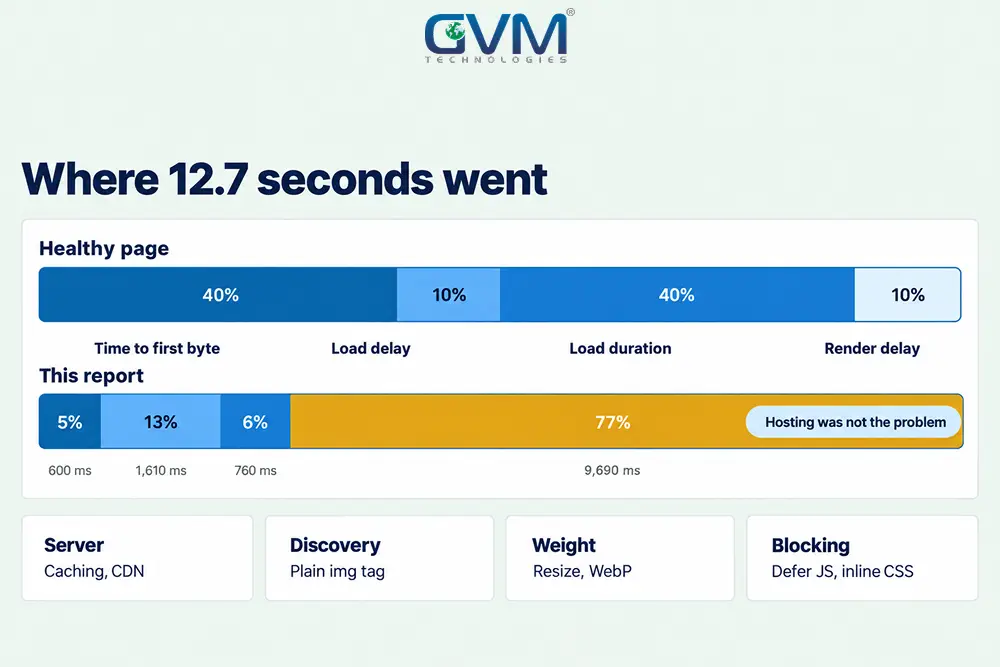
- Read the 4 LCP phases first. On 1 client site, 77% of LCP time was render delay, not hosting.
- Fix in this order: LCP image, blocking CSS and JavaScript, third-party scripts, hosting.
What a website slow on mobile means
A website slow on mobile means the same page takes much longer to appear on a phone than on a computer. The phone is rarely the only cause.
It runs your code on a weaker processor and network, so extra page weight costs more there.
Why a website slow on mobile can be fast on desktop
PageSpeed Insights runs Lighthouse, which tests mobile on Slow 4G with a 4x CPU slowdown. Desktop runs on an emulated desktop with a wired connection.
- Network: Slow 4G means 1.6 Mbps and 150 ms latency, near the bottom 25% of 4G
- Processor: a 2019 V8 test found median phones run the same script 3 to 4 times slower than flagships
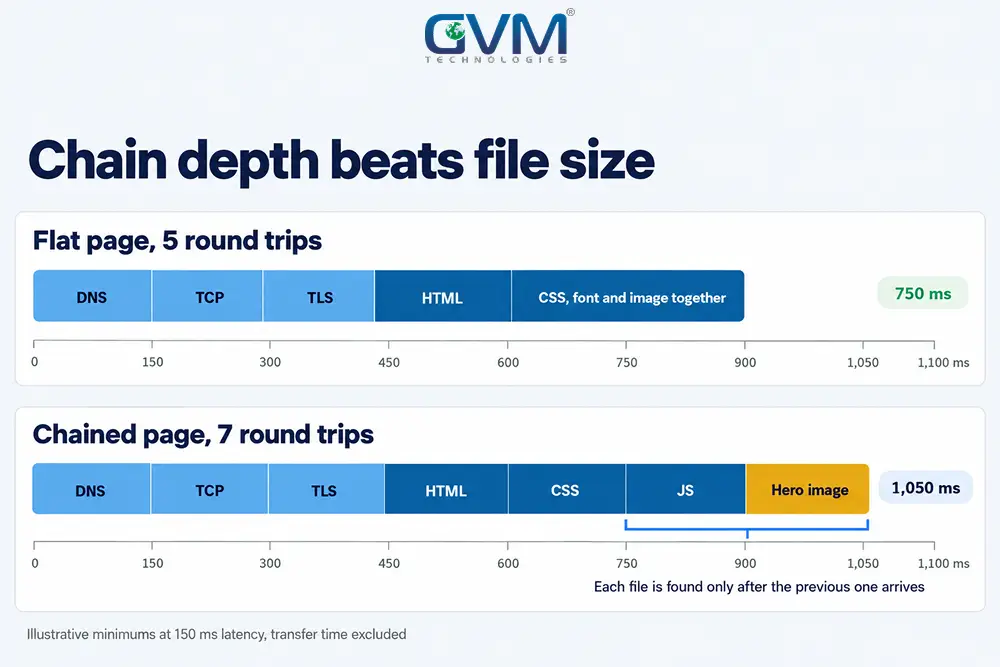
- Connection setup: DNS, TCP and TLS need several round trips, so latency can add about 0.5 seconds before the first byte
On Slow 4G, chain depth matters more than file size. Each step that waits on the previous step, such as HTML, then CSS, then a font, adds at least 1 round trip of 150 ms.
A mobile-first design approach plans for these limits, and for mobile page speed, from day 1.
Why “mobile only” narrows the suspects
Compression, minification and a CDN speed up both devices, so they rarely explain a phone-only gap. That gap comes from 3 things:
- Processor: scripts that a phone parses and runs slowly
- Mobile-only assets: a hidden desktop image still downloads on a phone, and some caches stay cold for mobile
- Test throttling: the lab run is harsher than most real visits
A few points of gap are normal. In the Web Almanac 2025, mobile trails desktop on LCP (62% against 74% of pages good) and INP (77% against 97%), but leads on CLS (81% against 72%). A fall from 98 to 60 is a defect.
The mobile gap triage: 3 gates before you change anything
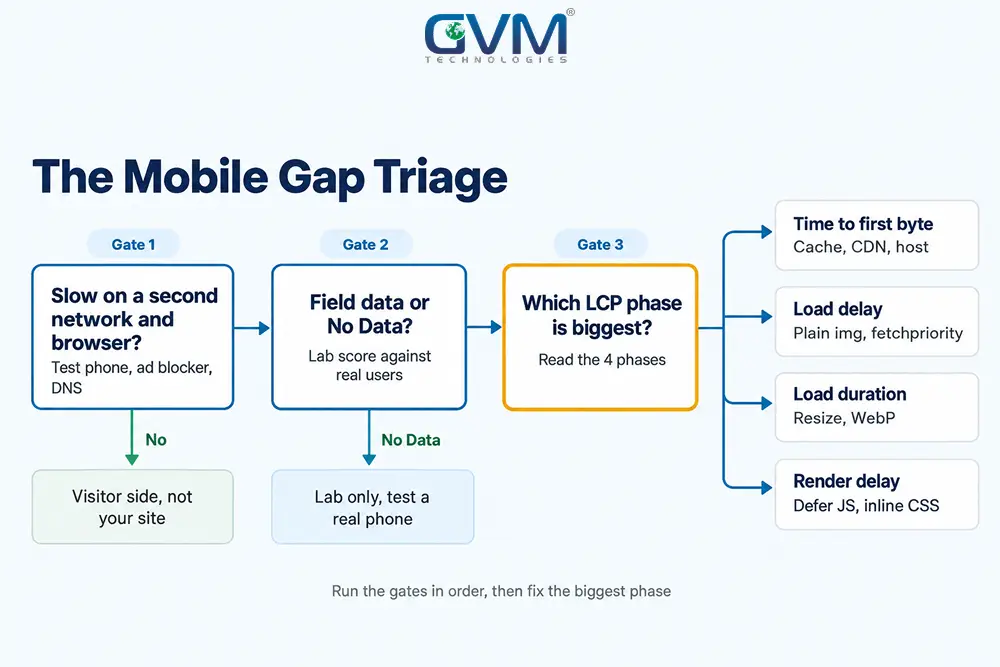
The Mobile Gap Triage checks a website slow on mobile in 3 gates. Gate 1 asks whether the phone or the site is slow.
Gate 2 asks whether a score or real users show it, and Gate 3 reads the LCP phases to name the fix.
1. Gate 1: is the website slow on mobile for everyone or only you
Test the phone first, because a visitor-side fault looks identical to a slow site. Run these in order, on iPhone or Android:
- Switch between Wi-Fi and mobile data, then retest
- Open the page in a private tab and in a second browser
- Turn off the built-in ad blocker that some Android browsers ship
- On iPhone, switch off Safari’s Advanced Tracking and Fingerprinting Protection (Settings, Safari, Advanced)
- Try another DNS server, and test with IPv6 off, since a broken path can stall 1 network
- Update the browser and the phone, clear the cache and restart
Treat each step as a test, not a diagnosis. A page that stalls in 1 browser only may be a rendering bug, and a page that fails to load needs the website down checklist.
Owners can also check analytics for slow sessions that cluster on 1 browser or device.
2. Gate 2: lab score versus real-user data
PageSpeed Insights shows 2 kinds of data. Field data comes from the Chrome UX Report: the last 28 days of real visits, judged at the 75th percentile. Lab data is 1 simulated load.
A new or low-traffic site often shows “No Data” in the field block. Then no real-visitor data backs the mobile page speed score, so test on a real mid-range phone with Chrome remote debugging.
GVM’s technical SEO audit starts from real-visitor data too.
3. Gate 3: the 4 LCP phases, the step most guides skip
Largest Contentful Paint (LCP) is the time until the biggest visible element appears. web.dev splits it into 4 phases, and the biggest phase names the first fix for a website slow on mobile.
| Phase | Healthy share | If this phase is big | First fix |
|---|---|---|---|
| Time to first byte | About 40% | Slow server, redirects or no page cache | Caching, CDN, hosting |
| Resource load delay | Under 10% | Browser finds the image late | Plain image tag, high fetch priority |
| Resource load duration | About 40% | Image file too heavy | Resize, WebP or AVIF |
| Element render delay | Under 10% | CSS or scripts block painting | Defer scripts, inline critical CSS |
All 4 phases look healthy but taps lag? Check INP and Total Blocking Time. That is a processor problem, so look at JavaScript.
Unoptimized speed also makes our list of web development blunders to avoid.
A worked example: the same page scores 98 on desktop and 60 on mobile
One of our clients runs a small WordPress site built with Elementor. Its March 2025 PageSpeed report scored 98 on desktop and 60 on mobile, with mobile LCP at 12.7 seconds against 0.9 on desktop. The 4 LCP phases show where the time went.
1. Reading the 4 phases of that report
- Time to first byte: 600 ms, or 5%, so the server was not the problem
- Resource load delay: 1,610 ms, or 13%, because a slider image was found late
- Resource load duration: 760 ms, or 6%, so the file was light
- Element render delay: 9,690 ms, or 77%, while stylesheets and scripts held the paint
The report flagged 2,990 ms of render-blocking savings. A 94 KiB first-party stylesheet (1,050 ms) and an icon-font stylesheet (900 ms) led the list.
2. Why the first fixes failed
The slider was swapped for a plain photo, and the page got slower. The photo likely became the new LCP element, while the same blocking stylesheets still delayed first paint.
Total Blocking Time was only 10 ms, so script execution was not the main cause.
3. The fix order for this website slow on mobile
The order below applies here: a plain <img> with fetchpriority="high" for the first slide, slider code after first paint, inline critical CSS and SVG icons instead of the icon font.
GVM’s WordPress development team can test these on a staging copy first.
This is our reading of the report, not a measured retest.
9 causes of a website slow on mobile and how each looks
These 9 causes cover most cases of a website slow on mobile. Match what you see in your mobile page speed report to a row, then jump to the fix.
Rows 1 to 3 explain most load-delay and render-delay cases.
| # | Cause | What you see | First fix |
|---|---|---|---|
| 1 | Render-blocking CSS and JS | Big render delay phase | Defer scripts, inline critical CSS |
| 2 | LCP image found late | Big load delay, slider image | Plain image tag, high fetch priority |
| 3 | LCP image lazy-loaded | loading="lazy" on the first image |
Remove lazy-loading there |
| 4 | Oversized or hidden images | Big load duration, desktop files on phones | Resize per screen, WebP or AVIF |
| 5 | Heavy JavaScript | High TBT or INP, slow on budget Android | Remove plugins, delay widgets |
| 6 | Third-party scripts | Chat, pixels, tag managers in the waterfall | Load after interaction, or drop them |
| 7 | Slow server response | TTFB above 0.8 seconds | Page cache, CDN, hosting review |
| 8 | HTML not cached at the edge | CDN header shows DYNAMIC | Add a cache rule for HTML |
| 9 | Web fonts and icon libraries | Late text, blocking font CSS | Self-host subsets, font-display swap |
Most owners of a website slow on mobile skip the cheapest fixes. In that Almanac data, only 17% of mobile image-LCP pages use fetchpriority="high", about 2% preload it and 16% to 17% lazy-load it.
Download size misleads too. Compression shrinks the transfer, but the phone still parses the full code, which in 1 public case grew from about 4 MB to 13 MB.
No engineer to read the bundle? Hiring dedicated resources adds engineers without a long hiring cycle.
What you can change on each platform
Your platform decides which levers you hold on a website slow on mobile. A Shopify owner cannot tune the server, while a custom build can change everything, and hosted builders limit you most.
Find your row, then make the first move listed.
| Platform | You control | First move |
|---|---|---|
| WordPress with a builder | Theme, plugins, caching, images, hosting | Page cache, delay JavaScript, trim builder CSS |
| Shopify | Theme, apps, added code, images | Remove unused apps, then slim the theme |
| Wix, Squarespace, Webflow | Images, embeds, animation, fonts | Resize images, cut embeds and motion |
| Custom or React build | Everything | Split bundles, render on the server, profile CPU |
Shopify names the theme, installed apps and added third-party code as its biggest speed drivers. Weighing a move off it? Read Shopify vs custom e-commerce first.
How to fix a website slow on mobile, in order
Fix a website slow on mobile in this order: the LCP image, render-blocking files, third-party scripts, then hosting.
The order follows effort and payoff, because the first 2 changes cost the least and usually move the score most. Each step names what to change.
1. Make the main image load first
- Put the first image in a plain
<img>tag, not a CSS background or slider script - Add
fetchpriority="high"to that image, and to no more than 2 images per page - Remove
loading="lazy"from it - Serve a phone-sized WebP or AVIF file
2. Stop CSS and scripts from blocking the first paint
Move non-critical JavaScript to defer, inline the CSS needed for the first screen and load the rest later. Page builders ship styles for features a page does not use, so trim those first.
Combining all CSS and JavaScript into 1 file is old HTTP/1.1 advice, and it often breaks layouts. Defer and inline instead.
Warning: enabling all optimisation toggles at once hides which setting broke the menu or a video. Enable 1, retest, then add the next.
GVM’s website development service lists fast loading and mobile-friendly design in its builds, so these fixes are planned in.
3. Delay third-party scripts and cut builder weight
- Load chat widgets, pixels and tag managers after first interaction
- Disable third-party scripts for 1 test, then add them back 1 at a time to find the culprit
- Remove sliders and animation from the first screen on phones
If the builder is still the bottleneck after steps 1 and 2, a lighter theme is the lasting fix. Compare the rebuild against typical website development costs first.
4. Decide whether hosting is the real problem
Use the web.dev TTFB thresholds: 0.8 seconds or less is good, and above 1.8 seconds is poor. In the worked example, TTFB was only 5% of LCP.
Deactivate plugins on a staging copy. If TTFB drops, the code is slow, not the host. On Cloudflare, a DYNAMIC status means HTML is not cached by default.
GVM’s DevOps and cloud hosting service covers real-time monitoring, performance tuning and cloud infrastructure.
5. Retest a website slow on mobile on a real phone
- Run the mobile page speed test 3 times and use the middle result, since scores vary
- Open the page on a real mid-range Android phone through remote debugging
- Watch field data for 28 days to confirm the result
- Add performance and cross-platform checks to each release, as GVM’s quality assurance testing does, and see our QA testing for startups guide
How much a mobile page speed score really matters
Skip the 100 target and aim for good field data on mobile page speed: LCP of 2.5 seconds or less, INP under 200 ms and CLS under 0.1 for 75% of visits.
Lab scores guide the work, while field data shows the result.
Lighthouse weights its metrics as TBT 30%, LCP 25%, CLS 25%, FCP 10% and Speed Index 10%. A clean TBT can therefore sit beside a poor score, as the worked example showed.
When a website slow on mobile becomes a business problem
A Google-commissioned study by Deloitte and 55 found a 0.1 second mobile speed gain lifted retail conversions 8.4% and spend 9.2%.
Our website speed and conversion rate guide and checkout abandonment fixes cover the buying side.
Google also indexes the mobile version of your content, so a thin or broken phone page costs rankings too.
FAQs
1. Why is my internet fast but websites load slowly on my phone?
Speed tests measure bandwidth, not latency, page weight or mobile page speed. Try a second network and browser first.
2. Does Elementor or another page builder make a website slow on mobile?
Builders add CSS and JavaScript, which hurts most on phones. The 4 LCP phases show whether the builder is the cause, so measure first.
3. Is a low PageSpeed mobile score hurting my rankings?
A low mobile page speed score acts as a tie-breaker, not a lever. Relevance still leads, but visitors leave slow pages, so the fix pays back.
4. Should I use AMP to fix mobile page speed?
No. Google removed the AMP requirement from Top Stories, so fix your normal pages.
Conclusion: fix a website slow on mobile by phase, not by guess
A website slow on mobile has 1 phase that dominates mobile page speed. Run the 3 gates, read the LCP phases and fix the biggest phase first.
Your checklist for today:
- Test the page on a second network, browser and real phone
- Write down the 4 LCP phase times in milliseconds
- Fix the largest phase, then retest mobile page speed 3 times
Field data over 28 days will confirm the first fix.
Talk to GVM Technologies about a website slow on mobile
Poor mobile page speed costs you visitors before they read a word, and a score alone does not say why.
GVM Technologies helps in 4 ways:
- Website development: responsive sites built with fast loading in scope
- DevOps and cloud hosting: real-time monitoring and performance tuning
- Quality assurance testing: performance and cross-platform tests on devices and browsers
- Search engine optimization: technical SEO audits and site speed improvements
We built the Crash Champions platform across 600+ locations, so production scale is familiar ground. Send us your URL and your 4 LCP phase times.