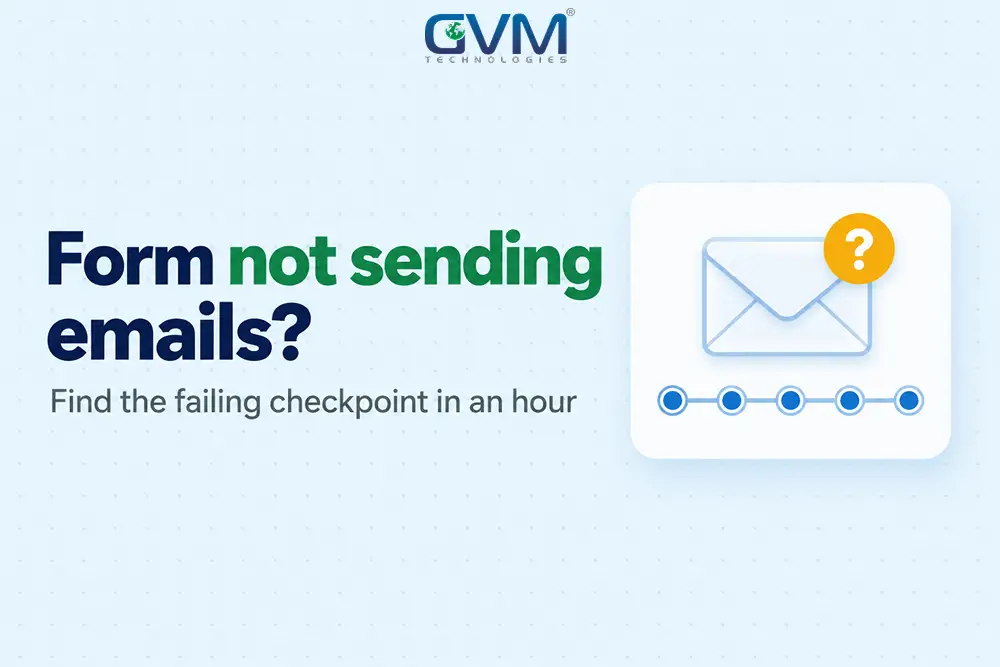
Quick answer: A contact form not sending emails failed at 1 of 5 checkpoints: form, settings, handoff, receiving server or inbox. Find which, then fix only that. If the whole site is down, start there.
Key takeaways
- A silent contact form not sending emails loses leads without a bounce, so save every entry first.
- A green “sent” message means a clean handoff, not delivery.
- Contact form emails going to spam usually mean SPF, DKIM or DMARC failed, not that the form broke.
- An SMTP plugin changes how your site sends. Incoming email stays untouched.
- Microsoft 365 turns off password-based SMTP by default at the end of December 2026.
Your form says thank you, and the inbox stays empty. No bounce, no log, and a lead you never knew you lost.
A contact form not sending emails is rarely 1 bug. Several systems touch every message, and each fails quietly.
This guide finds the failing one in about an hour, from a WordPress contact form not sending email to custom code.
Contact form not sending emails: the 5 checkpoints every message passes
Every submission crosses 5 checkpoints in order. The one where it stops tells you the fix, so test in order instead of guessing.
| # | Checkpoint | Fails as | 60-second test |
|---|---|---|---|
| 1 | Form | Endless spinner, red error | Network tab in DevTools |
| 2 | Settings | Wrong To, bad From, no email action | Is there a saved entry? |
| 3 | Handoff | Host blocks mail, wrong login, closed port | A line in the email log |
| 4 | Receiving server | SPF or DKIM fail, 550 rejection | Gmail’s Show original |
| 5 | Mailbox | Spam, forwarding, wrong routing | Point To at a Gmail address |
Most guides jump to checkpoint 3 and say install SMTP. That fixes 1 of 5 places a message dies.
Split “never sent” from “sent but lost”
The WordPress developer docs say a true result from wp_mail() only means the handoff raised no error. Delivery is a separate question.
- Submit the form and look for a saved entry. None means checkpoint 1 or 2.
- Open an email log such as Check & Log Email. No log line means checkpoints 1 to 3.
- A log line but no mail in spam or quarantine means checkpoint 4 or 5.
Match each contact form not sending emails symptom to a checkpoint
| What you see | Checkpoint | Jump to |
|---|---|---|
| Spinner never stops, or a red error | 1 | Clear a spinner |
| Contact Form 7 not sending email: “There was an error trying to send your message” | 3 | Authenticated SMTP |
| Green success, nothing arrives, no log line | 2 or 3 | To, From and Reply-To |
| Contact form emails going to spam, or missing from every folder | 4 | SPF, DKIM and DMARC |
| Gmail gets it, your own address does not | 5 | Spam and routing |
| Worked for years, then stopped | Any | What changed |
Fix a contact form not sending emails at checkpoints 1 and 2
These checkpoints cost nothing and take about 10 minutes. Many cases end here.
WordPress contact form not sending email after a plugin update? Conflicts need a staging test. Our QA testing team reproduces them without touching your live site.
1. Clear a spinner in a WordPress contact form not sending email
A contact form not sending emails with an endless spinner means the browser request failed, not the email. Submit with DevTools open on the Network tab and find the red request.
- Contact Form 7 not sending email with a 401, 403 or 500 on /wp-json/contact-form-7/ means a blocked REST API.
- Security plugins and firewalls are the usual blockers. Allow that path, or test with them paused.
- A reCAPTCHA or Turnstile key registered to an old domain stalls the form.
- A form that works only while you are logged in confirms a blocked REST path.
2. Fix Contact Form 7 not sending email with To, From and Reply-To
These 3 fields cause most failures.
| Field | Common mistake | Safer setting |
|---|---|---|
| To | Old staff address, or no comma between addresses | 1 shared inbox you watch |
| From | The visitor’s email, or wordpress@ with no mailbox | A real mailbox, such as forms@yourdomain.com |
| Reply-To | Blank | The visitor’s email field |
Contact Form 7 rejects a From address outside your site domain. A site cannot send as your visitor’s Gmail address.
3. Save every lead before you fix anything
Email is the weakest link, so store each submission too. Flamingo saves Contact Form 7 entries, so a contact form not sending emails never costs you the lead.
Need a legal record? BCC an archive mailbox. Entries hold personal data, so set a retention period, as our GDPR guide explains.
Decode the bounce message before you change anything
Every contact form not sending emails leaves a trace: an SMTP code. A 4xx code is temporary and retries. A 5xx code is permanent.
| Code or message | Meaning | Fix |
|---|---|---|
| 550 5.7.26 (Gmail) | Sender is unauthenticated | SPF, DKIM, DMARC |
| 550 5.1.1 | Recipient mailbox does not exist | Correct the To address |
| 550 5.7.1 | Blocked as spam or by policy | Check From, content, and whether the site was hacked |
| 535 5.7.8 | Wrong username or password | Re-enter credentials, or use OAuth |
| 535 5.7.139 (Microsoft 365) | SMTP sign-in disabled for the tenant | Enable it, or move to OAuth |
Bounces return to the Return-Path address, often the sender mailbox. Check that inbox and your email log.
Fix a contact form not sending emails at checkpoint 3 with authenticated SMTP
To fix a contact form not sending emails, send through authenticated SMTP or an email API. PHP mail leaves your web server unsigned, and some hosts block it.
| Sender | Best for | Free allowance | Watch out for |
|---|---|---|---|
| Your own mailbox (Google Workspace, Microsoft 365) | Sites already on that mailbox | Included | Password sign-in is closing |
| Brevo | Low volume, tight budget | 300 emails a day | Verify your domain first |
| SMTP2GO | Small sites | 1,000 emails a month | Monthly cap, not daily |
| Amazon SES, Mailgun, Postmark, SendGrid | High volume, custom apps | Free tiers vary | More setup and hidden costs |
Free limits checked September 2026. Confirm on each pricing page.
WP Mail SMTP and FluentSMTP are free and connect to all of these. For a WordPress contact form not sending email, the plugin is the easy part and the mailer is the decision.
1. Set it up in 6 steps
- Pick a sender from the table and create the mailbox or API key.
- Install 1 SMTP plugin, not 2. Two can conflict.
- Set From to a real address on your domain, and tick force-from.
- Enter the credentials, or authorize with OAuth where offered.
- Send the plugin’s test email, then turn on logging.
- Submit the real form and confirm the log shows it.
Will an SMTP plugin break the email I receive? No. Sending and receiving run on separate systems, and incoming mail follows your MX records. The plugin changes only how your site sends.
2. Password sign-ins are closing at Microsoft and Google
- Microsoft 365: basic-auth SMTP turns off by default at the end of December 2026. The earlier April date was withdrawn.
- Google Workspace: password-only SMTP stopped working in 2025. Use OAuth, or an app password with 2-Step Verification.
3. Cloud servers block mail ports
DigitalOcean blocks SMTP ports 25, 465 and 587 on all Droplets. Some other clouds restrict port 25 too.
Use an email API over HTTPS instead. Our DevOps and cloud hosting team sets this up.
Fix a contact form not sending emails at checkpoint 4: SPF, DKIM and DMARC
These 3 records prove a message really comes from your domain. Without them, contact form emails going to spam or bouncing at Gmail and Outlook is the usual result.
| Record | Question it answers | Where it lives |
|---|---|---|
| SPF | Is this server allowed to send for the domain? | 1 TXT record on the root |
| DKIM | Was the message signed and left unchanged? | Keys your mailer gives you |
| DMARC | What if both fail? | 1 TXT record at _dmarc |
Type  Host     Value
TXT   @        v=spf1 include:spf.protection.outlook.com include:MAILER-INCLUDE ~all
TXT   _dmarc   v=DMARC1; p=none; rua=mailto:dmarc@yourdomain.com
Swap MAILER-INCLUDE for your email service’s value. Keep the Microsoft include only for Microsoft 365.
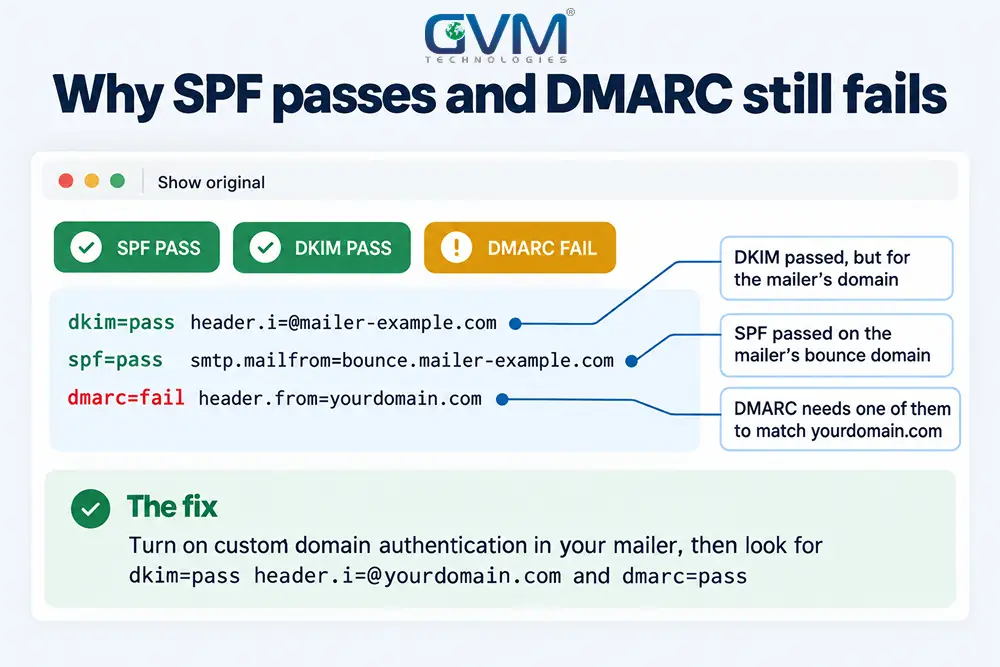
1. Why SPF passes and DMARC still fails
DMARC needs the domain that passed SPF or DKIM to match your visible From domain. Mailers often use their own Return-Path, so SPF passes without aligning.
The fix is your mailer’s custom-domain option, so DKIM signs with your domain. Then open the message in Gmail, choose Show original, and read PASS or FAIL for each check.
Google’s sender rules require SPF or DKIM from every sender. Senders above 5,000 messages a day to Gmail need both, plus DMARC.
2. Three DNS mistakes that break form mail
- A second SPF record. RFC 7208 treats 2 records as a permanent error.
- More than 10 DNS lookups. Every include counts.
- DKIM keys added but never verified by the mailer.
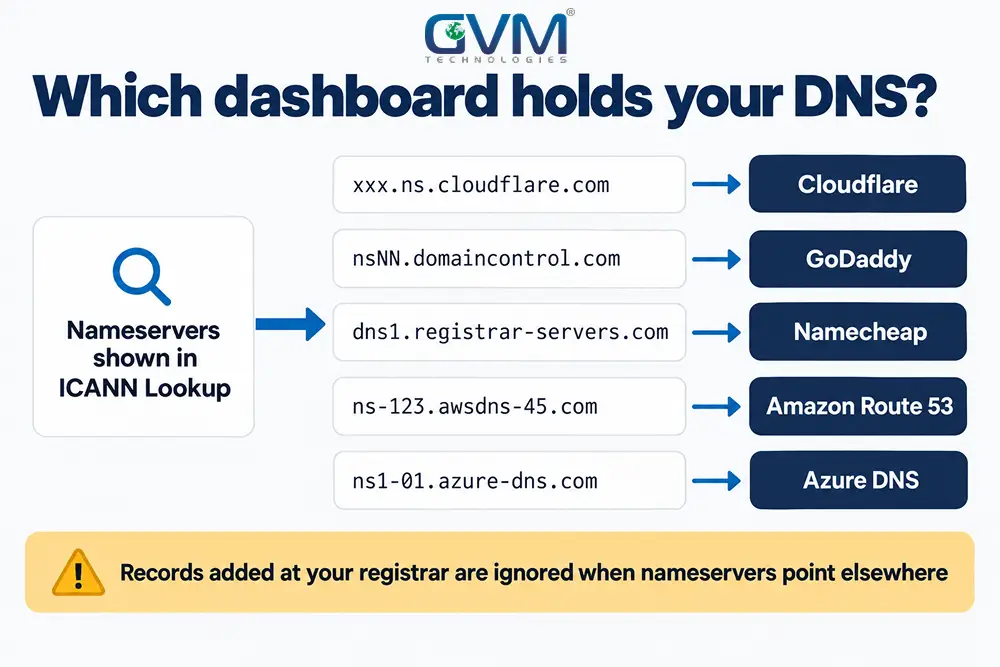
3. Find who controls your DNS
- Look up your domain in ICANN Lookup and read the nameservers.
- The nameserver names show where DNS lives: Cloudflare, your registrar, your host or Microsoft.
- Edit records there. Changes made anywhere else do nothing.
If a developer who left holds those logins, our project rescue team handles the takeover. After any change, test at mail-tester.com.
Contact form emails going to spam or vanishing: fix checkpoint 5
If the email was accepted, the mailbox is the last suspect. Point the form at a different address to find out.
| Clue | Likely cause | Fix |
|---|---|---|
| Gmail gets it, your own address does not | Routing, filter or full mailbox | Try a fresh mailbox |
| cPanel site, email on Google or Microsoft | Email Routing set to Local | Set Remote Mail Exchanger |
| Some forwarded recipients get it, others do not | Forwarding breaks SPF | Use a group, not forwarding |
| Nothing in Microsoft 365 spam | Quarantine or transport rule | Check quarantine, run a message trace |
| Only the visitor’s auto-reply fails | Second email uses another From | Reuse the authenticated From |
cPanel’s routing guide warns that Local routing with MX records at Google or Microsoft loses mail. Forwarded mail arrives from the forwarder’s server, which your SPF does not list.
Forms outside WordPress: hosted builders and custom code
The same 5 checkpoints apply to any contact form not sending emails. Only the first check changes.
| Platform | Check first |
|---|---|
| WordPress contact form not sending email (WPForms, Elementor, Formidable) | Notification tab: From on your domain, Reply-To set, then SMTP |
| Wix | Spam for no-reply@wixsiteautomations.com and reply-to@wixforms.com |
| Shopify | The store’s sender email, then a test notification |
| Custom code (PHP, Node, Next.js) | From on your domain, PHPMailer over SMTP, production environment variables, verified sender domain |
| Jotform, Google Forms | Notification address and spam settings. No SMTP to fix |
A form can return 200 while the mail call fails silently. Log the mailer’s response and alert on errors.
Building your own? Our website development team wires forms to email APIs with stored leads and alerts.
It worked for years, then stopped: what changed
A contact form not sending emails after years of working means something around it changed. Deleting the form rarely helps.
- A host move or plan change. The new server is missing from SPF, or PHP mail is off.
- A newsletter or CRM tool added a second SPF record.
- A security plugin, firewall or cloud host began blocking the REST API or ports.
- The domain lapsed. See our expired domain guide.
- The site was hacked and sent spam.
A 60-minute plan for a contact form not sending emails
| Minutes | Action | Done when |
|---|---|---|
| 0 to 10 | Store entries, submit a test, check spam | You know “never sent” from “lost” |
| 10 to 20 | Fix To, From and Reply-To | From is a real mailbox |
| 20 to 40 | Connect SMTP, turn on logging | The test email arrives |
| 40 to 55 | Fix SPF, DKIM, DMARC | Show original reads PASS |
| 55 to 60 | Submit to Gmail, Outlook, your domain | All 3 reach the inbox |
Allow longer if someone else holds your DNS. The hour is our estimate.
Stop the next silent failure
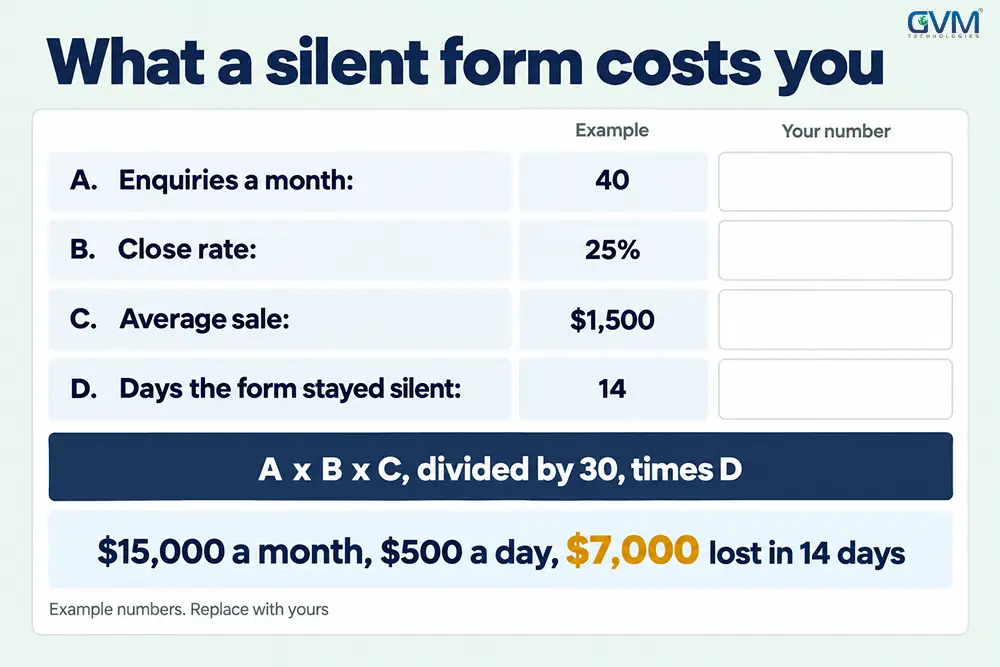
Price the outage of a contact form not sending emails with the worksheet below. Then fix it for good.
- Keep logging and entry storage on permanently.
- Submit a real test monthly and after updates. Our QA testing team builds it into release checks.
- Keep DNS and mailer logins with the business. See who owns the IP when you hire an agency.
FAQs
1. Why is my contact form not sending emails?
A contact form not sending emails failed at 1 of 5 checkpoints. A saved entry and an email log show which.
2. Why is my WordPress contact form not sending email?
WordPress uses your host’s PHP mail, which is often blocked or unsigned. Switch to authenticated SMTP and add SPF and DKIM.
3. Why is Contact Form 7 not sending email?
Usually the From address is off your domain, the REST request is blocked, or PHP mail fails. Check in that order.
4. Do I need an SMTP plugin?
Not always, but it is the most reliable fix. It signs your mail and adds logs, and Brevo’s free plan covers 300 emails a day.
5. Why are contact form emails going to spam?
The From domain fails SPF, DKIM or DMARC, or the visitor’s address is used as From. Fix both, then retest.
6. Why is my Elementor form not sending emails?
Check the Email action’s From, Reply-To and To. A “Server error” points to wp_mail, so connect SMTP.
Conclusion: find the failing checkpoint, then fix only that
A contact form not sending emails is a path problem, not a plugin mystery. Save entries, find where the message stops, and fix that checkpoint.
Then test 3 inboxes, keep logging on, and treat every silent day as lost revenue.
How GVM Technologies helps
- WordPress development: fixes for any WordPress contact form not sending email
- DevOps and cloud hosting: blocked ports, email APIs, monitoring
- QA testing: form checks on every release
- Project rescue: lost logins and DNS takeovers
Talk to GVM Technologies about your contact form
Tell us about your contact form not sending emails: platform, plugin and where email runs. We find the failing checkpoint, fix it, and add alerts so the next failure is never silent.