A broken WordPress update is any core, plugin, theme or PHP change after which your site shows an error, a blank page or a layout with no styling.
If “WordPress update broke my site” describes your morning, 1 version change caused it. Our website down checklist covers a full outage first.
Quick answer: If a WordPress update broke my site, stop clicking update, check a private window, then open your admin email for the Recovery Mode link and pause the newest plugin or theme. If only the layout broke, purge every cache layer. Restore a backup last.
Key takeaways
- When a WordPress update broke my site, the cause fits 1 of 5 break types, each with its own first move.
- “No further action is needed” in the auto-update email means the files copied. It does not mean your pages render.
- A half-split of 16 plugins takes at most 4 rounds.
- WordPress 6.6 auto-rollback checks only the homepage for fatal errors, so styling, forms and checkout can fail unnoticed.
- Restore files and database together, because a core update can change both.
When a WordPress update broke my site: name the break type first
A WordPress site broken after update fits 1 of 5 break types: a blank or error page, a stuck maintenance notice, a loaded page with no styling, a dead feature, or a redirect loop.
Name the type first, because each one starts with a different fix.
Rule out your own browser and cache
Open the site in a private window on mobile data. If it looks fine there, your browser held an old copy and nothing broke.
A common pattern we see: the site looks perfect when you are logged in and broken for visitors. Logged-in users often skip page caches, so stale CSS stays hidden from you.
A break in 1 browser only is CSS support, not the update, as Safari and Firefox rendering bugs explains.
Match the symptom to 1 of 5 break types
We call this the Break Type Test.
| What you see | Usual cause | First move |
|---|---|---|
| Blank page or “critical error” | PHP fatal error in a plugin, theme or PHP version | Recovery Mode email, then the debug log |
| “Briefly unavailable for scheduled maintenance” past 10 minutes | Update crashed before cleanup | Delete the .maintenance file |
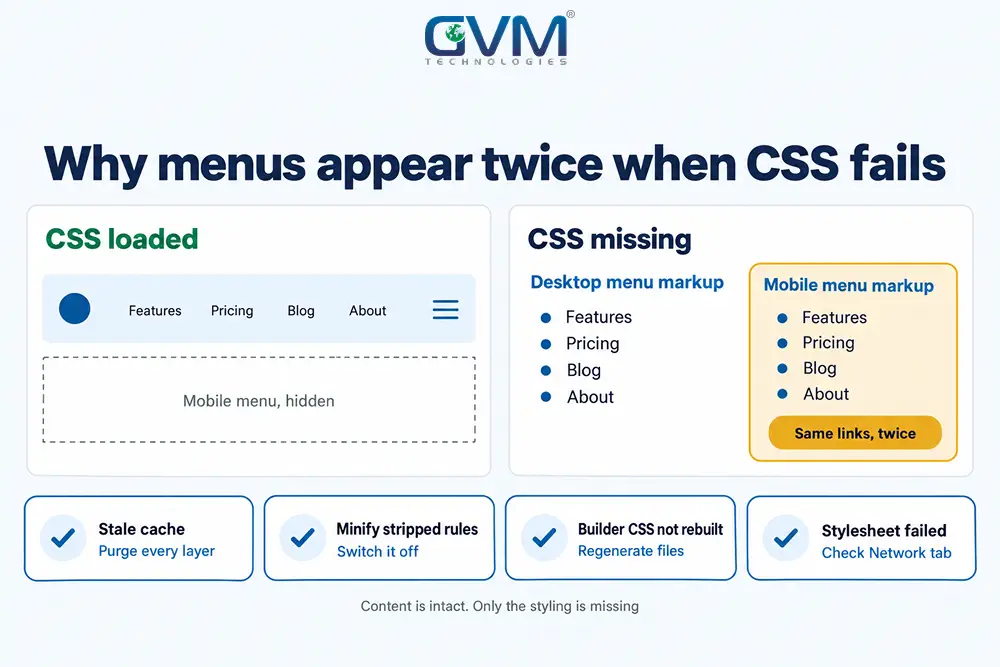
| Page loads without styling, or menus appear twice as bullet lists | CSS blocked, stale or minified wrongly | Purge caches, regenerate builder CSS |
| Page looks fine, but a form, cart or login fails | Plugin conflict or changed API | Isolate the plugin on a staging copy |
| Too many redirects or an admin login loop | Site URL, HTTPS or cache rule changed | Check Site Address, clear cache, test plugins |
The unstyled menu is the symptom owners misread most. Without its stylesheet, a theme often prints the desktop and mobile menus as plain lists, so links can appear twice. Your content is untouched.
Redirects to other domains or unknown admin users need our hacked website guide.
WordPress site broken after update: the first 15 minutes
When a WordPress update broke my site, spend the first 15 minutes limiting damage, not fixing.
Stop further updates, copy the broken site as it stands, and note the exact time of the change. A clear timeline shortens every later step.
Freeze updates and snapshot the broken state
- Ask everyone with admin access to stop clicking Update
- Download
wp-contentand export the database from phpMyAdmin or your host panel - Write down the update time, the versions involved and the exact error text
- Screenshot the broken page on desktop and mobile
Do this even when the site is down. If your backup plugin broke, a manual SFTP and phpMyAdmin copy still works.
Get back into admin with Recovery Mode
After a fatal error, WordPress emails the administrator a secret link to a safe session with the failing plugin paused, per the Recovery Mode announcement.
If the email does not arrive, see why a contact form is not sending emails.
Find which plugin or theme update broke the site
In most cases where a WordPress update broke my site, 1 plugin, theme or PHP version is the cause.
Read the first fatal error in the debug log, then split your plugins in half until 1 remains. It also works without admin access.
Read the debug log when a WordPress update broke my site
Set WP_DEBUG and WP_DEBUG_LOG to true and WP_DEBUG_DISPLAY to false in wp-config.php. Errors then land in wp-content/debug.log, as the WordPress debugging guide shows.
Read the first fatal error, not the last. Later errors are often fallout from it.
- Path contains
/plugins/name/: that plugin broke, so deactivate it - Path contains
/themes/: your theme broke, so switch to a default theme - “Call to undefined function” or “Class not found”: plugin code expects something the new version removed
- “Allowed memory size exhausted”: update added load, so raise the memory limit
Page-builder add-ons are a frequent trap: Elementor 3.26 removed its old Schemes API, and add-ons that still called it crashed. Add-ons idle for 6 months tend to break first.
Isolate the culprit with a half-split
If the log is empty, rename /wp-content/plugins to plugins-off over SFTP. No SFTP login because a developer left? Our developer disappeared guide covers the takeover.
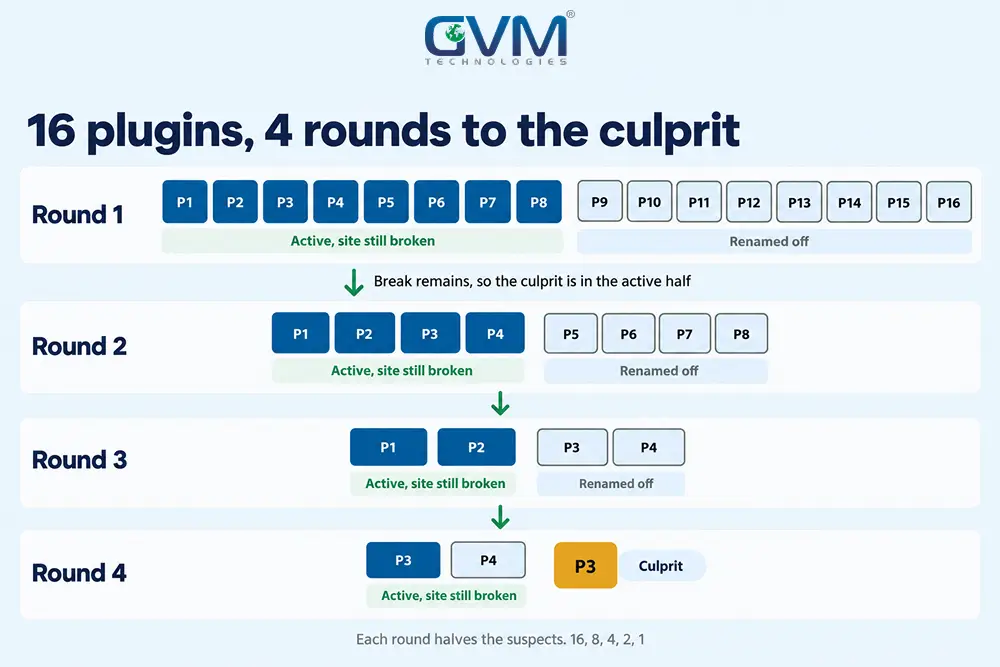
If the site returns, a plugin caused it, so test in halves:
- Restore the folder name, then rename half of the plugin subfolders
- Reload. If the break remains, the culprit sits in the active half
- Keep halving the suspect group until 1 plugin remains
A site with 16 plugins needs at most 4 rounds, because each round halves the suspects.
If no plugin is guilty, switch to a default theme, then ask your host to try the previous PHP minor version.
GVM’s WordPress maintenance and support covers updates, security patches and performance work, so a break like this has an owner.
Fix a WordPress site broken after update when only the layout broke
A layout that loads without styling is usually a delivery problem, not lost content.
Stale caches, a minify setting, a builder stylesheet that did not rebuild or a failed request can each strip CSS while every page and post stays intact.
Purge every cache layer, then switch off minify and combine
Clear the layers in this order:
- Plugin cache, such as WP Rocket, LiteSpeed Cache or W3 Total Cache
- Server or host cache, from your hosting panel
- CDN cache, such as Cloudflare
- Your browser, or a private window
Then switch off CSS minify, combine, critical CSS and delay JavaScript, and turn them back on 1 at a time.
Optimisers cache file names, so a new core version can request files the cache lacks. Speed still matters, as our site speed and conversion guide shows.
Regenerate builder CSS and check for failed requests
If a WordPress update broke my site’s styling on Elementor, open Tools and choose Regenerate Files and Data.
After 6.9, some owners fixed missing header CSS by setting the CSS Print Method to Internal Embedding.
Next open developer tools, reload with the Network tab open and filter by CSS. A red 404 or 500 names the missing file.
A broken logo icon beside an unstyled menu suggests a shared cause, such as a wrong Site Address, a blocked uploads folder or http files on an https page. See our SSL certificate guide.
Roll back a WordPress update that broke the site, then update safely
Use the smallest rollback that restores the site: a single plugin zip beats a full restore, and a full restore beats a core downgrade. Whatever you choose, restore files and database together, because a core update can change the database as well.
Choose the smallest rollback that works
| Method | Undoes | Best when | Watch out |
|---|---|---|---|
| Reinstall 1 plugin or theme version | 1 extension | The log names it | Premium plugins need the old zip from the vendor |
| Restore a full backup | Everything since the backup | Several things broke | Orders, comments and edits made later are lost |
| Core downgrade with WP-CLI or a rollback plugin | A WordPress version | Core caused it and no patch exists | The database may already be upgraded |
| Move PHP back 1 minor version | A PHP change | Errors began after a PHP bump | Temporary, since old PHP loses security fixes |
After a WordPress update broke my site, a restore can mislead: orders, form entries and comments live in the database and vanish if the backup predates them.
When nobody knows which theme files were hand edited, GVM’s project rescue team starts with a code audit before touching anything.
Update again in the right order
- Back up files and database, then confirm the restore works
- Clone the site to staging. A subdomain copy works when your host has no staging tool
- Update plugins and themes that declare support for the new core first, 1 at a time
- Update core, run the smoke test below, then repeat on the live site at low traffic
On a site years behind, stepping forward often stalls at an abandoned plugin or old PHP. Weigh a rebuild first, using our signs of software modernization.
WordPress 6.9 and 7.0: when core is the update that broke the site
Core releases change code that plugins and builders rely on, and vendors need days to catch up. WordPress 6.9, released 2 December 2025, broke parts of Elementor, WooCommerce and Yoast SEO until patches landed. Check compatibility before a major update, not after.
Why the “no further action” email proves little
If a WordPress update broke my site overnight, the notice WordPress emailed (“Your site has updated to WordPress 6.9”) explains little. It confirms the files changed. It says nothing about your pages.
Automatic updates cover major core releases by default only on installs created with WordPress 5.6 or later. Many hosts also switch them on, so check WP_AUTO_UPDATE_CORE in wp-config.php.
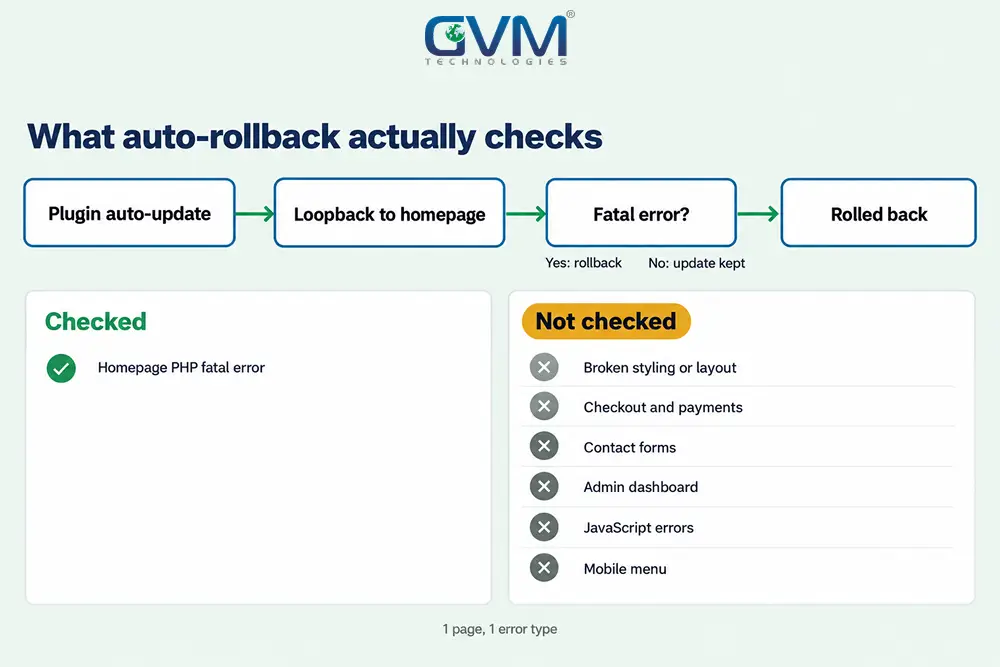
Since 6.6, WordPress rolls back an automatic plugin update if a homepage loopback hits a fatal error. That covers 1 page and 1 error type, so styling, checkout and forms pass.
6.9 and 7.0: what broke and how fast fixes arrived
Owners who searched “WordPress 6.9 broke my site” met 3 culprits first, per 365i’s breakage record:
- Elementor: editor and header or mega menu CSS errors, patched within days
- WooCommerce: checkout and cart errors, fixed in 10.4.2 on 12 December 2025
- Yoast SEO: garbled translations on non-English sites, fixed in 26.6 on 15 December 2025
The 6.9 performance guide says classic themes now load block styles on demand, so test styling after major updates. See Core Web Vitals explained for why load order matters.
WordPress 7.0 followed on 20 May 2026, per the 7.0 source of truth. Before any major update, check each plugin’s “Tested up to” version.
Stop the next WordPress update from breaking your site
Prevention is a loop: back up, stage, update in order, smoke-test, then watch the site for 24 hours.
Kipping updates is not the answer: Patchstack counted 11,334 new WordPress vulnerabilities in 2025, up 42% on 2024, with only 6 of them in core.
1. Back up in 2 places and test a restore
- Host backup: daily snapshots from your hosting panel
- Off-site copy: files and database in separate cloud storage
- Pre-update backup: a fresh manual copy, since a daily backup can be nearly 24 hours old
- Restore test: restore to staging each quarter to learn the real time
Ask your host in writing for the restore time. Our SLA checklist lists terms to request. GVM’s DevOps team builds backup and disaster recovery into client hosting.
2. Stage, update in order and run a 6-point smoke test
- Home page and 1 post on desktop and mobile, with the menu open
- Contact form submitted, with the email arriving
- Admin login and 1 post edit
- Checkout or booking up to the payment step, as in our payment gateway guide
- Search and 1 page using your builder’s widgets
- Browser console and
debug.logwith no new errors
GVM’s QA team runs such checks as manual and automated tests before release. Our QA testing for startups guide shows where they pay off.
3. Alerts that catch a silent break
- Uptime monitor: check the home page and 1 key page every 5 minutes for a text match
- Visual comparison: screenshots before and after each update
- Form and checkout test: an hourly scripted run
- Search Console: after an outage, watch crawl errors, as our pages not indexed guide explains
Keep minor core and security releases automatic, and stage the rest.
FAQs
1. Why did my WordPress site break after an update?
A plugin, theme or PHP version no longer matches the new code. Cached CSS is the second cause.
2. Is there an issue with WordPress right now?
If several sites broke the same day after a major release, vendor patches usually follow within days. Check your plugin’s support page.
3. What if a WordPress update broke my site and I cannot log in?
Check the admin email for the Recovery Mode link. If it is missing, rename the plugins folder over SFTP and reload.
4. Can I undo a WordPress update?
Yes. Reinstall the previous plugin version, restore a backup or downgrade core, and restore files and database together.
5. Should I turn off automatic WordPress updates?
Turn off major core and plugin auto-updates on busy sites, and stage them. Keep minor and security updates on.
6. Is WordPress outdated in 2026?
No. WordPress 7.0 shipped on 20 May 2026. Old PHP and abandoned plugins cause most failures.
Conclusion: fix the break, then close the gap that let it happen
When a WordPress update broke my site, 1 change was waiting to be found. Name the break type, read the log, roll back the smallest piece and update again in order.
Your checklist for today:
- Run the Break Type Test and write down what changed
- Take a manual backup of files and database before any fix
- Add an uptime monitor and a form test
With staging and alerts in place, the next update has a safety net.
Talk to GVM Technologies about a WordPress site broken after update
The layout is half-styled or the site is down, nobody knows which plugin changed, and each hour costs leads. GVM Technologies helps in 4 ways:
- WordPress development: updates, security patches and performance work
- DevOps and cloud hosting: monitoring, backup and disaster recovery
- Quality assurance testing: manual and automated tests before each release
- Project rescue: code audits and repairs for sites nobody fully owns
We built a shipment management platform on WordPress and Google Cloud with regular data backups. Send us the symptom and the update time.