A payment gateway passes your checkout’s card details to the bank for approval. Yours worked yesterday, and today customers see an error or pay without your system recording it.
That is a payment gateway not working, and 1 change usually caused it. This guide finds it in order, and our website down checklist comes first if the whole site is down.
Quick answer: A payment gateway not working means 1 thing changed: a key, certificate, plugin, API version or account status. Check the provider’s status page first, then your API keys and mode, then webhooks, and finally your last deploy or plugin update.
Key takeaways
- A payment gateway integration that fails after months of use traces to 1 change.
- Know who said no. A bank decline and a gateway rejection need different fixes.
- A payment gateway not working at the webhook layer gets 3 days of Stripe retries. After that, you resend by hand.
- Do not mark an order paid from the success page. Use a verified webhook.
- Price the gap: orders per hour x order value x hours unnoticed.
What is a payment gateway failure and where did it break?
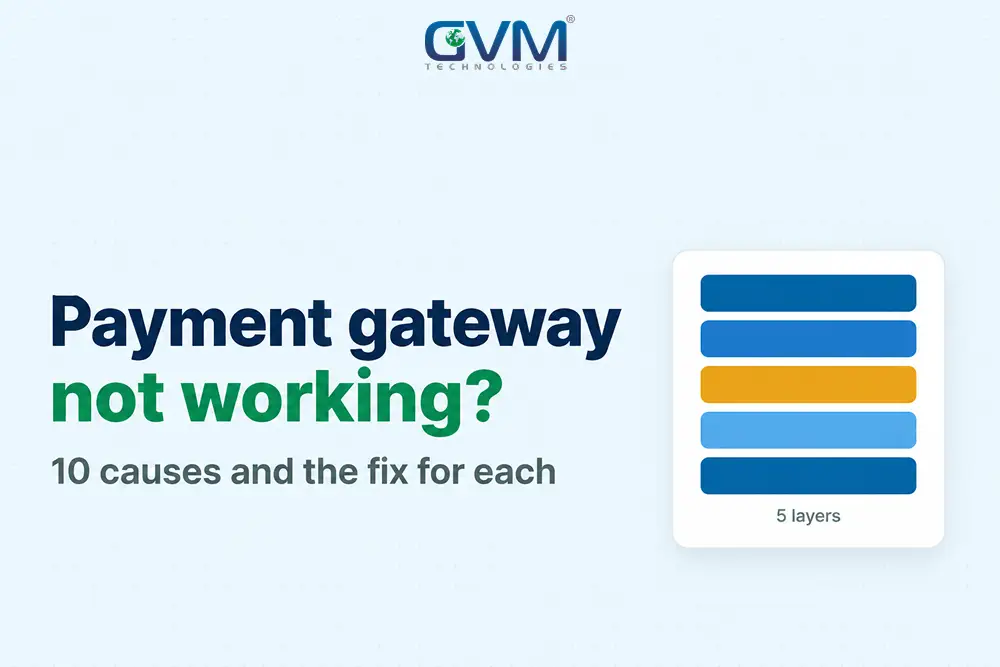
A payment gateway failure is any point where a payment request, authorization or confirmation does not complete. It sits in 1 of 5 layers: the bank, your checkout page, your server, the gateway API or your webhooks. The first layer showing the symptom tells you who owns the fix.
| Layer | It fails when | First check |
|---|---|---|
| 1. Customer and bank | Cards decline, 3D Secure fails | Second card, decline code |
| 2. Checkout page | Form is blank or button is dead | Console, blocked scripts |
| 3. Your server | 500 errors or timeouts | Server, plugin logs |
| 4. Gateway API | 401, 403 or version errors | Dashboard API logs, key and mode |
| 5. Webhooks, back office | Paid, order not updated | Webhook delivery log |
We call this the Layer Test. Use it on custom API integrations and plugins alike, or whenever you find a payment gateway not working, before anyone rewrites checkout code.
Decide who said no
Read the exact payment gateway error first. A failed payment is either a bank decline or a gateway rejection. Only a rejection comes from your own rules, as Braintree’s gateway rejection guide explains.
- “Do not honor” or insufficient funds: the bank said no, so ask for another card
- Gateway rejected (AVS, CVV, risk_threshold, duplicate): your gateway rules said no, so tune the rule
- 401 or “authentication failed”: your keys said no, so re-copy the live keys
success: falsewith HTTP 200: the gateway refused inside the body, so log the full body
The last case traps custom builds: code reads a field the failed response did not contain and crashes with a KeyError. Check the success flag first and log every raw response.
Match the fix to your setup
The type of payment gateway integration you run decides where payment gateway troubleshooting starts:
- Hosted checkout or plugin, such as Shopify or WooCommerce: plugin version, keys and status page. See the platform trade-offs
- Custom API build: API logs, SDK version and webhook log
- Card terminal or in-store POS: local listener, network and POS vendor support
A payment gateway not working on a terminal, with “no response from card processor”, points to the local listener or network, not your website.
10 reasons a payment gateway integration stops working
These 10 changes explain most cases of a payment gateway not working. Match your symptom to a row in the table, then jump to that fix. Start with the cheapest checks: the status page, the keys and the last deploy.
| # | What changed | Typical symptom |
|---|---|---|
| 1 | Keys expired, rotated or mixed with test keys | Every payment fails at once |
| 2 | Provider outage or maintenance | Sudden failures, no code change |
| 3 | Webhook endpoint broke | Paid, but the order stays pending |
| 4 | Certificate, TLS or server clock drift | Connection and signature errors |
| 5 | API version or library update | New errors after a deploy |
| 6 | Plugin, theme or PHP update | Checkout page breaks |
| 7 | Account hold or processing limit | “Not permitted” messages |
| 8 | Card-testing attack or strict fraud rules | Spike of tiny declines |
| 9 | Customer-side blocking | Fails for some customers only |
| 10 | Authorization expired or renewal failed | Paid orders cancel days later |
Rule out a payment gateway down incident first with Stripe Status, PayPal Status, Razorpay Status or your provider’s page. Slow pages also time out, as site speed and conversion shows.
Each cause leaves its own shape on your success-rate graph.
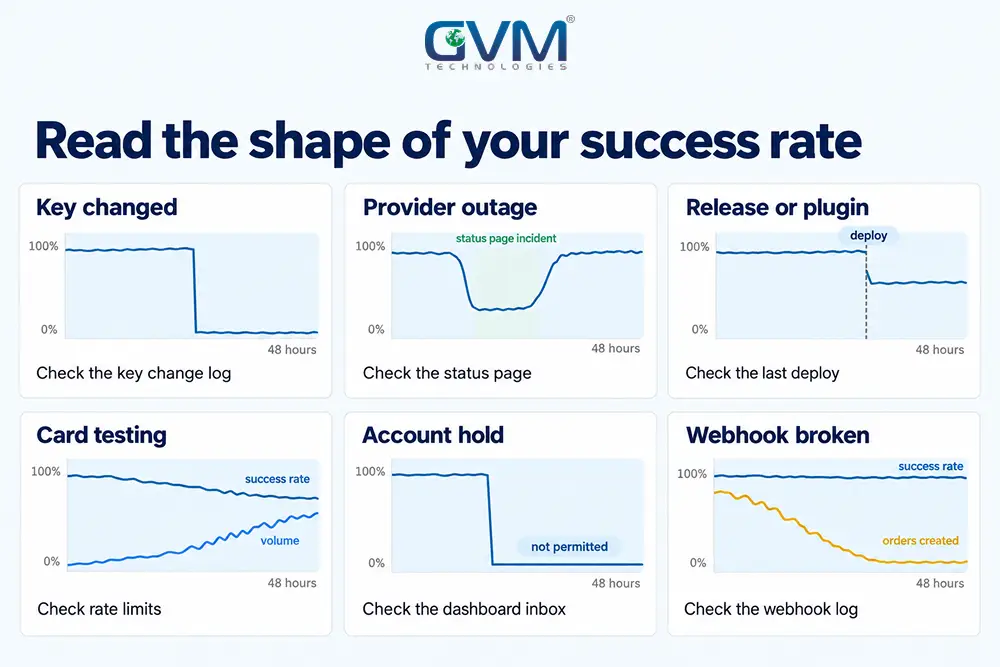
Fix a payment gateway not working after key, certificate or version changes
A payment gateway not working because of a credential or certificate fault fails every payment at once, often on a date nobody noted, such as a key rotation or certificate expiry. Version faults appear right after a deploy. Check keys, then certificates, then versions.
1. Keys, secrets and test or live mode
- Compare the live key in your payment gateway integration settings with the dashboard
- Check the webhook secret too. Stripe issues a different secret for test and live mode
- Check environment variables and callback URLs, since a deploy can restore test values
- If the only login left with a vanished developer, read our developer disappeared guide. GVM’s project rescue team handles that takeover
2. Certificates, clocks and wallet credentials
- Website certificate: capped at 200 days since 15 March 2026 and 100 days from March 2027, so automate renewals
- Stripe’s API certificates: the intermediates behind api.stripe.com changed on 2 September 2026, so pinned or old CA bundles fail
- Apple Pay certificate: 25 months, and only Apple Pay fails when it lapses
- Domain registration: a lapse kills return URLs, so see our recovery steps
- Server clock: Stripe tolerates 5 minutes of drift, so sync with NTP
Typical symptoms are “certificate verify failed” and “unable to get local issuer certificate”. Our SSL certificate guide covers a lapse that already happened.
3. API versions and library updates
A library update can change the API version your payment gateway integration speaks. Stripe’s upgrade guide says recent SDKs use the version current at their release.
- Pin the API version in your payment gateway integration code, not the dashboard default
- Test upgrades in a sandbox, and move legacy flows to ones that support 3D Secure
Payment gateway webhook not working: paid orders stay pending
A payment gateway webhook not working leaves paid orders in “pending”. The money path worked, but the order path did not hear about it.
This payment gateway failure hides well because checkout looks fine, so check the webhook delivery log before touching checkout code.
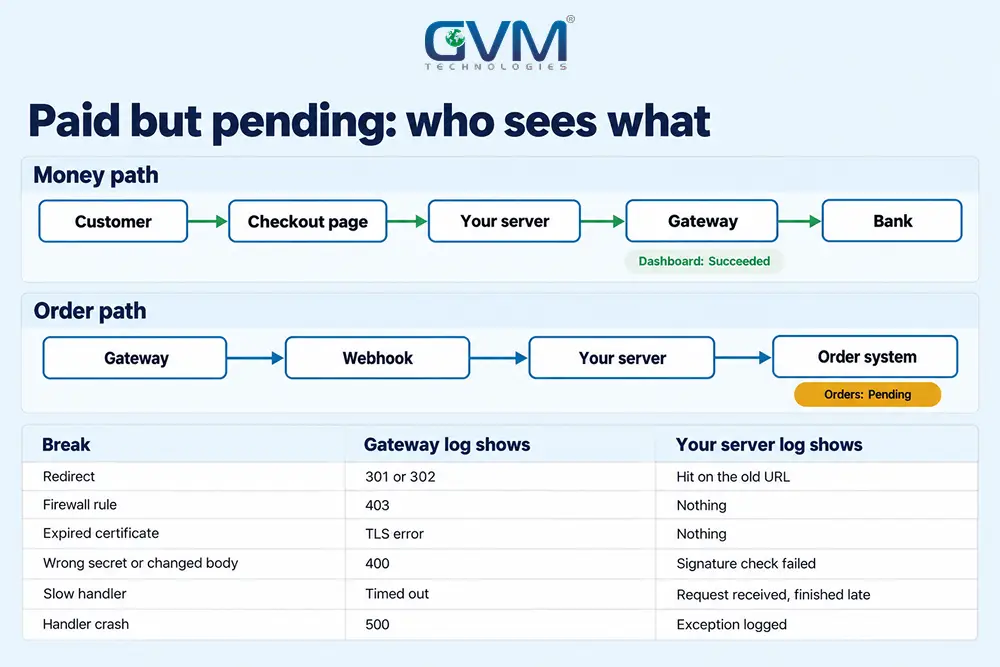
What breaks a webhook
| Delivery result | Likely cause | Fix |
|---|---|---|
| 3xx redirect | Endpoint moved: http to https, www, trailing slash | Register the final URL |
| 4xx | Firewall, WAF rule, login wall or wrong method | Allow gateway IPs and accept POST |
| 5xx, timeout or TLS error | Handler crashed or slow, or certificate chain below TLS 1.2 | Read logs, reply 2xx first, renew |
| Signature failure | Wrong secret, or a framework changed the body | Verify the raw request body |
Stripe treats any 3xx as a failure, so a migration or a forced-HTTPS rule can silently break every webhook. In Express, express.json() placed before the webhook route breaks signature checks.
Recover the orders you missed
- Open the webhook delivery log and filter the failures by date
- Fix the cause first, or every replay fails again
- Resend events from the dashboard (up to 15 days) or the CLI (up to 30 days)
- Compare gateway payments with your orders and fix gaps by hand
Stripe retries failed live events for up to 3 days with backoff, so a longer outage needs a manual resend. Missing order emails too? See why a contact form is not sending emails.
Confirm payments without trusting the browser
- Mark an order paid only from a verified webhook or an API lookup, not from the success page
- Store event IDs and skip repeats, since gateways do not guarantee order or uniqueness
- Retry timed-out requests with an idempotency key. Stripe saves the first result for at least 24 hours
- Run a fallback job that checks any order still pending after 15 minutes
Our rule: an event is a hint, and the gateway’s API is the truth. GVM’s DevOps team can run that fallback as a scheduled job.
When the gateway works but your account, traffic or timing does not
Sometimes the integration is healthy and the cause sits outside it: an account review, a card-testing attack, a customer’s browser or a payment that expires after checkout. These faults show up as patterns, such as tiny declines, overseas failures or cancelled orders.
1. Payment gateway not working after an account hold or limit
A review can pause a healthy payment gateway integration. Check email and dashboard notices before you touch code.
- Missing KYC documents, or business details that differ from your live site
- Processing caps on new accounts: Braintree answers “Application incomplete” until full approval
Ask support for the exact reason before you switch providers.
2. Payment gateway not working because of card testing
A burst of tiny failed charges means someone is testing stolen cards on your checkout. The payment gateway failure that follows may be a throttled account.
- Rate-limit payment session and token creation per IP and per session
- Put a CAPTCHA before a payment session is created, not after
- Issue 1 live token per cart and cancel the old token where the gateway allows it
Unknown scripts on checkout need our hacked website guide and the PCI compliance basics.
3. Payment gateway not working for some customers only
A payment gateway failure that hits some customers only usually has an issuer or browser cause.
- Overseas cards fail while local cards pass: pull decline reasons by country, since 3D Secure and issuer rules differ
- The same card works elsewhere: test a second browser, since fraud tools may judge the user agent and TLS fingerprint
Our checkout abandonment guide covers the friction side.
4. Payment gateway not working after checkout: captures and renewals fail
- Paid orders turn “canceled” days later: the authorization expired before capture, so capture earlier
- New buyers pay, renewals fail: expired cards or off-session 3D Secure, so send dunning emails and a re-authentication link
This payment gateway failure appears days late. Per Stripe’s hold guide, online card holds last about 7 days, Visa merchant-initiated holds 5 and in-person Mastercard holds 2.
After that, the funds release and the payment cancels.
Fix a payment gateway not working after a site update
If a payment gateway failure started right after an update, roll back the last change and retest on staging. Plugin, PHP and header changes can break any payment gateway integration. Change 1 thing at a time so the culprit stays visible.
- Note the date of the last deploy, plugin, PHP or header change
- Disable other plugins 1 at a time and retest, as SkyVerge’s guide suggests
- Review your Content Security Policy, since PCI DSS 6.4.3 has applied to payment-page scripts since 31 March 2025
- Exclude cart, checkout and webhook URLs from page caching and CDN rules
- Ship payment changes off-peak with a rollback plan ready
Skipping tests costs more later. GVM’s QA team adds payment checks to release lists, and our QA testing for startups guide treats payment flows as critical paths.
Stop a payment gateway not working again: price the gap, then add 3 alerts
The costly part of a payment gateway failure is the hours nobody noticed. Price it as orders per hour x order value x hours unnoticed: at 3 orders an hour and $90 each, 14 overnight hours cost $3,780 (illustrative). Add 3 alerts to shrink those hours.
Alerts that catch a payment gateway failure in minutes
- Success rate: alert at 10 points below your usual rate, which catches key, fraud and bank problems
- Zero payments: alert when none arrive for longer than your quietest normal gap, which catches silent outages
- Webhook failures: alert when any endpoint fails repeatedly, which catches pending-order bugs
A way out when the provider fails
- Store provider settings and the checkout URL in config, not hard-coded into your payment gateway integration
- Offer a second payment method, such as PayPal, so 1 failing route does not stop sales
- Treat a second provider as a different route, because currency and compliance rules differ
Use our SLA checklist for founders to set uptime terms with your provider.
FAQs
1. Why is my payment gateway not working?
A payment gateway failure usually means expired or mixed API keys, an outage, a broken webhook, an expired certificate or an account hold. Check the status page first.
2. Are online payment systems down right now?
Check your provider’s status page. No incident means the payment gateway failure is yours or the bank’s.
3. Why did my payment gateway integration stop working when I changed nothing?
A payment gateway not working after no code change means something outside your code changed: a certificate, key, API version, security review or auto-updated plugin.
4. What does “payment declined by gateway” mean?
Your gateway’s own rules rejected the payment, such as an AVS, CVV or risk check. A bank decline is different.
5. What should I send my payment gateway provider?
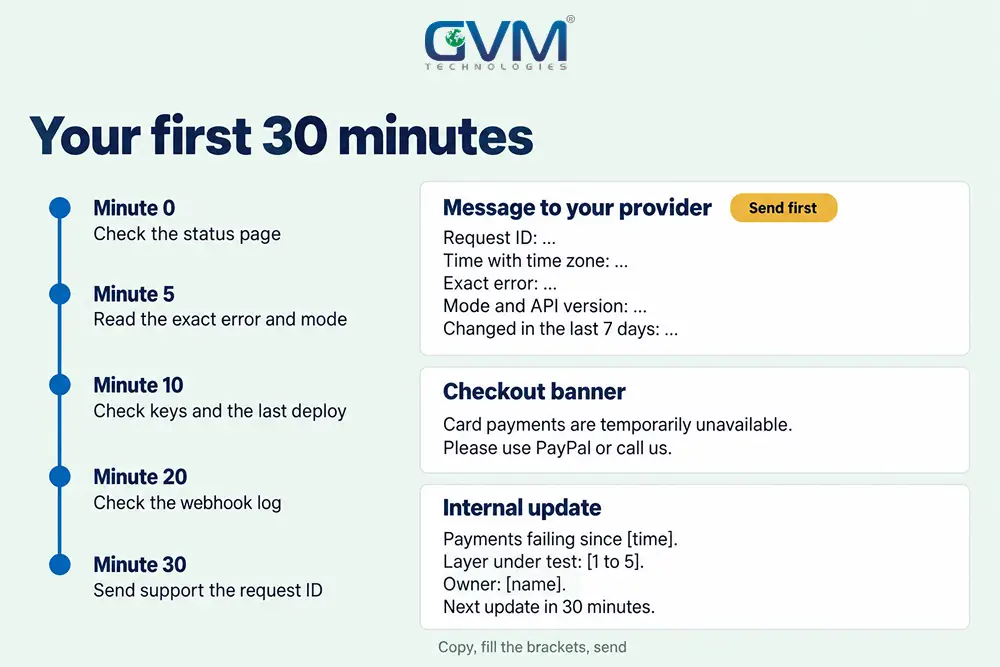
Send the request ID, timestamp with time zone, exact error, mode, API version and what changed in the last 7 days.
Conclusion: fix a payment gateway not working before it costs another sale
A payment gateway not working is 1 change waiting to be found. Test layer by layer, ask who said no, and recover missed orders before the retry window closes.
Your checklist for today:
- Run the Layer Test and list what changed in the last 7 days
- Pin API versions, automate certificates and refresh old CA bundles
- Add the 3 alerts so the next payment gateway failure costs minutes, not a night’s sales
With alerts and pinned versions in place, the next payment gateway failure becomes a 15-minute job.
Talk to GVM Technologies about a payment gateway not working
Payments are failing, nobody owns the code and every update risks checkout. GVM Technologies helps in 4 ways:
- Project rescue: code audits and repairs for a payment gateway integration nobody owns
- DevOps and cloud hosting: real-time monitoring and CI/CD releases for your payment gateway integration
- WooCommerce development: gateway integration and plugin updates
- Quality assurance testing: manual and automated tests before each release
We built a remittance platform with KYC and transaction tracking, so payment faults are familiar ground. Send us your gateway, the exact error and what changed last week.