Quick answer: To recover expired domain names, renew them at your registrar today. It costs the normal price in grace, then a restore fee applies. If your website looks down, check the expiry date first.
Key takeaways
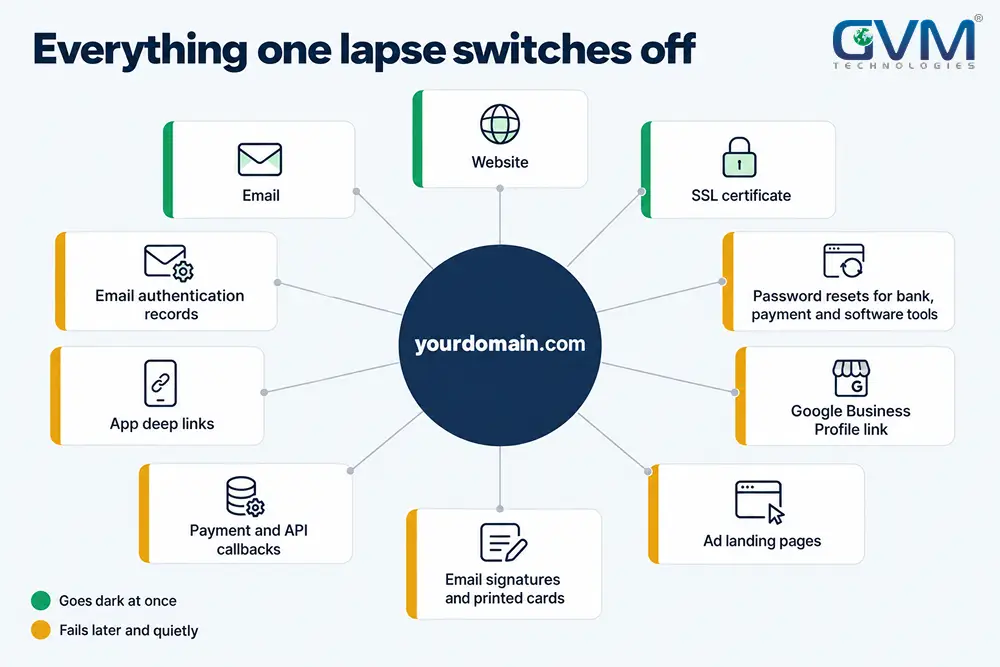
- When a domain expired, site and email stop together, but hosting files usually survive.
- GoDaddy lists expired names for auction at day 26, so day 25 is your real deadline.
- A domain redemption period restore costs about $50 to $200 on top of renewal.
- To recover expired domain names, renew first and prove ownership second.
- If someone else registered the name, you can backorder, negotiate, file a UDRP or rebrand.
Your domain expired, and now the site shows a parked page while email bounces.
Usually 1 missed renewal caused it, and you can recover expired domain names and the files behind them. The next 48 hours decide whether this costs $15, $200 or a rebrand.
This guide walks through each stage. Where a fix needs DevOps and hosting work, we at GVM Technologies say so.
Domain expired: the 4 stages that decide what you can recover
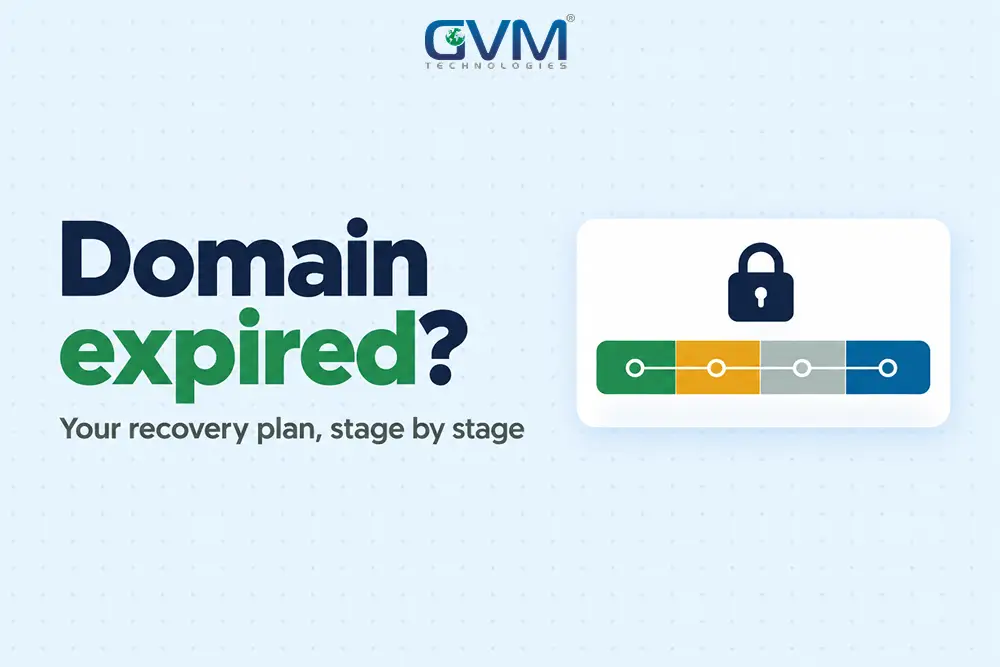
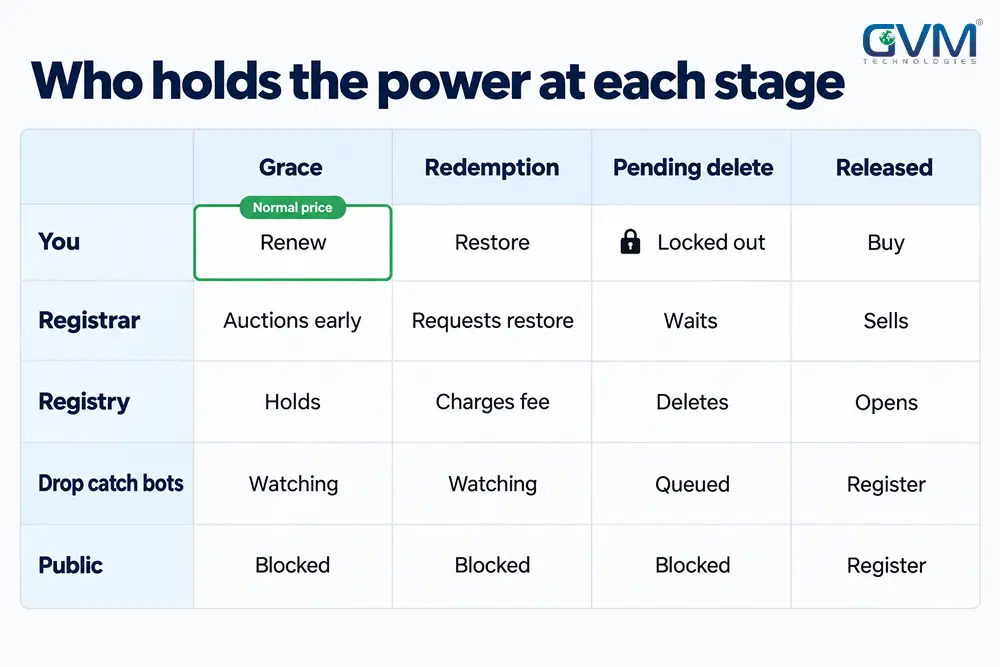
To recover expired domain names, first find your stage. A typical .com gets 25 to 45 days of grace, then 30 days of domain redemption period, 5 days of pending delete and release.
| Stage | Typical length (.com) | What it costs | Your move |
|---|---|---|---|
| Grace period | Day 0 to 25 or 45 | Normal renewal | Renew in the dashboard |
| Domain redemption period | Next 30 days | Renewal plus $50 to $200+ | Ask the registrar to restore |
| Pending delete | About 5 days | Not recoverable | Line up backorders |
| Public release | After roughly 65 to 80 days | New registration or buyout | Backorder, negotiate, UDRP |
Cost rises with every stage, and control shifts away from you. That is why the first 25 days matter most.
Registrar clocks differ, so use your own
| Registrar or TLD | Clock |
|---|---|
| GoDaddy | Auction listing at day 26, then recovery needs a redemption fee |
| Namecheap | 30 days in your account, services back 24 to 48 hours after renewal |
| Wix | About 30 days of grace, redemption recovery up to 7 days |
| .de, .fr, .nl, .at, .be, .ch, .me, .mx | No grace period, straight to redemption (per Wix) |
ICANN’s Expired Registration Recovery Policy sets only a floor: 2 warnings before expiry and a 30-day domain redemption period for gTLDs.
Most owners miss the deadline that matters: the registrar’s auction date, not the registry’s 45 days. Treat day 25 as yours.
Read the status code before you pay
Before you recover expired domain names, ICANN Lookup shows your stage:
autoRenewPeriod: still renewable at the normal priceclientHoldorserverHold: DNS is off, so site and email are downredemptionPeriod: the domain redemption period, so a restore fee appliespendingDelete: about 5 days from release, no restore possible
Confirm what broke before you recover expired domain names
Your domain, hosting and website are 3 assets with 3 renewal dates. Find which one lapsed, because each needs a different fix.
| What you see | Likely lapse | Fix |
|---|---|---|
| Parked page, email bounces | Domain | Renew or restore at the registrar |
| Host’s “account suspended” page | Hosting | Pay, then request a backup |
| Padlock warning, site loads | SSL certificate | Renew the expired certificate |
Triage before you pay. Renewing hosting when the domain lapsed, or the reverse, burns the days you are racing.
A 5-minute triage
- Look the domain up in ICANN Lookup. An expiry date in the past is your cause.
- Check the nameservers. Registrars swap yours for parking nameservers on expiry.
- Log in to the hosting panel. An active account means the files still exist.
- Email your domain address from another account. A bounce means DNS is off.
Finding the registrar when nobody remembers
Start with ICANN Lookup, which shows the registrar of record. Then search every inbox, spam folder included, for “domain” and “renewal”.
Card and bank statements also work, because registrar charges appear there by name.
A common trap: renewal notices went to an address on the lapsed domain itself. They never arrived.
When a developer or ex-employee is the registrant
Registrars deal only with the registrant of record. If a developer holds that role, prove the business paid, with invoices, bank records and company registration.
Prevent it with the clause in our guide on who owns the IP when you hire an agency.
If the only login left with a vanished developer, our project rescue service handles the takeover.
How to recover expired domain names at your registrar
To recover expired domain names, log in and renew. In the domain redemption period, request a restore instead. After redemption, only a buy-back remains.
Recover expired domain names during grace
- Log in and renew for 2 to 5 years, which moves the next deadline out.
- Turn on auto-renew and add a second payment card.
- Wait 24 to 48 hours for DNS to return.
Recover expired domain names in the domain redemption period
Open a support ticket first, since many registrars treat a restore as a request, not a button. Expect roughly $50 to $200 in total for the restore fee, handling and renewal.
Amazon Route 53 says some requests take a week or more. It also counts the new expiry from the old date, so the lapse eats into what you paid for.
Getting past a locked or unreachable account
Renew first and prove second. If your domain expired while the account email is dead, use account recovery.
Send ID, invoices and a card statement, and ask support to take payment while verification runs. Speed matters more than perfect paperwork here.
If a host or agency sold you the name, that reseller is your support contact.
Keeping customers reachable while you wait
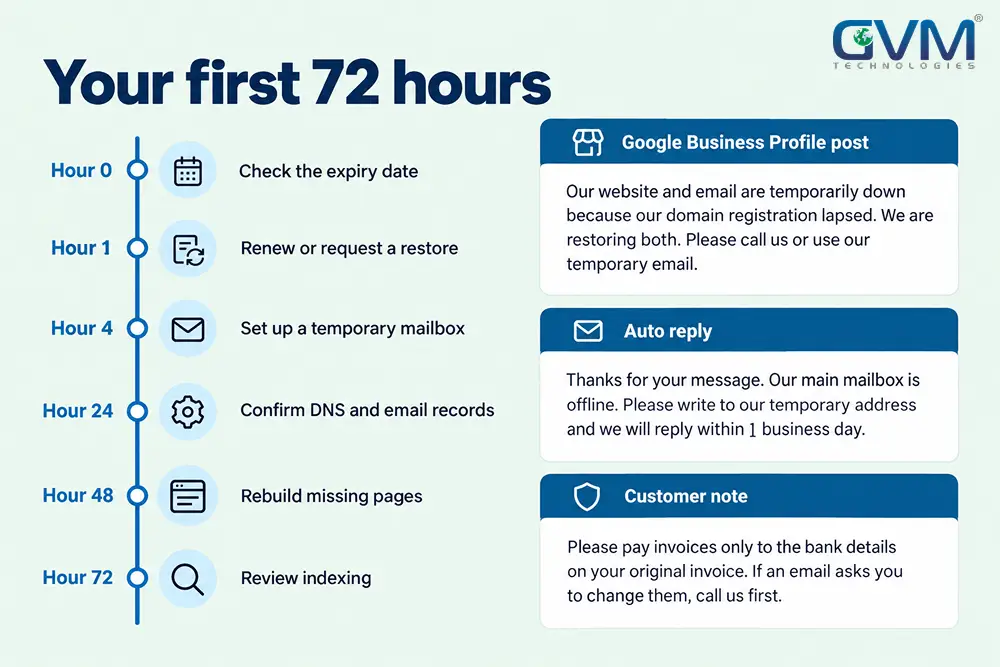
Set up a temporary mailbox on another domain and publish it on your Google Business Profile. Ask key customers to resend anything emailed during the outage.
Move payment, banking and software logins to the new address, since reset emails go to the old domain.
Restoring DNS, email and SSL after you recover expired domain names
- Confirm the status shows active with a new expiry date.
- Point the nameservers back to your DNS host and check A and CNAME records.
- Verify MX records, SPF, DKIM and DMARC, then send a test email.
- Confirm the SSL certificate is valid and the site loads on mobile data.
- Move the registrant email to a shared mailbox on a different domain, and turn on the registrar lock.
If your domain expired and someone else bought it, you have 4 routes
Once the domain redemption period ends and the name drops, the new registrant owns it legally.
To recover expired domain names from a new owner, backorder, negotiate, file a UDRP or move on.
Why an obscure name vanished in seconds
Infoblox research, reported by The Hacker News, counted about 50,400 drop-caught gTLD registrations a day in early 2026. That is roughly 20% of all registrations.
Drop-catch bots watch expiry lists for aged names with backlinks. The same research tracked 10,000+ such domains used for streaming and gambling.
Until you regain yours, assume the owner receives mail sent to your old address:
- Warn customers not to pay invoices from unfamiliar addresses
- Change every account login that uses an old-domain email
- If browsers flag the old URL, see our deceptive site warnings guide
Contacting the owner and pricing the buy-back
Look up the registrant in ICANN Lookup. If privacy hides it, use the registrar’s contact form.
Open the domain first, since a for-sale page may show a price. Asks run from a few hundred to several thousand dollars.
- Keep the first message short, and pay only through escrow
- Treat a backorder as a wait, not a plan, since competing backorders trigger a private auction.
The 3-number buy-back test
Our rule of thumb: compare 3 numbers before you negotiate.
| Number | How to get it |
|---|---|
| Asking price | The owner’s quote, or a broker’s |
| Rebrand cost | Reprints, relisted profiles and your estimate of the traffic dip |
| Domain revenue | 12 months of leads and sales that came through the site and email |
Buy back when the ask is below your rebrand cost and the domain earns revenue. Otherwise rebrand.
Register a near match today, such as the same name on .net. Our SEO team plans the move so listings you still control point to it.
Filing a UDRP to recover expired domain names
The Uniform Domain-Name Dispute-Resolution Policy (UDRP) requires all 3 elements:
- The domain is identical or confusingly similar to your trademark. Unregistered rights count if the name is known as yours.
- The registrant has no legitimate interest in it.
- It was registered and is used in bad faith.
WIPO’s filing fee is $1,500 for 1 panelist and $4,000 for 3, plus legal help.
Build evidence first: old-site screenshots, business cards and press mentions.
A generic name held by a stranger is hard to challenge. An owner redirecting your brand to unrelated ads is easier.
Rebuild a lost website from backups, the Wayback Machine and your own data
When your domain expired and hosting went too, ask the host for a full backup and database dump first. Then use the Wayback Machine and your own records.
Restore from the Wayback Machine in 5 steps
- Enter the domain and use Browse History on the Wayback Machine.
- Pick snapshots dated before your domain expired, because later ones may show a parked page.
- Pull pages and images with a tool such as Archivarix.
- Rebuild in a CMS, using the archive for text and structure.
- Scan every recovered script before running it. Our hacked website guide covers the clean-up.
You get a static copy. Forms, databases, admin panels and third-party assets are not captured.
Let your own data set the rebuild order
| Source | What it gives | How to use it |
|---|---|---|
| Search Console | Top pages and queries | Rebuild by traffic. DNS-verified properties may need re-checking after DNS returns |
| Sitemap and old proposals | URL structure | Keep original URLs to preserve links |
Rebuild by traffic, not by menu order. Pages that earned clicks and links deserve the first week of work.
Our website development and WordPress development teams rebuild from archived content on clean, current code.
Protect rankings and reputation after the lapse
Even after you recover expired domain names, Google publishes no recovery timeline. Short outages usually recover after recrawling, while long lapses can take months.
Recheck indexing after renewal
- Inspect your top URLs in Search Console and request indexing.
- Resubmit the sitemap and fix broken 301 redirects.
- Run a technical SEO audit. If pages stay out, read why pages are not indexed.
If you bought the name back or lost it for good
Google’s John Mueller said in September 2025 that a domain’s old state can take long to shake off. Nothing manual speeds it up.
A name used for spam may need penalty-style clean-up. A lost domain cannot be redirected, so publish the new one and ask top linking sites to update.
Habits that keep you from having to recover expired domain names again
Most times a domain expired, 3 causes explain it: a dead card, unread renewal emails or a registrant who left. Fix those, then add long terms and alerts.
| Habit | Setup |
|---|---|
| Company-owned account | Registrar login held by the business, with a shared mailbox on another domain |
| Renewal safety net | Auto-renew plus a second card, and a reminder before each card expires |
| Longer terms and alerts | Register key domains for 5 to 10 years, with reminders at 90, 60, 30 and 7 days |
| Transfer planning | Some registrars apply a 60-day transfer lock after renewal, so plan moves early |
| Asset register | 1 sheet with registrar, expiry, host, DNS, SSL and backup dates |
Two mistakes cost the most: pointing DNS at a new host before renewing, and paying anyone who guarantees your domain’s return.
FAQs
1. How do I recover expired domain names?
To recover expired domain names, log in to your registrar and renew. If the domain redemption period has started, request a restore instead.
2. Can I renew my domain after it expired?
Yes, until the domain redemption period ends, typically 60 to 80 days after expiry. The price rises once grace ends.
3. How long does GoDaddy hold an expired domain?
GoDaddy lists expired names on its auction 26 days after expiry. You can still recover the name then, in the domain redemption period, by paying a fee.
4. How can I restore my website after my domain expired?
Renew the domain, then check whether hosting and files survived. If not, restore from a backup or the Wayback Machine, and budget with our website development costs guide.
5. Can I recover expired domain names someone else registered?
Only by negotiating, winning a backorder or winning a UDRP. A UDRP costs $1,500 at WIPO for 1 panelist, plus legal help.
Conclusion: renew first, then rebuild what the lapse cost you
To recover expired domain names, work to the clock. Confirm what broke when your domain expired, renew or restore before your registrar’s deadline, then rebuild from backups.
To recover expired domain names someone else holds, price the buy-back against a rebrand. Then remove the causes: a company-owned account, a working card and long terms.
How GVM Technologies helps you recover expired domain names and sites
- DevOps and cloud hosting: off-site backups, DNS management and expiry monitoring
- Website development: rebuilds from archived content
- Search engine optimization: post-lapse audits
- Generative engine optimization: rebuilding how AI search tools describe you after the outage
Talk to GVM Technologies to recover expired domain names
If your domain expired, tell us which stage you are in and what the lapse switched off.
We will map what can be restored, what to rebuild first and the fastest route back online.