


A Service Level Agreement decides what happens the day your site goes down or a ticket sits unanswered. Most founders sign one without checking it, a gap we see constantly in software project rescue work.
A workable SLA states 5 numbers: response time, resolution time, uptime, an escalation path, and what happens on a miss. It also states a compliance percentage, not “always,” the detail most checklists skip.
SLAs use terms like SLO, P1, and “best efforts” that mean nothing to a founder who just wants a straight answer. This guide SLA checklist for founders from non-technical background translates that language before you sign.
Quick answer: A solid SLA names response and resolution targets by severity, a compliance percentage, an uptime window, a named escalation contact, and clear exclusions. “Best efforts” alone isn’t enforceable.
Key takeaways
- Response time and resolution time are 2 different promises. A vendor blending them into 1 number is usually protecting themselves.
- A good SLA states a compliance percentage, not “always.” “95% of P1s resolved in 4 hours” is realistic and enforceable.
- An SLA and an SLO aren’t the same thing. An SLA is what you’re owed; an SLO is the vendor’s internal target.
- A cash-backed SLA sounds stronger than it is. Most vendors cap penalties at what they can actually afford to pay.
- How a P1 gets reported matters as much as the number itself. A ticket filed into an unmonitored portal may never start the clock.
- The SLA should scale to your business, not a template. A 5-person startup doesn’t need enterprise-grade terms.
- Uptime alone doesn’t describe a worst-case day. RTO (recovery speed) and RPO (data-loss window) are the numbers most checklists skip.
What an SLA actually is, and the 3 types you’ll encounter
A Service Level Agreement is a written commitment to a measurable standard, response time, resolution time, uptime, or all 3, with a stated consequence for missing it.
A development contract is different. It covers the 1-time build: scope, payment, and code ownership.
Our guide to software development contract red flags covers that build contract in full. This one covers the clause that governs everything after launch.
1. SLA vs SLO: the 1 distinction that changes everything
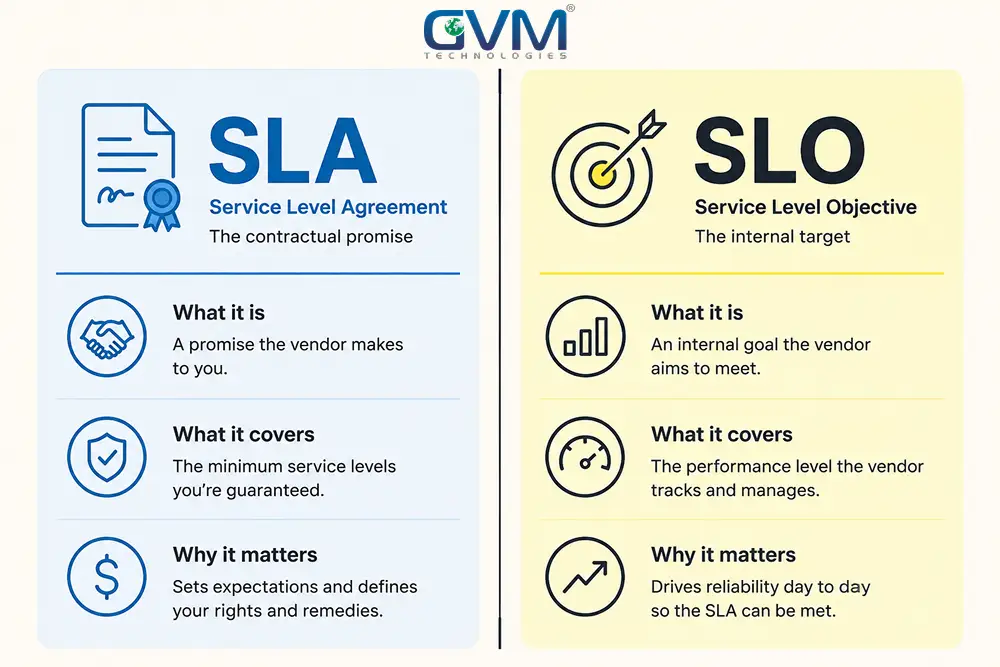
An SLA is what you’re contractually owed. An SLO, a Service Level Objective, is the vendor’s internal target, usually set stricter than your contract for a safety buffer.
Google’s Site Reliability Engineering guidance popularized this distinction. Most serious IT vendors track both, even when only 1 appears in your paperwork.
Ask a vendor for their internal SLO alongside the SLA. A vendor who shows a 30-90 day performance report is demonstrating results, not just promising them.
2. External, internal, and multi-level SLAs explained
Most founders only ever see 1 kind of SLA. The vendor is usually managing 3:
- External SLA: the agreement you sign with your vendor, agency, or host. This guide focuses on this 1.
- Internal SLA: the target a vendor’s own team tracks, rarely shared unless you ask.
- Multi-level SLA: 1 agreement with different terms by tier, like bronze, silver, and gold SaaS support.
Knowing the type prevents a common mix-up: comparing your external SLA against a vendor’s internal SLO and assuming a promise was broken.
3. When you need a formal SLA, and when an SLO alone is enough
Not every vendor relationship needs a binding SLA with penalties. A 5-person help desk gets more from an internal SLO than a contract it will never enforce.
A formal SLA earns its cost when downtime costs you revenue or customers: a SaaS product, an e-commerce checkout, or anything customers depend on directly.
If nobody outside your company notices the downtime, a documented SLO is usually enough.
Answer 1 question before asking for any number: how many hours could your business survive without this system before real damage happens?
Under 4 hours points to a strict, priced SLA. Over 48 hours means a standard tier already covers you.
Response time, resolution time, and severity levels
Response time is how long before someone acknowledges your ticket. Resolution time is how long until it’s fixed. Blending the 2 into 1 number usually hedges the harder promise.
1. Response time vs resolution time: why they’re never the same promise
A vendor controls how fast someone looks at a ticket. They can’t always control the fix, since it might need a specific developer or a backordered part.
Experienced vendors commit hard to response time and soften resolution time into a target. A vendor guaranteeing both equally hard hasn’t thought it through.
2. Severity levels: how P1 through P4 should actually work
Most SLAs sort issues into 4 tiers, each with its own targets:
| Severity | What it means | First response range | Resolution target range |
|---|---|---|---|
| P1 / Critical | Business-stopping: site down, checkout broken, data loss | 15-30 minutes | 2-4 hours |
| P2 / High | Major feature broken, no workaround available | 1-2 hours | 8 business hours |
| P3 / Medium | Feature degraded, a workaround exists | 4 hours | 1-2 business days |
| P4 / Low | Cosmetic issue or minor request | 8-24 hours | 3-5 business days |
These ranges shift with team size. A 2-person team can’t staff a 15-minute P1 response around the clock.
A vendor claiming otherwise hasn’t tested the number against their own headcount. For a bug needing real QA testing to even reproduce, a resolution target beats a guarantee every time.
3. The compliance percentage nobody tells founders about
Most generic checklists stop at listing response and resolution numbers. The detail that separates a workable SLA from an unenforceable 1 is the compliance percentage.
“100% of P1s resolved within 4 hours” sounds strong, but 1 hard bug breaches it forever.
“95% within 4 hours, measured monthly” is realistic and still holds the vendor accountable. Ask for the percentage, not just the hours.
Uptime, downtime, and the “nines” table every founder should keep on hand
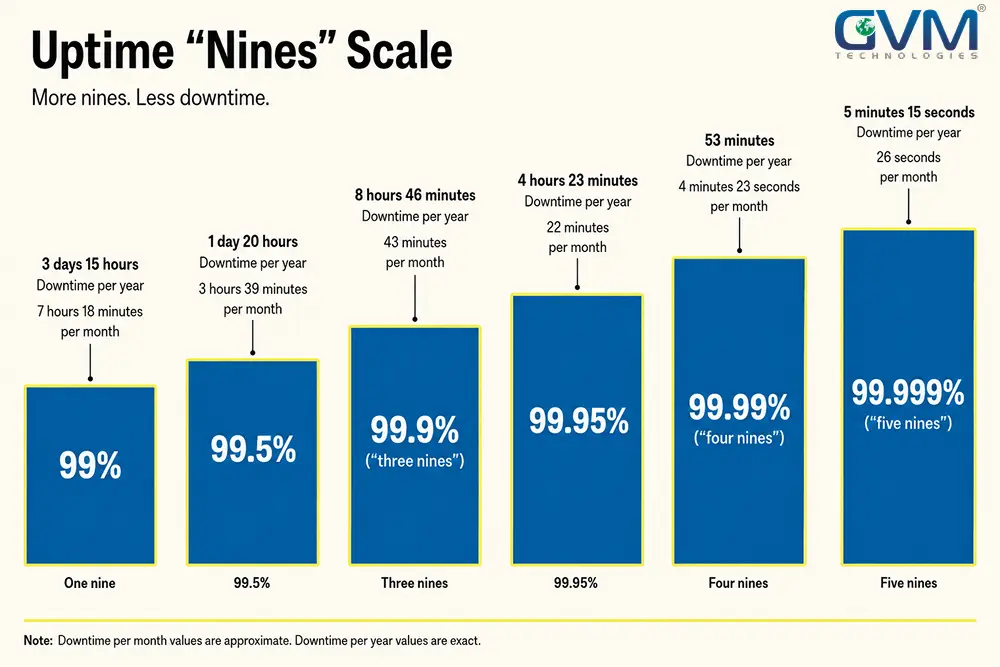
Uptime is stated as a percentage, and every extra 9 is dramatically more expensive to guarantee. The percentage alone means nothing without the downtime cost.
1. What each “nine” actually costs you in downtime
| Uptime target | Downtime per month | Downtime per year |
|---|---|---|
| 99% | 7 hours 18 minutes | 3 days 15 hours |
| 99.5% | 3 hours 39 minutes | 1 day 20 hours |
| 99.9% (“three nines”) | 43 minutes | 8 hours 46 minutes |
| 99.95% | 22 minutes | 4 hours 23 minutes |
| 99.99% (“four nines”) | 4 minutes 23 seconds | 53 minutes |
| 99.999% (“five nines”) | 26 seconds | 5 minutes 15 seconds |
Three nines, 99.9%, is realistic for most small business websites and SaaS products.
Four nines and up usually means redundant servers across regions, a cost most businesses under a few million in revenue don’t need yet.
2. The measurement window trap vendors rely on
The percentage means nothing without its window. 99.9% measured monthly resets every 30 days, so a bad week gets caught fast.
99.9% measured annually lets that bad week hide inside 11 good months. Always ask which window applies.
3. RTO and RPO: the disaster-recovery numbers uptime doesn’t cover
Uptime tells you how often things stay up. It says nothing about a genuine failure, a dead server or a corrupted database.
2 numbers matter there. RTO, Recovery Time Objective, is how long restoring service takes. RPO, Recovery Point Objective, is how much data you’d lose.
An SLA stating only 99.9% uptime hasn’t described a worst-case day. Ask for both alongside your cloud infrastructure setup.
Penalties, service credits, and the cash-backed SLA myth
A cash-backed SLA refunds money when a vendor misses its target. In practice, most vendors cap that penalty at what they can absorb without folding.
1. Why vendors cap penalties, and why that isn’t a red flag
A vendor accepting unlimited penalties either hasn’t priced their own risk or doesn’t expect the clause to matter. A cap tied to a percentage of the fee is normal.
An uncapped promise is usually the one worth questioning. 3 signs it isn’t sincere:
- Offered in the first sales call, before the vendor has seen your setup.
- No question asked about your team size or ticket volume first.
- The vendor won’t share their own SLO or a real report when asked.
Weigh an uncapped promise against a vendor’s track record on past projects.
2. Service credits vs real compensation: what you’re actually owed
Most SLA penalties pay as a service credit, a percentage off next month’s invoice, not cash. That still gives the vendor a real incentive to hit the number.
A common, tiered structure looks like this:
| How far the target was missed | Typical service credit |
|---|---|
| Just under the target | 5-10% of that month’s fee |
| Missed by a noticeable margin | 10-25% of that month’s fee |
| Missed badly, or repeatedly | 25-50% of that month’s fee, often with termination rights unlocked |
A credit won’t cover revenue lost during the outage itself. A bigger loss is a business continuity and insurance conversation, not an SLA one.
3. What an upgraded SLA tier really costs
Faster response and stronger penalties aren’t free. An upgraded tier commonly costs 10-20% on top of your base contract or subscription.
Hosting-heavy services often price higher, since extra 9s mean redundant infrastructure.
Weigh it against your actual project and hosting costs. A 5-person startup rarely needs the tier a payments company does.
Escalation and incident communication founders forget to ask for
1. The escalation matrix: how impact and urgency set priority
Priority isn’t how loud the reporter is. A workable matrix combines impact, how many people or revenue are affected, with urgency, how fast it needs fixing.
| Impact | Urgency | Resulting priority |
|---|---|---|
| Whole business affected | Needs fixing right now | P1 / Critical |
| Multiple users affected | Needs fixing today | P2 / High |
| Single user affected | A workaround exists | P3 / Medium |
| Cosmetic or minor | No real time pressure | P4 / Low |
A well-run matrix also caps how many tickets 1 requester can mark critical, usually 1. Without that cap, 1 anxious user jumps the whole queue.
2. What “stops the clock” on your SLA
An SLA timer should pause when the delay isn’t the vendor’s fault: waiting on your team, a third-party API that’s down, or a purchase you need to approve.
Ask which conditions pause the clock, in writing. An undefined “stop the clock” clause is where compliance numbers quietly get padded.
3. Status updates during an incident, not just a first response
A first-response time only covers the acknowledgment moment. It says nothing about the next 3 hours while a P1 stays open.
A stronger SLA adds a status-update cadence, an update every 30-60 minutes until resolved.
Easy to build into hosted monitoring, this single addition kills most “is it back up yet” calls.
4. How a P1 gets reported changes whether the clock even starts
A response clock is only as good as its trigger channel. A P1 filed into a portal checked hourly starts no clock that protects you.
Ask whether a genuine critical issue must be phoned in, not just logged, to trigger the fastest tier.
Ask who picks up that phone too. A named, dedicated team answers far more reliably than a rotating freelance pool.
Data security, indemnification, and what belongs outside your SLA
Data security terms your SLA should name, not assume
An SLA covering only speed and uptime misses half the risk. Ask it to name 4 things instead of a vague security promise:
- Encryption in transit and at rest, named explicitly.
- Backup frequency and retention, in days or hours, not “regularly.”
- A recognized standard, such as ISO/IEC 20000-1 for IT service management.
- Breach notification timeline, how fast you’re told if something breaks.
GVM Technologies holds ISO 27001, ISO 20000-1, and ISO 9001 certification, the kind of checkable claim to look for instead of “we take security seriously.”
Indemnification isn’t an SLA clause, and why that confuses founders
Several generic checklists list indemnification as an SLA item. It usually isn’t. Indemnification covers who pays legal costs for a claim, usually IP infringement.
That belongs in your underlying vendor contract, not the service-level document.
Mixing the 2 makes both harder to negotiate. If your SLA and contract disagree on liability, the contract wins.
That’s why our guide on who owns the IP when you hire a development agency exists as a separate resource.
Sizing your SLA to your business, not a template
1. The 1-page SLA vs the 10-page SLA
A 10-page enterprise SLA mostly intimidates a small business into signing unread. A 1-page version covering the same 5 core numbers protects a small team just as well.
Ask for the shorter version if the long 1 wasn’t written for you.
As traffic or headcount grows, revisit the SLA rather than living with the 1 you signed as a 2-person startup. A modernization review is often the moment that prompts the conversation.
An SLA also works the other way. SaaS founders selling to price-sensitive customers have found a documented SLA on a paid tier drives upgrades better than a feature does. Treat your SLA as part of the product, not just a legal safety net.
Either version needs the same 5 core numbers to actually function:
- Response time, stated by severity.
- Resolution target with a compliance percentage.
- Uptime target with its measurement window.
- Escalation contact and the impact-times-urgency matrix.
- Exclusions: what the SLA explicitly does not cover.
2. Business hours vs 24/7 coverage, and what each costs
A response time only means what it says once you know its hours. “4 hours” during 9-to-5 weekdays is a different promise than “4 hours” around the clock.
Genuine 24/7 coverage costs more. It requires a named on-call rotation, not a longer inbox-checking habit stretched across freelancers.
3. Ask if the vendor tested this SLA against its own ticket history
Before accepting a stated response time, ask how it was set. A vendor pulling 6 months of real ticket data and pricing slightly above their own average is offering something tested.
A vendor copying a template number, or setting 1 to close a sales call, is offering a guess.
That gap shows up the first time you need the SLA, the same way it shows up when nobody ran real QA testing before launch.
The CLEAR framework: a 5-point SLA check before you sign
Run every SLA a vendor hands you, or draft one yourself, through these 5 checks before signing.
It works whether you’re reviewing a hosting provider’s terms or the support agreement on a project like the ones in GVM’s own portfolio.
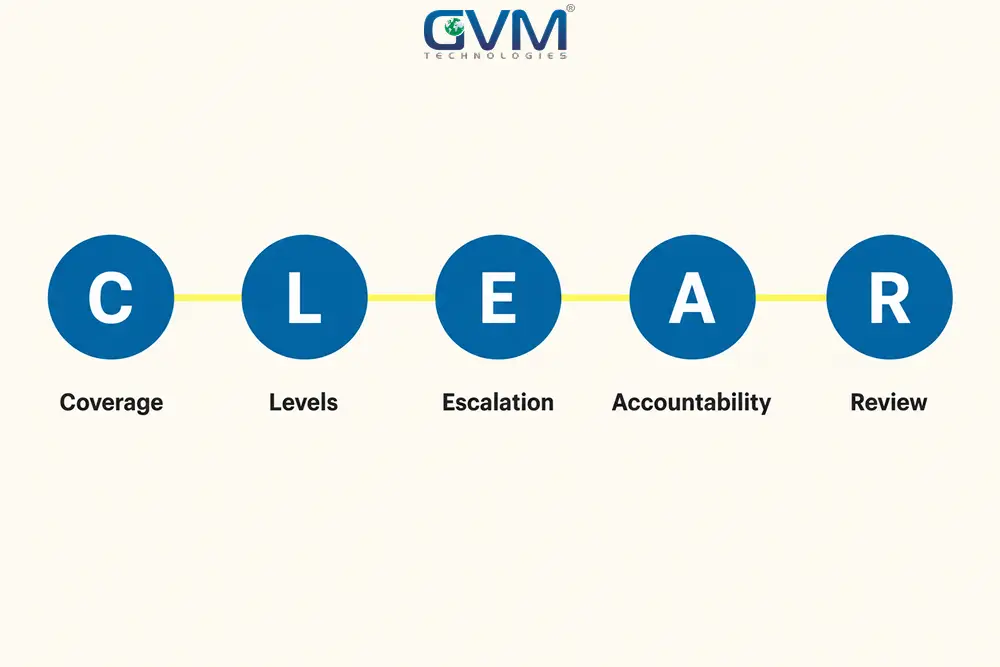
The 5 checks: Coverage, Levels, Escalation, Accountability, Review
- Coverage: a named uptime target with its measurement window, and its hours, business hours or 24/7.
- Levels: response and resolution targets by severity, with a compliance percentage, not “always.”
- Escalation: a named contact, an impact-times-urgency matrix, an update cadence, and clock-stopping conditions.
- Accountability: a capped, realistic penalty or credit, not an unenforceable “best efforts” promise.
- Review: a stated reporting cadence, and a clause to revisit the SLA as your business grows.
Red flag vs green flag SLA wording, side by side
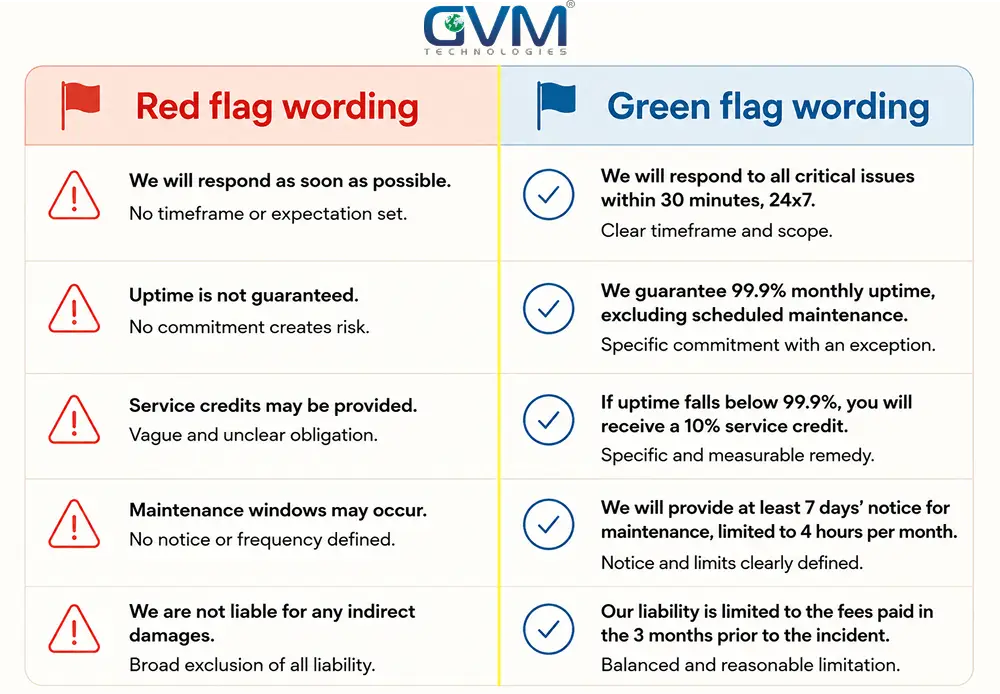
| Area | Red flag wording | Green flag wording |
|---|---|---|
| Response | “Best efforts” | “30-minute response for P1, 4-hour response for P3” |
| Resolution | “Guaranteed fix within 1 hour, every time” | “95% of P1s resolved within 4 hours, tracked monthly” |
| Uptime | “99.9% uptime” with no window stated | “99.9% uptime, measured monthly, excluding scheduled maintenance” |
| Penalties | “Unlimited liability for downtime” | “Service credit capped at 1 month’s fee” |
| Escalation | No named contact, matrix, or update cadence | Named contact, impact-times-urgency matrix, 30-60 minute updates |
FAQs
1. What’s the difference between an SLA and an SLO?
An SLA is the promise you’re owed. An SLO is the vendor’s internal target for hitting it. Asking to see the SLO shows whether the number was ever tested.
2. Should I ask for a cash-backed SLA?
Ask for one, but expect a cap at what the vendor can absorb. A capped credit paid out consistently beats an uncapped promise renegotiated the first time it’s invoked.
3. What’s a reasonable response time for a small business SLA?
30-60 minutes for a critical issue and 4-24 hours for a minor 1 is workable for most small businesses. Faster usually needs a bigger, pricier on-call team.
4. Do I need a resolution time guarantee, or just a response time guarantee?
A response time is something a vendor can reliably commit to. A resolution time works better as a target with a compliance percentage, since fixes can depend on others.
5. What uptime percentage should I ask for?
99.9%, “three nines,” is realistic for most small business websites and SaaS products. Above that usually needs redundant infrastructure most businesses don’t need yet.
6. Is indemnification part of my SLA?
No. Indemnification covers legal costs for a specific claim, usually IP infringement, and belongs in your vendor contract, not the service-level document.
7. Do I need a lawyer to review my SLA?
For a low-stakes tool, checking it against this list is usually enough. For anything customers depend on, a short paid review costs far less than a bad outage. Budget it alongside your agency vs freelancer costs.
8. What happens if my vendor misses the SLA repeatedly, not just once?
1 missed target is usually a service credit. A repeated pattern against the compliance percentage is grounds for the termination clause in your underlying contract.
What to do before you sign your next SLA
The 1 rule that actually protects you
Every clause here comes back to 1 rule: a number you can measure protects you, a promise you can’t measure doesn’t.
“Best efforts” isn’t a commitment. A stated response time, tracked against a real compliance percentage, is.
Get GVM Technologies to review your SLA before you sign
GVM Technologies reviews SLA and support terms as part of every MVP development or ongoing hosting engagement.
We also do this for founders recovering from a vendor who disappeared mid-project without one in place.
Book a meeting to walk through your current SLA, or the 1 a new vendor just sent you. No obligation, no pressure to switch.
 Call us : +1 (786) 947-6105