Hosting migration SEO is the work of keeping rankings steady while your files, database and DNS records (the settings that point a domain at a server) move to a new host.
When it goes wrong, positions slip within days though pages look unchanged. Hosting migration SEO losses usually trace to 1 of 5 layers, so confirm the fall is real with our traffic drop triage first.
Quick answer: Hosting migration SEO losses usually come from 1 of 5 layers: Googlebot cannot reach the new server, a rule blocks it, URL forms changed, pages render differently, or the server answers badly. Work through them in sequence, change 1 setting per day, and give Google 2 to 4 weeks.
Key takeaways
- Host alone is rarely the cause: Google says a move should not hurt rankings if the site stays reachable. Bundled changes are likelier.
- Date and scope narrow the cause: a step at cutover, a slow slide and a late drop point to different layers.
- Headers hide noindex: view-source misses an X-Robots-Tag header, so test with URL Inspection.
- Roll back rarely: switch hosts again only when the old host is intact and the new host cannot be fixed within about 48 hours.
What hosting migration SEO is, and what a host move changes
Hosting migration SEO, also searched as server migration SEO, protects visibility while a site moves to a new server. In 2024, Google’s Gary Illyes said a host change should not hurt rankings if the site keeps resolving and downtime stays minimal. Trouble starts with what changes alongside the move.
Why a host move alone rarely changes rankings
Google’s hosting change guide expects Googlebot’s crawl rate to dip right after launch, then climb over the next few days.
The report on Illyes’ answer added a caveat: a weaker host can still hurt. Long outages matter most, so our website down checklist is the first stop.
Why hosting migration SEO problems come from bundled changes
A common mistake seen across SEO communities is treating the move as the only change. These often ride along:
- Server software: a new PHP version, missing extensions or different caching rules.
- Default files: a fresh robots.txt, a staging noindex or a new .htaccess.
- Network layer: a CDN (a network of cached copies), a firewall or a new SSL certificate.
- Site layer: a new theme, page builder, permalink structure or www rule.
The 5-layer Move Audit for hosting migration SEO
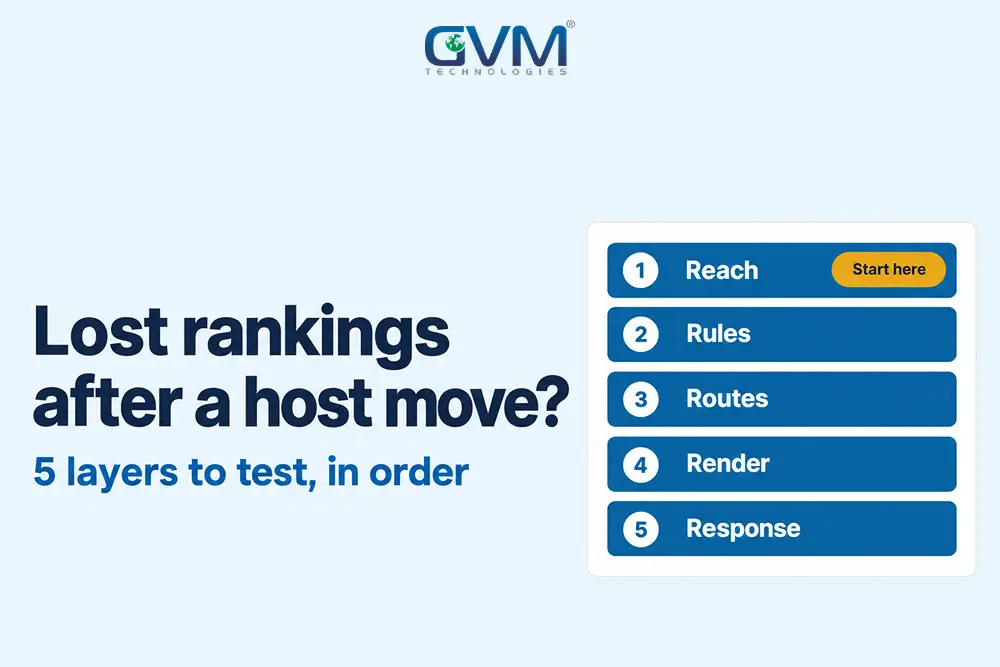
The Move Audit tests 5 layers in order: reach (can Googlebot connect), rules (what it is told), routes (which URL forms answer), render (the HTML it receives) and response (how the server answers). A drop usually sits in the first failed layer.
| Layer | What it covers | Typical symptom | First test |
|---|---|---|---|
| 1. Reach | DNS, SSL, firewall, IP | Whole site falls fast | Crawl Stats host status |
| 2. Rules | robots.txt, noindex, headers | Pages leave the index | URL Inspection live test |
| 3. Routes | HTTP or HTTPS, www, slashes | 1 hostname version drops | Check each URL form |
| 4. Render | PHP, plugins, cache, CDN | Content or links missing | Rendered HTML comparison |
| 5. Response | 5xx errors, speed, capacity | Slow slide, crawl dips | Server logs, response time |
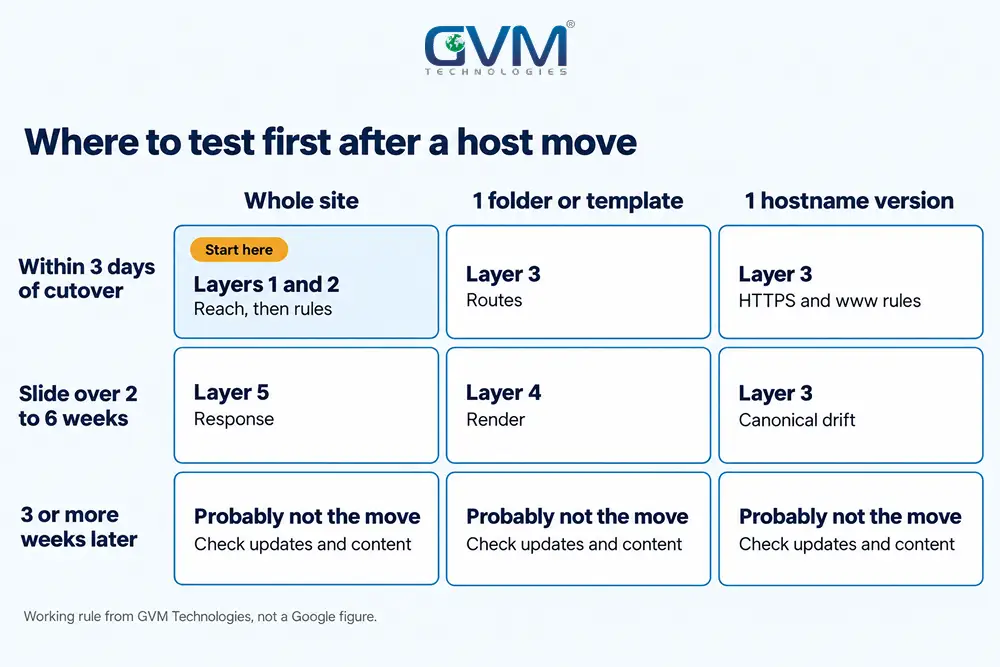
Read the date: 3 drop timings
The first bad day narrows the layers before you open a setting.
- Fall inside 3 days of cutover: points to reach or rules.
- Slide over 2 to 6 weeks: points to response or render.
- Fall that starts 3 or more weeks later: the move is probably not the cause. Check update dates and our Google penalty recovery guide.
These windows are our working rule, not a Google figure.
Run the scope test on your hosting migration SEO drop
Export Search Console clicks by page for 28 days before and after the move. Then sort by scope:
- Whole site: a server or rules fault. Start at layers 1 and 2.
- 1 template or folder: a routes or render fault.
- 1 hostname version: www and non-www behave differently. Reported cases show the other version still ranking.
- A few URLs: a page-level cause. The move may be coincidence.
A rank tracker export compared 2 dates, 6 days apart. In it, 6 keywords on a single listicle URL fell 1 to 23 positions, while a keyword on another URL held at position 13.
A server fault would not spare a URL, so the page became the first suspect. The 6 keywords then sat at positions 25 to 41, worth 0.02 to 0.10 estimated visits a month each.
If analytics disagrees with Search Console, read our GA4 not tracking guide before you act.
Layers 1 and 2 of hosting migration SEO: can Googlebot get in
Reach means Googlebot can resolve your domain, connect and receive a valid response. Rules means no instruction tells it to stay out. Both fail quietly in hosting migration SEO because the site still loads normally in your own browser, which hides the fault from you.
1. DNS, SSL and firewall problems that turn Googlebot away
Google’s guide warns that firewall or DoS protection (a filter against traffic floods) must not block Googlebot. Infrastructure and security settings are part of the DevOps work GVM Technologies delivers.
Start in Search Console:
- Open Settings, then Crawl Stats, and read host status, robots.txt fetch, DNS resolution and server connectivity.
- Run a live URL Inspection on the homepage and 2 top pages.
- Confirm the A record (the DNS entry holding the server address) and nameservers match the new host.
- Test that the SSL certificate covers www and non-www, using our SSL certificate guide.
Google’s Crawl Stats help rates host status over 90 days. Red means a significant issue in the last week, such as DNS failing on more than 5% of requests in a day.
2. robots.txt and noindex rules carried over from staging
Google tells owners to remove temporary blocks, such as a disallow-all rule or noindex tags, before the DNS switch. A leftover staging rule or default robots.txt is the classic miss.
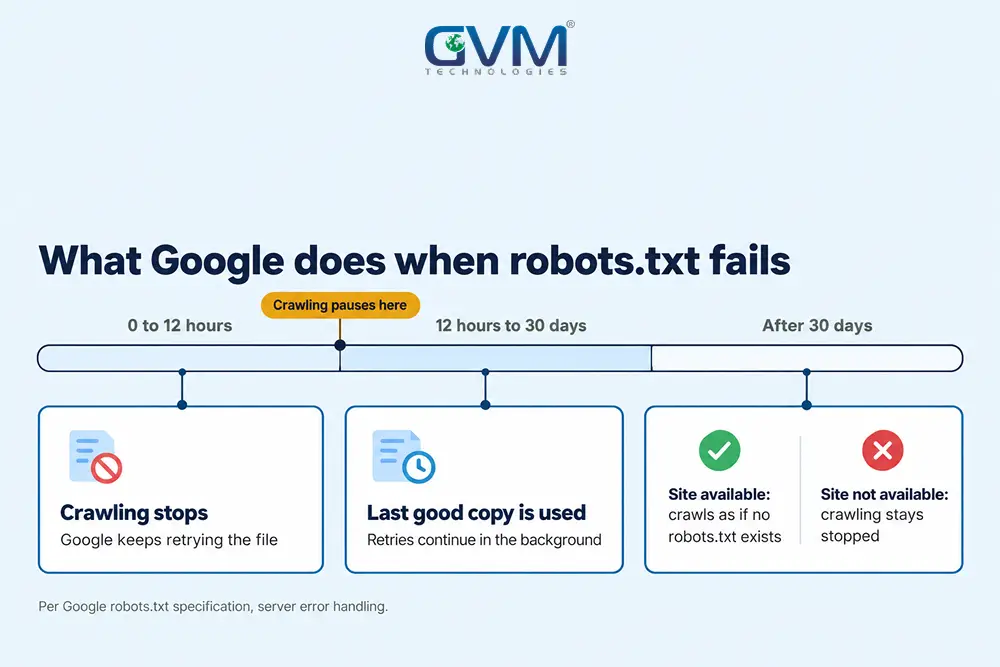
Google’s robots.txt rules also set a clock for a robots.txt file that errors out:
- First 12 hours: Google stops crawling the site and keeps retrying the file.
- Up to 30 days: Google uses the last good copy it cached.
- After 30 days: Google ignores robots.txt if the site is available, or stops crawling if it is not.
3. A noindex hidden in HTTP headers that view-source does not show
Most checklists say to look for noindex in the page source. That misses the X-Robots-Tag, a header the server sends before the page loads.
A host, CDN or security plugin can add it, and nothing appears in view-source. Check it with a live URL Inspection, which reports whether indexing is allowed, or with a header check such as curl -I.
Google’s noindex documentation adds a trap: a robots.txt block hides the noindex, so the page can stay in results. For the meaning of each exclusion label, read what each Search Console status means.
Layers 3 and 4 of hosting migration SEO: same domain, different pages
In hosting migration SEO, routes are the URL forms your server answers on: HTTP or HTTPS, www or non-www, trailing slash and permalink pattern. Render is the HTML Googlebot receives. A new server can change either with no visible difference to a visitor.
1. URL forms that changed without anyone choosing it
- HTTPS rule lost: the old host forced HTTPS, and the new host serves both versions.
- www rule lost: both hostnames now answer with 200 instead of 1 redirecting.
- Trailing slash changed: /page and /page/ now behave differently.
- Permalinks reset: WordPress falls back to ?p=123 style URLs after an import.
A same-URL move needs no redirect map. Google’s site move guide reserves Change of Address for domain or subdomain changes, not HTTPS or www changes.
2. Canonicals, sitemaps and internal links after the move
- Canonical tags: they may point at the staging hostname or the old IP.
- XML sitemap: it may still list URLs on the temporary test hostname.
- Internal links: a database import can keep absolute links to the test hostname.
Crawl the live site and compare it with a crawl saved before the move. A full crawl-and-audit sequence appears in the technical SEO audit steps.
3. Render differences from PHP, plugins and caching
Run a live URL Inspection on 3 top pages and compare the rendered HTML and screenshot with an archived copy. Missing text, missing links or “resources could not load” notes point to render.
Typical causes are a new PHP version, a caching plugin serving a logged-in copy, or a security plugin refusing bots.
An update to a plugin or theme can change output in the same way, as when a WordPress update breaks your site explains.
Cross-platform, performance and security tests from GVM’s QA team compare old and new rendering before cutover.
Layer 5 of hosting migration SEO: speed, errors and capacity
In hosting migration SEO, response is how the new server answers under crawl load: error codes, time to first byte (TTFB, the wait before the first byte arrives) and capacity. Google reads 5xx and 429 errors as a signal to slow crawling, and URLs that keep failing can leave the index.
1. Server errors that make Google crawl less
Google’s status code documentation says indexed URLs are kept at first but dropped eventually. Crawl rate rises gradually once 2xx responses return, with no stated timeframe.
- Read the logs: look for 5xx or 429 responses at the hours Googlebot visits.
- Check resource limits: shared plans can cap CPU or processes, which returns 503 errors.
2. Speed and server location: what Google documents and what is folklore
| Common claim | What the Google pages we reviewed say | How to treat it |
|---|---|---|
| Over 2 seconds and rankings drop | Crawl Stats shows average response time, with no threshold | Vendor rule of thumb. Measure before and after |
| A server abroad costs rankings | Neither Illyes’ answer nor the move guide mentions location | A latency risk for visitors. Add a CDN |
| A bad neighbour on shared IP hurts you | No Google page we found documents this | Check last, after layers 1 to 4 pass |
Measure with PageSpeed Insights before and after. The field metrics behind page experience are covered in how Core Web Vitals are measured.
Recovery plan for hosting migration SEO: fix, roll back or wait
Take the layers in audit order, check again once a change goes in, and note the date. Roll back only when the old host is intact and the new host cannot be fixed within about 48 hours. Otherwise fix forward and wait 2 to 4 weeks.
1. Fix in layer order and log every change
- Export Search Console clicks by page and query for the 28 days before and after.
- Fix the first failed layer, change only 1 thing per day and log each change with its date.
- Run live URL Inspection on 5 top pages after each change.
- Submit the corrected sitemap, and request indexing for those 5 pages only.
2. When to roll back after a hosting migration SEO drop
- Roll back when: the old host is intact and current, the new host breaks reach or response, and the fix will take over 48 hours.
- Fix forward when: the cause is a rule, route or render setting. Those follow you to the old host.
Both thresholds are our judgement, not a Google rule. If the previous developer left no access, see our developer disappeared guide.
3. How long hosting migration SEO recovery takes
- Within days: crawl rate climbs after a clean move, per Google’s guide.
- 2 to 4 weeks: typical settling time after a blocking error is fixed, in our experience.
- Past 4 weeks with all 5 layers clean: look for another cause, such as an update, a content change or a competitor.
4. How to plan hosting migration SEO so the next move holds rankings
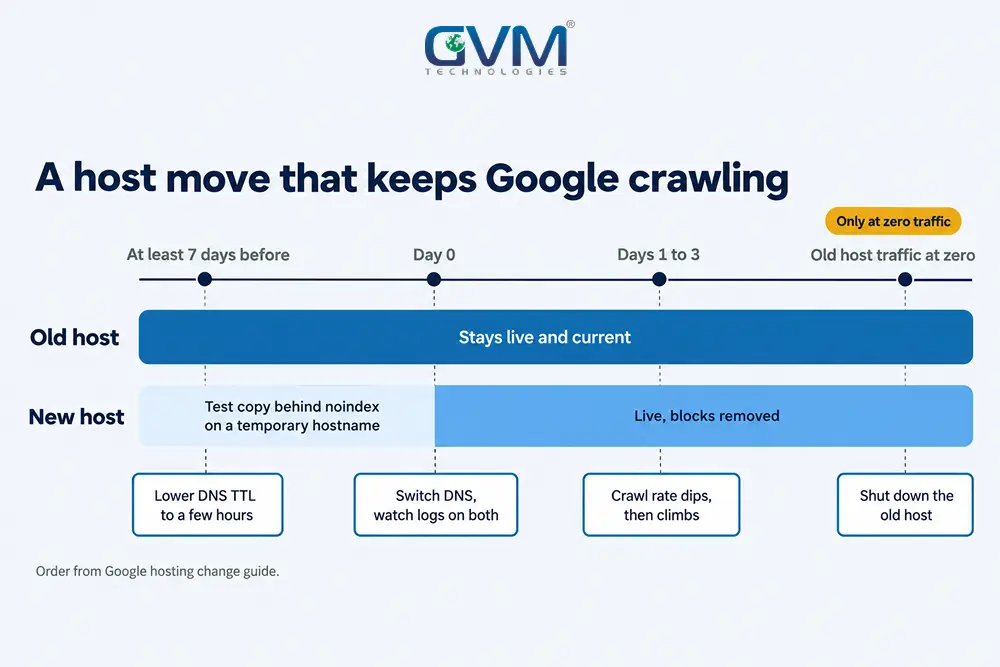
Google’s hosting guide gives the order:
- At least 1 week before, lower the DNS TTL (time to live, how long resolvers cache your records) to a few hours.
- Test the copy on a temporary hostname behind noindex, and confirm Googlebot is not blocked.
- Carry Search Console verification over to the new copy.
- At cutover, remove the temporary blocks, switch DNS and watch logs on both servers.
- Shut down the old host only when its traffic reaches zero.
GVM’s DevOps team covers real-time monitoring, CI/CD and backup and disaster recovery, which gives a move a restore point.
FAQs
1. Does changing hosting affect SEO?
A host change alone should not, if the site stays reachable and downtime is short. Rankings fall when the move also changes blocks, URL forms, rendering or speed.
2. How long do rankings take to recover after changing hosts?
For hosting migration SEO, expect 2 to 4 weeks for most pages once the cause is fixed. Track the result with the analytics in digital marketing guide.
3. Should I switch back to my old host?
Only if the old host is intact and the new host cannot be fixed within about 48 hours. Rule, route and render faults follow you.
4. Why did rankings drop when the new host is faster?
When rankings dropped after changing hosting to a faster server, speed was not the fault. A faster server cannot fix a robots.txt block, a noindex header, a lost HTTPS rule or a changed URL form.
5. Do I need Change of Address or 301 redirects after a hosting-only move?
No, when the domain and URLs stay the same. Change of Address covers domain or subdomain moves only.
6. Is 1 hosting company worse for SEO than another?
Google documents no brand effect. Capacity, defaults and firewall rules differ, so test each layer on the new plan instead of blaming the name.
Conclusion: test the 5 layers of hosting migration SEO first
Lost rankings after migration are usually a single failed layer, found by date, scope and a fixed test order.
Your checklist for today:
- Export clicks by page for the 28 days before and after the move
- Open Crawl Stats and run a live URL Inspection on 3 pages
- Check robots.txt, meta tags and the X-Robots-Tag header
Once the layers pass, give Google 2 to 4 weeks before changing content.
Talk to GVM Technologies about hosting migration SEO losses
Each week of lost visibility sends leads to competitors while the cause stays hidden. GVM covers this problem with 4 services:
- Search engine optimization: technical, on-page and local work that finds crawl and index faults
- DevOps and cloud hosting: server setup, monitoring, CI/CD and backup and disaster recovery
- Quality assurance and security testing: manual and automated checks before a move goes live
- Project rescue solutions: audits, system improvements and post-recovery help for a failing build
In 90 to 120 days, a US trucking insurance agency reached page 1 for numerous high-intent searches, as our SEO case study records.