


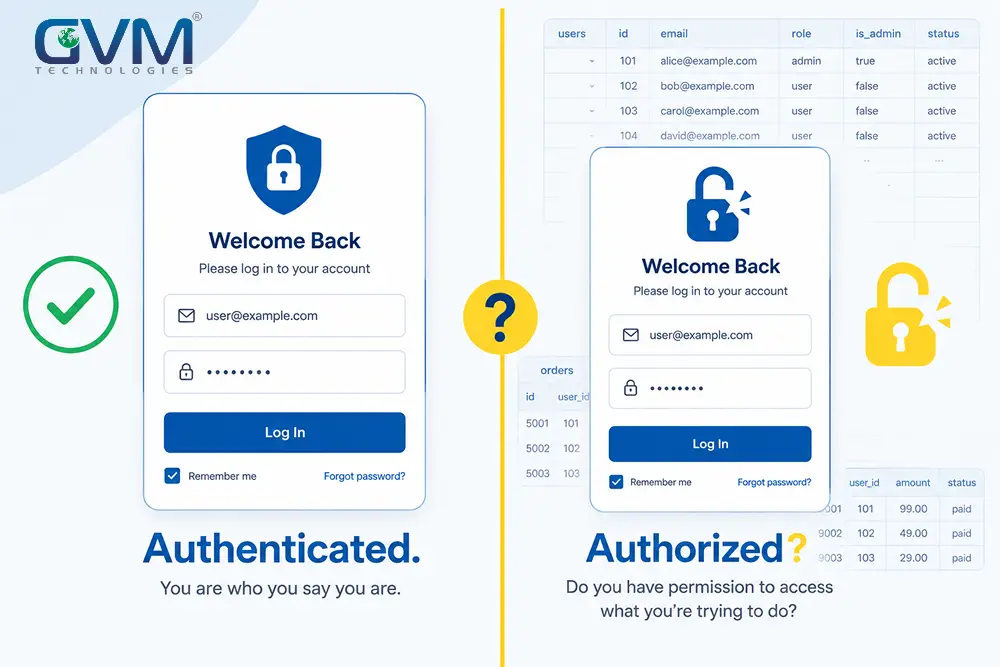
A working login screen and a secure application are two different products. Most founders find out the hard way, months after launch, that the first one shipped and the second one didn’t.
This pre-launch security checklist exists to close that gap before a stranger closes it for you. It’s built from two documented 2026 breaches, the OWASP API Security Top 10, and the same QA and security testing process GVM Technologies runs on every client build.
Score your own app in the next 10 minutes. Then work through 19 checks across five categories, each one explaining what to test, why it matters, and what a real 2026 incident looked like when a team skipped it.
Quick Answer: Your app is secure enough to launch when a stranger holding only your public API key can’t read, edit, or delete another user’s data. Nothing else on this checklist matters if that one test fails.
Most pre-launch failures trace back to one setting: an authorization check that exists in the interface but not on the server. A login screen proves the app knows who you are. It proves nothing about what that person is allowed to touch once they’re inside.
Key Takeaways
- Broken Object Level Authorization, letting a logged-in user reach someone else’s data by changing an ID, has topped the OWASP API Security Top 10 since 2019 and appears in roughly 40% of documented API attacks.
- Veracode’s 2026 GenAI Code Security Report tested more than 100 AI models. The average first-pass security rate: 56%.
- 83% of publicly documented Supabase database exposures trace back to one cause: Row Level Security left off or misconfigured.
- In February 2026, Wiz researchers found Moltbook leaking 1.5 million API tokens and 35,000 emails through one missing security policy.
- Lovable, an AI app builder valued at $6.6 billion, left every pre-November-2025 project’s source code and database credentials exposed for 11 weeks.
- The global average data breach now costs $4.44 million, per IBM’s 2025 Cost of a Data Breach Report.
- A focused pre-launch penetration test for a small SaaS product typically runs $5,000 to $15,000. Fixing the same gap after launch rarely costs less.
Why “It Works in the Demo” Isn’t the Same as “It’s Secure”
1. Authentication Proves Identity. Authorization Proves Permission.
These two words get used interchangeably by founders constantly. They’re not the same thing, and the gap between them is where almost every incident in this article started.
- Authentication asks one question: does the app know who you are? A login form, a password, a magic link, all of that is authentication.
- Authorization asks a different question: is this specific person allowed to touch this specific record? That check happens, or doesn’t happen, on the server, and the interface can’t enforce it alone.
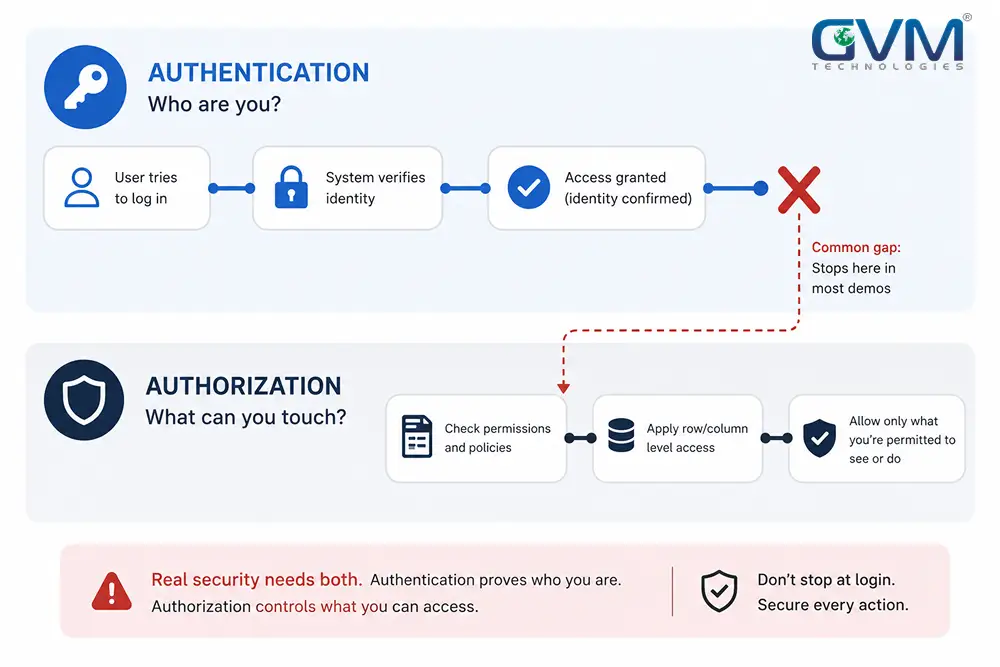
An app can have flawless authentication and zero authorization. From the outside, both look identical. Both show “please log in” to a stranger.
2. The Two-Minute Test That Exposes the Gap
Log into your own app. Open your browser’s developer tools and click the Network tab. Use the app normally for two minutes and watch what the server actually sends back, not what the screen renders.
An interface can hide a field with CSS. That doesn’t stop the raw API response from containing it.
If that response includes another user’s email, an internal flag, or admin-only data, the app was never locked down. It was decorated.
Try it now: Does anything in that response panel belong to someone else, or expose more than the screen shows? If you’re not sure, that’s the first gap to close before reading further.
This exact check is what separates a real security testing pass from a functional one that only confirms buttons work.
Two 2026 Breaches That Prove This Checklist Isn’t Theoretical
Neither of the incidents below hit a scrappy weekend project. Both had funding, users, and, in one case, a founder who was candid that AI wrote the entire application.
| Incident | Root cause | Documented impact | Timeline |
|---|---|---|---|
| Moltbook, Feb 2026 | A Supabase API key shipped in client-side JavaScript with Row Level Security never enabled | 1.5 million API tokens, 35,000 emails, and private messages exposed, some containing plaintext OpenAI keys | Found by Wiz researchers 3 days post-launch; fixed within hours |
| Lovable, Feb–Apr 2026 | /projects/{id}/* endpoints checked login status, never checked project ownership |
Source code, database credentials, and AI chat history exposed; 18,697 student records leaked, including 4,538 minors | Reported privately March 3; unresolved for 48 days; fixed 2 hours after going public |
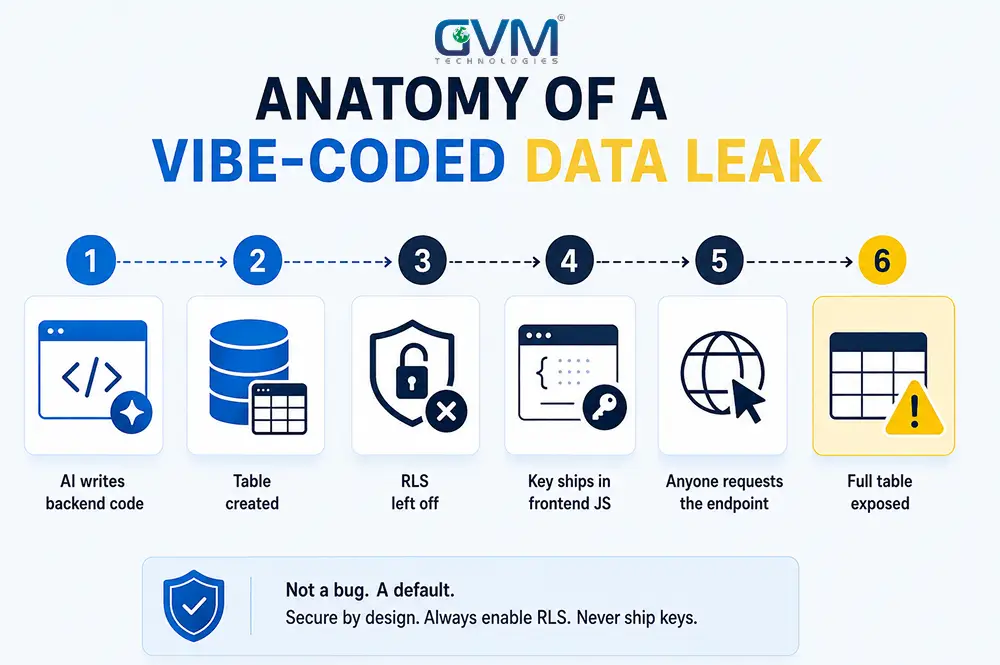
1. What Actually Failed at Moltbook
The Moltbook team didn’t skip authentication. Users still logged in normally. What they skipped was the database-level policy that decides who can read which row once someone’s inside.
Supabase’s public “anon” key is meant to be exposed in frontend code. That design only stays safe when every table it can reach has a row-level policy attached. Moltbook’s didn’t.
2. What Actually Failed at Lovable
Lovable’s flaw was different in mechanism but identical in category. Every project endpoint checked one thing: is a valid session token present?
It never checked a second thing: does this token’s owner actually own this project? That’s Broken Object Level Authorization, the same #1-ranked flaw from the OWASP list above, at a $6.6 billion company.
3. Why the Same Flaw Keeps Reappearing
This pattern isn’t a coincidence, and it isn’t limited to Supabase. Because so many AI-assisted apps share the same starter architecture, one misconfiguration isn’t a one-off bug. It’s a signature.
Once someone learns to spot that signature in one app, the same two-minute test works against thousands of others built on the same stack. That’s the real risk behind any AI-generated application shipped without a review layer on top of it.
This is what makes this checklist worth running before launch, not after a researcher’s email arrives.
The Pre-Launch Exposure Score: A 10-Minute Self-Assessment
Answer honestly. Score 1 point per “yes.”
- Have you never opened your Network tab while logged into your own app?
- Is your database reachable directly from the browser, with no API layer in front of it?
- Do you not know, table by table, whether Row Level Security is enabled everywhere user data lives?
- Has anyone pasted an API key or password into an AI chat tool to debug something?
- Can a logged-in user reach another user’s record by changing an ID in a URL or request?
- Does an admin route exist with no server-side role check behind it?
- Do your payment webhooks process requests without verifying a signature first?
- Is there no rate limit on signup, login, or password-reset endpoints?
- Have you never tested what a canceled or refunded customer still sees after canceling?
- Does the app fail silently, blank screen or spinner, instead of showing a real error?
- Is there no single named person accountable for a security check before release?
- Have you skipped an independent review because “the demo already works”?
Scoring bands:
| Score | Exposure level | What to do next |
|---|---|---|
| 0–2 | Low | Re-run this before your next major release |
| 3–5 | Moderate | Fix these before scaling past a handful of real users |
| 6–8 | High | Fix before public launch; at least one door is open |
| 9–12 | Critical | Stop. Close the top items before real user data touches this app |
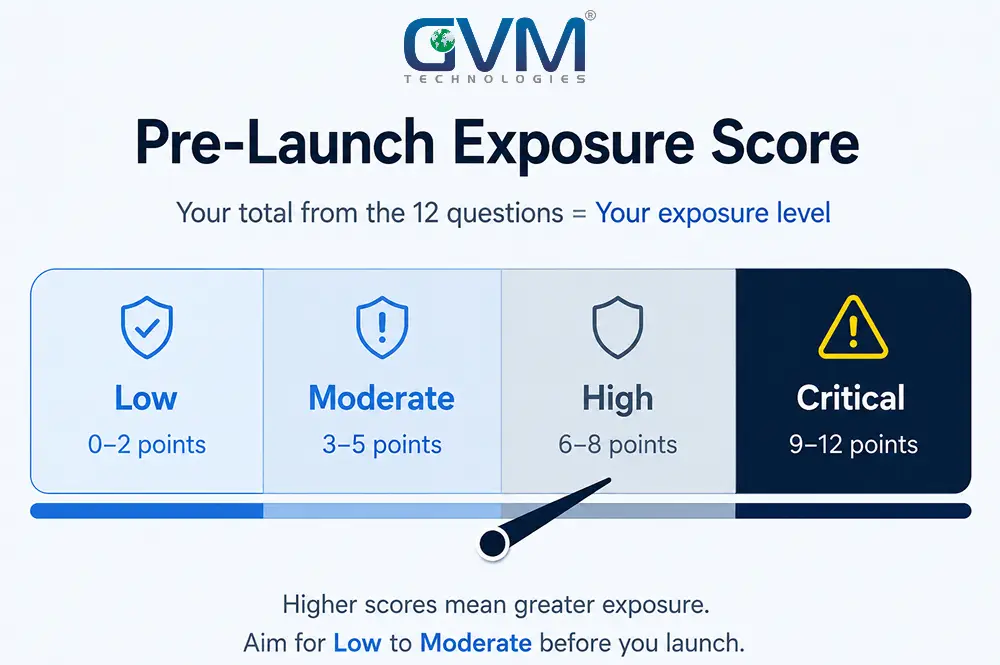
A score of zero doesn’t mean the app is unhackable. It means the high-frequency failures behind Moltbook and Lovable aren’t sitting open. That’s the bar this checklist is built to clear.
Nineteen checks make up the full founder’s pre-launch security checklist, grouped into five categories that mirror how an actual attacker, or an actual auditor, moves through an app: who can log in, what they can touch, what secrets are exposed, what happens with money, and what happens when something breaks.
Authentication and Authorization Checks
1. Run the Network Tab Test Before Anything Else
Covered above. Run it first. Every other check in this section assumes you’ve already done this one.
2. Run the Two-Account Ownership Test
Run it in three steps:
- Log in as two separate test users, in two separate browsers.
- Copy a request from account A that includes a record ID: an invoice, an order, a project.
- Change only the ID, then send that same request while logged in as account B.
If B can see or edit A’s data, that’s Broken Object Level Authorization. It’s the exact flaw behind Lovable’s exposure, and it’s a ten-minute test any QA testing pass should run before every release, not just before launch.
3. Block Admin Routes on the Server, Not in the Menu
Log out entirely. Type your admin URL directly into the address bar. Nothing should load.
Now log in as a normal user and try the same URL. Anything beyond an access-denied page means the “Admin” link was hidden from a menu, not actually protected, a distinction any properly architected website build handles at the routing layer, not the navigation bar.
4. Turn On Row-Level Access Control for Every Table
Check every table holding user data individually, not just the ones you remember creating. Escape.tech’s research found 83% of documented Supabase exposures trace to exactly this gap, applied to a PostgreSQL database with no row-level policy or a partial one.
Multi-tenant apps need this doubly. Tenant isolation, keeping one customer’s data invisible to every other customer, is the same principle applied at a bigger scale.
5. Understand Why This Keeps Happening
Most vulnerable backends make the same shortcut. They check whether a request carries a valid authentication token, often a JWT. They never decode that token’s claims to confirm the resource being requested actually belongs to that token’s owner.
Checking “is this authenticated” is a five-minute build. Checking “does this authenticated user own this specific record” takes real design work, and it’s the step that gets skipped under a deadline.
Secrets, Keys, and Data Exposure Checks
1. Audit What Actually Ships in Your Frontend Bundle
Everything in client-side JavaScript is public, no exceptions. Search your production build for anything starting with sk_, service_role, or a database connection string.
If it’s there, it’s already been seen by anyone who’s opened dev tools.
2. Rotate Every Key That’s Touched an AI Chat Tool
Search your team’s AI chat history for “key,” “password,” and “secret.” Anything pasted there for debugging now lives in a transcript on infrastructure you don’t control.
Rotate all of it. Assume it’s already compromised, not eventually compromised. A properly built AI integration never needs a raw secret pasted into a prompt in the first place, since keys stay server-side by design.
3. Turn Off Source Maps and Debug Routes in Production
Source maps make a minified production build fully readable, including comments and variable names that reveal internal logic. Debug endpoints (/debug, /.env, /api/health with verbose output) should return nothing outside development.
Network and Browser-Level Hardening Checks
This category rarely causes a headline-grabbing breach on its own. It’s still what a professional audit checks first, because it’s cheap to fix and expensive to explain away later.
It’s also exactly what a DevOps and cloud hosting review verifies alongside deployment configuration, before a single header setting becomes a production incident.
| Setting | What it does | Common mistake |
|---|---|---|
| Content-Security-Policy (CSP) | Blocks unauthorized scripts from executing on your pages | Left unset entirely, or set to allow unsafe-inline everywhere |
| Strict-Transport-Security (HSTS) | Forces every connection over HTTPS | Missing, allowing a downgrade to plain HTTP |
| X-Content-Type-Options | Stops browsers from guessing file types in risky ways | Absent on API responses, not just page loads |
| Cookie flags: HttpOnly, Secure, SameSite | Stops session cookies from being read by scripts or sent cross-site | Session cookies set without any of the three |
| CORS configuration | Controls which external origins can call your API | Access-Control-Allow-Origin: * combined with credentials enabled |
A misconfigured CORS policy is worth its own line. Setting it wide open with credentials allowed effectively invites any website on the internet to make authenticated requests to your API on a logged-in user’s behalf.
Payments, Webhooks, and Abuse Prevention Checks
1. Verify Every Webhook Signature
A payment provider’s webhook should never be trusted just because it hit the right URL. Verify its signature before processing it, every single time.
Skip this, and anyone who finds the endpoint can fake a “payment succeeded” event and grant themselves free access.
2. Close the Payment Lifecycle Gap Nobody Tests
Signature verification isn’t the whole job. Most teams wire up one event correctly and stop there.
Four events actually need handling:
checkout.session.completed: grants access. Nearly everyone gets this one right.customer.subscription.deleted: should revoke access immediately. Often missing entirely.invoice.payment_failed: should pause or downgrade access once retries fail.- A refund event: should revoke access the same way a cancellation does.
Skip the last three, and a canceled or refunded customer keeps full access indefinitely. It’s an access-control failure wearing a billing disguise, and it’s one of the most common gaps a fresh set of eyes finds in an otherwise well-built app.
Test it directly: cancel a subscription in a sandbox account, then check whether access actually disappears. Getting this right the first time is a core part of proper SaaS platform architecture, not an afterthought bolted on post-launch.
3. Rate-Limit Authentication and High-Cost Endpoints
Signup, login, and password-reset routes with no rate limit invite credential stuffing and account enumeration. Any AI-powered endpoint with a per-call cost needs the same protection, or a bot can run up a bill overnight.
4. Validate File Uploads Server-Side
Check file size, MIME type, and storage permissions on the server, never trust what the client claims a file is. An unvalidated upload path is a common route to remote code execution or storage abuse.
Testing, Monitoring, and Incident Response Checks
1. Scan Dependencies and Third-Party SDKs
Run an automated scan before every release, not just at project kickoff. Four open-source tools cover most of this without a budget line:
- Semgrep: scans source code for insecure patterns.
- Trivy: checks dependencies and containers for known vulnerabilities.
- Gitleaks: catches secrets accidentally committed to a repo.
- OWASP ZAP: runs automated attacks against a live, running app.
A package pulled in by an AI coding assistant deserves the same scrutiny as one a developer chose deliberately.
2. Test Error Handling Under Real Network Conditions
Disconnect from wifi mid-action and try to submit a form. A blank screen or infinite spinner means users on weak connections quietly abandon the app, and nobody on the team ever finds out why.
3. Confirm Backups Actually Restore
A backup nobody has restored from is a hypothesis, not a safety net. Test the restore process before launch, not during an incident.
4. Assign One Owner Before You Assign a Deadline
Every piece of software gets tested by somebody: a specialist, a developer wearing a second hat, or a paying customer who finds out the hard way. Pick the first option on purpose.
If nobody on the current team has the bandwidth, a dedicated resource who already owns this exact checklist elsewhere is usually faster than building the process from zero.
Manual Review vs. Automated Scanning
These aren’t competing approaches. They catch different failure types, and a real pre-launch process needs both.
| Particulars | Automated scanning | Manual review |
|---|---|---|
| Catches | Exposed secrets, outdated dependencies, missing headers, known injection patterns | Logic flaws: broken authorization, business-rule bypasses, role interactions unique to your app |
| Runs best | Continuously, on every commit | On new features and complex, multi-role workflows |
| Weak spot | Business logic, since a malformed request looks nothing like a valid one asking for the wrong record | Coverage at scale; a human can’t re-check every endpoint on every release |
| Typical cost | Often free via open-source tools | $5,000–$15,000 for a scoped external test; $4,000–$8,000 for continuous AI-augmented testing with retests |
Broken Object Level Authorization is a logic problem, not a syntax problem. Scanners are notoriously weak at catching it, because the request itself is perfectly valid, it’s just asking for the wrong record.
That’s exactly why the two-account test above takes ten minutes and catches what most scanners miss.
Stanford researchers found something worse than a raw failure rate in their 2023 study on AI coding assistants: developers using AI tools wrote less secure code, then rated it more secure than developers coding unaided. Confidence and correctness moved in opposite directions.
What a Skipped Checklist Actually Costs
None of this is a scare tactic. It’s arithmetic, and the numbers stay consistent across independent sources.
- A pre-launch fix, turning on a policy, adding a role check, verifying a signature, is measured in hours.
- A post-launch breach isn’t. IBM’s 2025 data puts the global average incident at $4.44 million, with businesses under 500 employees historically averaging in the low millions.
- A scoped penetration test typically runs $5,000 to $15,000. Continuous, AI-augmented testing for fast-moving teams often lands lower, $4,000 to $8,000 with retests included.
- Detection time compounds every other number here. Industry monitoring data puts the average time to detect a SaaS breach at 204 days, nearly seven months of quiet exposure before anyone starts counting the damage.
That math is the same reasoning behind GVM’s own ISO-certified build process: a fixed, repeatable quality gate costs far less than the incident it’s built to prevent.
When to Re-Run This Checklist After Launch
This isn’t a one-time gate. Four moments should trigger a re-run automatically:
- Before the first real user signs up, even in a closed beta.
- Before shipping any feature touching money, roles, or another user’s data.
- After a new engineer or AI tool joins the codebase, since assumptions about what’s protected don’t transfer cleanly.
- On a fixed schedule, quarterly at minimum, more often for anything handling payments or regulated data.
A checklist with no named owner decays the same way an unowned test suite does. It gets skipped once under deadline pressure, and skipping becomes the default from there.
When It’s Time to Bring In a Professional Review
Self-testing with this checklist catches most of what actually breaks in production. It has limits, and knowing them matters.
An internal team, however careful, tends to test the paths it designed for. Dedicated QA testing with a security-testing pass built in is designed to try the paths nobody designed for. That’s why GVM runs it as a standard phase, not a bolted-on afterthought, on every client build.
Three situations make an external review worth the cost specifically:
- The app is moving from prototype to production, especially if it started as a vibe-coded build with no review cycle built in.
- Real money, health data, or regulated information is about to flow through it. The stakes changed; self-testing alone stops being proportionate.
- The backend was set up on a backend-as-a-service platform, and the audit stopped at “it works,” not “every table has a policy.” A short DevOps and cloud hosting review closes that gap alongside deployment hardening.
Building access control correctly inside a properly scoped SaaS platform or MVP build costs less than retrofitting it once real users are already inside. If a product already shipped and something feels off, that’s exactly the kind of scoped fix project rescue services exist for.
The One Principle Behind All 19 Checks
Strip away the specifics, RLS, CORS, webhooks, rate limits, and one idea sits underneath every item on this list: least privilege. Nobody, no key, no route, no token, should have more access than the specific task in front of them requires.
The same rule, applied three different ways:
- An anon key should reach only what its policies allow.
- An admin route should answer only to an actual admin.
- A webhook should process only a signed, verified event.
Every failure above is the same principle broken in a different location.
7 Mistakes That Turn “We’ll Secure It Later” Into a Breach
1. Treating the Working Demo as Proof of Security
A demo proves the happy path renders for one user in one session. It proves nothing about a second account, a modified request, or a dropped connection.
2. Confusing “Public by Design” With “Safe by Default”
An anon key is only safe once every table it reaches has an enforced policy, checked individually, not assumed from the last table that worked.
3. Hiding a Feature in the UI Instead of Blocking It on the Server
A removed menu link isn’t a protected route. Anyone who finds the URL reaches it exactly as before.
4. Skipping the Ownership Test Because “Nobody Would Think to Try That”
Attackers, researchers, and curious users routinely try exactly that. It’s the single most common gap behind the incidents in this article.
5. Rotating a Leaked Key “Eventually” Instead of Immediately
A key pasted into an AI tool or committed to a public repo is compromised the moment it happens, not scheduled for a future cleanup.
6. Letting Webhook Endpoints Trust the Request Body
A webhook is a public URL. Signature verification is what separates a legitimate provider from anyone who found the endpoint.
7. Having No One Specifically Accountable for This Checklist
“The team” isn’t an owner. Without one named person, security debt accumulates quietly until a disclosure email forces the conversation.
It’s the single most common gap GVM’s engineering team finds when reviewing a previously shipped build: the checklist existed somewhere, but nobody owned it.
FAQs
1. Is my Supabase or Firebase app safe if I haven’t touched the security settings?
No. These platforms ship with public-facing keys by design, and they stay safe only once Row Level Security or an equivalent policy is enabled on every table holding user data.
2. Do I need a professional penetration test, or is this checklist enough?
This checklist catches most common, high-frequency gaps, including the exact failures behind Moltbook and Lovable. A professional review earns its cost once real money, health data, or regulated information is involved.
3. Can AI-generated code be trusted to handle security correctly by default?
No, not without review. Veracode’s 2026 report found AI-generated code passes security testing on the first attempt only 56% of the time across more than 100 models tested.
4. What’s the fastest test to check for a serious security gap?
The two-account ownership test. Swap one ID between two logged-in accounts and see whether account B can reach account A’s data.
5. How much does fixing these issues cost before launch versus after?
Before launch, most fixes take a few hours. After a breach, IBM’s 2025 data puts the global average incident at $4.44 million.
6. Does having a login screen mean authentication and authorization are both handled?
No. A login screen proves authentication only. Authorization, what a logged-in user is actually allowed to touch, needs to be tested separately.
7. How often should this checklist run after launch?
Quarterly at minimum, and immediately before any feature touching payments, roles, or another user’s data ships.
8. What’s the difference between a vibe-coded app’s security risk and a normally developed app’s?
The risk isn’t the AI itself. It’s the missing review cycle. AI-assisted code inside a normal engineering process, with tests and review, carries far less risk than the same code shipped with no second pair of eyes.
Conclusion
Run the two-account ownership test and the network tab check right now, before doing anything else on this list. If either one surfaces someone else’s data, the answer to “is your app secure enough” is no, and it’s a fixable no, usually within a day.
The founders who get burned aren’t the ones who moved fast. They’re the ones who never ran a single test past their own happy path, the same blind spot that let two of 2026’s highest-profile AI-built platforms leak millions of records through settings that take minutes to check.
Get a Professional Pre-Launch Security Review
A checklist catches what you know to look for. A professional review catches what you don’t.
GVM Technologies has built custom software and run quality assurance and security testing as a standard build phase since 2012, from offices in Miami and Surat, under ISO 27001:2022, 20000-1:2018, and 9001:2015 certified processes. Our QA team runs this exact checklist, and more, on every engagement before a build goes live.
Talk to GVM About a Pre-Launch Security Review and get a scoped assessment of what’s actually exposed in your app, not a generic checklist, before real users touch it.
 Call us : +1 (786) 947-6105