In April 2025 the US Federal Trade Commission fined accessiBe, the largest accessibility-widget vendor, $1 million and barred it from claiming an AI script alone can make a site compliant.
Every business that bought that widget for legal cover still carries the same risk.
That gap is the point of this guide. Website accessibility basics are code and content work, not a plugin, and our website development team sees the same handful of gaps expose otherwise solid sites.
Quick answer: Website accessibility basics mean meeting WCAG 2.1 Level AA, the standard US courts and the DOJ use to judge ADA compliance, with WCAG 2.2 AA on new builds. Roughly 80% of real risk sits in three fixes: image alt text, color contrast, and keyboard operation. No overlay, badge, or certificate replaces that work.
Key Takeaways
- The ADA is the law; WCAG is the spec. Robles v. Domino’s (9th Cir. 2019) confirmed a business website tied to a physical location is a public accommodation.
- Three fixes clear most of it. Alt text (WCAG 1.1.1), 4.5:1 contrast (1.4.3), and keyboard access (2.1.1) cause the majority of barriers and demand-letter claims.
- Six error types = 96% of everything. WebAIM’s 2025 scan of 1,000,000 home pages found the same six failures leading the list for five straight years.
- Overlays raise your risk. More than 800 businesses running widgets were still sued in 2023 and 2024.
- No certification exists. No agency certifies a website as ADA compliant.
- Scanners catch 30 to 40%. Keyboard traps, focus order, and alt-text quality need a human.
What ADA And WCAG Compliance Actually Require
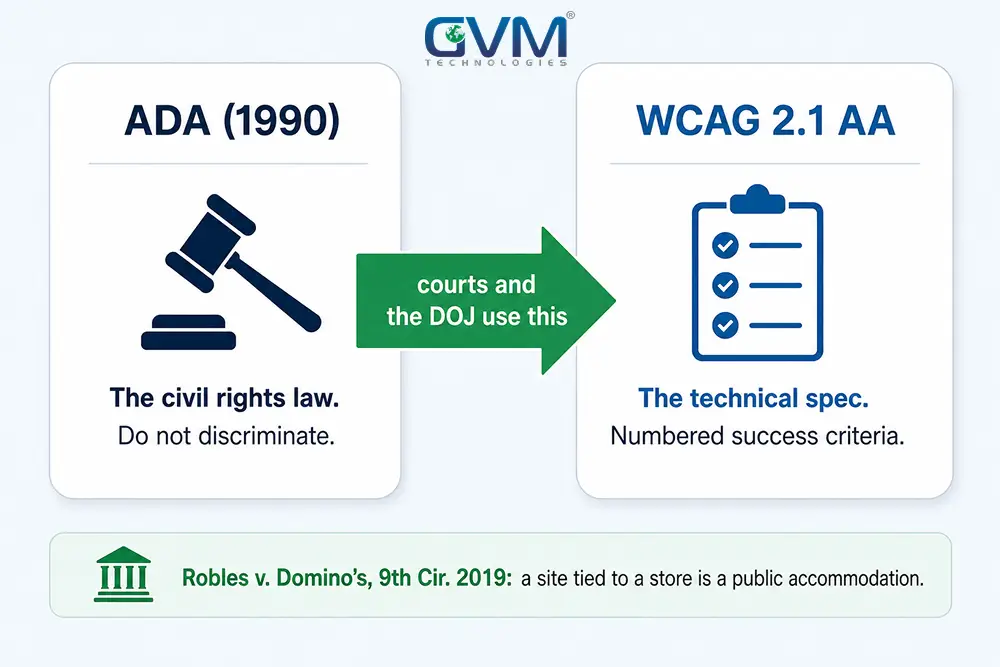
No single federal rule spells out website requirements for private businesses. The 2024 Title III rulemaking was never finalized, and that vacuum is what plaintiff firms work in.
1. The ADA Is The Law; Courts Supply The Detail
- Title III covers private businesses open to the public: retail, restaurants, healthcare, professional services, entertainment.
- Title II covers government and now has a firm 2024 federal rule. Title III still does not.
- Robles v. Domino’s Pizza (2019): the Ninth Circuit held Domino’s site and app had to be accessible because they connect customers to a physical store. The Supreme Court declined to review it.
2. WCAG 2.1 AA Is The Standard Courts Use
The Web Content Accessibility Guidelines, published by the W3C, turn “accessible” into testable rules called success criteria, each with a number like 1.1.1 or 2.4.7.
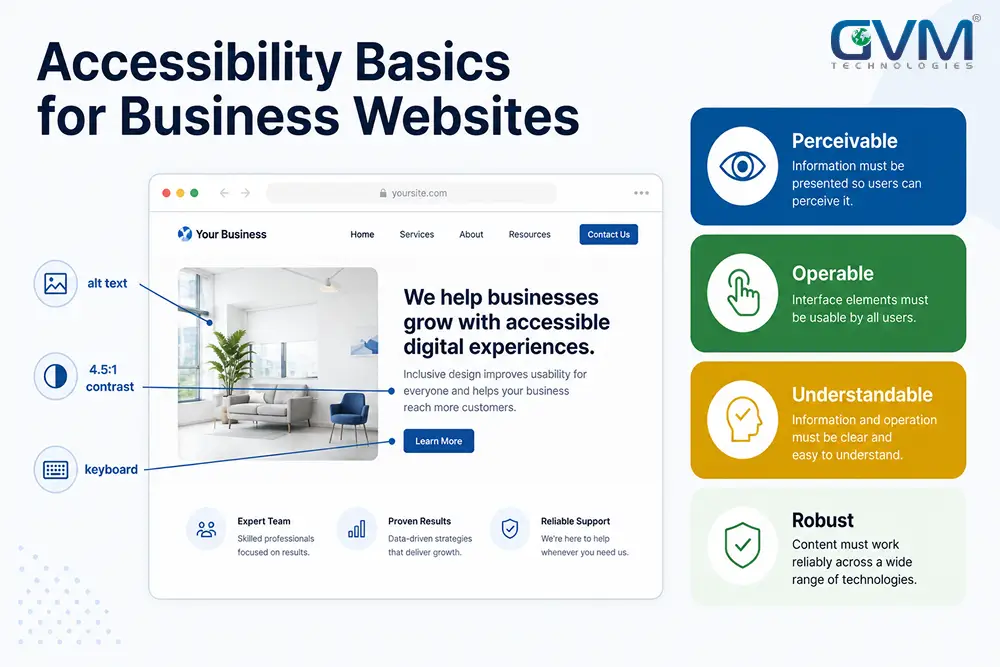
- Every criterion rolls up to four principles: Perceivable, Operable, Understandable, Robust (POUR).
- ADA.gov guidance, DOJ settlements, and most complaints reference Level AA.
3. Which Version To Build To
| Standard | Status in 2026 | Action |
|---|---|---|
| WCAG 2.1 AA | Reference standard in most lawsuits and settlements | Meet it fully. This is the floor. |
| WCAG 2.2 AA | Adds 9 criteria (focus visibility, dragging, 24px targets) | Scope all new builds and redesigns to it |
| WCAG 2.0 AA | Superseded | Do not scope new work to it |
| Section 508 / EN 301 549 | US federal contracts / EU market | Only if you sell to government or into the EU |
Hearing “AAA is best” and asking a developer to hit it site-wide is a common and costly mistake. The W3C says full AAA is not achievable for most content. Build to AA.
The POUR Test Every Business Website Must Pass
Four questions cover the shape of the whole standard.
| Principle | The question | The two checks that matter most |
|---|---|---|
| Perceivable | Can a blind, low-vision, or Deaf visitor still get the information? | Alt text on meaningful images; captions on video |
| Operable | Can someone use every feature without a mouse? | Full keyboard operation; visible focus outline |
| Understandable | Does the interface behave predictably? | Real labels and error text; no surprise page changes |
| Robust | Can assistive tech read the markup? | Semantic HTML over <div> soup; ARIA only where native HTML falls short |
Wrong ARIA is worse than none. A clickable <div> with five ARIA attributes still fails where a plain <button> would pass.
The 3 Fixes That Clear 96% Of Detected Errors
WebAIM’s 2025 report found six failure types account for 96% of all detected errors, and the list has not changed in five years. Three of them are the ones plaintiffs cite.
1. Alt Text (WCAG 1.1.1) Is Missing On 18.5% Of Images
- Describe the information the image carries, the way you would to a customer on the phone: “Blue ceramic mug, 12 oz, matte finish.”
- Mark decorative graphics
alt=""so screen readers skip them. - A linked image with no alt text becomes a link with no name, which fails twice.
2. Color Contrast (WCAG 1.4.3) Fails On 79% Of Home Pages
- Body text needs a 4.5:1 ratio against its background; large text (24px, or 19px bold) needs 3:1.
- White text on a bright brand color usually fails. Test it with a contrast checker.
- Never carry meaning in color alone, such as marking required fields only in red.
3. Keyboard Operation (WCAG 2.1.1) Is The Test Scanners Cannot Run
- Unplug your mouse and Tab through a page. Reach every link, button, field, and menu.
- Watch for a visible focus outline (WCAG 2.4.7) on each stop, and confirm Escape closes every popup.
- Add a “skip to content” link (WCAG 2.4.1) at the top of the markup so keyboard users bypass the nav.
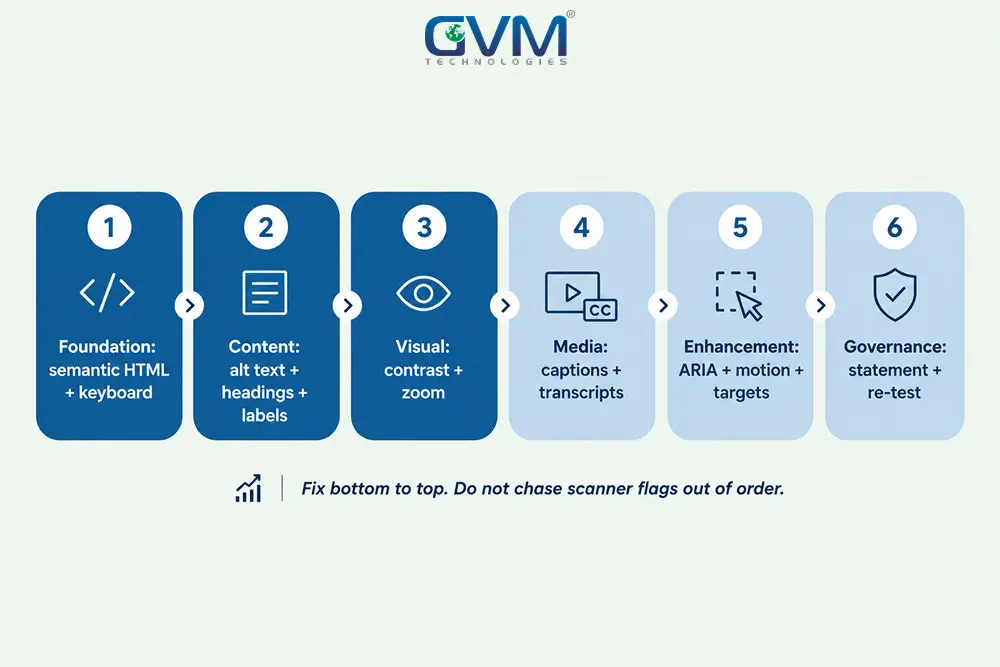
Fix In This Order, Not By Chasing Scanner Flags
Remediation goes wrong when teams fix random warnings instead of building from the foundation up.
- Foundation: semantic HTML, keyboard operation, visible focus, skip link.
- Content: alt text, one
<h1>per page, descriptive link text, form labels. - Visual: contrast, no meaning by color alone, usable at 200% zoom.
- Media: captions on video, transcripts for audio.
- Enhancement: correct ARIA, reduced-motion support, 24px tap targets.
- Governance: statement, quarterly re-test, a rule sheet for content authors.
Why Overlays And Widgets Increase Your Risk
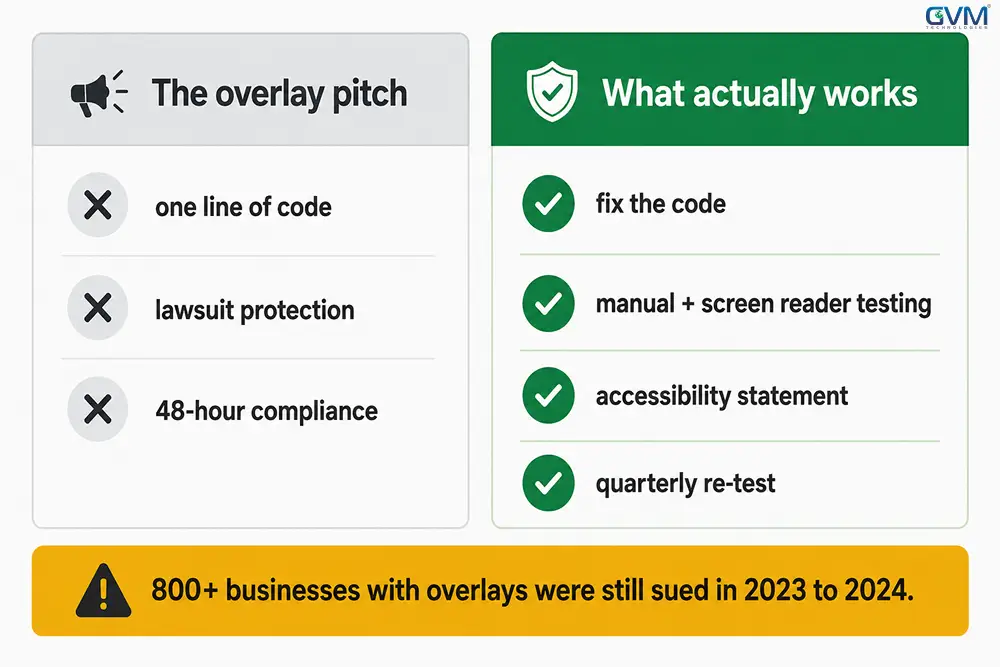
The most consistent advice from disabled users, auditors, and now the FTC: an overlay is not a fix.
1. They Never Touch The Broken Code
- An overlay is a script that loads a floating button and patches from the outside.
- The broken
<div>button stays broken underneath. - Screen reader users widely report overlays fighting the software they already run.
2. They Flag Your Site To Screening Bots
- Many demand letters start with an automated crawl.
- Plaintiff firms recognize the accessiBe, UserWay, and EqualWeb script signatures, and some complaints name the overlay directly.
- Overlay users were sued at rates equal to or above sites with nothing installed.
3. The FTC Fined accessiBe $1M In 2025
| The pitch | The reality |
|---|---|
| “One line of code, fully compliant” | Automated tooling reaches about 30% of issues |
| “Protects you from lawsuits” | No court has accepted an overlay as an ADA defense |
| “Better for disabled users” | Frequent reports of broken screen reader navigation |
| “AI fixes it automatically” | The FTC barred that exact claim |
Overlay scripts also add third-party JavaScript that drags Core Web Vitals, so the shortcut can cost rankings too.
Do You Need A Paid Accessibility Audit?
Both sides of this debate are partly right. The deciding factor: does your site take transactions?
1. DIY Works For A Small Brochure Site
- Under about 20 pages, no checkout, logins, or booking.
- Run WAVE and the axe extension on your top 5 templates, fix every error, do a keyboard pass, publish a statement.
2. Pay For Manual Testing If You Take Payments Or Logins
- E-commerce, booking, portals, and account flows need a human tester on NVDA or VoiceOver confirming a disabled visitor can finish checkout.
- Hire on evidence of manual and screen reader testing, not a scanner PDF.
- Confirm the same team can implement the fixes before you pay for the report.
3. Your Platform Caps What You Can Fix
- On Shopify, Squarespace, or Wix you can be sued over component code you cannot edit.
- Start from an audited theme, control what you can, and record the theme version and the vendor’s published conformance.
- A custom or WordPress build gives full control, which is why accessibility belongs in the brief from day one.
The Accessibility Statement: The Cheapest Way To De-Escalate
There is no badge that stops a lawsuit. A published statement is the next best thing, and it works like a cookie consent notice.
What it does:
- Shows good-faith effort if a claim is ever weighed.
- Gives real users a fast way to report a barrier, which often resolves a complaint before it is filed.
What to put in it:
- The standard you work toward (“We aim to conform to WCAG 2.1 Level AA”).
- An honest status, including known gaps and third-party content you do not control.
- A dedicated accessibility email and phone number, with a response-time commitment.
- The date of your last review.
Link it in the footer on every page, and pair it with a real testing schedule. A statement you never act on is worse than none.
Accessibility Compounds Into SEO And AI Search
A screen reader and a search crawler are both non-visual readers of your page, so one pass helps both.
- Semantic HTML and clean headings help AI Overviews and answer engines parse and cite you.
- Descriptive alt text is an image ranking signal and feeds multimodal models.
- Captions and transcripts turn video and audio into indexable text.
- Roughly 1 in 4 US adults reports a disability, so an inaccessible checkout loses real revenue.
Fold an accessibility pass into your next technical SEO audit rather than running it as a separate project.
What Remediation Costs And How Long It Takes
| Scope | Rough cost | Timeline |
|---|---|---|
| DIY basics, small site | Your time plus free tools | 1 to 3 days |
| Developer remediation, 15 to 40 pages | $2,000 to $8,000 | 2 to 4 weeks |
| Professional audit with manual testing | $2,500 to $10,000 | 1 to 3 weeks |
| Full remediation, custom store | $10,000 to $40,000 | 4 to 10 weeks |
Quick-settlement demand letters commonly run $5,000 to $25,000, before legal defense and the remediation you still owe. Fixing first is cheaper.
6 Mistakes That Keep Business Websites Exposed
- Installing an overlay and stopping there.
- Fixing only the homepage, when plaintiffs test checkout, forms, and logins.
- Treating it as one-and-done, so a new popup or theme update breaks past fixes.
- Letting content authors work without a one-page rule sheet for alt text, headings, and link text.
- Trusting AI to “make it compliant.” It drafts alt text well but cannot confirm a keyboard flow, the same gap behind AI-built sites shipped without review.
- Assuming a small informational site is immune. Demand letters land there too.
If An Accessibility Demand Letter Arrives
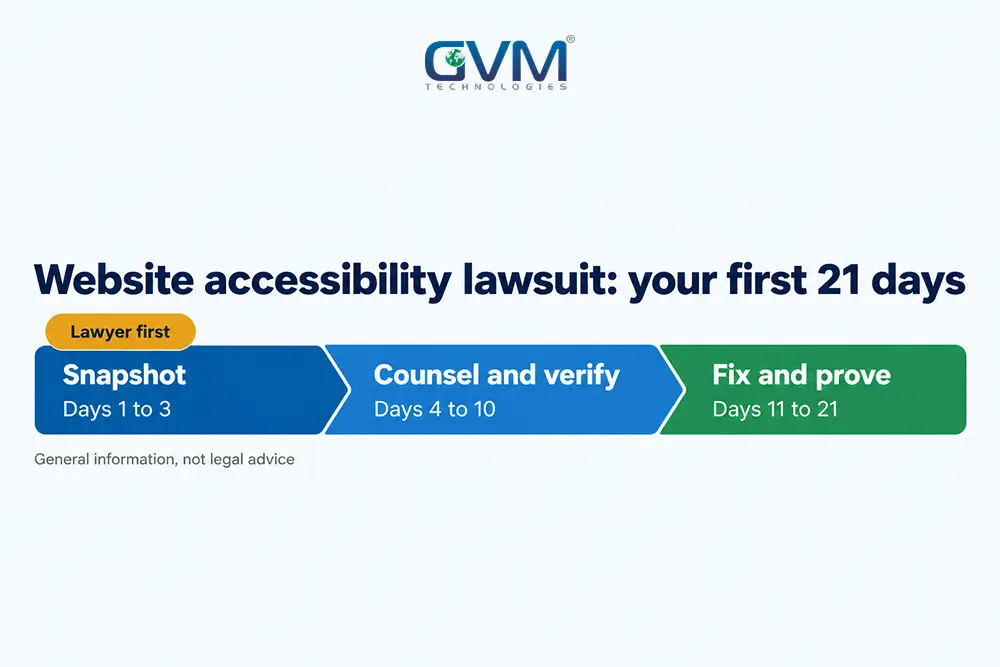
General information, not legal advice. The pattern most defense attorneys describe:
- Do not ignore it. A default judgment is the worst outcome.
- Do not pay the number on sight. These are opening offers sent in volume.
- Talk to an ADA defense attorney; many offer a flat-fee review.
- Start real remediation now and log it with dates.
- Run the plaintiff firm’s own site through a checker. A non-compliant plaintiff site cuts their leverage.
- Publish or update your accessibility statement with a working contact path.
Businesses that fare worst have nothing to show. The best have a scan report, a remediation log, a statement, and a testing schedule.
FAQs
1. Is my business website legally required to be ADA compliant?
If you are a place of public accommodation, courts have generally held your website falls under ADA Title III, especially after Robles v. Domino’s. No federal regulation lists the technical rules, but lawsuits are filed daily and the working standard is WCAG 2.1 Level AA.
2. Is there an official ADA or WCAG certification for websites?
No. No agency certifies a website as ADA compliant. What exists is third-party auditing, a VPAT-based conformance report, and your own statement, so treat any “certified compliant” badge as marketing.
3. Do accessibility widgets make my site compliant?
No. Overlays do not fix the underlying code, often interfere with screen readers, and provide no legal protection. The FTC fined accessiBe $1 million in 2025 over its compliance claims.
4. Which WCAG version should I follow in 2026?
Meet WCAG 2.1 Level AA as the floor, since courts and settlements reference it. Scope new projects to 2.2 AA, which adds focus visibility, dragging alternatives, and minimum target size.
5. Can automated tools like WAVE find every accessibility problem?
No. Scanners catch roughly 30 to 40% of issues. They cannot judge whether alt text is accurate or whether a screen reader user can complete a purchase, so add a keyboard pass and screen reader testing.
6. How much does an accessible website cost?
Developer remediation of a 15 to 40 page site typically runs $2,000 to $8,000. A professional audit with manual testing runs $2,500 to $10,000. Since demand-letter settlements start around $5,000, fixing first is usually cheaper.
Conclusion
Run WAVE on your homepage, a service or category page, your contact page, and your checkout. Fix every error, then unplug your mouse and try to complete a purchase.
Most fixes take days, not the months a full build needs. Accessibility is a maintenance habit, like security patching, not a one-time project.
Work With GVM Technologies On Accessibility
An overlay takes one line of code. A site a blind customer can actually check out on takes the component-level work most agencies skip.
GVM Technologies has built and audited production websites since 2013, from Miami and Surat, under ISO 27001:2022 and 9001:2015 certified processes.
Our website development, QA testing, and SEO teams run WCAG 2.1 and 2.2 AA checks on every build.
Book a free accessibility review with GVM Technologies and get a prioritized fix list mapped to WCAG criteria, before a demand letter finds them.