


“Core Web Vitals” sells SEO projects more than it sells truth. A vendor flags a failing score, a client panics, a budget gets approved.
Google’s own documentation never calls it a ranking factor. Not in those words. It says page experience “aligns with what our core ranking systems seek to reward.” That gap is what this guide closes.
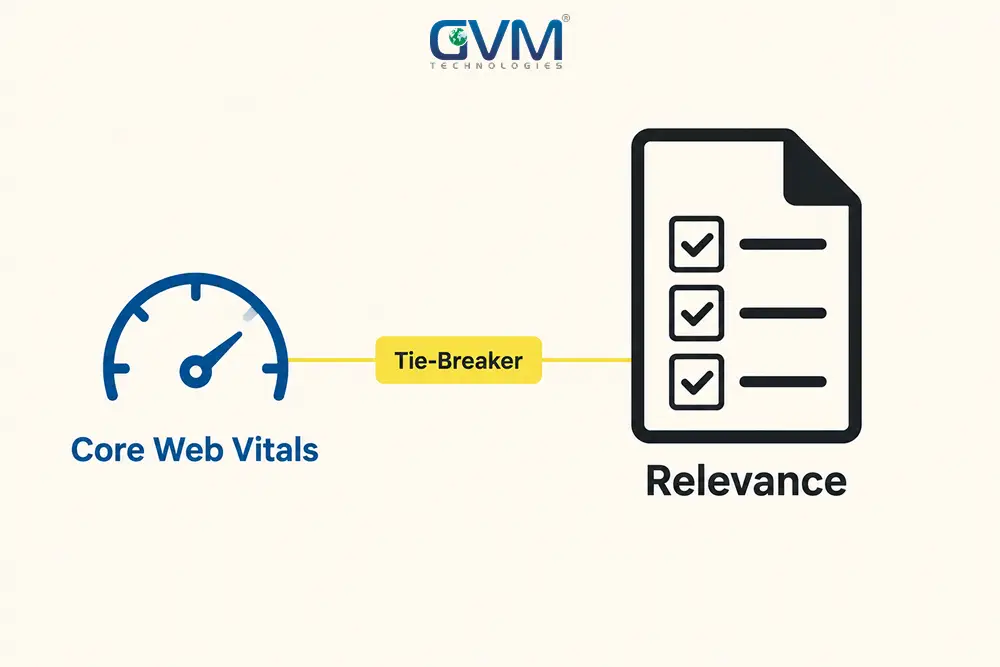
Quick Answer: Core Web Vitals measure whether a page feels fast, responsive, and stable. In Google Search, they act as a tie-breaker, not a ranking lever. Two equally strong pages, better vitals can decide the winner. One page that’s simply more relevant, vitals won’t close that gap.
The bigger, better-proven payoff sits in conversion rate and trust, a separate calculation from rankings.
Key Takeaways
- Google’s language stops at “aligns with,” not “is a ranking factor.” Relevance still decides most results.
- Scores pass or fail at the 75th percentile of real sessions, over 28 days. It’s a gate, not a leaderboard.
- Ahrefs’ crawl of 42 million pages found only 11.4% had measurable field data at all.
- Google’s Gary Illyes, quoted by Ahrefs, has said most sites won’t see a great benefit from working on the metric directly.
- One exception: CoinStats improved its “Good” score share by roughly 300% after fixing an image bug, with a matching rise in impressions, per DebugBear’s analysis.
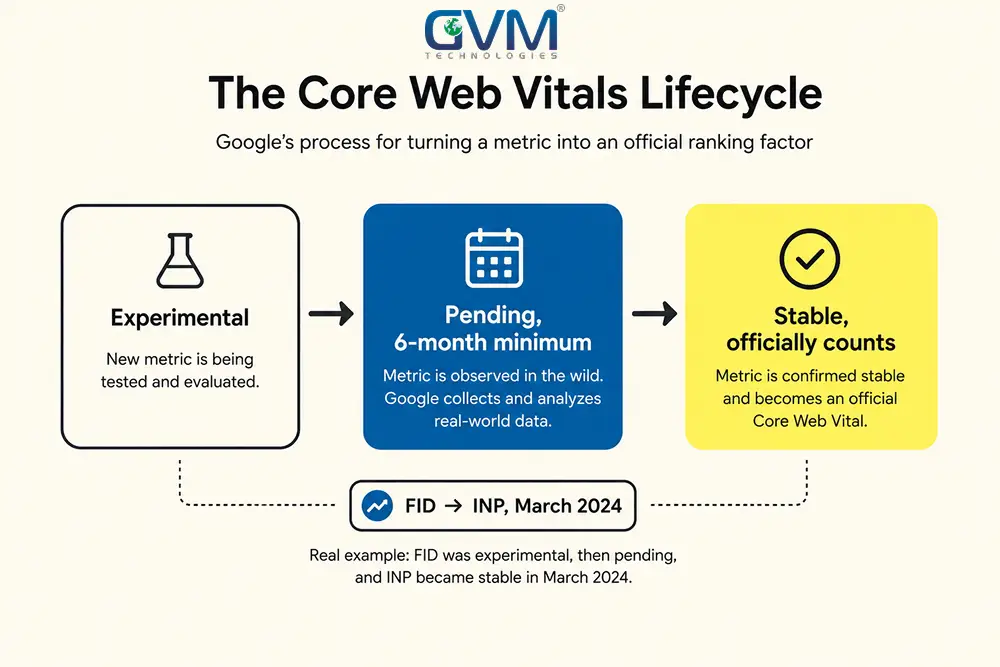
- New metrics spend a six-month minimum in “Pending” status before they count, which is why INP didn’t replace FID until March 2024.
- The provable case for fixing Core Web Vitals is bounce rate and conversions, not search position.
The Three Metrics Behind Core Web Vitals
Three scores make up Core Web Vitals. Each answers a plain question, without the jargon.
1. Largest Contentful Paint Measures How Long a Visitor Waits
LCP tracks the moment the biggest visible element finishes rendering. A visitor feels this as: is the thing I came here for even here yet?
Google’s “good” threshold is under 2.5 seconds.
2. Interaction to Next Paint Measures Whether Clicks Feel Alive
INP measures the delay between a tap and the page’s visible response. It replaced First Input Delay as the official third vital in March 2024.
A visitor feels this as whether a button worked, or did nothing. Under 200 milliseconds reads as instant.
3. Cumulative Layout Shift Measures Whether the Page Holds Still
CLS scores how much content jumps while loading. A poor score means a misclick, the wrong link tapped by accident because the page moved.
Google’s “good” threshold is under 0.1. TTFB isn’t an official vital, but it caps the other three; a slow server delays LCP’s clock from starting at all.
| Metric | The real question it answers | Good threshold | Failing feels like |
|---|---|---|---|
| LCP | Is the main content here yet? | Under 2.5 seconds | A blank or half-built page |
| INP | Did my tap actually do anything? | Under 200 milliseconds | A dead or delayed button |
| CLS | Did the page just move on me? | Under 0.1 | Misclicks from jumping content |
A technical SEO audit checks all three against real visitor data first. Guessing wastes both time and budget.
The Straight Answer on Whether Core Web Vitals Affects Your Rankings
Modestly, and only as a tie-breaker between pages that are already close in quality. That’s the honest reading of Google’s own documentation, not a hedge.
1. Google’s Own Wording Stops Short of “Ranking Factor”
Google says page experience “aligns with what our core ranking systems seek to reward.” That’s an alignment, not a lever.
Compare it to how Google talks about content relevance, in far more direct terms across the same guidance. The gap in language is the gap in weight.
2. Independent Research Confirms the Same Pattern
Ahrefs crawled 42 million pages. Only 11.4% had enough traffic to generate measurable field data.
Gary Illyes, quoted by Ahrefs, sets the same expectation: most sites won’t see a meaningful benefit from working on the metric directly.
It matches practice, too. Search a competitive term and run the top three through PageSpeed Insights. A “needs improvement” score at position one is common.
3. One Real Case Study Shows It Can Matter
CoinStats fixed a Base64 image-encoding bug that was wrecking its LCP. DebugBear’s analysis shows its share of “Good” pages jumped roughly 300%, with impressions rising to match.
That case is the exception that proves the rule. The site moved from broken to fixed, not from good to perfect, a distinction that runs through this whole article.
The lab data trap. PageSpeed Insights shows two data sets: a single simulated lab test, and field data from real visitors over 28 days.
Google’s systems reference field data. A page can score 95 in the lab and still fail in the real world.
The Core Web Vitals Lifecycle Nobody Explains to Business Owners
Most explainers treat LCP, INP, and CLS as if they’ve always existed exactly as they are today. They haven’t.
1. A Metric Spends Months as “Experimental” Before It Counts
Google’s web.dev documentation lays out a formal lifecycle: Experimental, then Pending, then Stable. Pending carries a minimum six-month runway before a metric becomes official.
INP sat in that pipeline before formally replacing FID in 2024, which is why an old SEO report can be confidently wrong today, through no fault of the writer.
2. Knowing This Protects You From Outdated Advice
Any guide still centering FID is working from a retired standard. Expect a similar multi-year runway for whatever replaces INP next.
Check the last-updated date on any Core Web Vitals guide before trusting a threshold. Ongoing analytics tracking catches metric drift early.
The Tie-Breaker Test
Run this before spending a dollar on Core Web Vitals work for ranking reasons. It takes ten minutes.
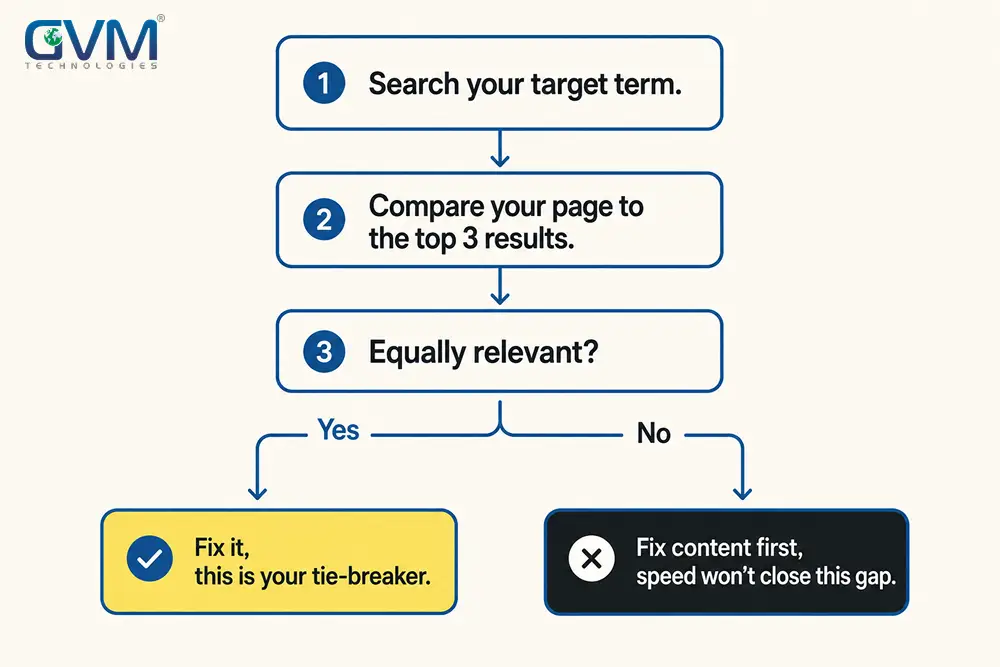
- Search the exact term you want the page to rank for.
- Open the top three organic results. Read them the way a stranger would.
- Ask directly: is my page as relevant, complete, and trustworthy as theirs?
- If yes, Core Web Vitals can genuinely be the deciding factor. Prioritize the fix.
- If no, better vitals won’t close that gap. Content depth carries more weight.
Most businesses asking “will speed help us rank” skip step three. Speed is easy to measure, so it gets blamed by default.
Why This Confusion Keeps Costing Businesses Money
Faster-equals-higher-rankings survives because speed is easy to measure and hard to argue against in a sales meeting.
- Treating a Lighthouse lab score as the ranking signal. It isn’t. Google references field data, not the synthetic number PageSpeed Insights shows first.
- Assuming a ranking drop must be a speed problem. Most trace back to content or an algorithm change. Search Console’s report rules this out in a minute.
- Chasing 100/100 on a page that already passes. Getting there often means stripping out chat, video, or personalization that carries real value.
- Applying one standard to every business. A national retailer hits the tie-breaker constantly. A local business rarely does.
None of this makes Core Web Vitals worthless. It means most businesses fix them for the wrong reason.
The Evidence, Weighed Fairly
Two credible positions exist side by side. A fair answer holds both, instead of picking a side for a headline.
1. The Case That It Barely Moves Rankings
Google’s phrasing is intentionally non-committal. Ahrefs’ adoption data shows most of the web can’t be measured at scale, and Illyes’ comment confirms it from the source.
2. The Case That It Sometimes Genuinely Does
CoinStats’ documented recovery shows the effect is real when a site starts genuinely broken. The pattern is consistent: the win comes from crossing out of “poor,” not polishing a passing score.
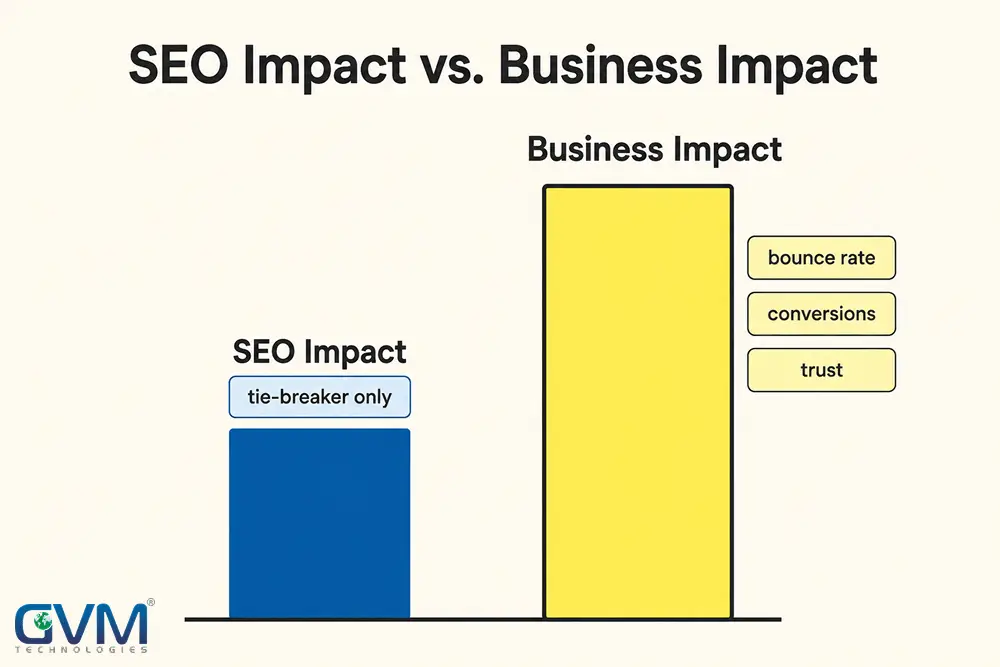
| SEO impact | Business impact | |
|---|---|---|
| Mechanism | Secondary signal inside “page experience” | Shapes whether a visitor stays or leaves |
| Evidence | Deliberately soft language; a tie-breaker at best | Named, measurable case studies |
| Shows up in | Rank position, against equally strong competitors | Bounce rate, cart abandonment, trust |
| Biggest lever | Moving out of “poor” | Every visitor, every session |
That second column doesn’t need an inflated SEO promise to justify a budget. It’s strong enough alone.
How to Explain This to a Non-Technical Stakeholder
Metric names are the wrong opening line for a founder or client who’s never opened PageSpeed Insights.
1. Translate Each Metric Into a Feeling, Not a Name
- LCP is whether the thing they came for shows up before they give up.
- INP is whether tapping a button feels like it worked, or nothing happened.
- CLS is whether the page holds still, or jumps and makes them misclick.
Collapse all three into one question: does this feel fast on an average phone, not a developer’s laptop on office WiFi?
2. Show the Problem Before You Show the Number
A screen recording, your site loading beside a faster competitor’s, side by side, lands harder than a score on a slide. Attach the cost estimate only after they’ve watched the problem happen.
Numbers convince accountants. A visible lag convinces everyone else first.
Who Should Prioritize This, and Who Shouldn’t
Core Web Vitals carry different weight by business type.
| Business type | How often the tie-breaker triggers | Recommended priority |
|---|---|---|
| E-commerce, high-competition terms | Frequently; listings are similarly relevant | High, on category and product pages |
| SaaS with differentiated content | Occasionally, against close competitors | Moderate, on signup and pricing pages |
| Local service, limited competition | Rarely; geography narrows the field | Low for SEO; still worth it for trust |
| Established brand, strong authority | Rarely; backlinks tend to dominate | Low for SEO; prioritize by conversions |
| New site, thin content | Almost never; content is the constraint | Very low; fix content first |
A brand with years of backlinks doesn’t need a perfect score to hold position one.
Keyword and content research closes more of that gap than another round of image compression.
Check Your Own Score in Under Five Minutes
- Open PageSpeed Insights on your highest-traffic page, not the homepage by default.
- Scroll to the field data section, not the lab score.
- Check Search Console’s Core Web Vitals report for a site-wide view.
- Load the page on an actual phone over cellular data, not office WiFi.
- Run the Tie-Breaker Test before deciding how urgent a fix really is.
A site landing in “poor” across multiple pages needs a proper audit, not a single-page guess.
A website rebuilt for speed and scale avoids re-discovering the same bottleneck on every new page.
Mistakes That Waste a Core Web Vitals Budget
- Buying “Core Web Vitals SEO” expecting a ranking jump. Budget it as a conversion project with an SEO side benefit.
- Chasing a perfect score on a page that already passes. Diminishing returns set in fast past “good.”
- Auditing the homepage when conversions happen elsewhere. Fix the pages carrying revenue first.
- Blaming a traffic drop on Core Web Vitals without checking. Search Console rules this in or out in a minute.
- Ignoring hosting and server response. A slow hosting setup caps every other fix.
- Skipping verification after the fix ships. QA testing on real devices catches what a lab score misses.
Conclusion: Fix It for the Right Reason, Not the Convenient One
Core Web Vitals are real and capable of deciding a ranking outcome, but only when two pages are already neck and neck. They’re not the ranking lever most pitches describe.
Run the Tie-Breaker Test before approving budget for a speed project. Keep that decision separate from the conversion case, which stands on its own evidence.
Mix the two up, and a business either overpays for a promise Google won’t confirm, or underinvests in a fix with a real return.
Get an honest verdict, not a sales pitch. GVM Technologies has run technical audits since 2012, from Miami and Surat, under ISO 27001:2022, 20000-1:2018, and 9001:2015 certified processes.
One team, SEO, dev, and QA under Zeel Shah, reviews the same site.
Not three vendors passing blame. See the GlobalRose case study.
Book a Core Web Vitals and Rankings Audit with GVM Technologies and get a written verdict on whether your score is costing you rankings, sales, both, or neither, before another dollar goes toward the wrong problem.
FAQs
1. Does Core Web Vitals affect SEO rankings?
Yes, modestly. Google describes page experience as aligning with its ranking systems, functioning mainly as a tie-breaker between similar pages.
2. Is Core Web Vitals a real ranking factor, or just a myth?
Real but limited. It’s a confirmed page experience signal, but content relevance and authority carry far more weight.
3. What counts as a good Core Web Vitals score?
LCP under 2.5 seconds, INP under 200 milliseconds, CLS under 0.1, at the 75th percentile of real sessions over 28 days.
4. How important is Core Web Vitals for a small business specifically?
Less important than for a national brand on identical terms. A local business rarely hits the scenario where vitals decide the outcome.
5. What’s the difference between Core Web Vitals and general page speed?
Page speed is a broad idea. Core Web Vitals are three specific, Google-defined metrics measuring loading, responsiveness, and stability.
6. Do I need a developer to fix Core Web Vitals issues?
Usually, yes, for genuine “poor” scores. A technical SEO audit scopes which fixes need code versus configuration.
7. Will fixing Core Web Vitals guarantee more sales or higher rankings?
No. It can tip a genuine tie-breaker, but it won’t fix weak content or low authority alone.
8. How much does a Core Web Vitals fix typically cost?
It depends on the cause. Hosting and image fixes resolve in days; a legacy codebase may need a rebuild. Website development costs is a fair starting comparison.
 Call us : +1 (786) 947-6105