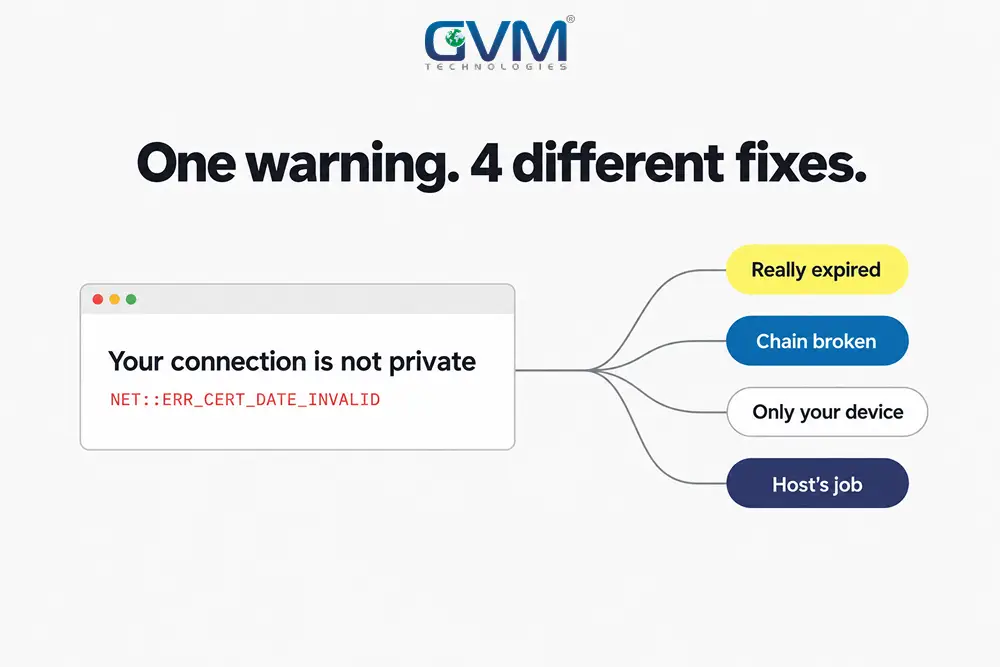
Your SSL certificate expired, or the padlock broke overnight, and every visitor now hits a full-page warning.
Before you renew anything, you need to know which of 3 problems you have.
The certificate might be genuinely expired. It might be valid but misconfigured. Or it might be fine on the server and still not working on your machine alone
Each has a different fix and a different owner.
Guessing wrong costs a day. This is also a separate issue from the grey “Not secure” label, which is an HTTPS and mixed-content problem, not a certificate one.
Quick answer: Read the exact error text first.
NET::ERR_CERT_DATE_INVALIDor “certificate has expired” means renew and reinstall the full chain on every server, then reload the service.
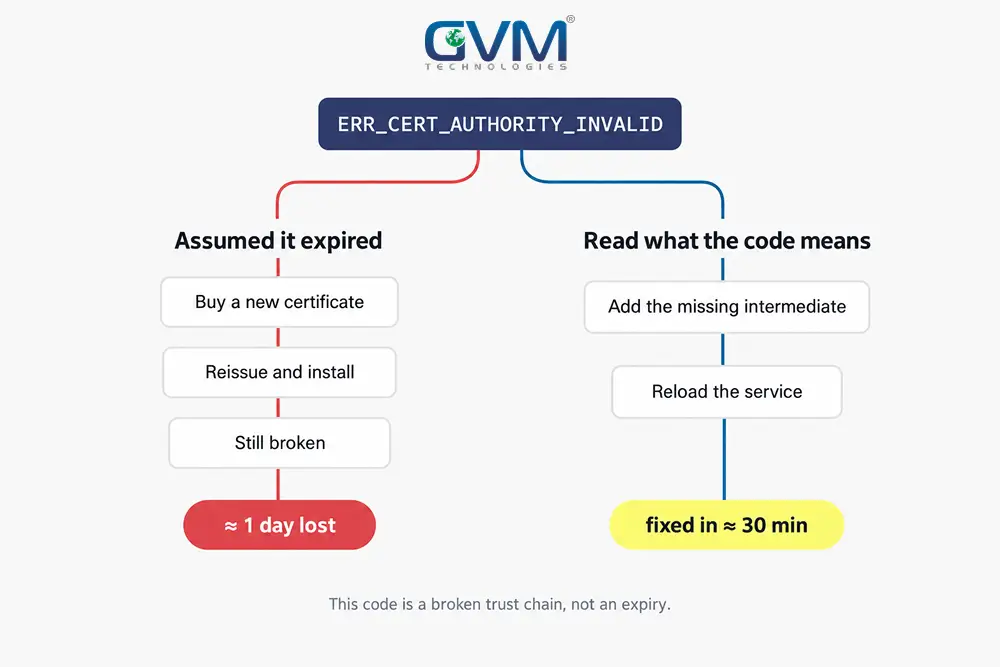
NET::ERR_CERT_AUTHORITY_INVALIDalmost always means a missing intermediate certificate, not an expiry.If the site works for everyone but you, check your clock and cached SSL state, not the server. Always verify from an external SSL checker, never your own cached browser.
Key Takeaways
- “Expired” and “not trusted” throw near-identical warnings but need opposite fixes: one is a renewal, the other is a broken certificate chain.
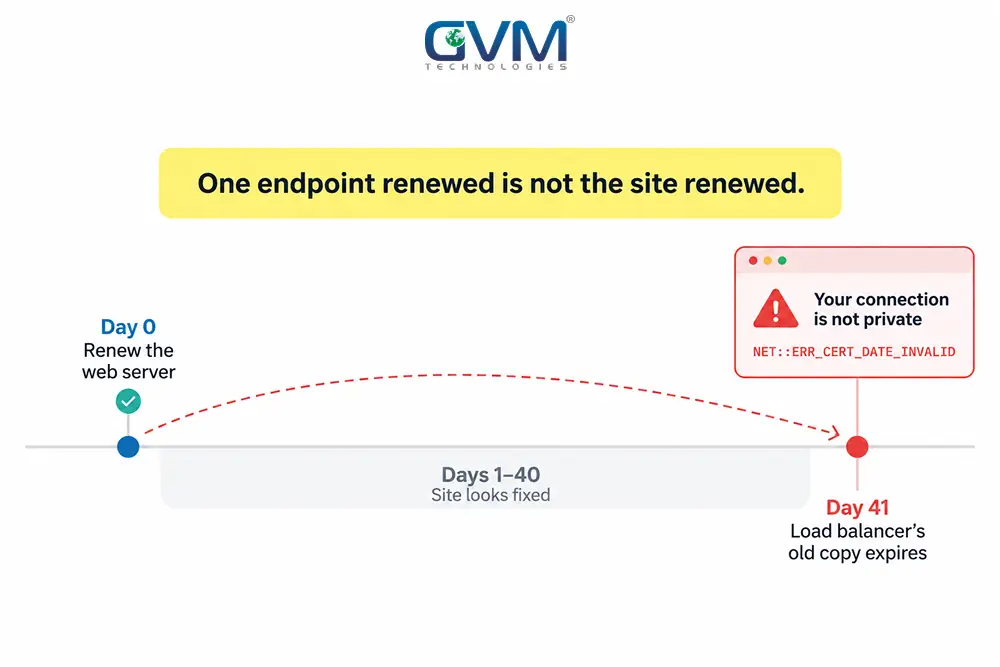
- A certificate lives in more than one place. Renewing it on the web server while the load balancer, CDN, or mail server still serves the old one is the top reason the warning survives a “fix.”
- An expired intermediate certificate takes a site down instantly. An expired root can sit in a trust store for years and hurt nothing.
- Since March 2026, publicly trusted certificates last 200 days, dropping to 100 in 2027 and 47 in 2029. Manual annual renewal is ending.
- Automated renewal that nobody monitors fails silently. You find out when the site does.
- Past the expiry date, the browser can no longer verify who it is talking to, which is what opens the door to interception. The warning is the visible symptom; the trust gap is the real one.
It happens to everyone: expired certificates have knocked out Spotify and GitHub’s CDN (2020) and Microsoft Azure (2014).
Roughly 32% of organizations run a certificate lifecycle tool, so most renewals still depend on a person remembering.
First, Which Problem Do You Actually Have?
3 checks sort this in under 5 minutes. Skip them and you risk renewing a certificate that had months left, or blaming the server for a fault on your own laptop.
1. Is it broken for everyone, or only you?
Open the site on your phone over mobile data, then run it through an external tool like SSL Labs. If the checker reports a valid, current certificate, the fault is on your device.
This is the same “everyone or just me” split that governs any website outage. Confirm it before touching a server.
2. Is the certificate actually past its expiry date?
View the certificate in the browser, or run one command from any terminal:
echo | openssl s_client -connect yourdomain.com:443 -servername yourdomain.com 2>/dev/null | openssl x509 -noout -dates -subject -issuer
This prints the notBefore and notAfter dates, the domain the certificate covers, and who issued it. Add -showcerts to see every certificate the server sends, which is how you spot a missing intermediate.
3. What does the error string actually say?
Click “Advanced” on the warning and read the code. Each one points somewhere different.
| Error string | What it means | Fix path |
|---|---|---|
NET::ERR_CERT_DATE_INVALID, SEC_ERROR_EXPIRED_CERTIFICATE |
Past notAfter, or your device clock is wrong |
Renew and reinstall, or fix the clock |
NET::ERR_CERT_AUTHORITY_INVALID, SEC_ERROR_UNKNOWN_ISSUER |
Browser cannot build a trust chain: missing intermediate, self-signed, or an expired chain link | Serve the full chain, or replace a self-signed certificate |
SSL_ERROR_BAD_CERT_DOMAIN, NET::ERR_CERT_COMMON_NAME_INVALID |
Certificate does not cover this hostname (usually www or a subdomain) |
Reissue with the correct SAN list |
ERR_SSL_PROTOCOL_ERROR, SSL handshake failed |
TLS negotiation failed: protocol, cipher, or SNI | Fix the server’s TLS config, not the certificate |
A pattern support teams see weekly: someone applies a clock or cache fix to a certificate that genuinely lapsed on the server, and nothing changes for visitors.
Fix a Genuinely Expired Certificate
The notAfter date has passed. The fix reads as 4 quick steps and turns into an outage when a step is skipped.
1. Renew or reissue with a fresh key and CSR
Log in to your certificate authority and renew, or run certbot renew for Let’s Encrypt. Generate a new private key and Certificate Signing Request rather than reusing the old one.
If the order sits “in validation” for hours, you are waiting on Domain Control Validation. Complete the email approval, DNS TXT record, or HTTP file the CA asked for.
Organization-validated and Extended Validation certificates need the business re-checked, which can take 1 to 2 weeks. Start that before the old certificate expires, not after.
2. Install the leaf certificate and the intermediate chain
This is the step that gets skipped. A CA gives you a leaf certificate plus its intermediates, and the server must send both.
Desktop browsers often hide a missing intermediate by caching it from another site. Mobile browsers and API clients do not, so the site “works on my laptop” and fails everywhere else.
3. Replace it everywhere the certificate lives
1 domain, 1 certificate, but often 4 places serve it:
- The origin web server (Nginx, Apache, IIS)
- A load balancer or reverse proxy in front of it
- The CDN edge (Cloudflare, Fastly, CloudFront)
- Non-web endpoints on the same name: mail server, API gateway, VPN, admin panels
Wildcard certificates make this worse. A *.yourdomain.com certificate can sit on 40 servers, so teams renew the website and get a ticket a week later when the mail server’s copy lapses.
4. Reload the service, then verify from outside
Dropping a file in place does nothing until the service reloads and reads it: nginx -s reload, apachectl graceful, or an IIS binding refresh.
Then confirm with SSL Labs or openssl from a machine that never visited the site. Your browser caches certificates hard, so it will show you a working site while new visitors still see the error.
This full sweep is what managed DevOps and cloud hosting turns into 1 automated job instead of 4 manual ones.
When the Certificate Is Valid but the Site Still Breaks
The external checker says the certificate is current, yet visitors still see a warning. The certificate is fine. Something around it is not.
1. A missing intermediate certificate
The most common cause of NET::ERR_CERT_AUTHORITY_INVALID on a certificate that has not expired. The server sends only the leaf, so the browser cannot reach a trusted root.
Concatenate the intermediates your CA provided into the chain file and reload. openssl s_client -showcerts from outside shows exactly what the server sends now.
2. An expired certificate deeper in the chain
An expired intermediate takes a site down the moment it lapses, because its dates are always checked. An expired root can sit harmlessly in a trust store for years.
In September 2021, the DST Root CA X3 cross-sign for Let’s Encrypt expired. Modern browsers stayed fine, but old Android phones and some firewalls rejected the whole chain.
Let’s Encrypt’s DST Root CA X3 expiration notes show the pattern. The fix was to stop serving the outdated link.
3. Name mismatch: www, wildcards, and SANs
A certificate for yourdomain.com does not cover www.yourdomain.com. A *.yourdomain.com wildcard does not cover the bare domain or a two-level subdomain like api.staging.yourdomain.com.
A recurring trap: the IIS certificate wizard builds a CSR with no Subject Alternative Name, and browsers reject the issued certificate on sight.
Build the CSR with every hostname listed, then reissue. Getting the SAN list right at build time is part of proper website development.
4. CDN and origin disagree
Running Cloudflare in “Full (strict)” mode means the edge validates your origin certificate. An expired or self-signed origin certificate breaks the site even when the public edge certificate is perfect.
Fix the origin certificate, or install the long-life origin certificate the CDN issues for exactly this job.
When the Error Only Shows on One Device
The checker is green. Colleagues load the site. It fails only for you. The certificate is not the problem.
1. The system clock is wrong
TLS validation compares the certificate dates against the device clock. A clock that is days off, common after a dead CMOS battery, makes a valid certificate look expired. Set the time to sync automatically and reload.
2. A cached certificate or SSL state
Browsers and operating systems cache certificates and TLS sessions. After a certificate changes, that cache keeps serving the old error.
On Windows, clear the SSL state in Internet Options. In any browser, use a private window, clear cached files for that site, and restart the browser fully.
3. An outdated device with a stale root store
Very old systems stop receiving root updates. Pre-2016 macOS, Windows XP-era machines, and unpatched Android below 7.1.1 reject certificates every current device accepts.
On a supported OS this is a patch. On an unsupported one it is an upgrade decision, not a certificate fix.
4. A corporate firewall inspecting traffic
Security appliances doing deep SSL inspection sit in the middle of the connection and re-sign traffic with their own certificate. When their trust bundle falls behind, they reject sites that are genuinely fine.
If the site fails only on the office network, check the firewall’s certificate bundle before you touch the server.
Why It Keeps Happening, and How to End It
Renewing the same certificate by hand once a year is ending. An SLA with your provider should already name who renews it and the uptime it protects. Here is why the manual habit no longer holds.
1. Certificates now expire far faster
The CA/Browser Forum baseline requirements now cut certificate lifetime in stages.
| From | Max certificate life | Max domain validation reuse |
|---|---|---|
| Before Mar 15, 2026 | 398 days | ~398 days |
| Mar 15, 2026 | 200 days | 200 days |
| Mar 15, 2027 | 100 days | 100 days |
| Mar 15, 2029 | 47 days | 10 days |
By 2029 a certificate needs replacing roughly 8 times a year, and domain ownership must be re-proven every 10 days.
2. Automated renewal that nobody watches
An ACME cron job breaks after an OS upgrade, a DNS API token rotates, or a disk fills, and renewal quietly stops. The first signal is the site going down 60 days later.
Renewal and monitoring are separate jobs. You need the renewal to run, and an independent check that alerts a human when the live certificate drops below 20 days left.
3. Wildcard certificates multiply the damage
A wildcard on 40 servers means a single expiry takes down all 40 services, and a stolen private key can impersonate every subdomain. Issue per-service certificates through automation where you can.
4. Registrars and appliances that fight automation
Printers, network storage, older VPNs, and virtualization consoles have no ACME support and expect a human to paste a certificate into a form once a year. Some even lock the admin account when their own certificate expires.
Registrars without a DNS API block DNS-based automation. The standard workaround is a CNAME that delegates the _acme-challenge record to a provider that does support an API.
For everything else, stop terminating public TLS on the device itself:
| Setup | Renewal reliability |
|---|---|
| One person remembers | Fails when they leave or forget |
| Calendar reminder | Ignored during a busy week |
| Manual renewal plus expiry monitoring | Human still acts, but gets warned early |
| ACME automation (certbot, Caddy, load balancer) | Silent failure after infra changes |
| ACME plus independent monitoring plus a staging test | Rare, and caught before visitors see it |
Put a reverse proxy in front of stubborn systems, automate the certificate there, and let the appliance keep a long-life internal certificate that never faces the public.
If your setup already hit the “locked out of an appliance” stage, that is a project rescue job, not a DIY afternoon.
What Fixing It Costs and How Long It Takes
The cost driver is never the certificate. It is how many places it lives and whether renewal is automated.
| Scenario | Typical effort or cost | Timeline |
|---|---|---|
| Renew and reinstall on one server you control | Free (Let’s Encrypt) to a CA fee | 15 to 60 minutes |
| Order stuck in domain validation | Free, plus a support call | 1 hour to 1 day |
| Missing intermediate on a live site | Free once diagnosed | ~30 minutes |
| Renewal across web, load balancer, CDN, and mail | Internal time, or 200 to 800 dollars | Half a day |
| Locked out of an appliance on its own expiry | 300 to 1,500 dollars | 1 to 3 days |
| Building automation and monitoring so it stops | 800 to 3,000 dollars one-off | 1 to 2 weeks |
A site with automated renewal plus monitoring almost never generates a bill for this again. Getting there is where a security and QA review pays for itself.
FAQs
1. My SSL certificate expired. Will my website still load?
The site loads, but every visitor first hits a full-page “Your connection is not private” warning with NET::ERR_CERT_DATE_INVALID, and most leave. API clients, webhooks, and cron jobs that call the domain fail outright, because they refuse the connection instead of showing a warning.
2. How do I renew an expired SSL certificate?
Renew or reissue with your CA or ACME client, install the leaf certificate together with the intermediate chain, update it on every server that serves the domain, reload the service, then verify from an external checker. Skipping the chain or a second endpoint is why a renewal often does not clear the warning.
3. Why does my SSL certificate say “not trusted” when it has not expired?
Almost always a missing intermediate certificate. Your server sends only the leaf, so the browser cannot build a chain to a trusted root. Concatenate the intermediates your CA gave you and reload.
A self-signed certificate shows the same message and cannot be revoked, so it is fine for internal tools but never for a public site. An expired link deeper in the chain also triggers it.
4. My SSL certificate works on my computer but not for visitors. Why?
Your browser cached the working certificate and chain from before. New visitors, especially on mobile, get the real broken response. Test with your phone on mobile data or an external checker, then fix the intermediate or the endpoint still serving the old certificate.
5. How long do SSL certificates last now?
Since 15 March 2026, publicly trusted certificates last a maximum of 200 days. That drops to 100 days in March 2027 and 47 days in March 2029, with domain validation reuse falling to 10 days. Certificates from your own private CA are not affected.
6. My host manages my certificate. Do I still need to renew it?
No. On shared or managed hosting the provider installs and renews the certificate, so an expiry warning there is a support ticket, not a plugin to install. WordPress SSL plugins force HTTPS and fix mixed content; they do not issue or renew the certificate itself.
Conclusion
A certificate error looks like 1 problem and is usually 1 of 4. Match the symptom before you act:
- Genuinely expired: renew, reinstall the full chain on every endpoint, reload, verify from outside.
- Valid but not trusted: fix the intermediate chain, the name mismatch, or the CDN mismatch. Do not renew a certificate with months left.
- Broken only on your device: check the clock, clear the SSL state, look at the office firewall. Leave the server alone.
- Your host’s job: open a ticket.
The sites that stop hitting this wall automated the renewal, then added a second check that warns a human before the certificate runs out.
Get It Fixed Today, and Kept That Way
Every hour a certificate warning stays up costs traffic, checkout completions, and sometimes email delivery. If the cause is not obvious or the renewal did not reach every system, you do not have time to learn this live.
GVM Technologies has built and run secure software since 2013 under ISO-certified processes. We take a broken certificate from panic to resolved:
- Diagnosis: which error, a true expiry or a chain fault, and every place the certificate is served.
- Full-chain installation across web servers, load balancers, CDN, and mail, verified from outside.
- ACME automation plus independent expiry monitoring, so renewal runs and a human is warned if it does not.
- Reverse-proxy TLS for appliances and legacy systems that cannot renew on their own.
- A pre-launch security check and technical SEO review so HTTPS is right site-wide.
Talk to GVM Technologies about a broken or expired SSL certificate and get a scoped fix: what broke, how to clear it now, and how to make sure it does not return in 200 days.