


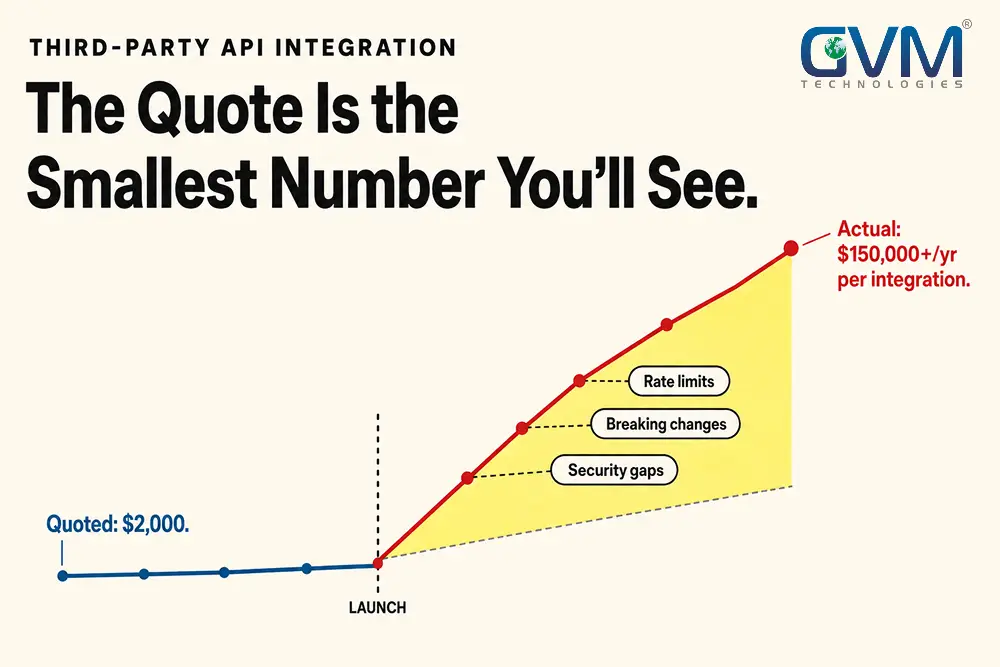
Every third party API integration starts with the same pitch: a few days of work, 1 clean connection, done. Then real traffic shows up. The vendor changes something. A bill lands that nobody budgeted for.
Third-party API integration always costs more than the build quote. GVM Technologies scopes software development problems like this one constantly.
The pattern repeats every time: teams price the connection between 2 systems, not the multi-year relationship that connection creates. This guide breaks that relationship down with real numbers, not generic warnings.
Quick Answer: The real cost of third-party API integration is rarely the build. It’s what shows up after launch:
- Usage-based billing with no hard ceiling
- $50,000 to $150,000 a year in ongoing maintenance
- Breaking changes vendors ship without notice
- A security review most teams skip until after a leak
API security incidents more than doubled in a single recent year. Only 42% of teams apply real security testing to their integrations. Those 2 numbers, sitting next to each other, explain most of what goes wrong.
Key Takeaways
- Annual maintenance for a single custom integration typically runs $50,000 to $150,000.
- A business running 20 integrations can clear $1,000,000 a year before touching a single new feature.
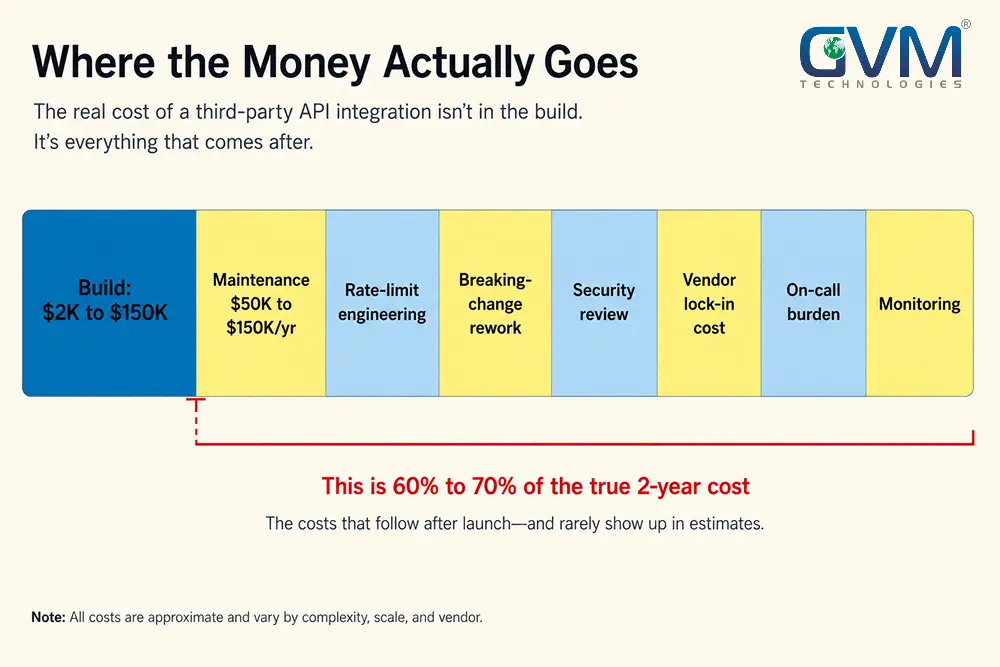
- Initial development is only 30% to 40% of the true 2-year cost of an integration.
- 78% of enterprise decision-makers admit they don’t know how many APIs their organization actually uses.
- Only 42% of teams run real security testing on their APIs, and 35.5% of all data breaches now trace back to a third party.
- 70% of security teams now flag deprecated, “zombie” APIs as a strong concern, up from 54% a year earlier.
- The fix isn’t avoiding third-party APIs. It’s treating each one as a dependency with a cost curve, a failure mode, and an exit plan.
What Third-Party API Integration Actually Means Today
Third-party API integration is the work of connecting your software to a service you don’t control, so both systems exchange data automatically.
MDN defines it plainly: an API provided by someone else, hosted on someone else’s server.
The vendor sets the price, the uptime, the rate limits, and the release schedule. You inherit every one of those decisions. That’s the entire risk profile in 1 sentence.
1. An API Call Is Not the Same as a Production Integration
Calling an endpoint once, in a script, takes an afternoon. That’s not the same job as keeping it working.
A production integration has to keep working correctly every day, under real load, while the vendor changes things without asking first.
Most quotes only price the first version.
2. Where the Real Work Actually Hides
A working integration needs more than a successful test call. At minimum, it needs:
- Authentication that survives token expiry and key rotation
- Error handling for every response code, not just the 200
- Retry logic that never duplicates a payment or an order
- Monitoring that flags a vendor outage before customers do
- A documented plan for when the vendor changes the contract
Most integration quotes only cover the first item on that list.
3. Why the Cost Conversation Starts Too Late
Teams typically price API integration services against the sticker price of the build. That’s the only number a vendor’s sales page or a freelancer’s quote actually shows.
Everything else gets filed under “maintenance.” It gets pushed into a future budget meeting.
In practice, that meeting only happens after something has already broken.
The Real Cost of Third-Party API Integration, With Real Numbers
Third-party API integration cost splits into 2 categories almost nobody compares side by side. What you pay to connect, and what you pay to stay connected.
The second number is usually 3 to 5 times larger over a 3-year period.
1. What Integration Actually Costs to Build
| Integration type | Typical build cost | What drives the price |
|---|---|---|
| Simple, single-endpoint integration | $2,000 and up | Auth complexity, data volume |
| CRM integration | $20,000 to $40,000 | Field mapping, sync direction |
| Payment gateway integration | $10,000 to $25,000 | PCI scope, error handling |
| Complex, multi-endpoint project | $30,000 and up | Number of connected systems |
Figures reflect Netguru’s published 2026 API integration cost analysis.
2. What Popular APIs Actually Charge You, Per Call
Build cost tables miss the part that scales with your growth: per-unit vendor fees. Here’s what a typical stack actually bills.
| Service | Rate you’ll actually pay |
|---|---|
| Stripe payments | 2.9% + $0.30 per successful charge |
| Twilio SMS (US) | Roughly $0.012 per message, after surcharges |
| Google Directions API | $5.00 per 1,000 requests |
| Google Places Autocomplete | $17.00 per 1,000 requests |
| OpenAI GPT-4o | $5 per 1M input tokens, $15 per 1M output |
| Identity verification (KYC) | $1.00 to $2.50 per successful check |
Figures based on a 2026 breakdown of third-party API pricing. None of these are one-time fees, and none of them appears in a static build quote.
3. The Scaling Trap: Why Costs Don’t Grow in a Straight Line
The gap between a small stack and a growing one isn’t linear. Published 2026 vendor pricing makes the jump obvious:
- 1,000 active users: roughly $3,870 a month across a typical stack
- 10,000 active users: roughly $37,980 a month, same stack, no new features
Payment processing usually drives that jump. Stripe’s percentage-based fee scales directly with revenue, faster than every other line item combined.
Budget the per-unit rate, not just the build.
4. The Maintenance Bill Nobody Quotes You Upfront
A single custom integration typically costs $50,000 to $150,000 a year to keep running.
That figure comes from 2 independent analyses, Netguru and Truto’s technical debt research, landing within a few thousand dollars of each other.
Scale that across a real stack and the math gets uncomfortable. A company running 20 integrations, not unusual once you count payments, shipping, email, and CRM, can clear $1,000,000 a year just to keep the lights on.
3 numbers explain why that bill keeps growing:
- Engineers spend 40% to 50% of their time on maintenance and unplanned work instead of new development.
- That’s roughly 13.4 hours a week per developer, close to a third of a working week, spent on integration debt.
- API maintenance alone can consume more than half of total software development lifecycle spending on API-heavy systems.
The number that actually matters isn’t the invoice. It’s the percentage of your engineering week that a single integration quietly claims, every week, forever.
7 Hidden Costs Nobody Warns You About Before You Integrate
The build cost is the tip. These 7 costs sit underneath it. They rarely show up in a standard breakdown of website development costs, and teams usually discover them in roughly this order.
1. Runaway Usage Billing With No Real Ceiling
Most APIs bill per call, per record, or per minute. That model works fine at predicted volume.
It turns dangerous the moment a retry loop fires without a limit, or a key gets exposed. Most vendors only offer usage alerts, not hard spending caps.
An alert tells you after the damage is already accruing.
There’s a second layer to this most teams never hear about:
- Requests already marked “in progress” keep processing after suspension, because the vendor’s backend has a delay that outlasts your account freeze
- Reinstating from a zero balance can trigger a fresh wave of that delayed usage
- That wave often lands as a new negative balance, days after you thought the bleeding had stopped
Build your own request budget inside your application. Don’t rely on the vendor’s dashboard to stop anything in real time.
2. Rate Limits That Throttle You at the Worst Moment
Every third-party API enforces a rate limit, a cap on requests per window. Hit that cap during a launch or a seasonal spike, and the vendor doesn’t scale with you.
It returns an error, at the worst possible moment.
Rate limits are rarely documented clearly, and they change without notice as a vendor’s own infrastructure evolves. Handling this properly means:
- Exponential backoff with jitter on retries, never a fixed delay
- A request queue that smooths bursts instead of firing them all at once
- Monitoring that warns you before you hit the limit, not after
None of that is optional once real traffic arrives. Almost none of it is in a basic quote.
3. Breaking Changes You Get Zero Warning About
Developer teams consistently name the same root cause when an integration fails without any code change on their end: the vendor changed something, and nobody told them.
Payload fields get renamed. Endpoints get deprecated. Domains migrate.
Postman’s 2026 State of the API survey found 55% of teams struggle with inconsistency across the APIs they depend on. Versioning ranks among the report’s top integration challenges.
That’s not a rare edge case. That’s the majority.
The only real defense is architecture, not vigilance. Isolate every integration behind an adapter layer inside your own codebase. A vendor’s breaking change should get absorbed in 1 file, not ripple through your entire product.
4. The Security Review You Skipped Becomes an Incident
Only 42% of teams apply real security testing to their APIs. 46% already say they’re worried about credential leakage.
35.5% of all data breaches now trace back to a third party, a 6.5-point jump from 2023, according to SecurityScorecard’s 2025 Global Third-Party Breach Report. API security incidents more than doubled in a single recent year, per Salt Security’s State of API Security research.
The common failure modes repeat constantly:
- API keys committed to a public repository and scraped by bots within minutes
- Keys embedded in client-side code, visible in any browser’s developer tools
- Overly broad permissions on a key scoped for 1 read-only endpoint
- Request data logged in plaintext by a monitoring tool nobody audited
That last point catches experienced teams off guard. It’s not only your own code that can leak a credential.
Some popular API development and testing tools have been shown to log full request URLs and “secret” fields to their own analytics servers, in plain text, without the user knowing. 15% of security breaches stem from credentials leaked exactly this way.
Restricting a key to a specific domain feels like protection. It isn’t. Domain and referrer checks read a header the caller supplies, and any script outside a browser can set that header to anything it wants.
A pre-launch security checklist that covers third-party credentials, not just your own code, catches this before launch instead of after.
5. Vendor Lock-In and the “You Don’t Own Your Stack” Problem
The deeper an integration reaches into payments, authentication, or customer records, the harder it becomes to leave that vendor later, even after their pricing doubles.
The root cause isn’t using third-party APIs. It’s coupling your business logic directly to a specific vendor’s data shapes.
A business whose core operations require 10 different vendors’ servers to stay online doesn’t fully control its own uptime.
GVM Technologies runs innovation consulting engagements specifically to map which integrations are swappable and which have quietly become structural.
6. Downtime and Vendor Instability That Becomes Your Problem
When a payment processor or authentication provider goes down, your application goes down with it. Your own code never changed.
Customers don’t distinguish between “a vendor failed” and “we’re down.”
The instability isn’t always temporary, either. Specialized API vendors get acquired, pivot their product, or shut down entirely more often than most teams plan for.
3 mitigations reduce how much a vendor’s bad day becomes your incident:
- Graceful degradation. A failed call should show a clear retry state, not crash the whole flow.
- Status page monitoring. Watch the vendor’s status page against your own error logs.
- A documented fallback. Know in advance what happens if a revenue-critical integration is down for an hour.
7. The Monitoring and On-Call Burden Nobody Assigned
Somebody has to watch every integration, every day, for the rest of its life. That’s a permanent headcount fraction, not a one-time setup task.
It rarely gets named in the original scope.
A DevOps and cloud hosting setup with real alerting turns a silent failure into a page at 2 a.m. Somebody still has to build that alerting. Somebody still has to answer the page.
That’s the cost that shows up nowhere on an invoice, and everywhere on an engineering calendar.
Why These Integrations Break in Production, Even After They “Worked”
Integrations that pass every staging test still fail once real traffic hits them. Testing covers the happy path. Production never runs on the happy path.
1. The Happy Path Isn’t the Real Job
Most of the actual engineering work in an API integration has nothing to do with the successful request. It’s:
- Rate limits and retries
- Timeouts and partial failures
- Inconsistent responses from the vendor
- Caching that serves stale data
A 200 status code doesn’t guarantee the operation actually completed on the vendor’s side. A webhook marked “delivered” doesn’t guarantee it was processed.
Treating error handling as an afterthought is the single most common reason a “working” integration turns unreliable within a few months.
2. Idempotency and the Duplicate-Request Trap
When a request times out, the safe response is to retry it. The dangerous response is to retry it blindly.
You often can’t tell whether the original request already succeeded before it timed out.
Retry a payment charge without an idempotency key, and a slow network can turn 1 charge into 2. An idempotency key lets the vendor’s system recognize a retry as the same operation, not a new one.
Any integration touching money, inventory, or anything that shouldn’t happen twice needs this designed in from line one.
3. Sandbox Parity Gaps and Rigid Plugin Limits
A vendor’s test environment rarely behaves like production. Test credentials often bypass real rate limits.
Some error conditions simply can’t be triggered outside production.
Rigid, pre-built plugins are a common source of delay once a real edge case surfaces that the plugin was never built to handle.
Dedicated quality assurance testing that simulates forced timeouts and malformed responses closes that gap.
4. Shadow Integrations Nobody Documented
78% of enterprise decision-makers admit they don’t know how many APIs their organization actually uses, according to Invicti’s shadow API research.
74% say a significant portion of those APIs are unmanaged. Only about 10% fully document what they have.
The most common origin story is boring, not dramatic:
- A frontend developer wires up a test endpoint for a demo
- The demo works, and nobody tears it down
- 6 months later, that endpoint is still live, still reachable, and completely undocumented
Every undocumented endpoint is attack surface nobody is watching. GVM Technologies starts every integration engagement with a discovery pass for exactly this reason.
Assuming the existing documentation is complete is how the surprises get found live, during an incident instead of a review.
The Engineering Practices That Actually Reduce These Costs
Most of the 7 hidden costs above aren’t inevitable. They’re the result of skipping 4 engineering habits that experienced teams treat as non-negotiable.
1. Cache Aggressively, Invalidate Precisely
Caching frequently requested data, like a product catalog or an account balance, cuts your call volume and your rate-limit exposure at the same time.
The hard part isn’t caching. It’s knowing when to invalidate.
Inventory data has to update the instant something sells out, or you’ll oversell. Static reference data can safely sit cached for hours.
Getting that distinction wrong either wastes money on redundant calls, or serves customers stale, wrong information.
2. Move Slow Work Off the Request Path
Don’t make a customer wait on a third-party API before you respond to their click. Acknowledge the action immediately.
Then process the vendor call asynchronously in the background, using a queue or a webhook.
Slower checkout experiences measurably increase cart abandonment. Processing invoice generation, inventory sync, and notification delivery off the main request path protects both your user experience and your rate-limit budget.
3. Build the Adapter Layer Before You Need It
Never let a vendor’s specific field names or data format spread directly through your business logic. Write a thin translation layer between your code and the vendor’s API.
Your application should only ever talk to your own internal model.
When the vendor changes something, or you eventually replace them, the change stays contained to 1 layer. It won’t touch every place the integration is used.
This is the same discipline behind a well-run agile software development process: isolate the volatile part, protect everything else.
4. Treat Every Key Like It’s Already Public
Assume any credential embedded in client-side code will be found. 3 habits limit the damage when it is:
- Scope every API key to the narrowest permission it actually needs
- Rotate keys on a schedule, not only after an incident
- Never rely on domain restriction as your only defense
Store production credentials in a secrets manager, not a config file committed to version control. Log requests without logging their full query strings or headers, since that’s exactly where a leaked secret tends to hide.
How to Budget, Score, and Choose Before You Sign
The businesses that avoid integration cost shock don’t pick a better vendor. They ask better questions and run better numbers before signing anything.
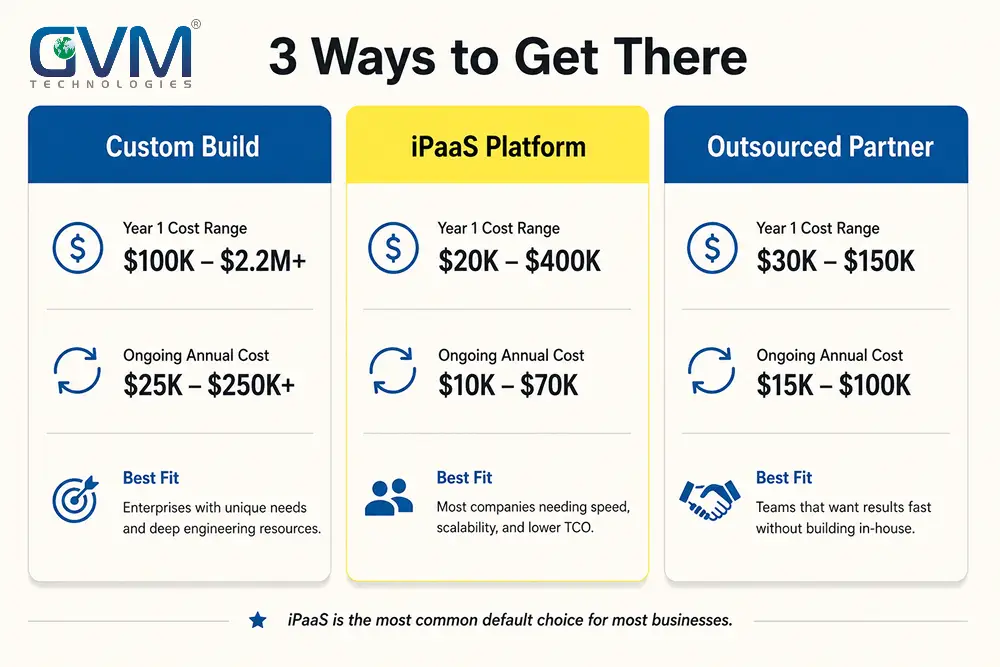
1. A Realistic Cost Framework: Custom vs. iPaaS vs. Outsourced
| Approach | Year 1 cost profile | Ongoing cost profile | Best fit |
|---|---|---|---|
| Custom in-house build | $2,000 to $150,000+ per integration | $50,000 to $150,000/year per integration | Core, differentiating workflows |
| iPaaS or unified API platform | Subscription, often $50 to $2,000+/month | Scales with connections and volume | Standard tools like CRM and email |
| Outsourced development partner | Scoped project fee | Support retainer, typically lower | Teams with no dedicated integration engineers |
The mistake most teams make isn’t picking the wrong row. It’s not comparing rows at all, and defaulting to whatever the first vendor conversation happened to cover.
Run a real agency vs. freelancer cost comparison against the custom build option before committing.
2. The iPaaS Services Tax Nobody Mentions
Enterprise integration platforms rarely cost what the license page shows. Teams that adopt one commonly spend another dollar or 2 on an implementation partner for every dollar spent on the license.
The platform fee is the entry ticket. The consulting bill to actually configure it is usually the bigger number, and it almost never appears in the initial pitch.
3. The 5-Question Scorecard Before You Commit
Score any proposed integration against these 5 questions. Answering “we’re not sure” to any of them means it needs a scoped review.
- What happens to the app when this API goes down?
- Can the bill spike without a hard spending cap?
- Who reviews the vendor’s breaking changes before they ship?
- Can we switch vendors later without a full rewrite?
- Does this touch payments, authentication, or customer data?
A “yes” on that last question moves the integration into a different risk tier entirely.
Build, Buy an iPaaS, or Hire a Development Partner?
The right approach depends on how central the integration is to what makes your product different, not on which option is fastest to set up this week.
1. When Custom Integration Wins
Build custom when the integration touches core, differentiating logic. Think pricing rules a vendor doesn’t support, or a workflow competitors can’t simply replicate.
SaaS platform development built around a genuinely custom integration is a real investment. It’s the right one when the integration is part of the product itself.
2. When an iPaaS or Unified API Wins
Standard, well-understood connections, like syncing a CRM to an email tool, don’t usually need custom code.
An integration platform handles the vendor-specific quirks for you, in exchange for a subscription and a small amount of platform lock-in. That’s typically cheaper to unwind than a custom build.
3. When to Bring in a Development Partner
If nobody on the team has scoped a production integration before, that’s the moment to bring in dedicated developers who’ve done this work.
The same applies when the integration touches payments or regulated data.
If an integration already went live and started causing incidents, that’s a different problem.
Project rescue solutions exist for the case where the integration works most of the time and fails in ways nobody can fully explain.
FAQs
1. What is third-party API integration?
Third-party API integration connects your software to an external service, like a payment processor or a CRM, so both systems exchange data automatically. The vendor controls the pricing, uptime, and update schedule.
2. How much does third-party API integration actually cost?
Builds typically run $2,000 for a simple connection, up to $150,000 or more for complex, multi-system integrations. Ongoing maintenance is usually the bigger number: $50,000 to $150,000 a year per integration.
3. What is the biggest hidden cost in API integration?
Ongoing maintenance is the largest recurring cost. Breaking changes cause the most disruption, since they can take down a working integration without any change on your side.
4. Why do third-party API integrations break without warning?
Most integrations break because testing only covers the happy path. Production traffic exposes rate limits, timeouts, and vendor-side changes that a sandbox never simulates.
5. How do you avoid vendor lock-in when integrating an API?
Build an adapter layer between the vendor’s API and your own business logic. That keeps a future vendor switch contained to 1 layer of code, not a full rewrite.
6. Is restricting an API key to my domain actually secure?
No, not on its own. Domain and referrer checks rely on a header the caller supplies, which can be set to anything from outside a browser. Pair it with narrow permissions and server-side proxying.
7. Should I build a custom integration or use an iPaaS platform?
Build custom when the integration is core to what makes your product different, often validated first through MVP development. Use an iPaaS for standard connections.
8. How do you budget for ongoing API maintenance?
Budget 15% to 25% of the initial build cost per year for basic upkeep. Expect that to climb toward $50,000 to $150,000 annually once you include monitoring and security review.
9. How can I stop a third-party API integration from causing a surprise bill?
Build your own request budget inside your application that stops calls once a threshold is hit. Most vendors only offer usage alerts, not hard caps, so don’t rely on their dashboard alone.
Conclusion
Third-party API integration was never really a build-it-or-don’t decision. It’s a decision about how much of your future engineering time, budget, and risk tolerance you’re handing to a vendor whose priorities aren’t yours.
The integrations that quietly damage a business aren’t the ones evaluated properly and still cause problems.
They’re the ones treated as a 1-time feature ticket instead of a permanent dependency with its own cost curve and its own exit plan.
GVM Technologies has built and rescued custom software since 2012, from offices in Miami and Surat. Its processes run under ISO 27001:2022, 20000-1:2018, and 9001:2015 certification.
Reviewing past integration and platform builds in the portfolio is a reasonable place to start.
Get an honest read on what your integration will actually cost to run, not just to build. Book a free consultation with GVM Technologies and talk to an engineering team that scopes this exact conversation every week.
 Call us : +1 (786) 947-6105