A hacked website is not the disaster. The panic response is.
Most owners spot a strange file, start deleting things, and take the site down with a 500 error. The malware stays. The evidence is gone.
Here is what to do if your website gets hacked, in order: take the site offline, save a copy for evidence, rotate every password and key, find the entry point, remove all malware and backdoors, restore a clean backup, then notify anyone whose data was exposed.
The way in is usually a gap a pre-launch security checklist catches.
Quick answer: Contain first. Investigate second. Clean third. Notify on a legal clock. Rebuild last. Skip the investigation and the site gets hacked again. Skip the snapshot and you never learn how they got in.
Key Takeaways
- Do not wipe the server before you save a full copy. That copy holds the logs that prove what happened and how.
- A password reset does nothing to malware, backdoor files, or hidden admin accounts.
- A reportable breach must reach the regulator within 72 hours under GDPR, and on each state’s own deadline in the US.
- A backup on the same hosting account as the live site is not a backup.
- Never pay a ransom. It funds the next attack, often fails, and never closes the hole.
How to Confirm Your Website Is Hacked, Not Just Broken
Spend 10 minutes confirming the problem first. Many “we got hacked” calls are an expired plugin licence or a DNS change nobody logged.
The signs that mean a real compromise
| Sign | What it usually means |
|---|---|
| “Deceptive site ahead” browser warning | Google flagged malware or a phishing page |
| Host suspended the account | Outbound spam or malware detected server-side |
| Redirects only from Google, or only on mobile | Cloaked redirect hack, hidden from you on purpose |
| Unknown pages ranking for your brand | SEO spam: pharmaceuticals, loans, replicas |
| New admin users or changed core files | Active attacker access |
Cloaking is the trap. A redirect hack often shows the clean site to you and the spam version to Googlebot, so rankings drop for weeks before you notice.
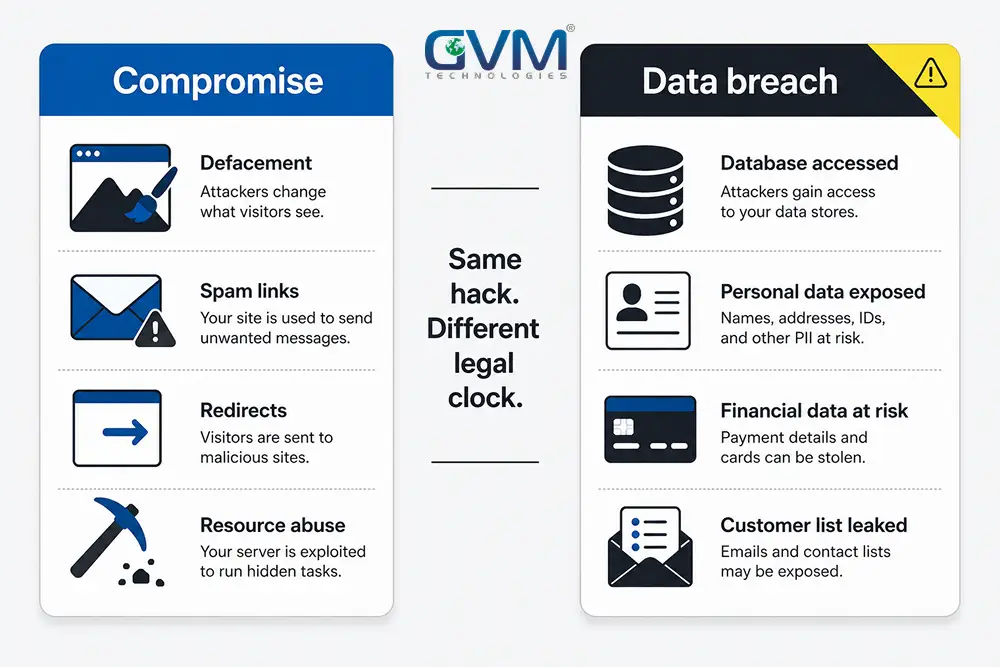
Compromise vs. data breach: the distinction that starts a legal clock
| Particulars | Website compromise | Data breach |
|---|---|---|
| What happened | Content changed: defacement, SEO spam, redirects, cryptojacking | Personal data was reachable: accounts, logins, orders, payment details |
| Legal duty | Usually none | Notification, often on a deadline |
| Your first job | Get clean, stay clean | Work out whose data was exposed |
Assume a breach if the incident reached a database, a wp-config.php file, form logs, or a checkout.
Check for a DNS or registrar hijack first
If the site points elsewhere but the server files are untouched, the attack is at your domain registrar, not your code.
- Compare nameservers and DNS records against what they should be.
- Look for account contacts or transfer auth-codes you did not request.
- Recover the account, restore records, enable registrar two-factor authentication, set a domain lock.
The First Hour: Contain the Damage, Keep the Evidence
Every guide says “take it offline now.” Responders say “do not destroy the evidence.” The order is what people get wrong.
Your first 60 minutes, in order
- Enable maintenance mode at the server or CDN level. Visitors stop getting infected and data stops leaving.
- Do not power off or rebuild the server. Logs and file timestamps name the entry point.
- Take a full forensic snapshot. Image the files, export the database, label it, store it off the server.
- Copy the logs now. Access, error, and authentication logs rotate out on a schedule.
- Keep the ransom note, attacker IPs, and any malicious file for the notification, the insurer, and law enforcement.
- Call your host. They can isolate the account and see activity you cannot.
- Rotate every credential from a clean device: hosting panel, SFTP, database, CMS admins, API keys, config secrets.
Delete the attacker’s files first and you delete the log lines that name the vulnerable plugin. That is why teams that skip the snapshot clean the same site twice.
What to leave alone until you have a plan
- Do not delete files by hand. Hacked plus broken is worse than hacked.
- Do not restore a backup yet. You do not know which are clean.
- Do not email customers yet. You do not know the scope.
- Do not request a Google review. It fails if the site is not clean, and the next one takes longer.
The access list almost nobody makes
Every stale login is a way back in. List what can reach the site:
- Former developers and contractors who still have SFTP or admin logins.
- Marketing and analytics tools with admin-level API access.
- Abandoned staging subdomains with no password.
- Shared hosting neighbours. One vulnerable site on the account infects the rest.
A contractor who built the site and vanished did not take their access with them. GVM’s project rescue team usually starts by revoking access nobody remembered granting.
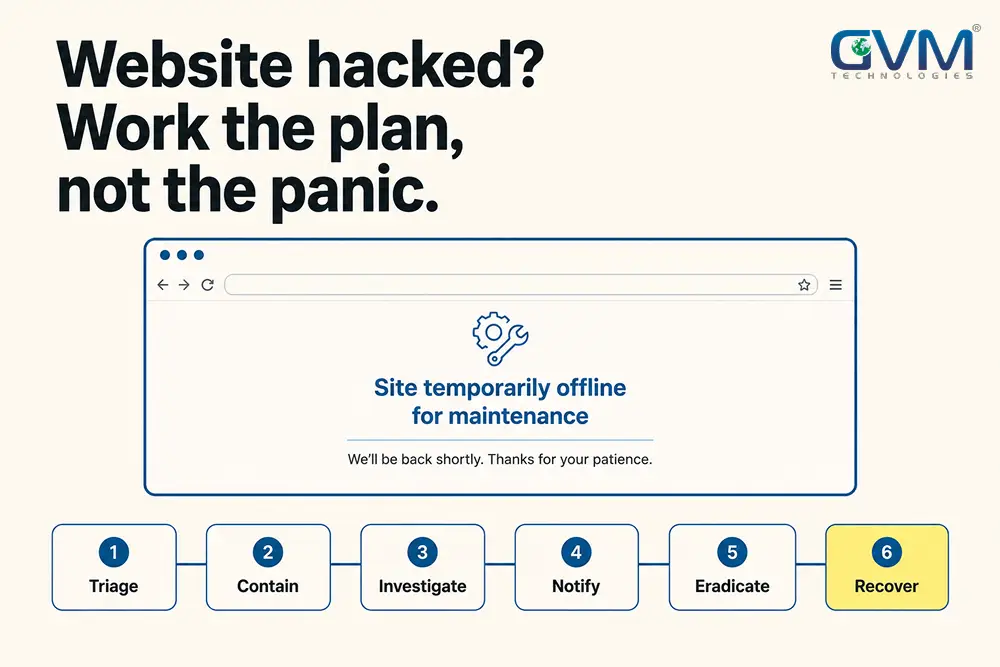
The 6-Phase Website Breach Response Plan
Every serious model, from SANS to NIST to the FTC’s guidance, uses the same 6 moves.
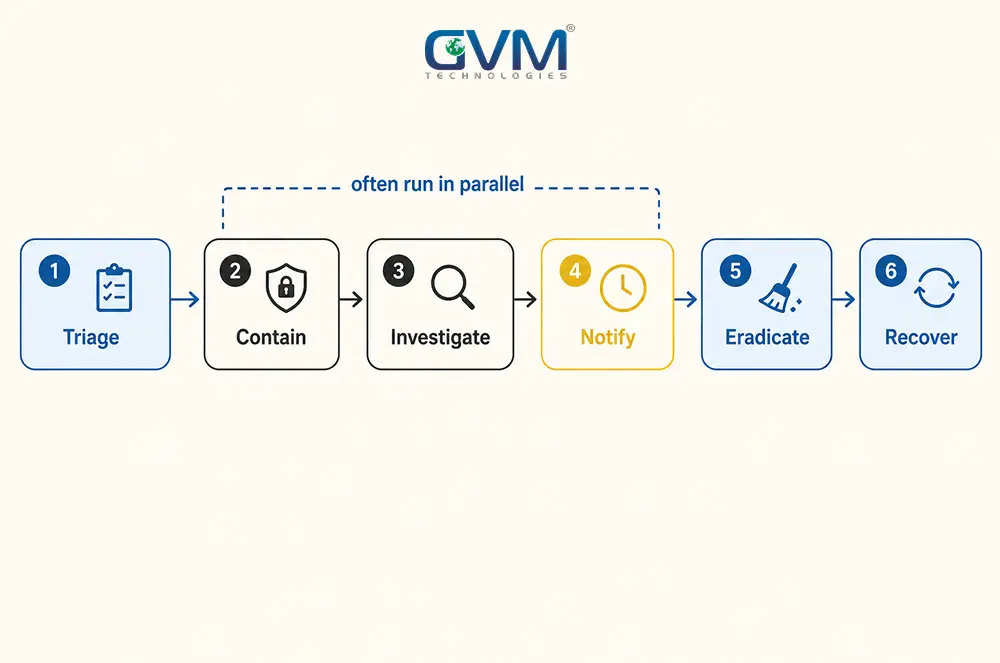
1. Triage: confirm and classify
Verify the hack is real, label it a compromise or a possible breach, and rule out DNS, billing, and plugin-licence false alarms.
2. Contain: freeze the scene
Run the first-hour list above. Stop the bleeding, do not start surgery.
3. Investigate: find the entry point
This is the phase self-cleanups skip, and the one that decides whether you are back next month.
Work backward from the logs to the first unfamiliar file or admin account, then read the requests just before it appeared. Usual entry points:
- An outdated plugin, theme, or CMS with a public exploit. The leading cause by far. Verizon’s 2025 DBIR found vulnerability exploitation as an entry route up 34% year over year.
- A weak or reused admin password with no rate limiting.
- A file upload or contact form that accepts too much.
- Poisoned third-party code, or a developer’s infected laptop.
No entry point in the logs means you stop and get help. Cleaning without a cause is guessing.
4. Notify: meet the legal deadline
The clock starts when you become aware, not when cleanup ends. Detail is in the next section.
5. Eradicate: remove every way back in
Delete the malware, backdoor files, hidden admin accounts, and scheduled tasks. Rotate the CMS security keys so stolen session cookies die.
Attackers plant 2 or 3 ways back in, so finding 1 is not finishing.
6. Recover: restore, harden, monitor
Restore a verified clean backup, patch the entry point, and add two-factor authentication, a web application firewall, least-privilege accounts, and file integrity monitoring.
Did the Breach Reach Personal Data? Your Notification Duties
The test is not “can I prove data was stolen.” It is “was personal data in reach.”
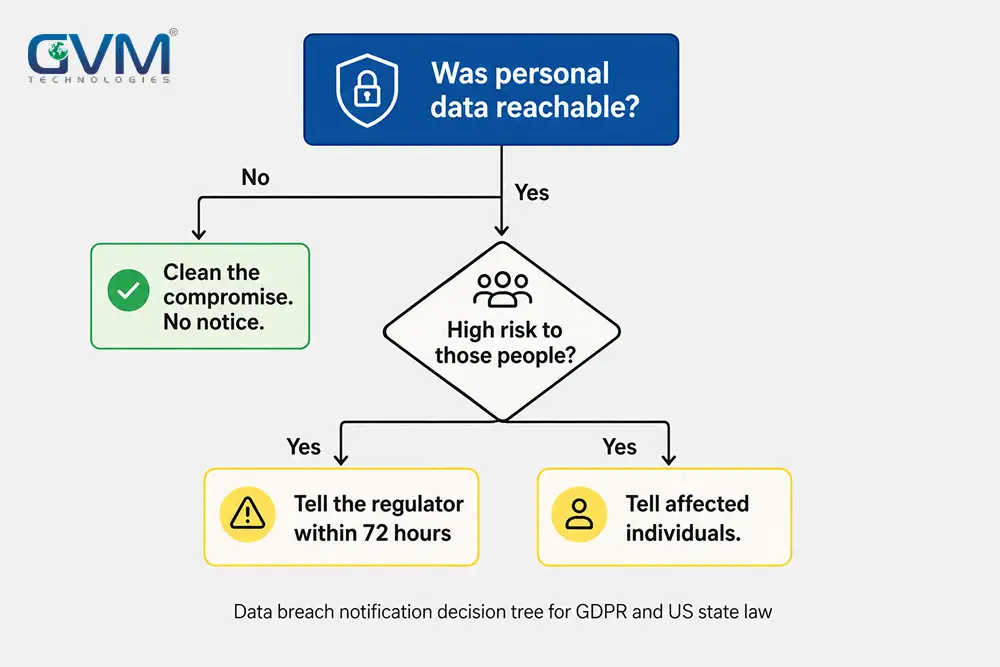
The notification decision in 4 questions
- Was personal data involved? Accounts, email lists, orders, tickets, form data. If not, you have a compromise to clean and no notice to send.
- Whose data, and where? GDPR applies if anyone affected is in the EU or UK. US state laws apply by each resident’s location.
- Is the risk real? Marketing emails are low risk. Passwords, payment data, and government IDs are high risk.
- Who do you tell? The regulator first, then affected individuals when their risk is high.
The UK ICO’s breach guidance is a plain-language reference for the thresholds.
Notification deadlines by law
| Regime | Tell the regulator | Tell individuals |
|---|---|---|
| GDPR (EU / UK) | Within 72 hours of awareness | Without undue delay, if high risk |
| US state laws | Varies; several cap at 30, 45, or 60 days | Without unreasonable delay |
| HIPAA (US health data) | Within 60 days | Within 60 days |
| PCI DSS (card data) | Notify your acquiring bank promptly | Per applicable law |
Failing to notify is a separate violation, with GDPR fines up to 10 million euros or 2% of global turnover.
What your breach notice must contain
- What happened, when you found it, and roughly how many people and records were affected.
- The likely consequences, and concrete advice: reset this password, expect phishing, freeze your credit if payment data was exposed.
- A named contact for questions.
If the hacked site holds a client’s data, read the data processing agreement first. Hosting a client’s production site on informal infrastructure moves that liability to you.
If you carry cyber insurance, call them first
Most cyber policies require a call to their incident response hotline before you hire anyone or start cleanup.
Skip it and the claim can be denied.
Their panel firm often runs the forensics; your job is to preserve the snapshot.
Why Cleaned Websites Get Hacked Again
Reinfection is a checklist item that got skipped.
The 6 reasons reinfection happens
- The vulnerability was never found. The door is still open.
- Only 1 backdoor of several was removed.
- Credentials were “mostly” rotated. One old API key survived.
- The restored backup was already infected. Most infections sit quiet for weeks.
- The vulnerable plugin went back on at the same version.
- A neighbouring site on the same hosting account reinfected this one.
A common WordPress version: a fake plugin folder dressed as a security tool, plus a hidden admin like adm1nlxg1n that never shows in the dashboard.
The clean-once rebuild, step by step
- Rebuild on fresh ground. New environment, CMS and plugins from official sources at current versions.
- Bring back only 3 things: the database after inspection, the media after scanning, the custom code after review.
- Hunt backdoors: base64 blocks,
eval(calls, stray.htaccessfiles, PHP inside upload folders. Check core files against known-good checksums. - Scan with 2 tools, not 1. A remote scanner and a server-side scanner miss different things.
- Rotate every secret again, then patch the entry point before launch and add a firewall.
- Move off shared hosting if a neighbour was the source.
A free scanner that reports “no threats found” is not proof. It checks known signatures, not the custom backdoor written for your site, which is why GVM’s security testing pairs automated scans with a manual review.
Restore a backup without restoring the hack
- Restore into isolation and scan it before trusting it.
- Check its date against the first sign of intrusion in the logs.
- If the only backups sit on the compromised account, treat them as infected.
A host’s flat-fee “restore” puts files back but never finds the entry point, which is why off-site versioned backups are part of a managed cloud hosting setup.
Recovering Rankings and Trust After the Hack
Get off Google’s blocklist, in the right order
- Verify the site in Google Search Console, then open Security Issues for the hacked URLs and hack type.
- Only after the site is fully clean and live, submit a review and say what you fixed.
- Malware reviews often clear in a day. Spam reviews can take a week or more.
Request the review too early and it fails, which lengthens the queue for the next one.
Clear the spam pages from search
- Find them: search
site:yourdomain.complus spammy terms. - Return a 410 status, then request removal in Search Console.
- Check for a manual action; hacked-content actions need their own reconsideration request.
- A technical SEO audit confirms nothing structural was left behind, and SEO recovery work speeds the climb back.
What to tell customers
A short honest note beats silence, especially if customers saw a browser warning.
Say what happened, what data was and was not involved, and what they should do.
“We found no evidence X was accessed” is honest; “no data was accessed” usually is not provable yet.
What Recovery Costs and How Long It Takes
| Scenario | Typical cost | Typical timeline |
|---|---|---|
| DIY cleanup, small site, entry point found | Your time plus tools | 1 to 3 days |
| Professional cleanup and hardening | 200 to 1,500 dollars | 1 to 5 days |
| E-commerce or database site, rebuild plus forensics | 2,000 to 15,000 dollars and up | 1 to 4 weeks |
| Confirmed data breach with notification and legal work | Tens of thousands and up | Weeks to months |
Detection time drives every number. IBM’s 2025 report puts the average breach at 4.44 million dollars and average detection at 241 days.
That is why GVM builds security testing into every build instead of selling it after something breaks.
FAQs
1. Should I take my website offline if it is hacked?
Yes, into maintenance mode, as soon as you confirm the hack. Do not power off or wipe the server first, because that destroys the logs you need.
2. Do I have to tell customers my website was hacked?
If personal data could have been accessed and the risk is real, yes, often on a deadline. GDPR requires telling the regulator within 72 hours. A pure defacement with no data exposure usually carries no legal duty.
3. Can I just restore from a backup?
Only if it predates the compromise and you scan it clean in isolation first. You still have to patch the vulnerability, or the clean backup gets hacked the same way within days.
4. Should I pay a ransom to get my website back?
No. Payment funds more attacks, often fails, and never fixes the vulnerability. Rebuild from clean, off-site backups.
5. Why did my website get hacked again after I cleaned it?
Almost always 1 of 5 reasons: the entry point was never patched, a second backdoor was missed, a credential was not rotated, the backup was already infected, or a neighbouring site reinfected it.
Conclusion
The urge in the first 10 minutes is to start fixing. The better move is to slow down for 1 hour: confirm the hack, take the site offline, save a copy, preserve the logs.
After that the path is fixed:
- Find how they got in.
- Decide whether personal data was in scope, and notify on the clock if it was.
- Rebuild clean instead of disinfecting in place.
- Patch the hole before you go live.
Sites that end up back here treated the symptoms. Sites that recover for good find the exact door a stranger used, and lock it.
Recover Your Hacked Site With GVM Technologies
A live breach is a bad time to learn incident response. If the entry point is not obvious, if customer data was in scope, or if the site was cleaned once and came back, hand it to a team that does this weekly.
GVM Technologies has built and secured custom software since 2012, under ISO 27001, 20000-1, and 9001 certified processes.
The recovery service covers this full sequence:
- Forensic snapshot and log analysis to find the real entry point.
- Complete malware and backdoor removal, not a scanner pass.
- A clean rebuild on hardened infrastructure, with your data migrated safely.
- Google blocklist removal and ranking recovery.
- A dedicated resource to keep the checks running afterward.
Talk to GVM Technologies about recovering a hacked website and get a scoped assessment: what was exposed, how they got in, and what it takes to close it for good.